EPUB to WebP API
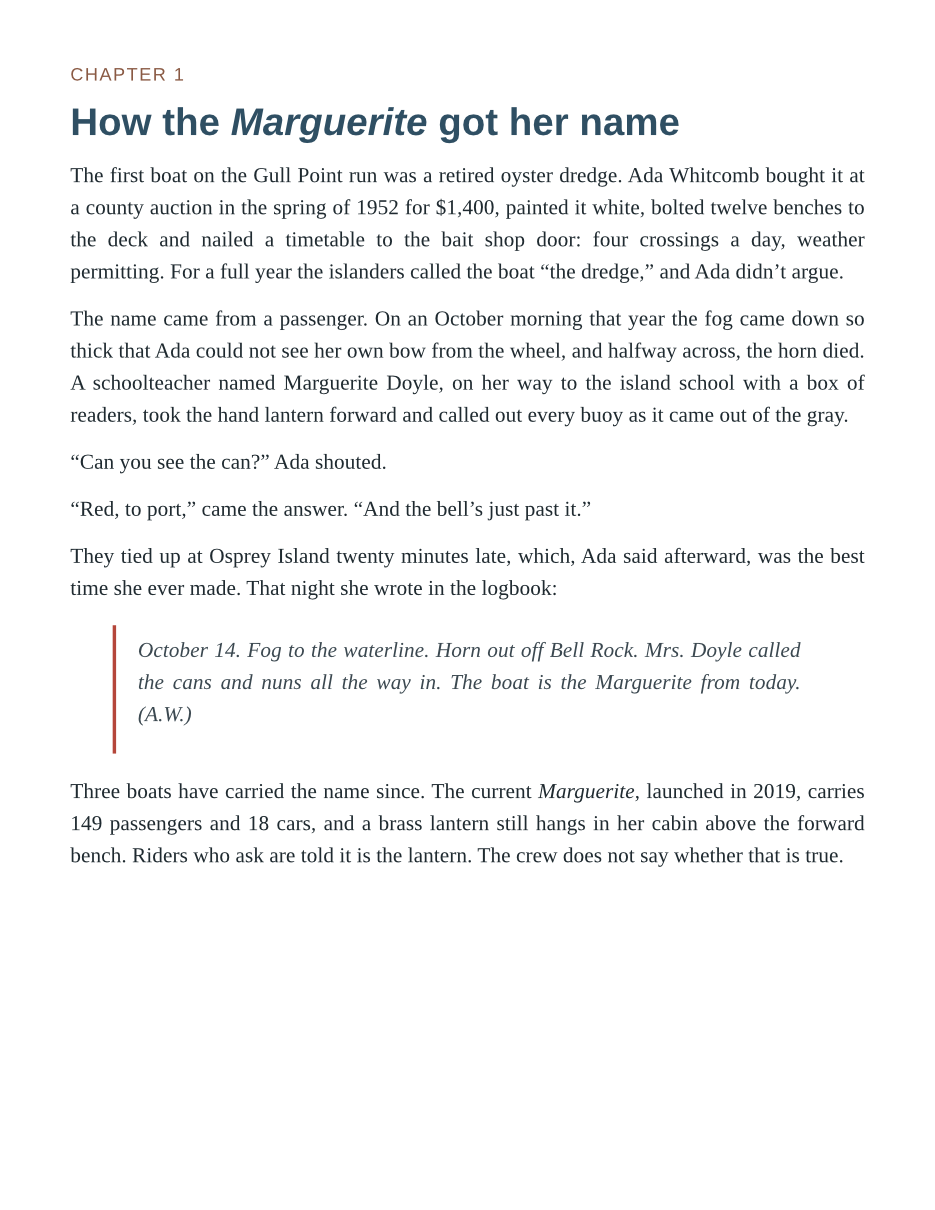
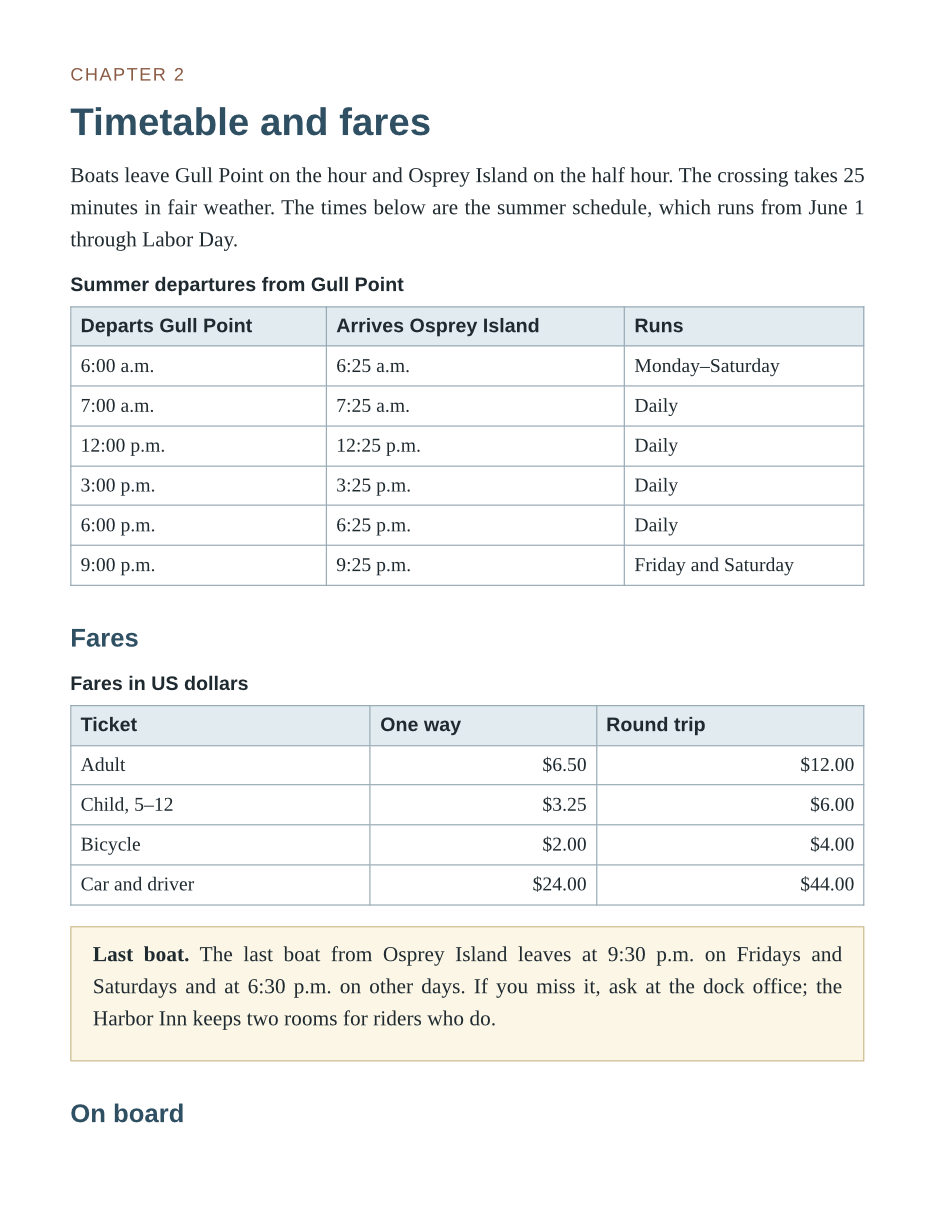
POST an .epub to /v2/convert/epub/to/webp and get a lossless WebP for each page. The sample sets BaseFontSize=14, which lays the ferry handbook out on seven Letter pages, and asks for pages 3 to 5 at 110 dpi: three 935 × 1210 images.
- Endpoint
- POST /v2/
convert/ epub/ to/ webp - Accepts
- epub
- Sample timing
- 60 ms median of 5 runsHow we measure
- Request size
- Up to 10 MB on the Free plan or 100 MB on paid plans, all files together
Request and response
Every sample below ran against the API before this page was published. Set PDFCONVERSIONAPI_KEY to your key and run it as is.
curl -sS -X POST \
  https://api.pdfconversionapi.com/v2/convert/epub/to/webp \
  -H "Authorization: Bearer $PDFCONVERSIONAPI_KEY" \
  -F File=@gull-point-ferry.epub \
  --form-string PageRange=3-5 \
  --form-string BaseFontSize=14 \
  --form-string ImageResolution=110 \
  -o response.json

# FileData is base64. Save the first file in converted/,
# or print the JSON error.
if jq -e '.Files' response.json > /dev/null; then
  mkdir -p converted
  name=$(jq -r '.Files[0].FileName' response.json)
  jq -r '.Files[0].FileData' response.json \
    | base64 --decode > "converted/$name"
else
  cat response.json
fi
import base64
import os
import requests
key = os.environ["PDFCONVERSIONAPI_KEY"]
response = requests.post(
"https://api.pdfconversionapi.com/v2/convert/epub/to/webp",
headers={"Authorization": f"Bearer {key}"},
files=[("File", open("gull-point-ferry.epub", "rb"))],
data={
"PageRange": "3-5",
"BaseFontSize": "14",
"ImageResolution": "110",
},
timeout=180,
)
result = response.json()
if not response.ok:
raise SystemExit(f"{result['Code']}: {result['Message']}")
os.makedirs("converted", exist_ok=True)
for file in result["Files"]:
path = os.path.join("converted", file["FileName"])
with open(path, "wb") as out:
out.write(base64.b64decode(file["FileData"]))
print(path, file["FileSize"], "bytes")
import { mkdir, readFile, writeFile } from "node:fs/promises";
import { join } from "node:path";

const form = new FormData();
const file = "gull-point-ferry.epub";
form.append("File", new Blob([await readFile(file)]), file);
form.append("PageRange", "3-5");
form.append("BaseFontSize", "14");
form.append("ImageResolution", "110");

const url = "https://api.pdfconversionapi.com/v2/convert/epub/to/webp";
const key = process.env.PDFCONVERSIONAPI_KEY;
const response = await fetch(url, {
  method: "POST",
  headers: { Authorization: `Bearer ${key}` },
  body: form,
});
const result = await response.json();
if (!response.ok) {
  throw new Error(`${result.Code}: ${result.Message}`);
}

await mkdir("converted", { recursive: true });
for (const file of result.Files) {
  const path = join("converted", file.FileName);
  await writeFile(path, Buffer.from(file.FileData, "base64"));
  console.log(path, file.FileSize, "bytes");
}
{
  "ConversionCost": 1,
  "ConversionTime": 0.06,
  "Files": [
    {
      "FileName": "gull-point-ferry-3.webp",
      "FileExt": "webp",
      "FileSize": 187488,
      "FileData": "UklGRljcAgBXRUJQVlA4TEzc…"
    },
    {
      "FileName": "gull-point-ferry-4.webp",
      "FileExt": "webp",
      "FileSize": 117170,
      "FileData": "UklGRqrJAQBXRUJQVlA4TJ3J…"
    },
    {
      "FileName": "gull-point-ferry-5.webp",
      "FileExt": "webp",
      "FileSize": 30448,
      "FileData": "UklGRuh2AABXRUJQVlA4TNx2…"
    }
  ]
}
Response from our test run on 2026-11-03. ConversionTime shows the median of 5 runs. FileData is shortened here; the real response carries the whole file as base64.
The sample, converted
The same file the code sends. Download the input and the output and compare them yourself.
- Input
- gull-point-ferry.epub (53 KB)
- Output
- gull-point-ferry-3.webp (183 KB)gull-point-ferry-4.webp (114 KB)gull-point-ferry-5.webp (30 KB)
- Source
- A short fictional ferry guide written for this site: a cover, a contents page and three chapters with a route map and a fare table. (CC0-1.0). How it was made
- Made by
- 2026-11-04, API build
9eeeb0640aba

Parameters
Send these as form fields next to the file. Names are case-insensitive. If you set one of the documented options below that we don't support yet, the request fails with a 400 that names it instead of returning a file made without it.
| Parameter | What it does |
|---|---|
PageRangestring | Pages to draw, counted after layout. At 14 pt the sample's chapter 1 is page 3, so 3-5 returns chapter 1 and all of chapter 2.Values: 1, 3-5, 4-, 2-last |
BaseFontSizenumber, default 12 | Base size of the book's text in points. The sample's CSS gives body text no size of its own and sizes headings and tables in em, so at 14 all of it is a sixth larger and the book gains two pages.Values: 1–50 (points) |
ImageResolutioninteger, default 150 | Pixels per inch of the Letter page: 110 gives 935 × 1210. The WebP file keeps no record of it.Values: 36–600 |
ImageWidthinteger | A fixed pixel width for every page, such as your reader column.Values: 1–20,000 |
ImageHeightinteger | A fixed pixel height for every page.Values: 1–20,000 |
PageSizeenum, default letter | Page format the chapters are flowed onto. Smaller sizes like a6 suit phone-sized pages.Values: a0–a9, b0–b5, letter, legal, ledger |
MarginTopnumber, default 40 | Space above the text, in points.Values: 0–200 (points) |
MarginRightnumber, default 40 | Space to the right, in points.Values: 0–200 (points) |
MarginBottomnumber, default 40 | Space below, in points.Values: 0–200 (points) |
MarginLeftnumber, default 40 | Space to the left, in points. The book's body keeps a further 6 pt unless its CSS sets body margins.Values: 0–200 (points) |
TransparentColorstring | Make one exact color transparent, typically the white page, so your reader's own background shows.Values: Color names, #RRGGBB or R,G,B |
BackgroundColorstring, default white | Paper color behind the text where the book paints none, such as a sepia #F4ECD8.Values: Color names, #RRGGBB or R,G,B |
ColorSpaceenum, default default | Gray or black-and-white pixels, still written as an RGB WebP.Values: default, rgb, gray, monochrome |
FileNamestring | Stem for the output names; the page number is kept, so pages 3 to 5 stay -3, -4, -5. |
StoreFileboolean, default false | Links valid for 3 hours instead of inline WebP data. |
Not supported yet
Setting one of these to anything but its default returns 400.
| Option | What to do instead |
|---|---|
ImageQuality | WebP output is lossless only. The documented default, 75, is accepted; any other value returns 400 "ImageQuality is not supported yet for EPUB → WebP". |
What carries over, and what doesn't
Kept
- The pages exactly as laid out: VP8L lossless WebP, with the book's text, tables and rules unchanged by compression
- Chapter 1's italic logbook entry with its red left rule, and chapter 2's timetable and fare tables with shaded heading rows and the yellow last-boat note
- The book's page numbering in the file names: with
PageRange=3-5the files aregull-point-ferry-3.webpto-5.webp - Larger text without overflow: at 14 pt the tables still fit the Letter width
- Opaque RGB pages with no alpha channel, unless you set
TransparentColor
Lost or not yet supported
- Keep-with-next for headings. At 14 pt the "On board" heading ends page 4 and its list starts page 5.
- A lossy setting: WebP here is always lossless, so
ImageQualitycannot shrink it further. - Clickable links and selectable text, including the book's own contents page.
- Fonts embedded in the book, which our layout did not use in testing.
- Landscape pages:
PageOrientationis not read for e-books and is ignored.
Limits
- One EPUB per request.
- Requests up to 10 MB on the Free plan or 100 MB on paid plans, all files and fields together.
- A book may unpack to 1 GB and 10,000 files and lay out to 2,000 pages; more returns 413.
- DRM-protected books return 422 "the book is DRM-protected".
- A page number past the end in
PageRangereturns 400 that names the page count. - 120 seconds per conversion.
Where teams use it
A page-image reader on the web
Serve a book as WebP page images in a simple viewer with next and previous buttons, without an EPUB reader library in the browser. BaseFontSize and PageSize set how much text each image holds.
Chapter previews in a store or catalog
Pick the chapter pages with PageRange and publish them as WebP. The sample's three pages, chapter 1 and chapter 2 at 14 pt, total 335,106 bytes at 110 dpi.
Questions
Why do the page numbers change when I change BaseFontSize?
Pages are counted after the book is laid out, and bigger text needs more pages. The sample is five pages at 12 pt and seven at 14 pt, so chapter 2, one page at 12 pt, runs onto a second page at 14 pt. Render once without PageRange to see where chapters fall at your settings.
Can I get smaller files with a quality setting?
Not as WebP: the encoder writes lossless images and ImageQuality other than 75 returns 400. Lower ImageResolution or ImageWidth for smaller files, or use /v2/convert/epub/to/jpg with ImageQuality.
How big are the pages?
In the sample at 110 dpi, the page with two tables was 117,170 bytes, the dense text of chapter 1 187,488 bytes, and the short last list 30,448 bytes. At the default 150 dpi each page is 1275 × 1650 pixels.
Can the pages have a tinted paper instead of white?
Yes. BackgroundColor is painted behind every page wherever the book's CSS sets no background, so #F4ECD8 gave the sample a sepia page in our test with the text colors unchanged. A background the book sets itself is drawn on top of it.
Convert your first EPUB file in a minute.