NUMBERS to PDF API
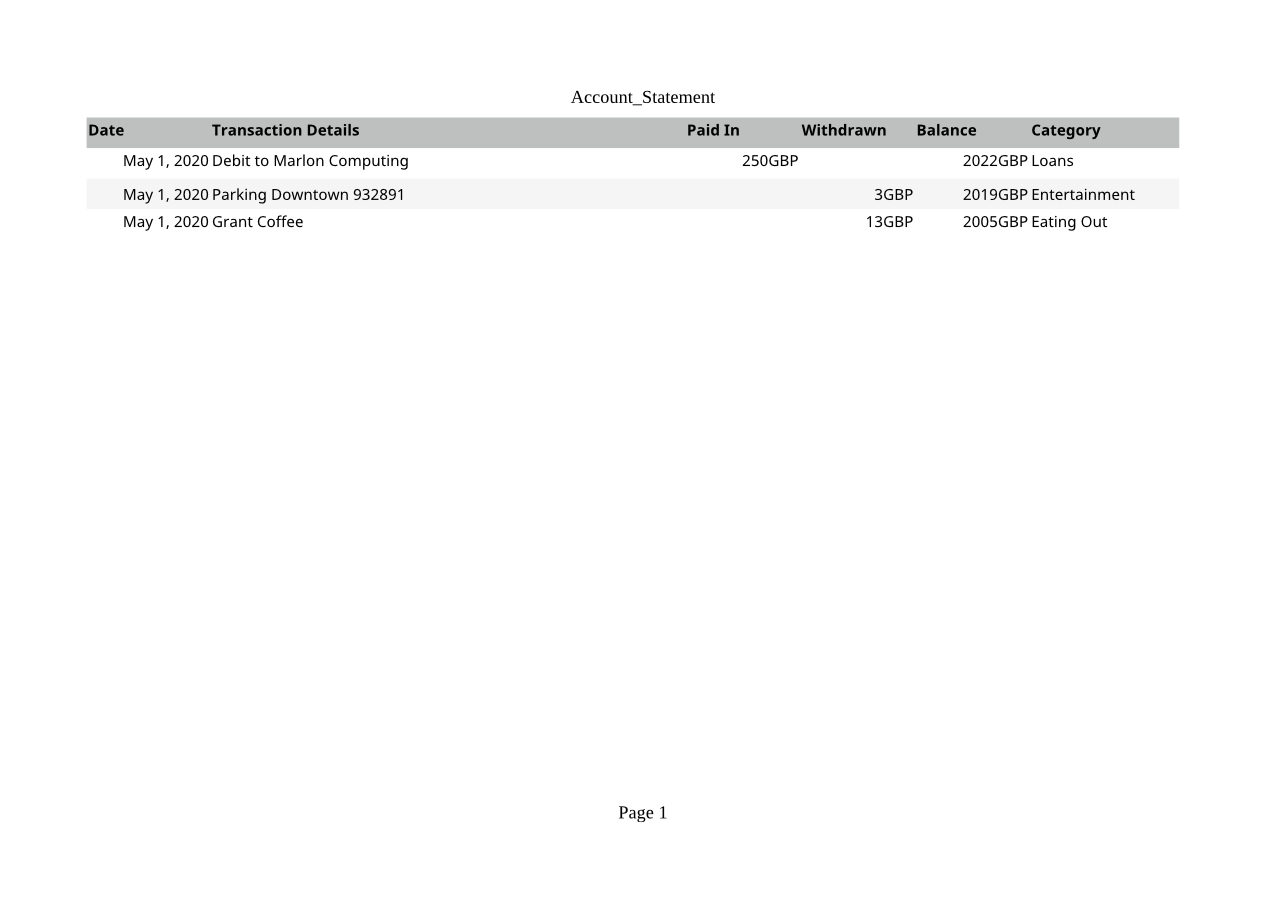
POST a .numbers file to /v2/convert/numbers/to/pdf and get it printed as a PDF with selectable text. The sample asks for PageOrientation=landscape, which keeps all six columns of its statement on one A4 page.
- Endpoint
- POST /v2/
convert/ numbers/ to/ pdf - Accepts
- numbers
- Sample timing
- 0.794 s median of 5 runsHow we measure
- Request size
- Up to 10 MB on the Free plan or 100 MB on paid plans, all files together
Request and response
Every sample below ran against the API before this page was published. Set PDFCONVERSIONAPI_KEY to your key and run it as is.
curl -sS -X POST \
  https://api.pdfconversionapi.com/v2/convert/numbers/to/pdf \
  -H "Authorization: Bearer $PDFCONVERSIONAPI_KEY" \
  -F File=@account-statement.numbers \
  --form-string PageOrientation=landscape \
  -o response.json

# FileData is base64. Save the first file in converted/,
# or print the JSON error.
if jq -e '.Files' response.json > /dev/null; then
  mkdir -p converted
  name=$(jq -r '.Files[0].FileName' response.json)
  jq -r '.Files[0].FileData' response.json \
    | base64 --decode > "converted/$name"
else
  cat response.json
fi
import base64
import os
import requests
key = os.environ["PDFCONVERSIONAPI_KEY"]
response = requests.post(
"https://api.pdfconversionapi.com/v2/convert/numbers/to/pdf",
headers={"Authorization": f"Bearer {key}"},
files=[("File", open("account-statement.numbers", "rb"))],
data={
"PageOrientation": "landscape",
},
timeout=180,
)
result = response.json()
if not response.ok:
raise SystemExit(f"{result['Code']}: {result['Message']}")
os.makedirs("converted", exist_ok=True)
for file in result["Files"]:
path = os.path.join("converted", file["FileName"])
with open(path, "wb") as out:
out.write(base64.b64decode(file["FileData"]))
print(path, file["FileSize"], "bytes")
import { mkdir, readFile, writeFile } from "node:fs/promises";
import { join } from "node:path";

const form = new FormData();
const file = "account-statement.numbers";
form.append("File", new Blob([await readFile(file)]), file);
form.append("PageOrientation", "landscape");

const url = "https://api.pdfconversionapi.com/v2/convert/numbers/to/pdf";
const key = process.env.PDFCONVERSIONAPI_KEY;
const response = await fetch(url, {
  method: "POST",
  headers: { Authorization: `Bearer ${key}` },
  body: form,
});
const result = await response.json();
if (!response.ok) {
  throw new Error(`${result.Code}: ${result.Message}`);
}

await mkdir("converted", { recursive: true });
for (const file of result.Files) {
  const path = join("converted", file.FileName);
  await writeFile(path, Buffer.from(file.FileData, "base64"));
  console.log(path, file.FileSize, "bytes");
}
{
  "ConversionCost": 1,
  "ConversionTime": 0.794,
  "Files": [
    {
      "FileName": "account-statement.pdf",
      "FileExt": "pdf",
      "FileSize": 34291,
      "FileData": "JVBERi0xLjcKJcOkw7zDtsOf…"
    }
  ]
}
Response from our test run on 2026-11-03. ConversionTime shows the median of 5 runs. FileData is shortened here; the real response carries the whole file as base64.
The sample, converted
The same file the code sends. Download the input and the output and compare them yourself.
- Input
- account-statement.numbers (102 KB)
- Output
- account-statement.pdf (33 KB)
- Source
- A three-row account statement table saved by Numbers 12, taken from the MIT-licensed test files of an open-source Numbers reader; not made by us (MIT). How it was made
- Made by
- 2026-11-04, API build
9eeeb0640aba
Parameters
Send these as form fields next to the file. Names are case-insensitive. If you set one of the documented options below that we don't support yet, the request fails with a 400 that names it instead of returning a file made without it.
| Parameter | What it does |
|---|---|
PageOrientationenum, default default | Paper direction. Without it the sample's six columns split over two portrait pages, three columns each; with landscape they share one page.Values: default, portrait, landscape |
FitToPageboolean, default false | Shrinks the table to one page wide on the default portrait paper. |
PageSizeenum, default default | Paper size. A Numbers file brings no print setup here, so default is A4; letter gives 612 × 792 point pages.Values: letter, legal, tabloid, ledger, statement, executive, lettersmall, a3, a4, a4small, a5, b4, b5 |
Scaleinteger | Print zoom in percent; 50 fits the sample on one portrait page.Values: 10–300 |
WorksheetNamestring | Print one sheet. Sheet and table names are joined for this route, so the sample's sheet is Account_Statement; Account returns 400. |
WorksheetIndexinteger | Print one sheet by position.Values: 1 to the sheet count |
PdfaVersionenum, default none | Write PDF/A in that version. The sample as PDF/A-2b passed our validator.Values: none, pdfA1b, pdfA2b, pdfA3b |
Pdfaboolean, default false | PDF/A-1b. If you also send PdfaVersion, that one wins. |
PageRangestring | Keep only some pages. Dropping pages removes the bookmark and can't be combined with PDF/A.Values: e.g. 2 or 1-last |
FileNamestring | PDF name without the extension. |
StoreFileboolean, default false | Return a link that lasts 3 hours. |
Not supported yet
Setting one of these to anything but its default returns 400.
| Option | What to do instead |
|---|---|
IncludeMetadata | false returns 400. |
Also refused when set: AutoFitColumns, ThousandsSeparator, DecimalSeparator, DateFormat.
What carries over, and what doesn't
Kept
- The table's own look: the gray header row and the shaded alternate rows
- All six columns on one A4 landscape page (841.9 × 595.3 points)
- Dates shown as May 1, 2020, as the cells are formatted
- Text you can select and search, and a bookmark named Account_Statement
Lost or not yet supported
- Exact amounts. The currency cells print rounded to whole units with the code after them: a 2021.5 balance prints as 2022GBP and 2.99 as 3GBP. The CSV and XLSX routes keep the exact values.
- The Numbers fonts, replaced by a sans-serif font installed on the server.
- Numbers' own page layout: the sheet prints with a plain header (Account_Statement) and footer (Page 1) added, in a serif face because the sample sends a page option.
- Our layout comes from an office suite's reading of the file. We have not compared it with a PDF exported from Numbers.
Limits
- One Numbers file per request; a second file returns 400.
- Requests up to 10 MB on the Free plan or 100 MB on paid plans, all files and fields together.
- 120 seconds per conversion, then 504.
PageRangethat leaves pages out plus PDF/A returns 400.
Where teams use it
Printing Numbers files without a Mac
Your users save in Numbers, but your servers run Linux. Make a PDF of every upload for printing, review or e-mail.
Archiving statements and budgets
Store a PDF/A-2b copy of each Numbers statement, readable long after the app version that made it is gone.
Attaching a readable copy
Send a PDF alongside the .numbers file to people on Windows and Android, who can't open the original.
Questions
Why does my table print on two pages?
Without other settings the table is laid out on A4 portrait, and a wide table continues on a second page, column by column. The sample splits after Paid In. Send PageOrientation=landscape, FitToPage=true or a Scale to keep it on one page.
Why are the amounts rounded in the PDF?
The currency cells print with whole units in this conversion, so 2021.5 shows as 2022GBP. The stored values are not changed; /v2/convert/numbers/to/csv returns 2021.5 for the same cell.
Can I get PDF/A?
Yes: PdfaVersion=pdfA1b, pdfA2b or pdfA3b, or Pdfa=true for 1b. Our validator reported the sample compliant as PDF/A-2b. Send the whole document, since PageRange with PDF/A returns 400.
What if the file isn't really a Numbers spreadsheet?
You get 422 saying it could not be opened as NUMBERS. That is also the answer for a Pages document renamed .numbers.
Convert your first NUMBERS file in a minute.