XLTX to PDF API
POST an Excel template to /v2/convert/xltx/to/pdf and get the PDF its page setup describes: every visible sheet, in tab order, inside its print area. The sample estimate template prints on two Letter pages; its hidden sheet stays out.
- Endpoint
- POST /v2/
convert/ xltx/ to/ pdf - Accepts
- xltx
- Sample timing
- 0.532 s median of 5 runsHow we measure
- Request size
- Up to 10 MB on the Free plan or 100 MB on paid plans, all files together
Request and response
Every sample below ran against the API before this page was published. Set PDFCONVERSIONAPI_KEY to your key and run it as is.
curl -sS -X POST \
  https://api.pdfconversionapi.com/v2/convert/xltx/to/pdf \
  -H "Authorization: Bearer $PDFCONVERSIONAPI_KEY" \
  -F File=@job-estimate-template.xltx \
  -o response.json

# FileData is base64. Save the first file in converted/,
# or print the JSON error.
if jq -e '.Files' response.json > /dev/null; then
  mkdir -p converted
  name=$(jq -r '.Files[0].FileName' response.json)
  jq -r '.Files[0].FileData' response.json \
    | base64 --decode > "converted/$name"
else
  cat response.json
fi
import base64
import os
import requests
key = os.environ["PDFCONVERSIONAPI_KEY"]
response = requests.post(
"https://api.pdfconversionapi.com/v2/convert/xltx/to/pdf",
headers={"Authorization": f"Bearer {key}"},
files=[("File", open("job-estimate-template.xltx", "rb"))],
timeout=180,
)
result = response.json()
if not response.ok:
raise SystemExit(f"{result['Code']}: {result['Message']}")
os.makedirs("converted", exist_ok=True)
for file in result["Files"]:
path = os.path.join("converted", file["FileName"])
with open(path, "wb") as out:
out.write(base64.b64decode(file["FileData"]))
print(path, file["FileSize"], "bytes")
import { mkdir, readFile, writeFile } from "node:fs/promises";
import { join } from "node:path";

const form = new FormData();
const file = "job-estimate-template.xltx";
form.append("File", new Blob([await readFile(file)]), file);

const url = "https://api.pdfconversionapi.com/v2/convert/xltx/to/pdf";
const key = process.env.PDFCONVERSIONAPI_KEY;
const response = await fetch(url, {
  method: "POST",
  headers: { Authorization: `Bearer ${key}` },
  body: form,
});
const result = await response.json();
if (!response.ok) {
  throw new Error(`${result.Code}: ${result.Message}`);
}

await mkdir("converted", { recursive: true });
for (const file of result.Files) {
  const path = join("converted", file.FileName);
  await writeFile(path, Buffer.from(file.FileData, "base64"));
  console.log(path, file.FileSize, "bytes");
}
{
  "ConversionCost": 1,
  "ConversionTime": 0.532,
  "Files": [
    {
      "FileName": "job-estimate-template.pdf",
      "FileExt": "pdf",
      "FileSize": 62645,
      "FileData": "JVBERi0xLjcKJcOkw7zDtsOf…"
    }
  ]
}
Response from our test run on 2026-11-03. ConversionTime shows the median of 5 runs. FileData is shortened here; the real response carries the whole file as base64.
The sample, converted
The same file the code sends. Download the input and the output and compare them yourself.
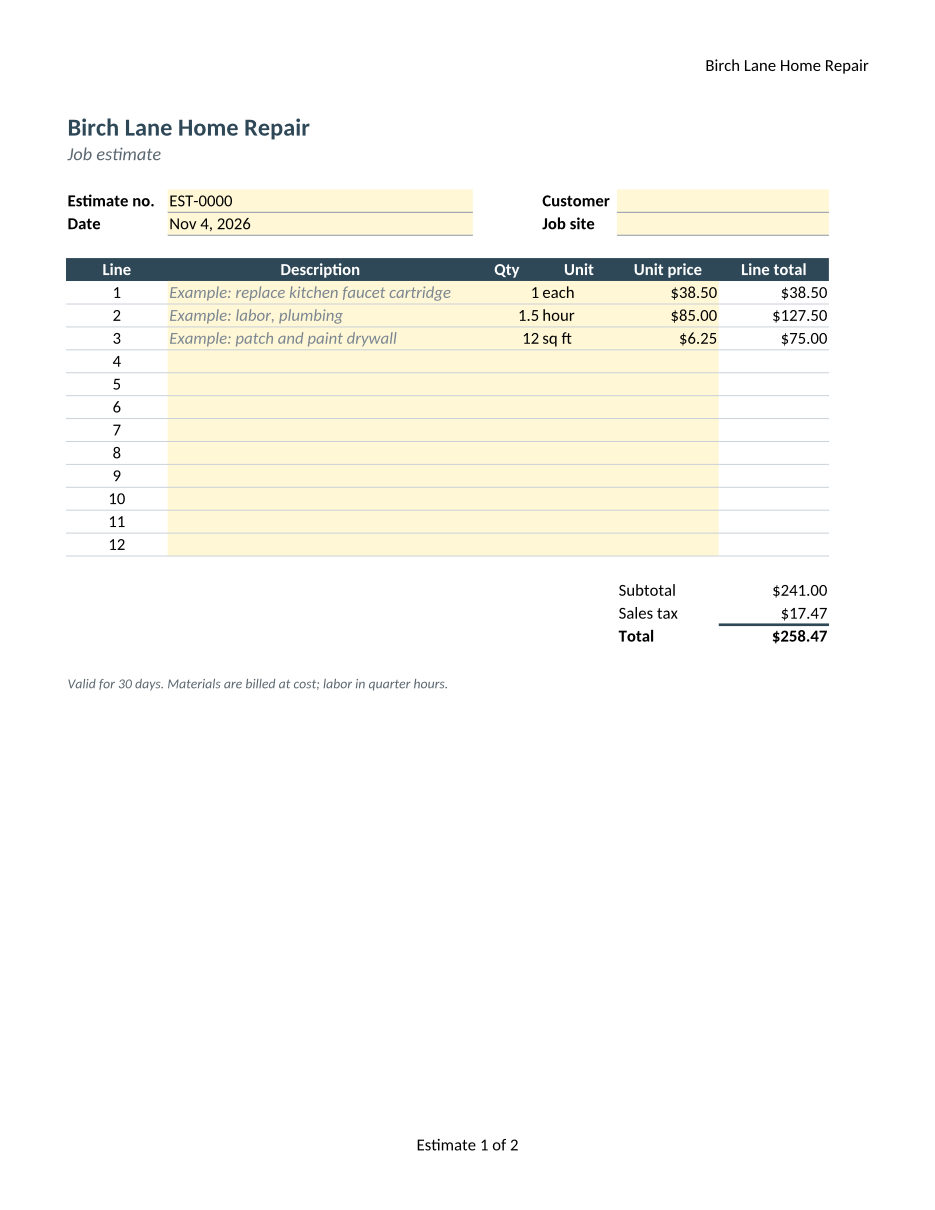
- Input
- job-estimate-template.xltx (10 KB)
- Output
- job-estimate-template.pdf (61 KB)
- Source
- Written for this site: a fictional home-repair company's job estimate template with three sheets, one of them hidden, saved as an Excel template (CC0-1.0). How it was made
- Made by
- 2026-11-04, API build
9eeeb0640aba
Parameters
Send these as form fields next to the file. Names are case-insensitive. If you set one of the documented options below that we don't support yet, the request fails with a 400 that names it instead of returning a file made without it.
| Parameter | What it does |
|---|---|
WorksheetNamestring | Print one sheet, matched without regard to case. WorksheetName=Estimate leaves out Rates, and the footer then reads Estimate 1 of 1. |
WorksheetIndexinteger | Print one sheet by position, hidden ones counted. Index 3 prints the sample's hidden Notes sheet; 4 returns 400 saying the workbook has 3.Values: 1 to the number of sheets |
ActiveWorksheetOnlyboolean, default false | Print only the sheet that was open when the template was saved (Estimate in the sample). |
ClearPrintAreaboolean, default false | Ignore saved print areas and print every used cell. In the sample this adds the internal Our cost column that the template keeps off paper. |
PageSizeenum, default default | Override the paper size of every printed sheet. default keeps each sheet's own; the sample's Notes sheet has none and prints on A4.Values: letter, legal, tabloid, ledger, statement, executive, lettersmall, a3, a4, a4small, a5, b4, b5 |
PageOrientationenum, default default | Override the orientation; landscape turns both sample pages to 792 × 612 points.Values: default, portrait, landscape |
FitToPageboolean, default false | Fit each sheet to one page wide. The sample is already set up that way, so the output doesn't change. |
Scaleinteger | Print at a fixed percentage and turn off the template's own fit-to-width setting.Values: 10–300 |
HeaderOnEachPageboolean, default false | Repeat the first row that holds a value on every page. In a template with a title above its table, that is the title row, not the table header (see the FAQ). |
Pdfaboolean, default false | Write PDF/A-1b. Sent with PdfaVersion, the version you name there decides. |
PdfaVersionenum, default none | Write PDF/A in the version you name. It wins over Pdfa: Pdfa=true with PdfaVersion=pdfA3b gives PDF/A-3b. The sample as PDF/A-2b passed our validator.Values: none, pdfA1b, pdfA2b, pdfA3b |
PageRangestring | Keep only some pages of the printout. Cutting pages removes the sheet bookmarks and can't be combined with PDF/A.Values: e.g. 1 or 2-last |
Passwordstring | Opens an encrypted template. Without it, or with the wrong one, the answer is 422. |
FileNamestring | Name of the PDF without the extension; otherwise it follows the upload, job-estimate-template.pdf. |
StoreFileboolean, default false | Answer with a link that works for 3 hours instead of the PDF data. |
Not supported yet
Setting one of these to anything but its default returns 400.
| Option | What to do instead |
|---|---|
IncludeMetadata | false returns 400; the PDF keeps its document properties. |
AutoFitColumns | Columns print at the widths saved in the template. |
ThousandsSeparator | Numbers print with the cell formats in the template. |
Also refused when set: DecimalSeparator, DateFormat.
What carries over, and what doesn't
Kept
- Each sheet's page setup: Letter portrait, fit to one page wide, and the 7.25% tax rate sheet on its own page
- The print area: the internal Our cost column (column G) is not printed
- Header and footer fields, worked out at print time: "Birch Lane Home Repair" top right and "Estimate 1 of 2" at the bottom
- Fills, borders and the dark slate-blue header band (#2F4858), with real, selectable text
- Formula results: $241.00 subtotal, $17.47 tax read from the Rates sheet, $258.47 total
- A bookmark for each printed sheet, named Estimate and Rates
Lost or not yet supported
- Hidden sheets. The template's Notes sheet is left out unless you pick it with
WorksheetIndexorWorksheetName. - Interactive parts: the drop-down list on the Unit column prints as plain cells.
- Calibri is drawn with Carlito, a font with the same character widths.
- Saved results win over recalculation, except for TODAY() and similar functions. A copy of the sample with a wrong saved total printed the wrong total, while its TODAY() cell printed the conversion date.
Limits
- One template per request; two files return 400.
- Requests up to 10 MB on the Free plan or 100 MB on paid plans, all files and fields together.
- 120 seconds per conversion, then 504.
PageRangethat drops pages can't be combined with PDF/A; the request returns 400.
Where teams use it
Proofing a template before you hand it out
Check that a new estimate, invoice or timesheet template fits its paper, keeps internal columns off the page and repeats the right header rows, before staff start filling it in.
Blank forms for people who work on paper
Print the empty template as a PDF form for site visits or a front desk. Example lines, input shading and totals print the way the template shows them.
A PDF of every version in a template library
Keep a PDF/A-2b copy next to each template you publish, so you can show later what version 3 of the estimate form looked like.
Questions
Does the template open as a new workbook first?
It doesn't need to. The template is printed as it is, with its example lines, shading and formulas. The only things that change are cells that depend on the day: the sample's Date cell, =TODAY(), shows the day of the conversion.
Why does HeaderOnEachPage repeat the wrong row?
It repeats the first row that has a value, and it replaces the print titles the template already sets. In the sample that is row 1, the company name, instead of the row 7 table header. If your template defines rows to repeat, leave the option out.
Can I send a normal XLSX to this route?
Yes, an ordinary workbook renamed .xltx converted fine in our test. ODS and other formats return 422; use /v2/convert/xlsx/to/pdf or /v2/convert/ods/to/pdf for those.
How do I get a password-protected template converted?
Send Password with the file. We encrypted the sample with our protect route and it converted with the right password; without it, or with a wrong one, the API returned 422 "the input file is password-protected".
Which PDF/A versions can I ask for?
PDF/A-1b with Pdfa=true, or 1b, 2b and 3b with PdfaVersion. If you send both, PdfaVersion decides: Pdfa=true with PdfaVersion=pdfA2b gives PDF/A-2b. Our validator found the sample compliant as PDF/A-2b.
Convert your first XLTX file in a minute.