XLTX to PNG API
Send a template to /v2/convert/xltx/to/png and every printed page returns as a PNG. The sample picks the Estimate sheet with WorksheetName and draws it at 100 DPI: one Letter page, 850 × 1100 pixels.
- Endpoint
- POST /v2/
convert/ xltx/ to/ png - Accepts
- xltx
- Sample timing
- 0.76 s median of 5 runsHow we measure
- Request size
- Up to 10 MB on the Free plan or 100 MB on paid plans, all files together
Request and response
Every sample below ran against the API before this page was published. Set PDFCONVERSIONAPI_KEY to your key and run it as is.
curl -sS -X POST \
  https://api.pdfconversionapi.com/v2/convert/xltx/to/png \
  -H "Authorization: Bearer $PDFCONVERSIONAPI_KEY" \
  -F File=@job-estimate-template.xltx \
  --form-string WorksheetName=Estimate \
  --form-string ImageResolution=100 \
  -o response.json

# FileData is base64. Save the first file in converted/,
# or print the JSON error.
if jq -e '.Files' response.json > /dev/null; then
  mkdir -p converted
  name=$(jq -r '.Files[0].FileName' response.json)
  jq -r '.Files[0].FileData' response.json \
    | base64 --decode > "converted/$name"
else
  cat response.json
fi
import base64
import os
import requests
key = os.environ["PDFCONVERSIONAPI_KEY"]
response = requests.post(
"https://api.pdfconversionapi.com/v2/convert/xltx/to/png",
headers={"Authorization": f"Bearer {key}"},
files=[("File", open("job-estimate-template.xltx", "rb"))],
data={
"WorksheetName": "Estimate",
"ImageResolution": "100",
},
timeout=180,
)
result = response.json()
if not response.ok:
raise SystemExit(f"{result['Code']}: {result['Message']}")
os.makedirs("converted", exist_ok=True)
for file in result["Files"]:
path = os.path.join("converted", file["FileName"])
with open(path, "wb") as out:
out.write(base64.b64decode(file["FileData"]))
print(path, file["FileSize"], "bytes")
import { mkdir, readFile, writeFile } from "node:fs/promises";
import { join } from "node:path";

const form = new FormData();
const file = "job-estimate-template.xltx";
form.append("File", new Blob([await readFile(file)]), file);
form.append("WorksheetName", "Estimate");
form.append("ImageResolution", "100");

const url = "https://api.pdfconversionapi.com/v2/convert/xltx/to/png";
const key = process.env.PDFCONVERSIONAPI_KEY;
const response = await fetch(url, {
  method: "POST",
  headers: { Authorization: `Bearer ${key}` },
  body: form,
});
const result = await response.json();
if (!response.ok) {
  throw new Error(`${result.Code}: ${result.Message}`);
}

await mkdir("converted", { recursive: true });
for (const file of result.Files) {
  const path = join("converted", file.FileName);
  await writeFile(path, Buffer.from(file.FileData, "base64"));
  console.log(path, file.FileSize, "bytes");
}
{
  "ConversionCost": 1,
  "ConversionTime": 0.76,
  "Files": [
    {
      "FileName": "job-estimate-template-1.png",
      "FileExt": "png",
      "FileSize": 88905,
      "FileData": "iVBORw0KGgoAAAANSUhEUgAA…"
    }
  ]
}
Response from our test run on 2026-11-03. ConversionTime shows the median of 5 runs. FileData is shortened here; the real response carries the whole file as base64.
The sample, converted
The same file the code sends. Download the input and the output and compare them yourself.
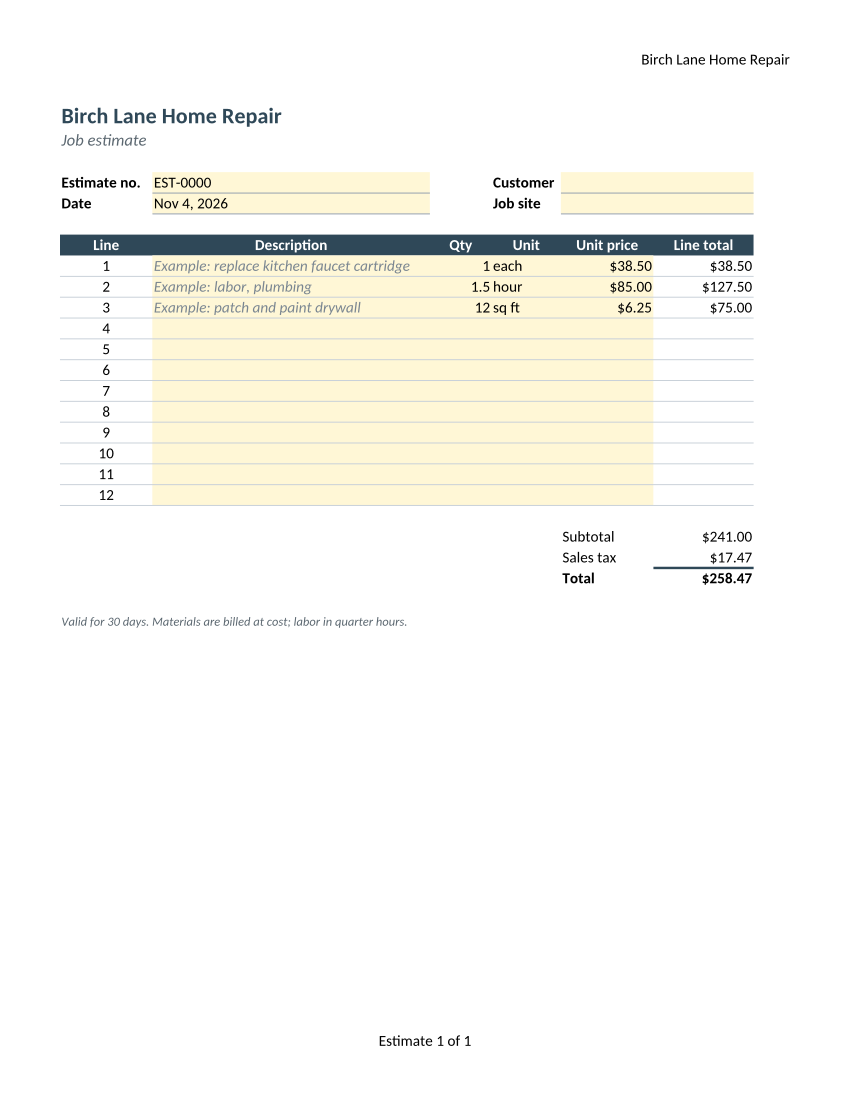
- Input
- job-estimate-template.xltx (10 KB)
- Output
- job-estimate-template-1.png (87 KB)
- Source
- Written for this site: a fictional home-repair company's job estimate template with three sheets, one of them hidden, saved as an Excel template (CC0-1.0). How it was made
- Made by
- 2026-11-04, API build
9eeeb0640aba
Parameters
Send these as form fields next to the file. Names are case-insensitive. If you set one of the documented options below that we don't support yet, the request fails with a 400 that names it instead of returning a file made without it.
| Parameter | What it does |
|---|---|
WorksheetNamestring | Draws only this sheet (case does not matter). Without it the sample gives two PNGs, Estimate and Rates. |
WorksheetIndexinteger | The same by position. Hidden sheets count, and a hidden one you pick is drawn.Values: 1 to the sheet count |
ActiveWorksheetOnlyboolean, default false | Draws the sheet that was selected when the template was saved. |
ClearPrintAreaboolean, default false | Drops the saved print area. On the sample this reveals column G, the internal cost column marked Not printed. |
ImageResolutioninteger, default 150 | Pixels per inch: a Letter page is 850 × 1100 at 100 and 1275 × 1650 at 150. When sent, the value goes into the PNG's pHYs chunk.Values: 36–600 |
PageSizeenum, default default | Replaces each sheet's paper size; default keeps the template's Letter.Values: letter, legal, tabloid, ledger, statement, executive, lettersmall, a3, a4, a4small, a5, b4, b5 |
PageOrientationenum, default default | Replaces each sheet's orientation.Values: default, portrait, landscape |
Scaleinteger | Fixed print percentage. It switches off the template's fit-to-width, so 60 makes the estimate visibly smaller on the page.Values: 10–300 |
FitToPageboolean, default false | One page wide per sheet. No change on the sample, which already fits. |
PageRangestring | Only these pages, counted across all printed sheets.Values: e.g. 1 or 2- |
ImageWidthinteger | Width of each PNG in pixels, the page drawn at that size.Values: 1–20000 |
ImageHeightinteger | Height of each PNG in pixels.Values: 1–20000 |
TransparentColorstring | Exact color to make transparent, such as white for the paper. Shaded cells keep their color.Values: a color name, #RRGGBB or R,G,B |
BackgroundColorstring, default white | Color behind the page wherever a cell has no fill.Values: a color name, #RRGGBB or R,G,B |
ColorSpaceenum, default default | Gray or black-and-white pixels in a one-channel PNG. rgb gives the same three-channel file as the default, with no alpha.Values: rgb, gray, monochrome |
Passwordstring | Opens an encrypted template; 422 without it. |
FileNamestring | Stem for the files, each followed by its page number. |
StoreFileboolean, default false | Returns 3-hour links instead of inline PNG data. |
Not supported yet
Setting one of these to anything but its default returns 400.
| Option | What to do instead |
|---|---|
AutoFitColumns | Column widths come from the template. |
ThousandsSeparator | Cell number formats from the template apply. |
Also refused when set: DecimalSeparator, DateFormat.
What carries over, and what doesn't
Kept
- The Estimate sheet on one Letter page, its print area and fit-to-width setting included
- Footer and header fields, recounted for what was printed: "Estimate 1 of 1" once Rates is left out
- Yellow input cells, the dark header band and the gray italic example lines
- Results of the line total, tax and total formulas: $38.50, $127.50, $75.00, $241.00, $17.47, $258.47
- Lossless pixels in an RGB PNG with no alpha channel, and 100 DPI stored
Lost or not yet supported
- The Rates sheet, because the sample names Estimate. The hidden Notes sheet is skipped with or without
WorksheetName; it is drawn only when you name it or pick it by index. - The list on the Unit column, which shows as plain cells.
- Calibri, which is drawn with a font that has the same widths.
- The date the template was saved: the Date cell, =TODAY(), shows the day of the conversion.
Limits
- One template per request.
- Requests up to 10 MB on the Free plan or 100 MB on paid plans, all files and fields together.
- Up to 2,000 page images per request; each at most 16,000 pixels per side and 100,000,000 pixels.
- 120 seconds per conversion, then 504.
Where teams use it
Thumbnails for a template gallery
Show what each form in your library looks like before someone downloads it. One PNG of the main sheet is enough for a card or a picker.
Pictures for how-to guides
Documentation that explains how to fill in a form needs a clean picture of it. PNG keeps the thin borders and small type sharp.
Checking template changes
Render the template after each edit and compare the PNG with the last approved one, so a moved total or a broken print area shows up as a changed image.
Questions
How do I get only the first sheet?
Send WorksheetName with the sheet's name, WorksheetIndex=1, or ActiveWorksheetOnly=true. The sample names Estimate and gets one PNG; without it, the Rates sheet comes back as a second image.
Why is a column from my template missing?
It is outside the print area. The sample keeps an internal cost column off paper that way. Send ClearPrintArea=true to draw every used cell; for the sample, the cost column and its Not printed label then appear to the right of the table.
Can I get a transparent PNG of the template?
Send TransparentColor=white. Only pure white pixels turn transparent: the paper and empty cells. The cream input cells, the header band and the smoothed edges of letters stay opaque.
Convert your first XLTX file in a minute.