ODS to PNG API
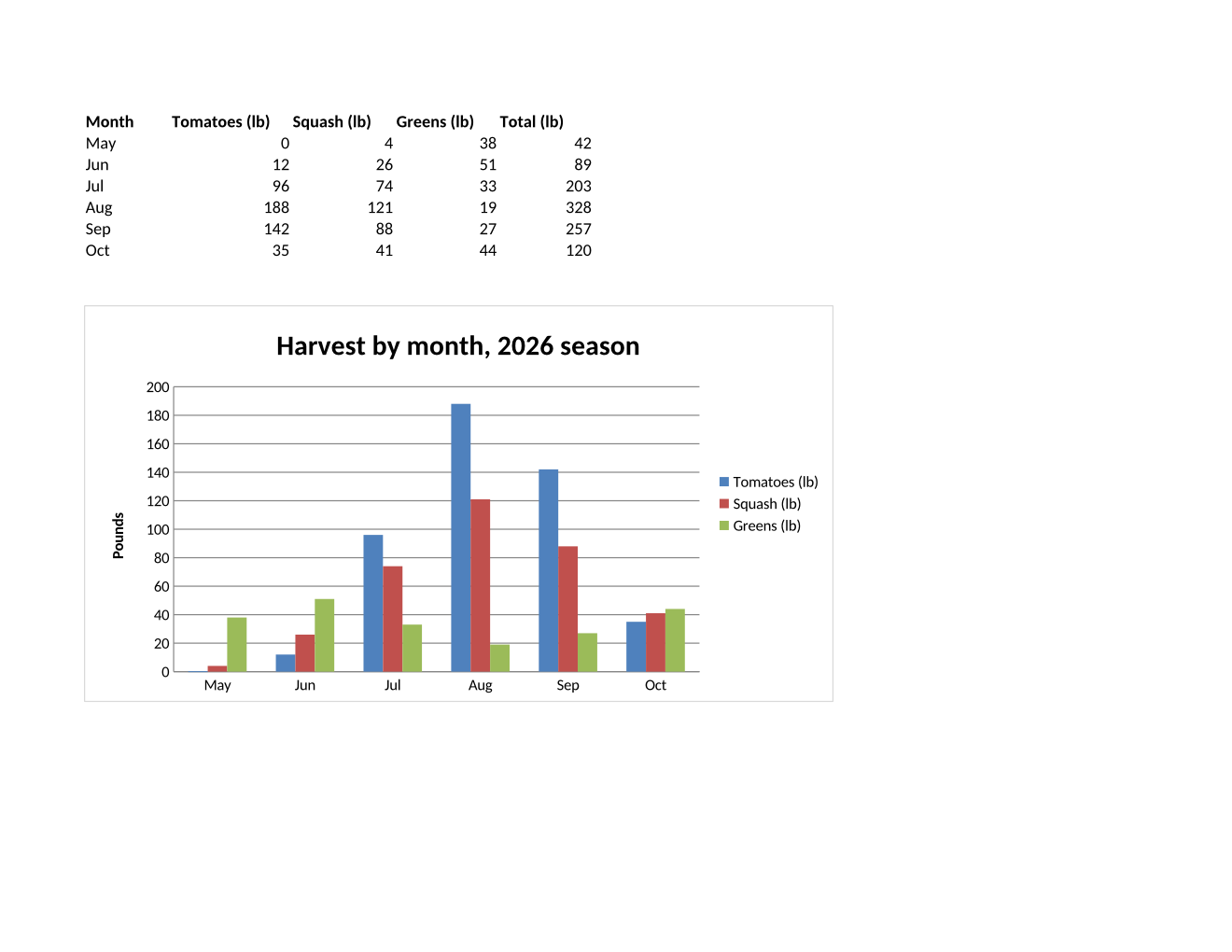
Send an .ods file to /v2/convert/ods/to/png and each printed page comes back as a lossless PNG. The sample picks its Harvest sheet at 120 DPI: one 1320 × 1020 image holding the monthly table and its column chart.
- Endpoint
- POST /v2/
convert/ ods/ to/ png - Accepts
- ods
- Sample timing
- 0.822 s median of 5 runsHow we measure
- Request size
- Up to 10 MB on the Free plan or 100 MB on paid plans, all files together
Request and response
Every sample below ran against the API before this page was published. Set PDFCONVERSIONAPI_KEY to your key and run it as is.
curl -sS -X POST \
  https://api.pdfconversionapi.com/v2/convert/ods/to/png \
  -H "Authorization: Bearer $PDFCONVERSIONAPI_KEY" \
  -F File=@garden-plots-2026.ods \
  --form-string WorksheetName=Harvest \
  --form-string ImageResolution=120 \
  -o response.json

# FileData is base64. Save the first file in converted/,
# or print the JSON error.
if jq -e '.Files' response.json > /dev/null; then
  mkdir -p converted
  name=$(jq -r '.Files[0].FileName' response.json)
  jq -r '.Files[0].FileData' response.json \
    | base64 --decode > "converted/$name"
else
  cat response.json
fi
import base64
import os
import requests
key = os.environ["PDFCONVERSIONAPI_KEY"]
response = requests.post(
"https://api.pdfconversionapi.com/v2/convert/ods/to/png",
headers={"Authorization": f"Bearer {key}"},
files=[("File", open("garden-plots-2026.ods", "rb"))],
data={
"WorksheetName": "Harvest",
"ImageResolution": "120",
},
timeout=180,
)
result = response.json()
if not response.ok:
raise SystemExit(f"{result['Code']}: {result['Message']}")
os.makedirs("converted", exist_ok=True)
for file in result["Files"]:
path = os.path.join("converted", file["FileName"])
with open(path, "wb") as out:
out.write(base64.b64decode(file["FileData"]))
print(path, file["FileSize"], "bytes")
import { mkdir, readFile, writeFile } from "node:fs/promises";
import { join } from "node:path";

const form = new FormData();
const file = "garden-plots-2026.ods";
form.append("File", new Blob([await readFile(file)]), file);
form.append("WorksheetName", "Harvest");
form.append("ImageResolution", "120");

const url = "https://api.pdfconversionapi.com/v2/convert/ods/to/png";
const key = process.env.PDFCONVERSIONAPI_KEY;
const response = await fetch(url, {
  method: "POST",
  headers: { Authorization: `Bearer ${key}` },
  body: form,
});
const result = await response.json();
if (!response.ok) {
  throw new Error(`${result.Code}: ${result.Message}`);
}

await mkdir("converted", { recursive: true });
for (const file of result.Files) {
  const path = join("converted", file.FileName);
  await writeFile(path, Buffer.from(file.FileData, "base64"));
  console.log(path, file.FileSize, "bytes");
}
{
  "ConversionCost": 1,
  "ConversionTime": 0.822,
  "Files": [
    {
      "FileName": "garden-plots-2026-1.png",
      "FileExt": "png",
      "FileSize": 84685,
      "FileData": "iVBORw0KGgoAAAANSUhEUgAA…"
    }
  ]
}
Response from our test run on 2026-11-03. ConversionTime shows the median of 5 runs. FileData is shortened here; the real response carries the whole file as base64.
The sample, converted
The same file the code sends. Download the input and the output and compare them yourself.
- Input
- garden-plots-2026.ods (30 KB)
- Output
- garden-plots-2026-1.png (83 KB)
- Source
- Written for this site: a fictional community garden's plot register and harvest chart in three sheets, one of them hidden, saved as an OpenDocument spreadsheet (CC0-1.0). How it was made
- Made by
- 2026-11-04, API build
9eeeb0640aba
Parameters
Send these as form fields next to the file. Names are case-insensitive. If you set one of the documented options below that we don't support yet, the request fails with a 400 that names it instead of returning a file made without it.
| Parameter | What it does |
|---|---|
WorksheetNamestring | The one sheet to draw. The sample asks for Harvest, so the Plots register is skipped. |
WorksheetIndexinteger | One sheet by position; hidden sheets are counted and drawn when picked.Values: 1 to the sheet count |
ActiveWorksheetOnlyboolean, default false | Only the sheet that was open when the file was saved (Plots in the sample). |
ImageResolutioninteger, default 150 | Pixels per inch; Letter landscape is 1320 × 1020 at the sample's 120. ConvertAPI documents 200 as its default for this conversion; ours is 150.Values: 36–600 |
ImageWidthinteger | Draw each page this wide; 800 gives an 800-pixel image of the chart page.Values: 1–20000 |
ImageHeightinteger | Draw each page this tall.Values: 1–20000 |
BackgroundColorstring, default white | Color behind the page where the sheet has no fill.Values: a color name, #RRGGBB or R,G,B |
TransparentColorstring | Exact color made transparent.Values: a color name, #RRGGBB or R,G,B |
PageSizeenum, default default | Replaces the sheets' saved paper size (Letter in the sample).Values: letter, legal, tabloid, ledger, statement, executive, lettersmall, a3, a4, a4small, a5, b4, b5 |
PageOrientationenum, default default | Replaces the saved orientation; A4 portrait splits the sample into 4 pages.Values: default, portrait, landscape |
Scaleinteger | Print zoom in percent.Values: 10–300 |
FitToPageboolean, default false | Each sheet one page across. |
PageRangestring | Only these pages of the printout; PageRange=2 is the chart page when both sheets print.Values: e.g. 2 |
ColorSpaceenum, default default | Gray or black and white instead of color; rgb returns the same three-channel file as the default.Values: rgb, gray, monochrome |
Passwordstring | Opens a password-protected ODS. Without it, the API answers 422. |
FileNamestring | Stem for the PNG names. |
StoreFileboolean, default false | Links valid for 3 hours instead of data. |
Not supported yet
Setting one of these to anything but its default returns 400.
Refused when set: AutoFitColumns, ThousandsSeparator, DecimalSeparator, DateFormat.
What carries over, and what doesn't
Kept
- The chart: bars for three crops over six months, its title, legend and axis title
- The table above it, with the Total (lb) column calculated (42, 89, 203, 328, 257, 120)
- The sheet's Letter landscape page setup
- Lossless pixels in an RGB PNG, with no alpha channel and 120 DPI stored
Lost or not yet supported
- The other sheets: Plots, and the hidden Fees sheet, which is never drawn unless picked.
- The chart's live link to its data. The PNG is a picture of the numbers at conversion time.
- Interactivity in general: the image cannot be re-sorted, filtered or copied as cells.
Limits
- One spreadsheet per request.
- Requests up to 10 MB on the Free plan or 100 MB on paid plans, all files and fields together.
- No more than 2,000 page images per request.
- 16,000 pixels per side and 100,000,000 pixels per page image, or 413.
- 120 seconds per conversion, then 504.
Where teams use it
Charts for newsletters and websites
Keep the data and the chart in one spreadsheet and publish the chart page as a PNG whenever the numbers change, as the sample does with a season's harvest.
Pictures of shared sheets in chat
Post the current state of a team's OpenDocument sheet in a chat channel, where an image shows inline and an .ods file doesn't.
Previews for uploads from office suites
Many people save in OpenDocument format by default. Show them what you received as an image, before any further processing.
Questions
How do I get only the chart?
Draw the sheet that holds it, as the sample does with WorksheetName=Harvest. The image is the whole printed page, table included; there is no option to crop to the chart, so place charts on their own sheet if you want them alone.
Can I convert a password-protected ODS?
Yes, send Password. We saved the sample with a password: without one, and with a wrong one, the answer was 422 "the input file is password-protected"; with the right one, both pages came back.
Why is the PNG larger than the JPG?
PNG keeps every pixel. For the sample's register page at the default 150 DPI, the PNG is 270,834 bytes, the lossless WebP 101,982 bytes and a JPEG at quality 85 170,303 bytes.
Convert your first ODS file in a minute.