ODS to JPG API
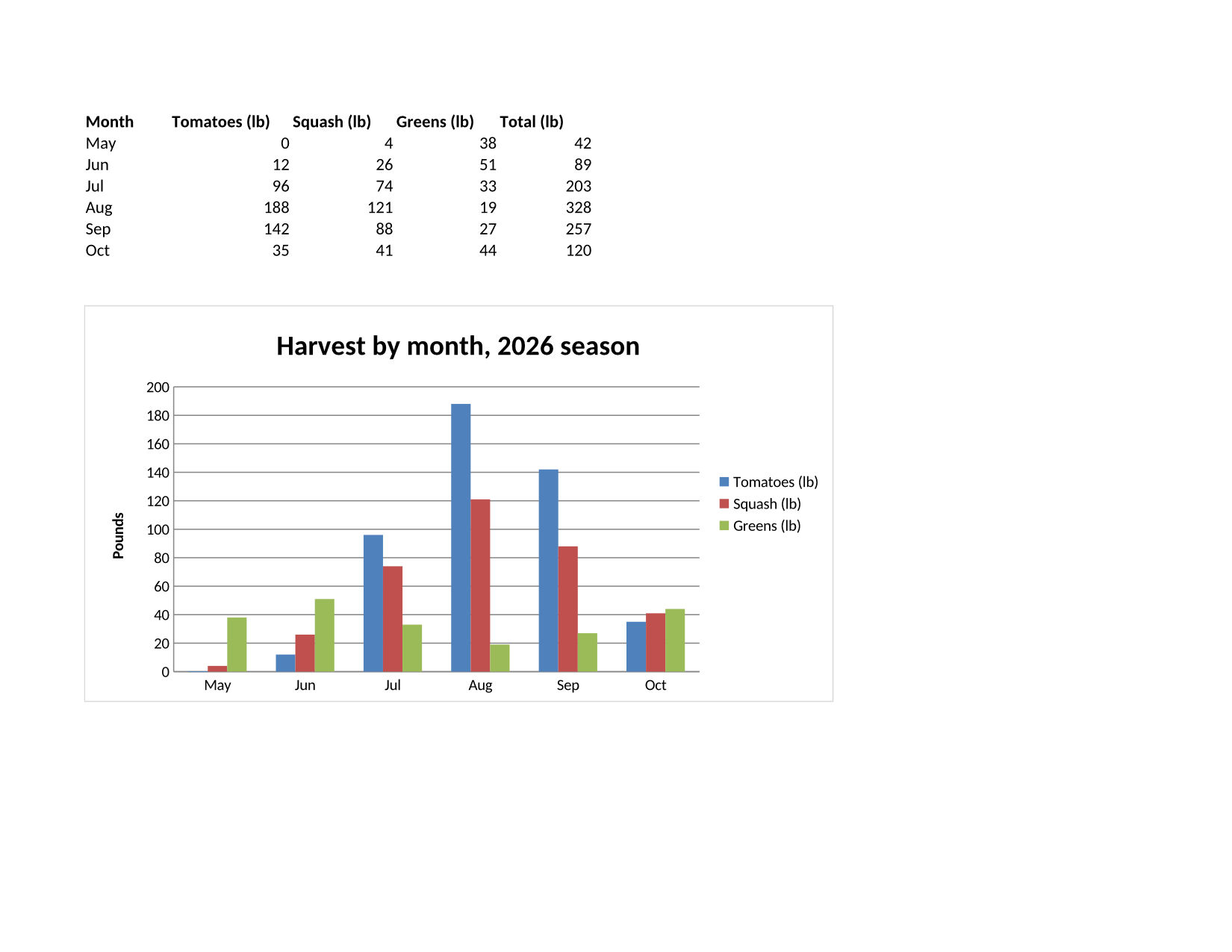
POST an OpenDocument spreadsheet to /v2/convert/ods/to/jpg for one JPEG per printed page. The sample, sent with ImageQuality=80 only, prints as saved: two Letter landscape pages at 150 DPI, the register and the chart.
- Endpoint
- POST /v2/
convert/ ods/ to/ jpg - Accepts
- ods
- Sample timing
- 0.645 s median of 5 runsHow we measure
- Request size
- Up to 10 MB on the Free plan or 100 MB on paid plans, all files together
Request and response
Every sample below ran against the API before this page was published. Set PDFCONVERSIONAPI_KEY to your key and run it as is.
curl -sS -X POST \
  https://api.pdfconversionapi.com/v2/convert/ods/to/jpg \
  -H "Authorization: Bearer $PDFCONVERSIONAPI_KEY" \
  -F File=@garden-plots-2026.ods \
  --form-string ImageQuality=80 \
  -o response.json

# FileData is base64. Save the first file in converted/,
# or print the JSON error.
if jq -e '.Files' response.json > /dev/null; then
  mkdir -p converted
  name=$(jq -r '.Files[0].FileName' response.json)
  jq -r '.Files[0].FileData' response.json \
    | base64 --decode > "converted/$name"
else
  cat response.json
fi
import base64
import os
import requests
key = os.environ["PDFCONVERSIONAPI_KEY"]
response = requests.post(
"https://api.pdfconversionapi.com/v2/convert/ods/to/jpg",
headers={"Authorization": f"Bearer {key}"},
files=[("File", open("garden-plots-2026.ods", "rb"))],
data={
"ImageQuality": "80",
},
timeout=180,
)
result = response.json()
if not response.ok:
raise SystemExit(f"{result['Code']}: {result['Message']}")
os.makedirs("converted", exist_ok=True)
for file in result["Files"]:
path = os.path.join("converted", file["FileName"])
with open(path, "wb") as out:
out.write(base64.b64decode(file["FileData"]))
print(path, file["FileSize"], "bytes")
import { mkdir, readFile, writeFile } from "node:fs/promises";
import { join } from "node:path";

const form = new FormData();
const file = "garden-plots-2026.ods";
form.append("File", new Blob([await readFile(file)]), file);
form.append("ImageQuality", "80");

const url = "https://api.pdfconversionapi.com/v2/convert/ods/to/jpg";
const key = process.env.PDFCONVERSIONAPI_KEY;
const response = await fetch(url, {
  method: "POST",
  headers: { Authorization: `Bearer ${key}` },
  body: form,
});
const result = await response.json();
if (!response.ok) {
  throw new Error(`${result.Code}: ${result.Message}`);
}

await mkdir("converted", { recursive: true });
for (const file of result.Files) {
  const path = join("converted", file.FileName);
  await writeFile(path, Buffer.from(file.FileData, "base64"));
  console.log(path, file.FileSize, "bytes");
}
{
  "ConversionCost": 1,
  "ConversionTime": 0.645,
  "Files": [
    {
      "FileName": "garden-plots-2026-1.jpg",
      "FileExt": "jpg",
      "FileSize": 157445,
      "FileData": "/9j/4AAQSkZJRgABAgAAAQAB…"
    },
    {
      "FileName": "garden-plots-2026-2.jpg",
      "FileExt": "jpg",
      "FileSize": 118185,
      "FileData": "/9j/4AAQSkZJRgABAgAAAQAB…"
    }
  ]
}
Response from our test run on 2026-11-03. ConversionTime shows the median of 5 runs. FileData is shortened here; the real response carries the whole file as base64.
The sample, converted
The same file the code sends. Download the input and the output and compare them yourself.
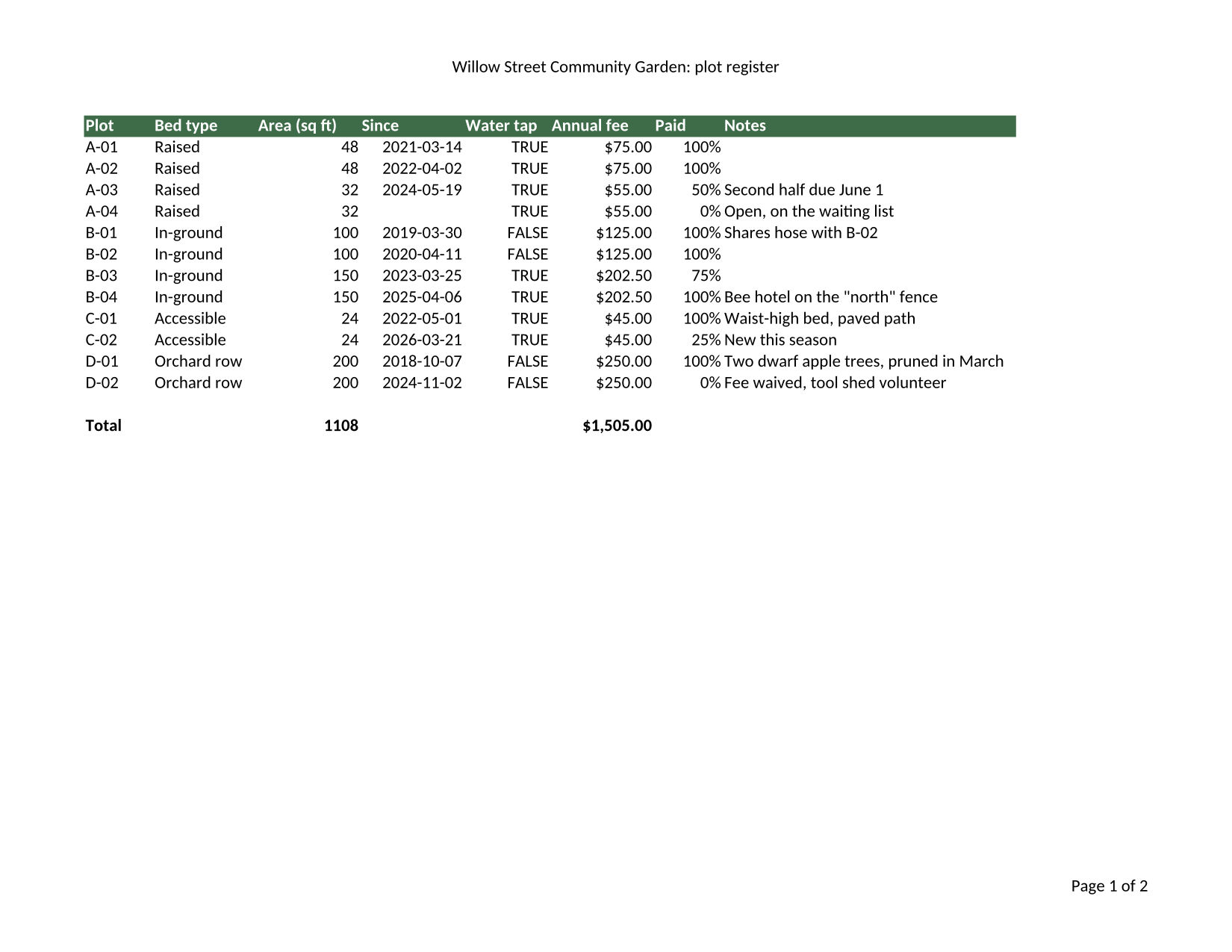
- Input
- garden-plots-2026.ods (30 KB)
- Output
- garden-plots-2026-1.jpg (154 KB)garden-plots-2026-2.jpg (115 KB)
- Source
- Written for this site: a fictional community garden's plot register and harvest chart in three sheets, one of them hidden, saved as an OpenDocument spreadsheet (CC0-1.0). How it was made
- Made by
- 2026-11-04, API build
9eeeb0640aba
Parameters
Send these as form fields next to the file. Names are case-insensitive. If you set one of the documented options below that we don't support yet, the request fails with a 400 that names it instead of returning a file made without it.
| Parameter | What it does |
|---|---|
ImageQualityinteger, default 85 | JPEG quality. The sample's two pages are 157,445 and 118,185 bytes at 80. ConvertAPI documents 75 as its default here.Values: 1–100 |
ImageResolutioninteger, default 150 | Pixels per inch: Letter landscape is 1650 × 1275 at 150. ConvertAPI's documented default is 200, so send it if you move code over and want the same size.Values: 36–600 |
ImageWidthinteger | Width of every JPEG in pixels.Values: 1–20000 |
ImageHeightinteger | Height of every JPEG in pixels; 600 makes the chart page 776 pixels wide.Values: 1–20000 |
WorksheetNamestring | Print only this sheet. |
WorksheetIndexinteger | Print only the sheet at this position, hidden ones counted.Values: 1 to the sheet count |
ActiveWorksheetOnlyboolean, default false | Print only the sheet that was active at save time. |
PageSizeenum, default default | Paper for all printed sheets, replacing what the file says.Values: letter, legal, tabloid, ledger, statement, executive, lettersmall, a3, a4, a4small, a5, b4, b5 |
PageOrientationenum, default default | Orientation for all printed sheets.Values: default, portrait, landscape |
FitToPageboolean, default false | Shrink each sheet to one page wide. |
Scaleinteger | Shrink or enlarge the printout by a percentage.Values: 10–300 |
HeaderOnEachPageboolean, default false | Repeat each sheet's first filled row at the top of later pages. |
PageRangestring | Only these pages.Values: e.g. 1 |
BackgroundColorstring, default white | Paper color.Values: a color name, #RRGGBB or R,G,B |
ColorSpaceenum, default default | gray writes a one-channel JPEG.Values: rgb, gray, monochrome |
Passwordstring | Opens an encrypted ODS. |
FileNamestring | Base name; pages get -1.jpg, -2.jpg. |
StoreFileboolean, default false | Links for 3 hours in place of base64. |
Not supported yet
Setting one of these to anything but its default returns 400.
Refused when set: AutoFitColumns, ThousandsSeparator, DecimalSeparator, DateFormat.
What carries over, and what doesn't
Kept
- The page setup saved in the file: Letter landscape for both sheets
- Header and footer text from the file, such as "Page 1 of 2" on the register
- Cell formats as displayed: $75.00, 100%, 2021-03-14 and TRUE or FALSE
- The chart on page 2, drawn from the Harvest numbers
- Calculated values: $1,505.00 total fees and 1108 sq ft
Lost or not yet supported
- The hidden Fees sheet, which only prints when you pick it.
- Exact pixels, since JPEG is lossy (quality 80 in the sample).
- The DPI in the file, unless you send
ImageResolution. - Transparency:
TransparentColorhas no effect on JPEG.
Limits
- One spreadsheet per request.
- Requests up to 10 MB on the Free plan or 100 MB on paid plans, all files and fields together.
- No more than 2,000 page images per request.
- 16,000 pixels per side and 100,000,000 pixels per page image, or 413.
- 120 seconds per conversion, then 504.
Where teams use it
A weekly snapshot by email
Mail the register page as a JPEG every Monday to members who don't use a spreadsheet app. The header and page numbers saved in the file come along.
Lists of shared files with previews
File portals that accept .ods uploads can show page one as a JPEG thumbnail with PageRange=1 and ImageWidth.
Moving from ConvertAPI
This route reads the same image options ConvertAPI documents for ODS to JPG. Send ImageResolution=200 and ImageQuality=75 to match its defaults.
Questions
Why do I get two JPEGs from one file?
Each visible sheet prints on its own pages, and each page is one image. The sample's Plots and Harvest sheets each fit one Letter landscape page. Send WorksheetName or PageRange=1 for a single image.
What do hidden sheets do?
They are not printed. The sample's Fees sheet holds the rates its fee formulas point to, yet no page is drawn for it unless you ask for it by name or index. Picked that way, it prints on A4 portrait, because it has no page setup of its own.
Does the JPEG look like the file in my office suite?
The layout follows the page setup saved in the file: paper, orientation, header and footer. Sheet options send the file through an extra conversion step; in our side-by-side check the pages looked the same either way. We have not compared the images with what other spreadsheet apps print.
Convert your first ODS file in a minute.