XLSX to JPG API
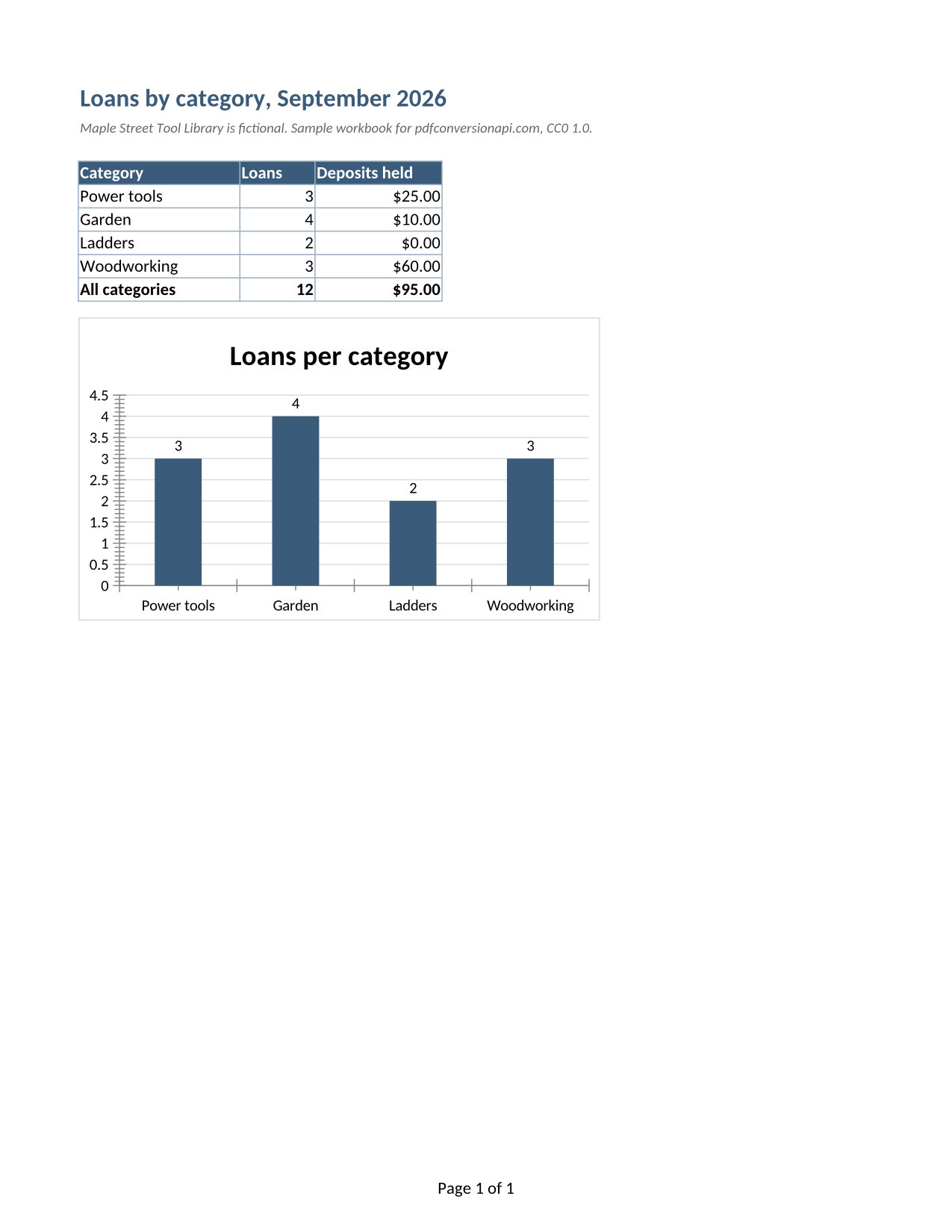
Send an Excel workbook to POST /v2/convert/xlsx/to/jpg and get one JPEG for each printed page. The sample adds ActiveWorksheetOnly=true, so only the Summary tab, the one open when the file was saved, comes back as a single image.
- Endpoint
- POST /v2/
convert/ xlsx/ to/ jpg - Accepts
- xlsx
- Sample timing
- 0.624 s median of 5 runsHow we measure
- Request size
- Up to 10 MB on the Free plan or 100 MB on paid plans, all files together
Request and response
Every sample below ran against the API before this page was published. Set PDFCONVERSIONAPI_KEY to your key and run it as is.
curl -sS -X POST \
  https://api.pdfconversionapi.com/v2/convert/xlsx/to/jpg \
  -H "Authorization: Bearer $PDFCONVERSIONAPI_KEY" \
  -F File=@tool-library-loans.xlsx \
  --form-string ActiveWorksheetOnly=true \
  -o response.json

# FileData is base64. Save the first file in converted/,
# or print the JSON error.
if jq -e '.Files' response.json > /dev/null; then
  mkdir -p converted
  name=$(jq -r '.Files[0].FileName' response.json)
  jq -r '.Files[0].FileData' response.json \
    | base64 --decode > "converted/$name"
else
  cat response.json
fi
import base64
import os
import requests
key = os.environ["PDFCONVERSIONAPI_KEY"]
response = requests.post(
"https://api.pdfconversionapi.com/v2/convert/xlsx/to/jpg",
headers={"Authorization": f"Bearer {key}"},
files=[("File", open("tool-library-loans.xlsx", "rb"))],
data={
"ActiveWorksheetOnly": "true",
},
timeout=180,
)
result = response.json()
if not response.ok:
raise SystemExit(f"{result['Code']}: {result['Message']}")
os.makedirs("converted", exist_ok=True)
for file in result["Files"]:
path = os.path.join("converted", file["FileName"])
with open(path, "wb") as out:
out.write(base64.b64decode(file["FileData"]))
print(path, file["FileSize"], "bytes")
import { mkdir, readFile, writeFile } from "node:fs/promises";
import { join } from "node:path";

const form = new FormData();
const file = "tool-library-loans.xlsx";
form.append("File", new Blob([await readFile(file)]), file);
form.append("ActiveWorksheetOnly", "true");

const url = "https://api.pdfconversionapi.com/v2/convert/xlsx/to/jpg";
const key = process.env.PDFCONVERSIONAPI_KEY;
const response = await fetch(url, {
  method: "POST",
  headers: { Authorization: `Bearer ${key}` },
  body: form,
});
const result = await response.json();
if (!response.ok) {
  throw new Error(`${result.Code}: ${result.Message}`);
}

await mkdir("converted", { recursive: true });
for (const file of result.Files) {
  const path = join("converted", file.FileName);
  await writeFile(path, Buffer.from(file.FileData, "base64"));
  console.log(path, file.FileSize, "bytes");
}
{
  "ConversionCost": 1,
  "ConversionTime": 0.624,
  "Files": [
    {
      "FileName": "tool-library-loans-1.jpg",
      "FileExt": "jpg",
      "FileSize": 128953,
      "FileData": "/9j/4AAQSkZJRgABAgAAAQAB…"
    }
  ]
}
Response from our test run on 2026-11-03. ConversionTime shows the median of 5 runs. FileData is shortened here; the real response carries the whole file as base64.
The sample, converted
The same file the code sends. Download the input and the output and compare them yourself.
- Input
- tool-library-loans.xlsx (11 KB)
- Output
- tool-library-loans-1.jpg (126 KB)
- Source
- A fictional tool library's September loans workbook (three sheets, one of them hidden, with formulas and a chart) that we wrote for this site (CC0-1.0). How it was made
- Made by
- 2026-11-04, API build
9eeeb0640aba
Parameters
Send these as form fields next to the file. Names are case-insensitive. If you set one of the documented options below that we don't support yet, the request fails with a 400 that names it instead of returning a file made without it.
| Parameter | What it does |
|---|---|
ActiveWorksheetOnlyboolean, default false | Print only the sheet that was open when the workbook was saved. The sample was saved on Summary, so the answer is one JPEG of 1,275 × 1,650 pixels instead of two pages. Its footer reads Page 1 of 1: page numbers are counted after the other sheets drop out. |
WorksheetNamestring | Print one sheet by its tab name, in any letter case. Hidden sheets count: WorksheetName=Deposits printed the sample's hidden rate table. An unknown name returns 400 with "no worksheet named 'Nope'". |
WorksheetIndexinteger | Choose the sheet by position from 1, hidden sheets included, so 3 is Deposits in the sample. 4 returns 400 with "WorksheetIndex is 4, but the workbook has 3 worksheets". Sending it together with WorksheetName returns 400.Values: 1–2000 |
PageRangestring | Pages to draw, numbered across every printed sheet. Without sheet options the sample prints Loans as page 1 and Summary as page 2, and PageRange=2 returns only tool-library-loans-2.jpg. Page 3 returns 400 with "PageRange asks for page 3, but the document has 2 pages".Values: e.g. 2, 1-3, 2- |
ImageQualityinteger, default 85 | JPEG quality. The sample's Summary page is 128,953 bytes at 85, 114,523 at 75, 97,937 at 50 and 231,734 at 100. ConvertAPI's default is 75, so pin the number if you are moving code over. 0 returns 400.Values: 1–100 |
ImageResolutioninteger, default 150 | Pixels per inch of paper. A Letter page is 1,275 × 1,650 at 150 and 1,700 × 2,200 at 200, ConvertAPI's default. When you send it, the JPEG also records that DPI; left out, no DPI is stored.Values: 36–600 |
PageSizeenum, default default | Paper size for every printed sheet, replacing the one saved in the file. default keeps the workbook's own setting (Letter in the sample).Values: default, letter, lettersmall, tabloid, ledger, legal, statement, executive, a3, a4, a4small, a5, b4, b5 |
Passwordstring | Opens a workbook saved with a password to open. We encrypted the sample with /v2/convert/xlsx/to/protect: without the password, or with a wrong one, the answer is 422 "the input file is password-protected"; with it, the same pages come back. |
FileNamestring | Base name for the images. Each file still gets its page number: FileName=loans-sept gives loans-sept-1.jpg. |
What carries over, and what doesn't
Kept
- The chart on the Summary sheet, with its bars, axis and the data label above each bar (3, 4, 2, 3)
- Cell formats as printed: currency with two decimals ($25.00, $0.00) and the bold All categories row with 12 loans and $95.00
- Fills and borders: the dark blue header row with white text and the light blue cell borders
- The page setup saved for each sheet: the Summary page is portrait Letter, 8.5 × 11 inches at 150 DPI
- Footers worked out at print time, with page numbers that match the pages actually printed
- Results of the COUNTIF and SUMIFS formulas on Summary, which count and total rows of the Loans sheet even though Loans is not printed in this request
Lost or not yet supported
- The workbook's Calibri text is drawn with Carlito, a font with the same letter widths, so lines break in the same places but the letters look slightly different.
- Anything off the printed page: hidden sheets, hidden rows and hidden columns are left out unless you name a hidden sheet with
WorksheetName. - Selectable text. Numbers and labels become pixels; send the workbook to
/v2/convert/xlsx/to/jsonorxlsx/to/csvwhen you need the values. - JPEG compression blurs the edges of small text a little at every quality below 100. Use the PNG route for pages that will be zoomed or read by OCR.
Limits
- Up to 2,000 pages per request; above that the API returns 413.
PageRangeorWorksheetNamekeeps large workbooks under it. - Each image is limited to 16,000 pixels per side and 100 million pixels.
- One workbook per request, up to 10 MB on the Free plan or 100 MB on paid plans for the whole request. Printing and drawing together get 120 seconds; after that the API returns 504.
Where teams use it
A chart and its totals in an email or chat message
Mail clients and chat apps show a JPEG inline, while an attached workbook has to be opened. Print just the summary tab, as the sample does, and send the picture of the table and the column chart.
Thumbnails for a document library
Store a small first-page image next to each uploaded workbook so people can tell files apart before opening them. PageRange=1 with ImageResolution=72 turns the sample's landscape first page into a 792 × 612 image of 65,919 bytes.
Archiving a month's figures as they looked
A JPEG of the printed page can't be recalculated later, so it records the values a report showed on the day you made it.
Questions
How do I get only the sheet that was open in Excel?
Send ActiveWorksheetOnly=true. The API reads which tab was active when the file was saved and prints only that one; for the sample that is Summary, so one JPEG comes back. To pick a sheet regardless of where the file was saved, use WorksheetName or WorksheetIndex instead.
Why does my JPEG differ in size from ConvertAPI's?
Two defaults differ. We draw at 150 DPI where ConvertAPI uses 200, and we encode at quality 85 where ConvertAPI uses 75. On the sample's Summary page our defaults give 1,275 × 1,650 pixels and 128,953 bytes; with ImageResolution=200 and ImageQuality=75 the page is 1,700 × 2,200 pixels and 183,863 bytes. Send both values when you want ConvertAPI's settings.
Are formulas recalculated before the image is made?
The image shows the results stored in the workbook, the same ones Excel showed when it saved the file. A formula saved without any result, as some libraries write them, is calculated during the conversion.
Can I make the page landscape or fit a wide sheet on one page?
Yes. PageOrientation=landscape and FitToPage=true change the page setup of every printed sheet before it is drawn. FitToPage makes each sheet one page wide and as many pages tall as it needs, and Scale (10 to 300 percent) zooms instead.
Convert your first XLSX file in a minute.