XLS to JPG API
Upload an Excel 97-2003 workbook to POST /v2/convert/xls/to/jpg to get a JPEG of each printed page. The sample asks for PageRange=1 and receives one landscape image of its Fuel sheet.
- Endpoint
- POST /v2/
convert/ xls/ to/ jpg - Accepts
- xls
- Sample timing
- 0.539 s median of 5 runsHow we measure
- Request size
- Up to 10 MB on the Free plan or 100 MB on paid plans, all files together
Request and response
Every sample below ran against the API before this page was published. Set PDFCONVERSIONAPI_KEY to your key and run it as is.
curl -sS -X POST \
  https://api.pdfconversionapi.com/v2/convert/xls/to/jpg \
  -H "Authorization: Bearer $PDFCONVERSIONAPI_KEY" \
  -F File=@van-fuel-log.xls \
  --form-string PageRange=1 \
  -o response.json

# FileData is base64. Save the first file in converted/,
# or print the JSON error.
if jq -e '.Files' response.json > /dev/null; then
  mkdir -p converted
  name=$(jq -r '.Files[0].FileName' response.json)
  jq -r '.Files[0].FileData' response.json \
    | base64 --decode > "converted/$name"
else
  cat response.json
fi
import base64
import os
import requests
key = os.environ["PDFCONVERSIONAPI_KEY"]
response = requests.post(
"https://api.pdfconversionapi.com/v2/convert/xls/to/jpg",
headers={"Authorization": f"Bearer {key}"},
files=[("File", open("van-fuel-log.xls", "rb"))],
data={
"PageRange": "1",
},
timeout=180,
)
result = response.json()
if not response.ok:
raise SystemExit(f"{result['Code']}: {result['Message']}")
os.makedirs("converted", exist_ok=True)
for file in result["Files"]:
path = os.path.join("converted", file["FileName"])
with open(path, "wb") as out:
out.write(base64.b64decode(file["FileData"]))
print(path, file["FileSize"], "bytes")
import { mkdir, readFile, writeFile } from "node:fs/promises";
import { join } from "node:path";

const form = new FormData();
const file = "van-fuel-log.xls";
form.append("File", new Blob([await readFile(file)]), file);
form.append("PageRange", "1");

const url = "https://api.pdfconversionapi.com/v2/convert/xls/to/jpg";
const key = process.env.PDFCONVERSIONAPI_KEY;
const response = await fetch(url, {
  method: "POST",
  headers: { Authorization: `Bearer ${key}` },
  body: form,
});
const result = await response.json();
if (!response.ok) {
  throw new Error(`${result.Code}: ${result.Message}`);
}

await mkdir("converted", { recursive: true });
for (const file of result.Files) {
  const path = join("converted", file.FileName);
  await writeFile(path, Buffer.from(file.FileData, "base64"));
  console.log(path, file.FileSize, "bytes");
}
{
  "ConversionCost": 1,
  "ConversionTime": 0.539,
  "Files": [
    {
      "FileName": "van-fuel-log-1.jpg",
      "FileExt": "jpg",
      "FileSize": 139883,
      "FileData": "/9j/4AAQSkZJRgABAgAAAQAB…"
    }
  ]
}
Response from our test run on 2026-11-03. ConversionTime shows the median of 5 runs. FileData is shortened here; the real response carries the whole file as base64.
The sample, converted
The same file the code sends. Download the input and the output and compare them yourself.
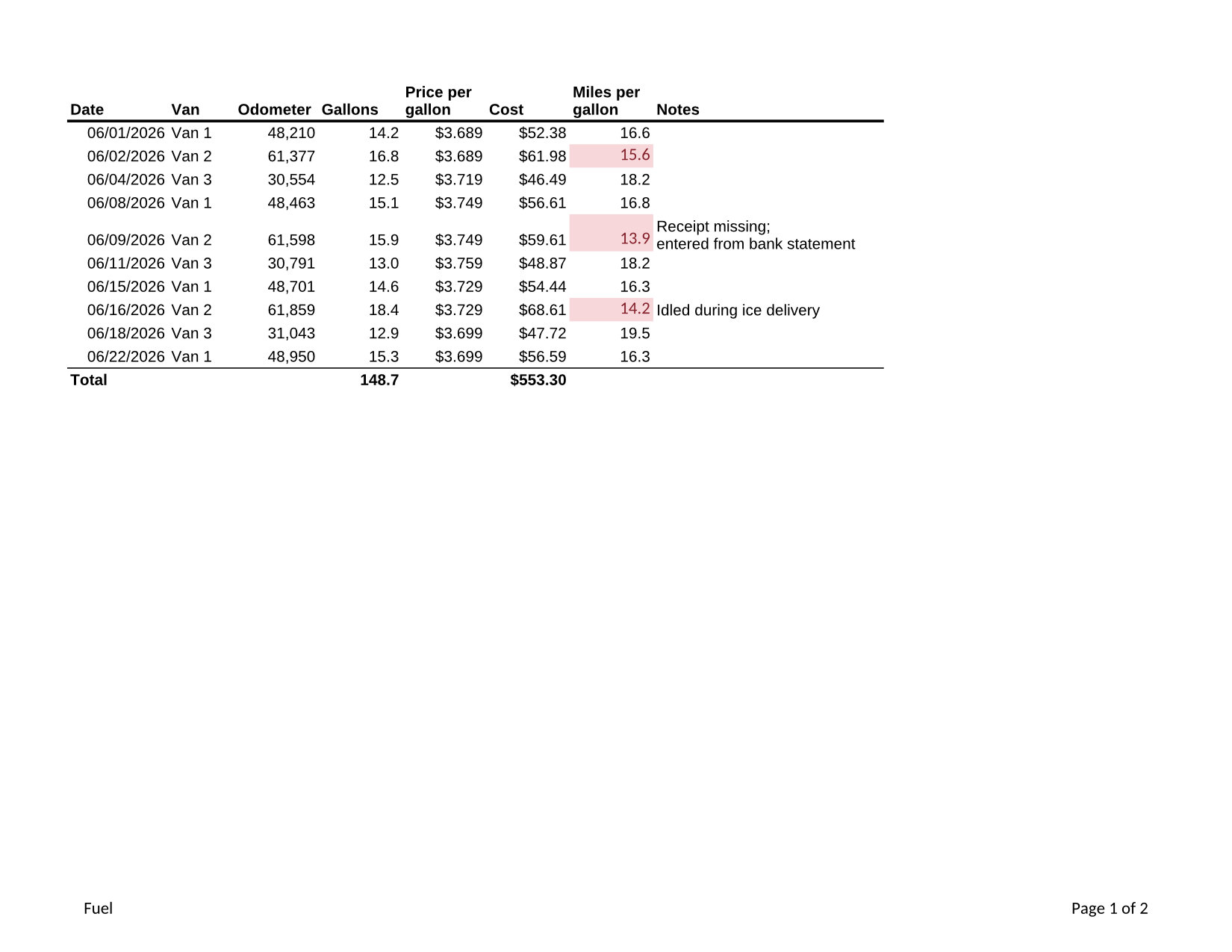
- Input
- van-fuel-log.xls (11 KB)
- Output
- van-fuel-log-1.jpg (137 KB)
- Source
- A fictional bakery's van fuel log in Excel 97-2003 format (two sheets, formulas, a cell note and a merged title) that we wrote for this site (CC0-1.0). How it was made
- Made by
- 2026-11-04, API build
9eeeb0640aba
Parameters
Send these as form fields next to the file. Names are case-insensitive. If you set one of the documented options below that we don't support yet, the request fails with a 400 that names it instead of returning a file made without it.
| Parameter | What it does |
|---|---|
PageRangestring | Which printed pages to draw, counted across all sheets. The sample prints Fuel as page 1 and Vans as page 2; PageRange=1 returns only van-fuel-log-1.jpg, 1,650 × 1,275 pixels. A page past the end returns 400 with the page count.Values: e.g. 1, 1-2, 2- |
ImageQualityinteger, default 85 | JPEG compression quality. The Fuel page is 139,883 bytes at the default and 111,062 at 60. ConvertAPI uses 75 when it is left out.Values: 1–100 |
ImageResolutioninteger, default 150 | Pixels per inch of paper; a value you send is also stored in the JPEG. ConvertAPI's default is 200.Values: 36–600 |
WorksheetNamestring | Print one sheet, named without regard to case: vans prints the Vans sheet. |
WorksheetIndexinteger | Print the sheet at this position, starting at 1. For the 2-sheet sample, 3 returns 400.Values: 1–2000 |
ClearPrintAreaboolean, default false | Ignore print areas saved in the file and print each sheet's whole used range. In a test file whose first sheet printed only cell A1, the page then showed the second value below it too. |
Passwordstring | For a .xls saved with a password to open. Our test file, protected in an office suite, printed with its password and returned 422 without it. |
What carries over, and what doesn't
Kept
- Conditional formatting as printed: the three mileage values under 16 (15.6, 13.9 and 14.2) are drawn on a pink fill in dark red
- Text wrapping: the two-line note "Receipt missing; entered from bank statement" makes its row taller and prints on two lines
- Number formats saved in the .xls: 06/01/2026 dates, 48,210 with a thousands separator, $3.689 prices with three decimals
- The footer with the sheet name on the left and Page 1 of 2 on the right
- Results of the Cost, miles-per-gallon and SUM formulas as stored in the file
Lost or not yet supported
- Arial, the font the sheet uses, is drawn with Liberation Sans, which has the same letter widths.
- The note attached to cell A6 is not printed, as in Excel's default print settings.
ActiveWorksheetOnly=trueprints the first sheet of an .xls rather than the one that was open: in our test file saved on its second sheet, the image showed the first. Name the sheet withWorksheetNameinstead.- JPEG compression leaves faint artifacts around small text; the PNG route avoids them.
Limits
- 2,000 pages per request at most (413 above), and 16,000 pixels per side or 100 million pixels per image.
- Requests up to 10 MB on the Free plan or 100 MB on paid plans; after 120 seconds the API returns 504.
- A web page saved with a .xls name is not an Excel file and returns 422 "the input file could not be read: it could not be opened as XLS". Send it to
/v2/convert/html/to/xlsxfirst.
Where teams use it
Showing old reports that only exist as .xls
Accounting exports and archived workbooks from the 1997-2003 format era can be turned into images that any browser or phone shows without Excel.
Attaching a picture of one page to a ticket or chat
Draw only the page you need with PageRange and paste the JPEG where people are discussing it.
Questions
How do I get just one page of a multi-sheet .xls?
Use PageRange with the page number, as the sample does, or WorksheetName to print a single sheet whatever its page count. Page numbers run across all printed sheets in tab order.
Do conditional formats and colors show up in the image?
Yes, the way they print. In the sample, the rule that highlights mileage under 16 colors three cells pink with dark red numbers, exactly as on the printed page.
My .xls came from a web app and fails with 422. Why?
Many systems export an HTML table and give it an .xls name. That file is not in Excel's binary format, so this route can't open it. /v2/convert/html/to/xlsx reads such tables; convert that result to JPG.
Convert your first XLS file in a minute.