XLS to PNG API
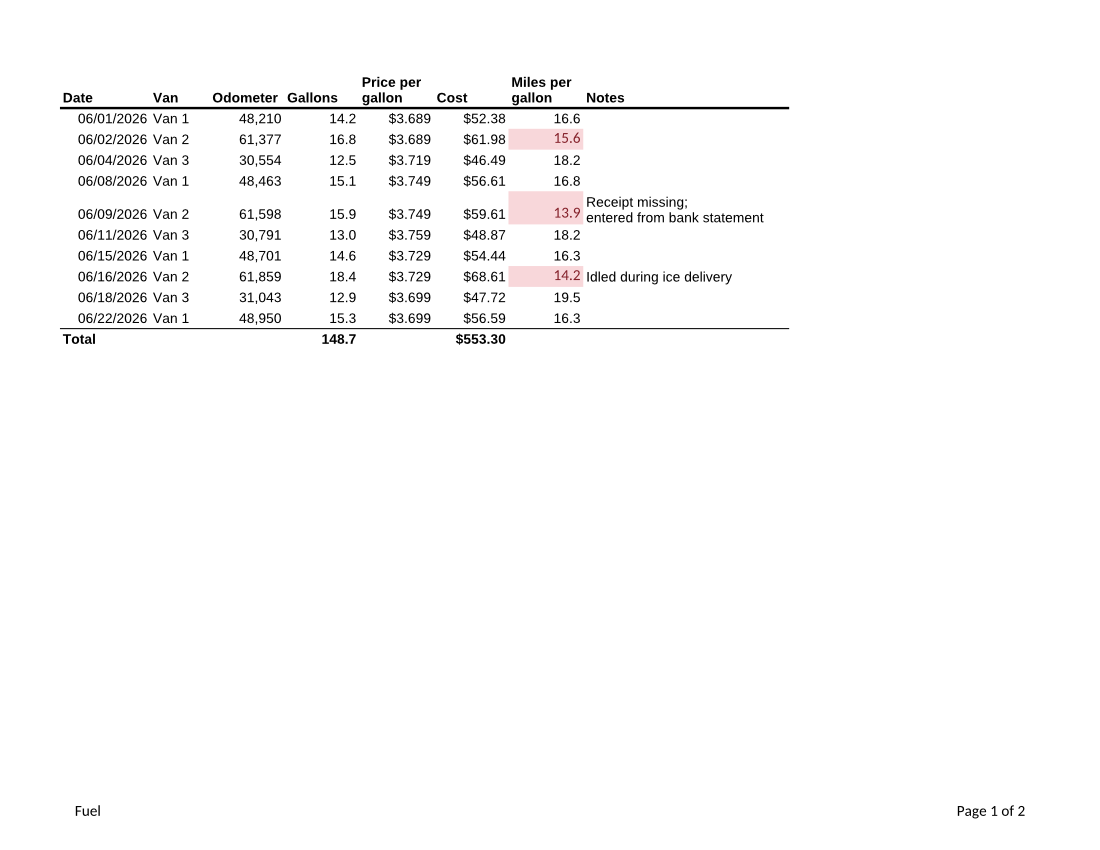
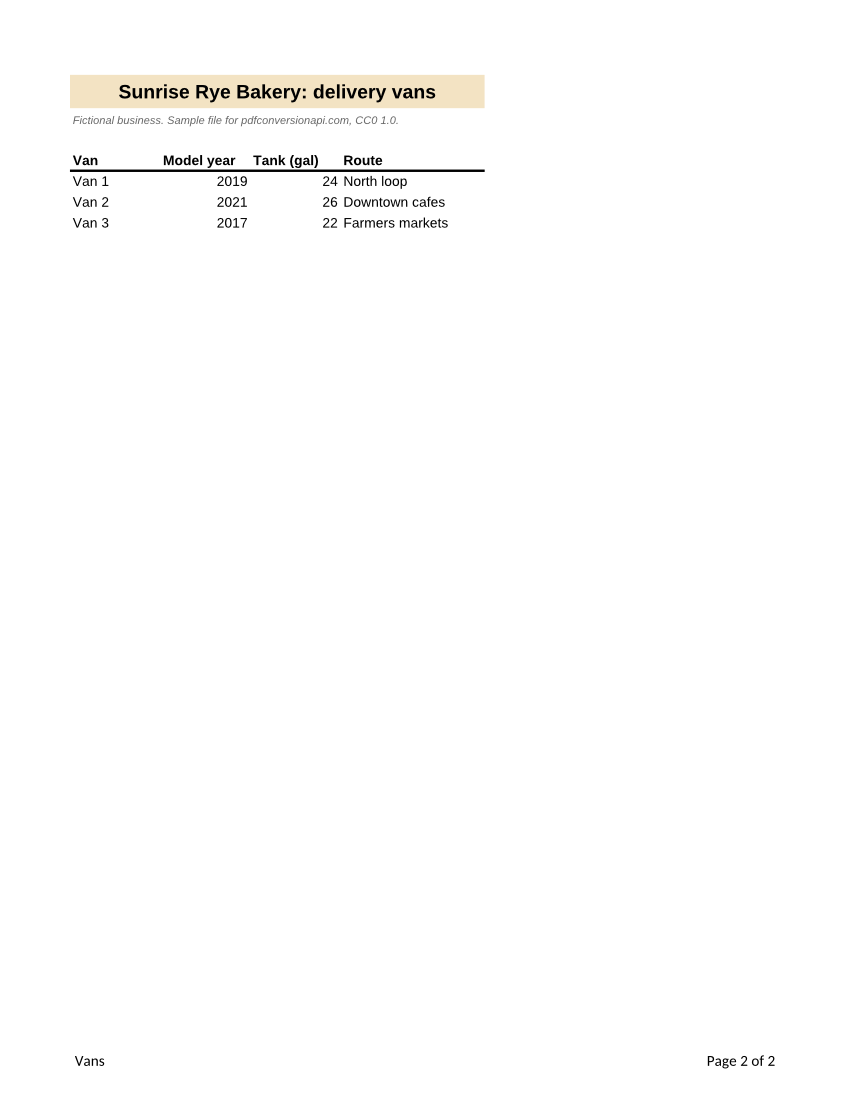
Send a .xls workbook to POST /v2/convert/xls/to/png and receive one lossless PNG per printed page. With ImageResolution=100 the sample's landscape Fuel sheet comes back as 1,100 × 850 pixels and its portrait Vans sheet as 850 × 1,100.
- Endpoint
- POST /v2/
convert/ xls/ to/ png - Accepts
- xls
- Sample timing
- 0.532 s median of 5 runsHow we measure
- Request size
- Up to 10 MB on the Free plan or 100 MB on paid plans, all files together
Request and response
Every sample below ran against the API before this page was published. Set PDFCONVERSIONAPI_KEY to your key and run it as is.
curl -sS -X POST \
  https://api.pdfconversionapi.com/v2/convert/xls/to/png \
  -H "Authorization: Bearer $PDFCONVERSIONAPI_KEY" \
  -F File=@van-fuel-log.xls \
  --form-string ImageResolution=100 \
  -o response.json

# FileData is base64. Save the first file in converted/,
# or print the JSON error.
if jq -e '.Files' response.json > /dev/null; then
  mkdir -p converted
  name=$(jq -r '.Files[0].FileName' response.json)
  jq -r '.Files[0].FileData' response.json \
    | base64 --decode > "converted/$name"
else
  cat response.json
fi
import base64
import os
import requests
key = os.environ["PDFCONVERSIONAPI_KEY"]
response = requests.post(
"https://api.pdfconversionapi.com/v2/convert/xls/to/png",
headers={"Authorization": f"Bearer {key}"},
files=[("File", open("van-fuel-log.xls", "rb"))],
data={
"ImageResolution": "100",
},
timeout=180,
)
result = response.json()
if not response.ok:
raise SystemExit(f"{result['Code']}: {result['Message']}")
os.makedirs("converted", exist_ok=True)
for file in result["Files"]:
path = os.path.join("converted", file["FileName"])
with open(path, "wb") as out:
out.write(base64.b64decode(file["FileData"]))
print(path, file["FileSize"], "bytes")
import { mkdir, readFile, writeFile } from "node:fs/promises";
import { join } from "node:path";

const form = new FormData();
const file = "van-fuel-log.xls";
form.append("File", new Blob([await readFile(file)]), file);
form.append("ImageResolution", "100");

const url = "https://api.pdfconversionapi.com/v2/convert/xls/to/png";
const key = process.env.PDFCONVERSIONAPI_KEY;
const response = await fetch(url, {
  method: "POST",
  headers: { Authorization: `Bearer ${key}` },
  body: form,
});
const result = await response.json();
if (!response.ok) {
  throw new Error(`${result.Code}: ${result.Message}`);
}

await mkdir("converted", { recursive: true });
for (const file of result.Files) {
  const path = join("converted", file.FileName);
  await writeFile(path, Buffer.from(file.FileData, "base64"));
  console.log(path, file.FileSize, "bytes");
}
{
  "ConversionCost": 1,
  "ConversionTime": 0.532,
  "Files": [
    {
      "FileName": "van-fuel-log-1.png",
      "FileExt": "png",
      "FileSize": 123864,
      "FileData": "iVBORw0KGgoAAAANSUhEUgAA…"
    },
    {
      "FileName": "van-fuel-log-2.png",
      "FileExt": "png",
      "FileSize": 53845,
      "FileData": "iVBORw0KGgoAAAANSUhEUgAA…"
    }
  ]
}
Response from our test run on 2026-11-03. ConversionTime shows the median of 5 runs. FileData is shortened here; the real response carries the whole file as base64.
The sample, converted
The same file the code sends. Download the input and the output and compare them yourself.
- Input
- van-fuel-log.xls (11 KB)
- Output
- van-fuel-log-1.png (121 KB)van-fuel-log-2.png (53 KB)
- Source
- A fictional bakery's van fuel log in Excel 97-2003 format (two sheets, formulas, a cell note and a merged title) that we wrote for this site (CC0-1.0). How it was made
- Made by
- 2026-11-04, API build
9eeeb0640aba
Parameters
Send these as form fields next to the file. Names are case-insensitive. If you set one of the documented options below that we don't support yet, the request fails with a 400 that names it instead of returning a file made without it.
| Parameter | What it does |
|---|---|
ImageResolutioninteger, default 150 | Pixels per inch. The sample's PNGs are 123,864 and 53,845 bytes at 100; at the default 150 they are 220,383 and 95,448 bytes. When you send a value, it is written into the PNG as its DPI. ConvertAPI draws at 200.Values: 36–600 |
WorksheetNamestring | Print a single sheet. WorksheetName=Vans returns one 850 × 1,100 PNG with the merged title and the fleet table. |
Scaleinteger, default 100 | Print zoom in percent for every printed sheet. At 60 the sample's pages keep their size while the tables shrink, and the files drop to 68,230 and 35,443 bytes at 100 DPI.Values: 10–300 |
PageSizeenum, default default | Replace each sheet's paper size, for example a4 or legal. default keeps Letter, as saved in the sample.Values: default, letter, legal, tabloid, a3, a4, a5, b4, b5 and others |
HeaderOnEachPageboolean, default false | Repeat each printed sheet's first row with data at the top of every page it fills. The sample's Fuel sheet already repeats its header row, saved as a print title. |
ImageWidthinteger | Exact width in pixels instead of a resolution; the height follows the page.Values: 1–20000 |
Passwordstring | Open password of a protected .xls. Without it, or with a wrong one, the API returns 422 "the input file is password-protected". |
FileNamestring | Base name for the PNGs, followed by the page number (fuel-1.png, fuel-2.png). |
What carries over, and what doesn't
Kept
- Both sheets in tab order, each with its saved orientation: Fuel landscape, Vans portrait
- The merged title on Vans, centered across four columns on its tan fill
- Highlight colors from the conditional formatting rule and the bold Total row with its top border
- Wrapped cell text, number formats and the footer with the sheet name and page number
- Lossless pixels: the 10-point text has no compression artifacts, in RGB files without an alpha channel
Lost or not yet supported
- The sheet's Arial is drawn with Liberation Sans, which keeps the letter widths but not the exact shapes.
- On-screen extras of the .xls: the cell note on A6 and the drop-down list on the Van column are not drawn.
ActiveWorksheetOnly=truedoesn't find the open tab of an .xls; it prints the first sheet. UseWorksheetNameorWorksheetIndex.
Limits
- Up to 2,000 pages per request and 16,000 pixels per side (100 million pixels per image).
- Requests up to 10 MB on the Free plan or 100 MB on paid plans; a conversion stops after 120 seconds with 504.
- Files that are not real .xls workbooks, such as HTML tables renamed to .xls, return 422 "the input file could not be read: it could not be opened as XLS".
Where teams use it
Previews for an archive of old workbooks
Show what each .xls in a records system looks like without asking users to download it or own a copy of Excel.
Embedding a legacy table in new documentation
Turn a sheet that only exists in the old format into a sharp image for a wiki page or a slide.
Questions
Which DPI should I pick?
72 to 100 for previews on screen (the sample's Letter pages are 1,100 × 850 at 100), 150 for reading small numbers, and 300 for print. The range is 36 to 600; other values return 400 with "ImageResolution must be between 36 and 600".
Can a password-protected .xls be converted?
Yes, send its password as Password. Our test file, protected in an office suite, printed normally with the password and returned 422 without it.
Why does the Fuel page show a header row at the top of each page?
The sample saves row 1 as a print title, so it repeats when the sheet runs to more pages. For sheets without print titles, HeaderOnEachPage=true sets the same thing on every printed sheet.
Convert your first XLS file in a minute.