XLS to TIFF API
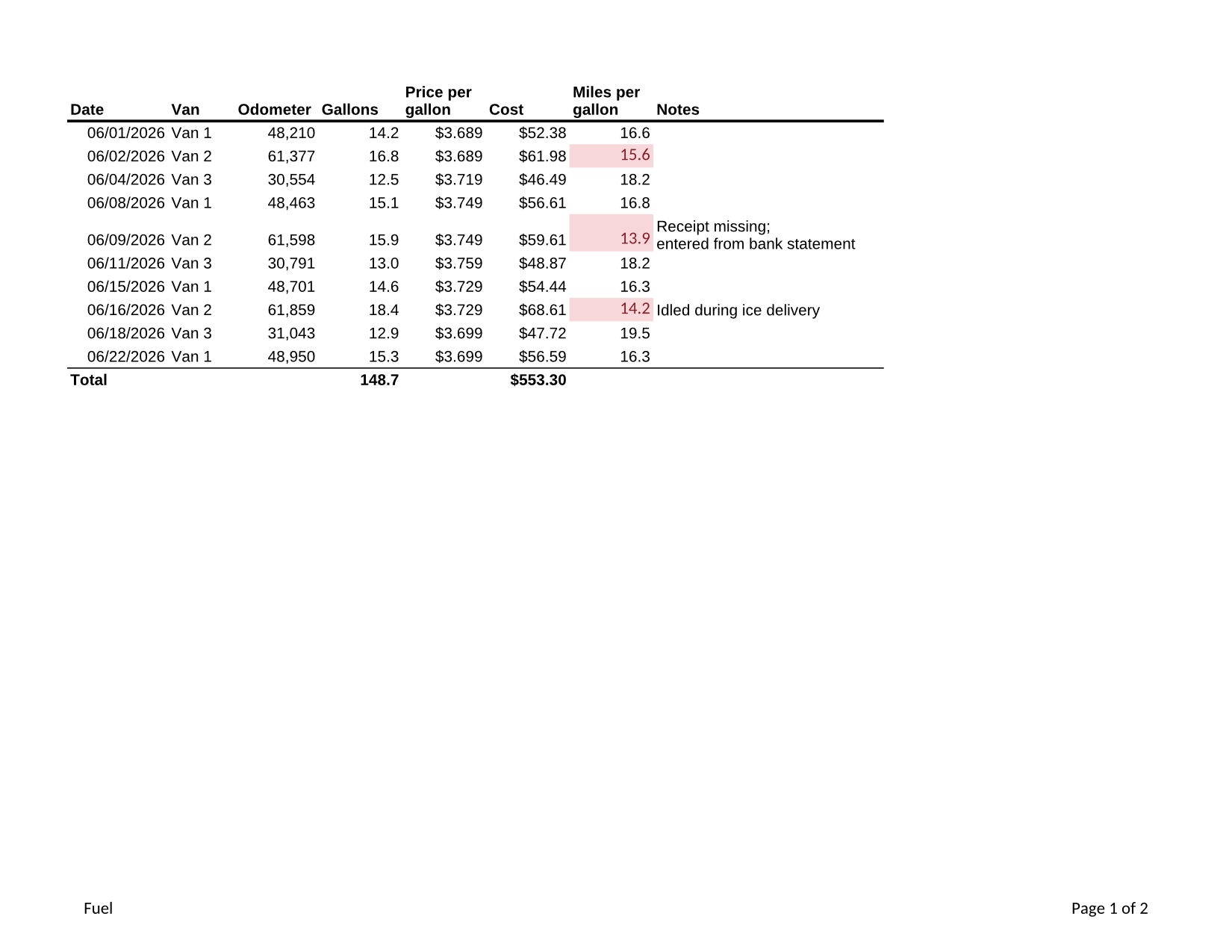
Post a .xls file to POST /v2/convert/xls/to/tiff and get all of its printed pages in one TIFF. The sample's Fuel and Vans sheets become a single 159,348-byte file with two frames.
- Endpoint
- POST /v2/
convert/ xls/ to/ tiff - Accepts
- xls
- Sample timing
- 0.646 s median of 5 runsHow we measure
- Request size
- Up to 10 MB on the Free plan or 100 MB on paid plans, all files together
Request and response
Every sample below ran against the API before this page was published. Set PDFCONVERSIONAPI_KEY to your key and run it as is.
curl -sS -X POST \
  https://api.pdfconversionapi.com/v2/convert/xls/to/tiff \
  -H "Authorization: Bearer $PDFCONVERSIONAPI_KEY" \
  -F File=@van-fuel-log.xls \
  -o response.json

# FileData is base64. Save the first file in converted/,
# or print the JSON error.
if jq -e '.Files' response.json > /dev/null; then
  mkdir -p converted
  name=$(jq -r '.Files[0].FileName' response.json)
  jq -r '.Files[0].FileData' response.json \
    | base64 --decode > "converted/$name"
else
  cat response.json
fi
import base64
import os
import requests
key = os.environ["PDFCONVERSIONAPI_KEY"]
response = requests.post(
"https://api.pdfconversionapi.com/v2/convert/xls/to/tiff",
headers={"Authorization": f"Bearer {key}"},
files=[("File", open("van-fuel-log.xls", "rb"))],
timeout=180,
)
result = response.json()
if not response.ok:
raise SystemExit(f"{result['Code']}: {result['Message']}")
os.makedirs("converted", exist_ok=True)
for file in result["Files"]:
path = os.path.join("converted", file["FileName"])
with open(path, "wb") as out:
out.write(base64.b64decode(file["FileData"]))
print(path, file["FileSize"], "bytes")
import { mkdir, readFile, writeFile } from "node:fs/promises";
import { join } from "node:path";

const form = new FormData();
const file = "van-fuel-log.xls";
form.append("File", new Blob([await readFile(file)]), file);

const url = "https://api.pdfconversionapi.com/v2/convert/xls/to/tiff";
const key = process.env.PDFCONVERSIONAPI_KEY;
const response = await fetch(url, {
  method: "POST",
  headers: { Authorization: `Bearer ${key}` },
  body: form,
});
const result = await response.json();
if (!response.ok) {
  throw new Error(`${result.Code}: ${result.Message}`);
}

await mkdir("converted", { recursive: true });
for (const file of result.Files) {
  const path = join("converted", file.FileName);
  await writeFile(path, Buffer.from(file.FileData, "base64"));
  console.log(path, file.FileSize, "bytes");
}
{
  "ConversionCost": 1,
  "ConversionTime": 0.646,
  "Files": [
    {
      "FileName": "van-fuel-log.tiff",
      "FileExt": "tiff",
      "FileSize": 159348,
      "FileData": "SUkqAAKyAQABAAAAAQAAAAEA…"
    }
  ]
}
Response from our test run on 2026-11-03. ConversionTime shows the median of 5 runs. FileData is shortened here; the real response carries the whole file as base64.
The sample, converted
The same file the code sends. Download the input and the output and compare them yourself.
- Input
- van-fuel-log.xls (11 KB)
- Output
- van-fuel-log.tiff (156 KB)
- Source
- A fictional bakery's van fuel log in Excel 97-2003 format (two sheets, formulas, a cell note and a merged title) that we wrote for this site (CC0-1.0). How it was made
- Made by
- 2026-11-04, API build
9eeeb0640aba
Parameters
Send these as form fields next to the file. Names are case-insensitive. If you set one of the documented options below that we don't support yet, the request fails with a 400 that names it instead of returning a file made without it.
| Parameter | What it does |
|---|---|
MultiPageboolean, default true | Combine the pages into one file. MultiPage=false gives van-fuel-log-1.tiff and van-fuel-log-2.tiff; those single pages are written uncompressed, 6,311,516 bytes each at 150 DPI. |
ImageResolutioninteger, default 150 | Pixels per inch for every frame; sending it also records the DPI. Without it, the TIFF's resolution fields hold 1 with no unit. ConvertAPI's default is 200.Values: 36–600 |
PageRangestring | Printed pages to include. Two or more stay in one file; a single page comes back on its own, uncompressed.Values: e.g. 1, 2, 1-2 |
WorksheetNamestring | Print one sheet only, by name in any case. |
PageOrientationenum, default default | Force portrait or landscape on every printed sheet.Values: default, portrait, landscape |
ColorSpaceenum, default default | gray or monochrome give one-channel pages, in a combined file too: with gray both frames are 8-bit gray and the sample's TIFF is 98,317 bytes; with monochrome they hold only black and white (26,684 bytes). rgb gives the same three-channel color frames as the default.Values: default, rgb, gray, monochrome |
Passwordstring | For an .xls that asks for a password before it opens; 422 without it. |
What carries over, and what doesn't
Kept
- Both printed pages in one file, in tab order: frame 1 is Fuel at 1,650 × 1,275, frame 2 is Vans at 1,275 × 1,650
- Lossless LZW compression: 159,348 bytes for the two frames, against 315,831 bytes for the same pages as PNG
- Everything that prints: conditional highlight colors, the wrapped note, the merged title and the footers
Lost or not yet supported
- Frames have no alpha channel.
TransparentColoradds one, stored without the tag that names it, so some TIFF tools show a warning while opening that file (248,738 bytes withwhite). - Single-page results are uncompressed: one Letter page at 150 DPI is 6.3 MB.
- Notes, drop-down lists and anything else Excel shows only on screen.
Limits
- 2,000 pages per request; each frame at most 16,000 pixels per side and 100 million pixels.
- Requests up to 10 MB on the Free plan or 100 MB on paid plans; 120 seconds per conversion, then 504.
Where teams use it
Moving old spreadsheets into an imaging archive
Systems that store scanned documents as TIFF can take printed .xls files in the same format, one file per workbook.
Fax and print services that accept TIFF
A multi-page TIFF carries every printed page of the workbook in a single upload.
Questions
How do I get a smaller TIFF?
Keep the pages together, which turns on LZW compression, and lower ImageResolution. Avoid single-page requests: a single page is stored uncompressed, about 6.3 MB for Letter at 150 DPI.
Can the TIFF be grayscale for a document archive?
Yes. ColorSpace=gray gives 8-bit gray frames, also in the combined file: the sample's two pages take 98,317 bytes in gray against 159,348 in color. With MultiPage=false as well, each gray page is its own uncompressed file of 2,103,972 bytes.
Does the order of the pages follow the workbook?
Yes. Sheets print in tab order and each sheet's pages follow its own page order, so the frames match what a printout of the workbook would give.
Convert your first XLS file in a minute.