XLSX to PNG API
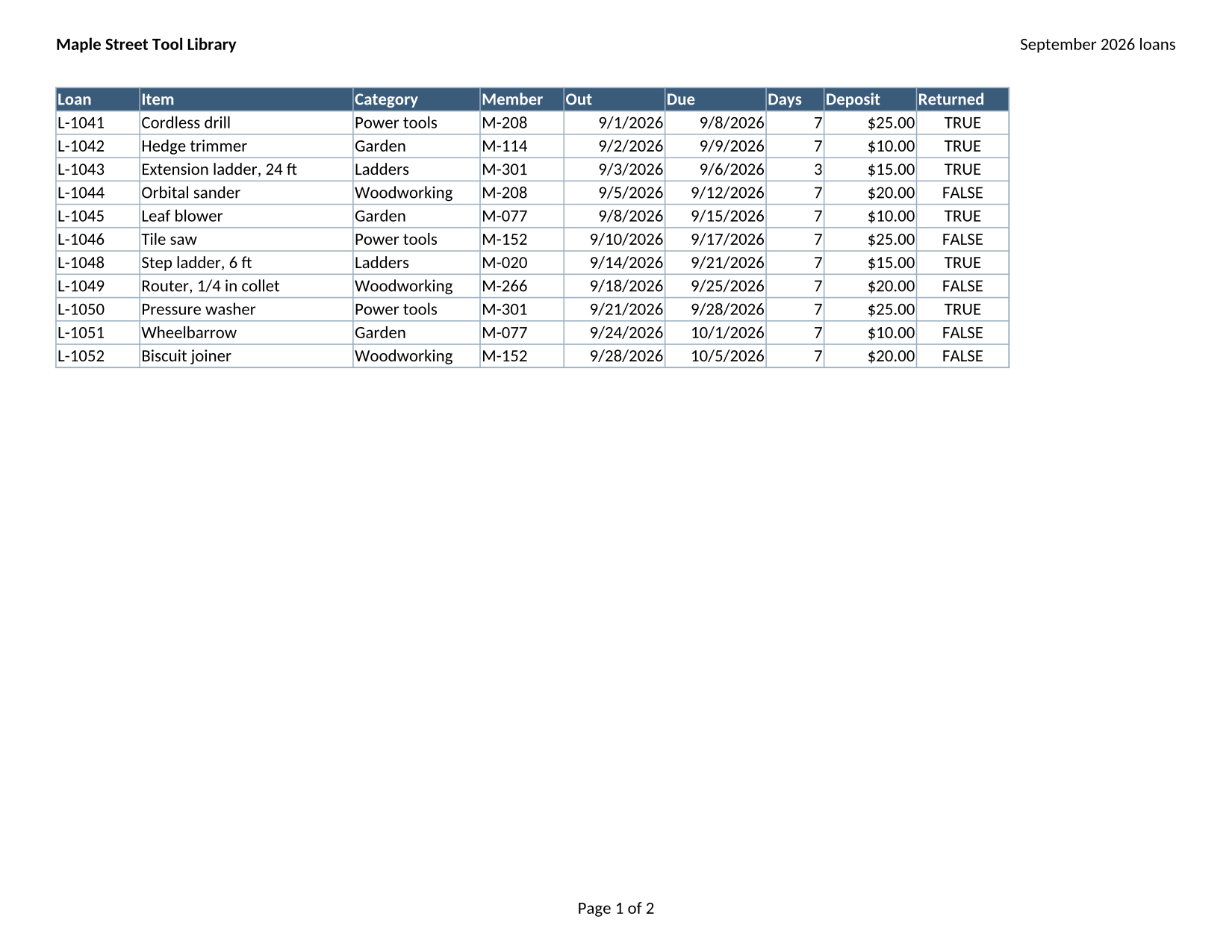
Upload an Excel workbook to POST /v2/convert/xlsx/to/png and receive a lossless PNG for every page it prints, sheet after sheet in tab order. The 3-sheet sample prints 2 pages because its third sheet is hidden.
- Endpoint
- POST /v2/
convert/ xlsx/ to/ png - Accepts
- xlsx
- Sample timing
- 0.651 s median of 5 runsHow we measure
- Request size
- Up to 10 MB on the Free plan or 100 MB on paid plans, all files together
Request and response
Every sample below ran against the API before this page was published. Set PDFCONVERSIONAPI_KEY to your key and run it as is.
curl -sS -X POST \
  https://api.pdfconversionapi.com/v2/convert/xlsx/to/png \
  -H "Authorization: Bearer $PDFCONVERSIONAPI_KEY" \
  -F File=@tool-library-loans.xlsx \
  -o response.json

# FileData is base64. Save the first file in converted/,
# or print the JSON error.
if jq -e '.Files' response.json > /dev/null; then
  mkdir -p converted
  name=$(jq -r '.Files[0].FileName' response.json)
  jq -r '.Files[0].FileData' response.json \
    | base64 --decode > "converted/$name"
else
  cat response.json
fi
import base64
import os
import requests
key = os.environ["PDFCONVERSIONAPI_KEY"]
response = requests.post(
"https://api.pdfconversionapi.com/v2/convert/xlsx/to/png",
headers={"Authorization": f"Bearer {key}"},
files=[("File", open("tool-library-loans.xlsx", "rb"))],
timeout=180,
)
result = response.json()
if not response.ok:
raise SystemExit(f"{result['Code']}: {result['Message']}")
os.makedirs("converted", exist_ok=True)
for file in result["Files"]:
path = os.path.join("converted", file["FileName"])
with open(path, "wb") as out:
out.write(base64.b64decode(file["FileData"]))
print(path, file["FileSize"], "bytes")
import { mkdir, readFile, writeFile } from "node:fs/promises";
import { join } from "node:path";

const form = new FormData();
const file = "tool-library-loans.xlsx";
form.append("File", new Blob([await readFile(file)]), file);

const url = "https://api.pdfconversionapi.com/v2/convert/xlsx/to/png";
const key = process.env.PDFCONVERSIONAPI_KEY;
const response = await fetch(url, {
  method: "POST",
  headers: { Authorization: `Bearer ${key}` },
  body: form,
});
const result = await response.json();
if (!response.ok) {
  throw new Error(`${result.Code}: ${result.Message}`);
}

await mkdir("converted", { recursive: true });
for (const file of result.Files) {
  const path = join("converted", file.FileName);
  await writeFile(path, Buffer.from(file.FileData, "base64"));
  console.log(path, file.FileSize, "bytes");
}
{
  "ConversionCost": 1,
  "ConversionTime": 0.651,
  "Files": [
    {
      "FileName": "tool-library-loans-1.png",
      "FileExt": "png",
      "FileSize": 286206,
      "FileData": "iVBORw0KGgoAAAANSUhEUgAA…"
    },
    {
      "FileName": "tool-library-loans-2.png",
      "FileExt": "png",
      "FileSize": 137875,
      "FileData": "iVBORw0KGgoAAAANSUhEUgAA…"
    }
  ]
}
Response from our test run on 2026-11-03. ConversionTime shows the median of 5 runs. FileData is shortened here; the real response carries the whole file as base64.
The sample, converted
The same file the code sends. Download the input and the output and compare them yourself.
- Input
- tool-library-loans.xlsx (11 KB)
- Output
- tool-library-loans-1.png (279 KB)tool-library-loans-2.png (135 KB)
- Source
- A fictional tool library's September loans workbook (three sheets, one of them hidden, with formulas and a chart) that we wrote for this site (CC0-1.0). How it was made
- Made by
- 2026-11-04, API build
9eeeb0640aba
Parameters
Send these as form fields next to the file. Names are case-insensitive. If you set one of the documented options below that we don't support yet, the request fails with a 400 that names it instead of returning a file made without it.
| Parameter | What it does |
|---|---|
ImageResolutioninteger, default 150 | Drawing resolution in pixels per inch. The sample's landscape Loans page is 1,650 × 1,275 at the default; ImageResolution=300 made the Summary page 2,550 × 3,300. A value you send is also stored in the PNG's pHYs chunk, which the default leaves out. ConvertAPI draws at 200.Values: 36–600 |
PageRangestring | Draw only some of the printed pages. Files keep their page numbers, so PageRange=2 returns tool-library-loans-2.png alone. A range may run past the end (1-10 gives both pages); a page that doesn't exist returns 400.Values: e.g. 2, 1-3, 2- |
WorksheetNamestring | Print a single sheet, matched without regard to case. Naming a hidden sheet prints it: WorksheetName=Deposits returned the rate table on an A4 page of 1,240 × 1,753, because that sheet has no page setup of its own. |
PageOrientationenum, default default | Turn every printed sheet portrait or landscape. With portrait, the sample's wide Loans sheet comes back 1,275 × 1,650 and is shrunk to fit the narrower page, since the sheet is set to one page wide.Values: default, portrait, landscape |
Scaleinteger, default 100 | Zoom percentage written into each sheet's page setup, replacing its fit-to-page setting. At 50 the sample's pages keep their paper size and the Loans table is drawn at half size in the top-left corner.Values: 10–300 |
TransparentColorstring | Pixels of exactly this color become transparent. With white, the page background and the white header text turn clear; anti-aliased letter edges are not pure white, so they stay opaque. With ColorSpace=gray as well, the PNGs are gray with an alpha channel.Values: white, black, red, green, blue, gray, #RRGGBB or R,G,B |
ColorSpaceenum, default default | Pages are RGB with no alpha channel, so rgb returns the same files as the default. gray writes one-channel grayscale PNGs, 106,193 and 53,176 bytes for the sample against 286,206 and 137,875 in color, and monochrome pure black and white; cmyk returns 400.Values: default, rgb, gray, monochrome |
Passwordstring | The open password of an encrypted workbook. Without it the answer is 422 "the input file is password-protected". |
What carries over, and what doesn't
Kept
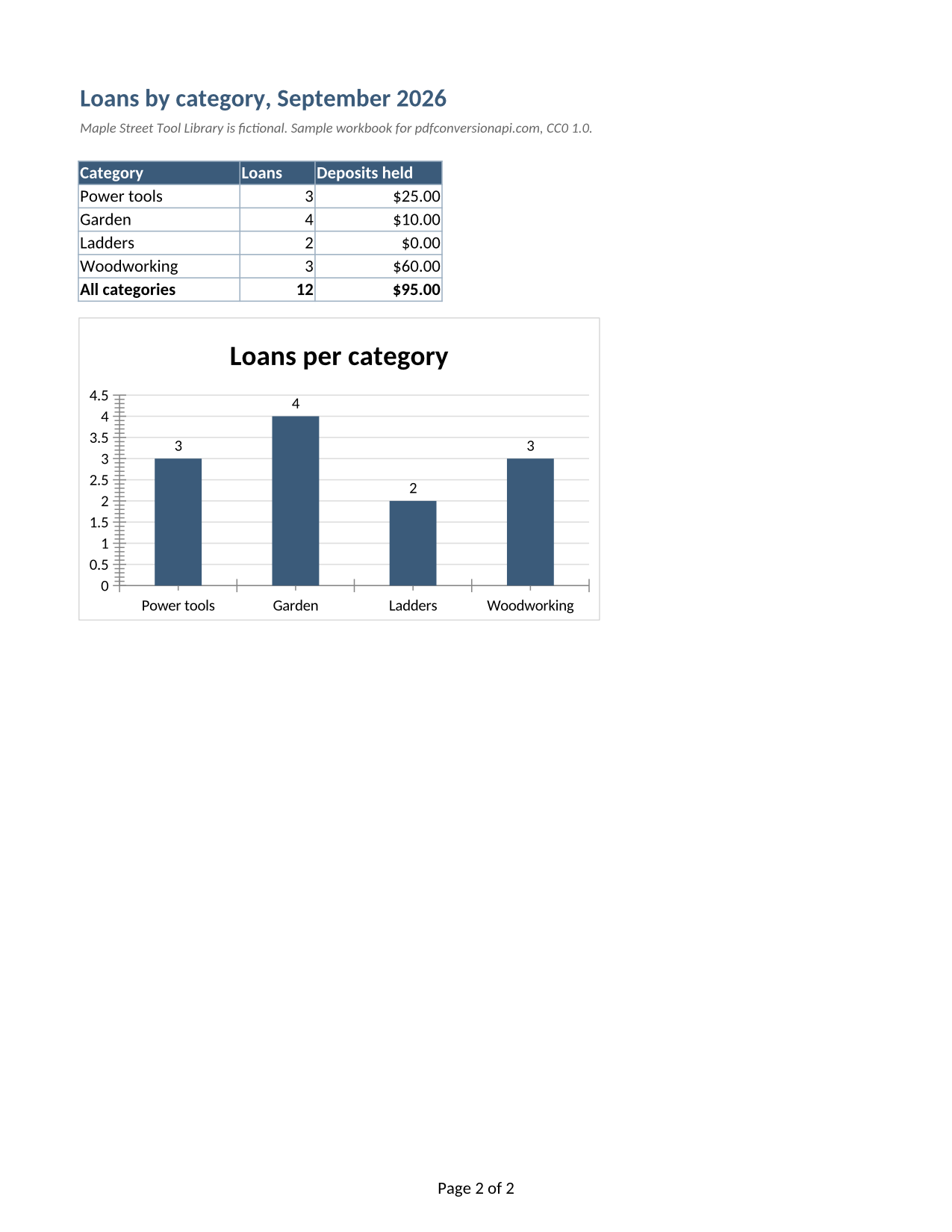
- Every visible sheet in tab order, one PNG per printed page: Loans as page 1 (landscape, 1,650 × 1,275) and Summary as page 2 (portrait, 1,275 × 1,650)
- Hidden data stays hidden: loan L-1047 in hidden row 8 and the hidden Shelf column are not on page 1, and the hidden Deposits sheet is not printed
- The page header and footer saved in the sheet: Maple Street Tool Library at the top left, Page 1 of 2 at the bottom
- Formula results such as the Deposit column, which looks its values up on the hidden sheet
- Exact pixels: PNG is lossless, so the small dates and amounts have no compression noise
- The column chart on Summary, drawn with its title, axis and value labels
Lost or not yet supported
- Calibri is not installed on our servers; the text is drawn with Carlito, which takes the same space per letter.
- Unless you send
ImageResolution, the PNG stores no DPI, so layout software may assume 72 or 96 and show it larger than the paper size.
Limits
- At most 2,000 pages per request (413 above that) and 16,000 pixels per side or 100 million pixels per image.
- The request may be up to 10 MB on the Free plan or 100 MB on paid plans; a conversion that runs past 120 seconds returns 504.
- Encrypted workbooks need
Password. A file that isn't an XLSX at all returns 422 "the input file could not be read: it could not be opened as XLSX".
Where teams use it
Showing a spreadsheet inside a web page or help article
A PNG keeps thin cell borders and small numbers sharp, so a picture of a price table or schedule reads well on screen without a spreadsheet viewer.
Visual checks in a reporting pipeline
Render the workbook your job produced and compare the PNG with yesterday's, pixel by pixel, to catch a broken format or a column that suddenly prints on a second page.
Pages for a slide or a printed handout
Drop the PNG of a summary sheet into a deck or a layout program at 300 DPI, where it stays crisp at print size.
Questions
Why does my workbook give fewer PNGs than it has sheets?
Only sheets that would print are drawn. Hidden sheets are skipped, and a sheet can also print as several pages. The sample has three sheets and returns two PNGs, because Deposits is hidden. Send WorksheetName to print a hidden sheet on purpose.
How do I get a sharper image?
Raise ImageResolution. At 300 the sample's Summary page is 2,550 × 3,300 pixels and 347,880 bytes, against 1,275 × 1,650 and 137,875 bytes at the default 150. The maximum is 600.
Can I get a transparent background?
Send TransparentColor=white. Every pure white pixel becomes transparent, which clears the page background but also white text such as the sample's header row labels. Smoothed letter edges stay as a light fringe.
Does it need Excel or an office suite on my server?
No. You send the file over HTTPS and get the PNGs back; the printing and drawing happen on our side.
Convert your first XLSX file in a minute.