XLTX to TIFF API
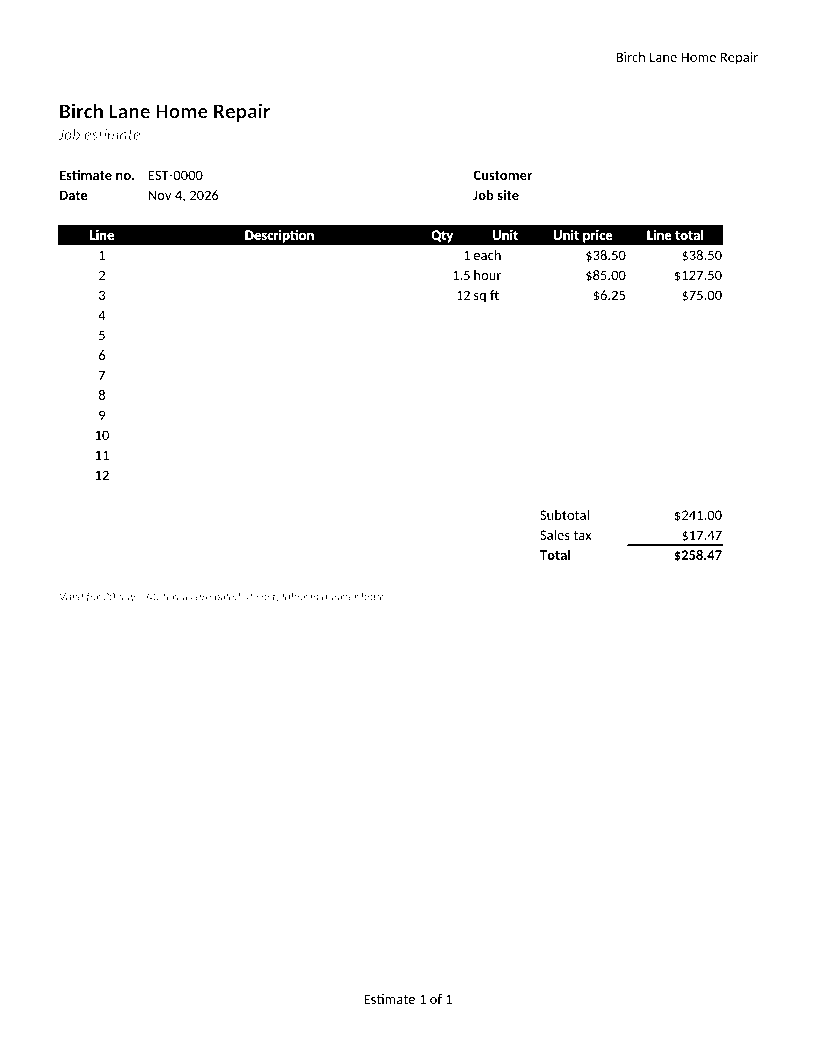
Send an Excel template to /v2/convert/xltx/to/tiff and receive one uncompressed TIFF per printed page. The sample takes the first sheet in black and white at 96 DPI: an 816 × 1056 file of 861,894 bytes.
- Endpoint
- POST /v2/
convert/ xltx/ to/ tiff - Accepts
- xltx
- Sample timing
- 0.806 s median of 5 runsHow we measure
- Request size
- Up to 10 MB on the Free plan or 100 MB on paid plans, all files together
Request and response
Every sample below ran against the API before this page was published. Set PDFCONVERSIONAPI_KEY to your key and run it as is.
curl -sS -X POST \
  https://api.pdfconversionapi.com/v2/convert/xltx/to/tiff \
  -H "Authorization: Bearer $PDFCONVERSIONAPI_KEY" \
  -F File=@job-estimate-template.xltx \
  --form-string WorksheetIndex=1 \
  --form-string ColorSpace=monochrome \
  --form-string ImageResolution=96 \
  -o response.json

# FileData is base64. Save the first file in converted/,
# or print the JSON error.
if jq -e '.Files' response.json > /dev/null; then
  mkdir -p converted
  name=$(jq -r '.Files[0].FileName' response.json)
  jq -r '.Files[0].FileData' response.json \
    | base64 --decode > "converted/$name"
else
  cat response.json
fi
import base64
import os
import requests
key = os.environ["PDFCONVERSIONAPI_KEY"]
response = requests.post(
"https://api.pdfconversionapi.com/v2/convert/xltx/to/tiff",
headers={"Authorization": f"Bearer {key}"},
files=[("File", open("job-estimate-template.xltx", "rb"))],
data={
"WorksheetIndex": "1",
"ColorSpace": "monochrome",
"ImageResolution": "96",
},
timeout=180,
)
result = response.json()
if not response.ok:
raise SystemExit(f"{result['Code']}: {result['Message']}")
os.makedirs("converted", exist_ok=True)
for file in result["Files"]:
path = os.path.join("converted", file["FileName"])
with open(path, "wb") as out:
out.write(base64.b64decode(file["FileData"]))
print(path, file["FileSize"], "bytes")
import { mkdir, readFile, writeFile } from "node:fs/promises";
import { join } from "node:path";

const form = new FormData();
const file = "job-estimate-template.xltx";
form.append("File", new Blob([await readFile(file)]), file);
form.append("WorksheetIndex", "1");
form.append("ColorSpace", "monochrome");
form.append("ImageResolution", "96");

const url = "https://api.pdfconversionapi.com/v2/convert/xltx/to/tiff";
const key = process.env.PDFCONVERSIONAPI_KEY;
const response = await fetch(url, {
  method: "POST",
  headers: { Authorization: `Bearer ${key}` },
  body: form,
});
const result = await response.json();
if (!response.ok) {
  throw new Error(`${result.Code}: ${result.Message}`);
}

await mkdir("converted", { recursive: true });
for (const file of result.Files) {
  const path = join("converted", file.FileName);
  await writeFile(path, Buffer.from(file.FileData, "base64"));
  console.log(path, file.FileSize, "bytes");
}
{
  "ConversionCost": 1,
  "ConversionTime": 0.806,
  "Files": [
    {
      "FileName": "job-estimate-template-1.tiff",
      "FileExt": "tiff",
      "FileSize": 861894,
      "FileData": "SUkqABgmDQBgAAAAAQAAAGAA…"
    }
  ]
}
Response from our test run on 2026-11-03. ConversionTime shows the median of 5 runs. FileData is shortened here; the real response carries the whole file as base64.
The sample, converted
The same file the code sends. Download the input and the output and compare them yourself.
- Input
- job-estimate-template.xltx (10 KB)
- Output
- job-estimate-template-1.tiff (842 KB)
- Source
- Written for this site: a fictional home-repair company's job estimate template with three sheets, one of them hidden, saved as an Excel template (CC0-1.0). How it was made
- Made by
- 2026-11-04, API build
9eeeb0640aba
Parameters
Send these as form fields next to the file. Names are case-insensitive. If you set one of the documented options below that we don't support yet, the request fails with a 400 that names it instead of returning a file made without it.
| Parameter | What it does |
|---|---|
ColorSpaceenum, default default | monochrome rounds every pixel to black or white at the halfway mark, as in the sample; gray keeps 256 shades. Both store one 8-bit channel. rgb gives the same three-channel color file as the default.Values: rgb, gray, monochrome |
WorksheetIndexinteger | Draws one sheet by position. Hidden sheets count: 3 draws the sample's hidden Notes sheet.Values: 1 to the sheet count |
WorksheetNamestring | Draws one sheet by name, case-insensitively. |
ActiveWorksheetOnlyboolean, default false | Draws the sheet that was selected at save time. |
ImageResolutioninteger, default 150 | Pixels per inch, stored in the TIFF's resolution tags when you send it (96 in the sample).Values: 36–600 |
PageSizeenum, default default | Paper for every printed sheet.Values: letter, legal, tabloid, ledger, statement, executive, lettersmall, a3, a4, a4small, a5, b4, b5 |
PageOrientationenum, default default | Orientation for every printed sheet.Values: default, portrait, landscape |
Scaleinteger | Print zoom; it replaces the template's fit-to-width.Values: 10–300 |
FitToPageboolean, default false | One page across for each sheet. |
ClearPrintAreaboolean, default false | Ignores saved print areas. |
HeaderOnEachPageboolean, default false | Repeats the first filled row on each page, in place of any rows the template already repeats. |
PageRangestring | Only these pages.Values: e.g. 2 |
ImageWidthinteger | Width per page in pixels.Values: 1–20000 |
ImageHeightinteger | Height per page in pixels.Values: 1–20000 |
TransparentColorstring | Exact color to give zero alpha. The page is then an RGBA TIFF, with gray values when ColorSpace=gray is sent too.Values: a color name, #RRGGBB or R,G,B |
BackgroundColorstring, default white | Fill behind unshaded cells.Values: a color name, #RRGGBB or R,G,B |
Passwordstring | For encrypted templates. |
MultiPageboolean, default false | true returns job-estimate-template.tiff, one LZW-compressed file with a frame per printed page, once there are at least two. Estimate and Rates in color at 150 DPI take 146,328 bytes together. |
FileNamestring | Stem of the TIFF names. |
StoreFileboolean, default false | Links for 3 hours instead of inline data, which suits large TIFF pages. |
Not supported yet
Setting one of these to anything but its default returns 400.
Refused when set: AutoFitColumns, ThousandsSeparator, DecimalSeparator, DateFormat, IncludeMetadata.
What carries over, and what doesn't
Kept
- The first sheet only, on one Letter page at 96 pixels per inch
- Dark text, the table header band (white on black) and the totals
- Pure black and white: every pixel of the sample is 0 or 255
- "Estimate 1 of 1" in the footer
Lost or not yet supported
- Light colors. Pixels lighter than halfway gray turn white: the three example descriptions in mid-gray italics (#7A8691) and the cream input shading disappear, and the small gray subtitle and validity note break up.
- Compression. The page is stored uncompressed, 8 bits per pixel even in black and white: 861,894 bytes for the sample.
- One file for the whole template: pages stay separate files unless you send
MultiPage=true. - Standard alpha tagging. Color pages carry no alpha, but the channel
TransparentColoradds is written without the TIFF ExtraSamples tag, which strict readers warn about.
Limits
- One template per request.
- Requests up to 10 MB on the Free plan or 100 MB on paid plans, all files and fields together.
- Up to 2,000 page images per request; each at most 16,000 pixels per side and 100,000,000 pixels.
- 120 seconds per conversion, then 504.
Where teams use it
Registering forms in a document system
Document and records systems that work with scanned pages can file the blank template as a TIFF, beside the filled-in copies that come back scanned.
Black and white copies
A monochrome page holds only black and white pixels, for workflows that want no gray at all. Check light text first: see what the sample loses.
A fixed copy of each template version
Store a TIFF of the template every time it changes, so you can show later exactly what version 4 of the form looked like on paper.
Questions
Why are parts of my template missing in black and white?
monochrome turns each pixel black or white at the halfway brightness. The sample's example lines are a mid-gray (#7A8691), just past that mark, so they turn white and vanish. Use ColorSpace=gray, or darken light text in the template.
How big are the TIFF files?
Separate pages have no compression: one byte per pixel in gray or black and white, three in color. The sample's 816 × 1056 page is 861,894 bytes; the same template in color at the default 150 DPI is 6,311,516 bytes per page. With MultiPage=true the two color pages share one LZW-compressed file of 146,328 bytes.
Can I convert a hidden sheet?
Yes. Hidden sheets are skipped by default but counted by WorksheetIndex, so WorksheetIndex=3 draws the sample's hidden Notes sheet. WorksheetName=Notes works too.
Convert your first XLTX file in a minute.