CSV to TIFF API
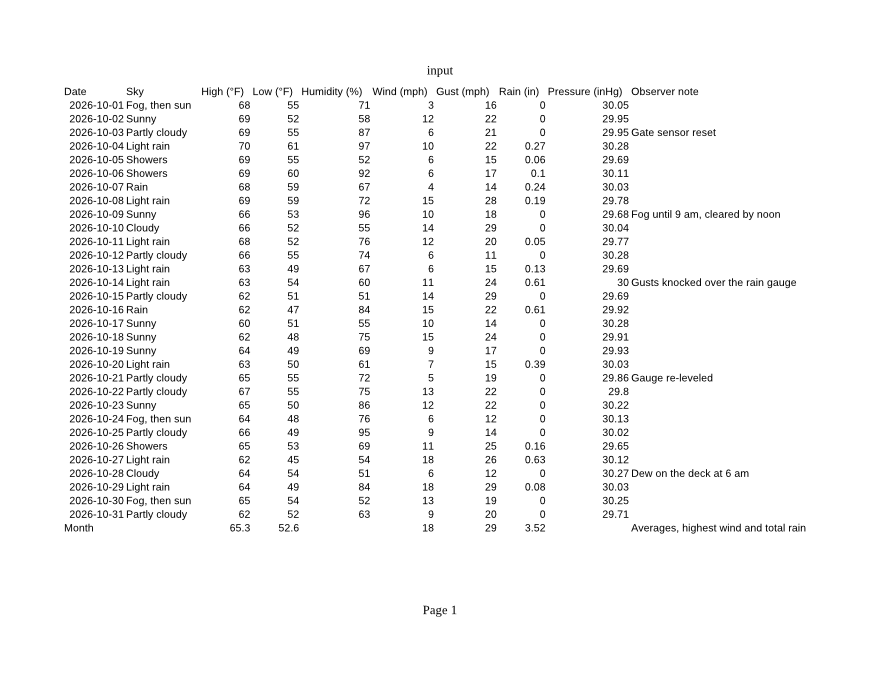
POST a CSV to /v2/convert/csv/to/tiff and every printed page comes back as its own uncompressed TIFF. The sample asks for Letter landscape, fit to one page wide, in grayscale at 80 DPI: one 880 × 680 file of 598,598 bytes.
- Endpoint
- POST /v2/
convert/ csv/ to/ tiff - Accepts
- csv
- Sample timing
- 0.758 s median of 5 runsHow we measure
- Request size
- Up to 10 MB on the Free plan or 100 MB on paid plans, all files together
Request and response
Every sample below ran against the API before this page was published. Set PDFCONVERSIONAPI_KEY to your key and run it as is.
curl -sS -X POST \
  https://api.pdfconversionapi.com/v2/convert/csv/to/tiff \
  -H "Authorization: Bearer $PDFCONVERSIONAPI_KEY" \
  -F File=@rooftop-weather-oct-2026.csv \
  --form-string PageSize=letter \
  --form-string PageOrientation=landscape \
  --form-string FitToPage=true \
  --form-string ColorSpace=gray \
  --form-string ImageResolution=80 \
  -o response.json

# FileData is base64. Save the first file in converted/,
# or print the JSON error.
if jq -e '.Files' response.json > /dev/null; then
  mkdir -p converted
  name=$(jq -r '.Files[0].FileName' response.json)
  jq -r '.Files[0].FileData' response.json \
    | base64 --decode > "converted/$name"
else
  cat response.json
fi
import base64
import os
import requests
key = os.environ["PDFCONVERSIONAPI_KEY"]
response = requests.post(
"https://api.pdfconversionapi.com/v2/convert/csv/to/tiff",
headers={"Authorization": f"Bearer {key}"},
files=[
("File", open("rooftop-weather-oct-2026.csv", "rb")),
],
data={
"PageSize": "letter",
"PageOrientation": "landscape",
"FitToPage": "true",
"ColorSpace": "gray",
"ImageResolution": "80",
},
timeout=180,
)
result = response.json()
if not response.ok:
raise SystemExit(f"{result['Code']}: {result['Message']}")
os.makedirs("converted", exist_ok=True)
for file in result["Files"]:
path = os.path.join("converted", file["FileName"])
with open(path, "wb") as out:
out.write(base64.b64decode(file["FileData"]))
print(path, file["FileSize"], "bytes")
import { mkdir, readFile, writeFile } from "node:fs/promises";
import { join } from "node:path";

const form = new FormData();
const file = "rooftop-weather-oct-2026.csv";
form.append("File", new Blob([await readFile(file)]), file);
form.append("PageSize", "letter");
form.append("PageOrientation", "landscape");
form.append("FitToPage", "true");
form.append("ColorSpace", "gray");
form.append("ImageResolution", "80");

const url = "https://api.pdfconversionapi.com/v2/convert/csv/to/tiff";
const key = process.env.PDFCONVERSIONAPI_KEY;
const response = await fetch(url, {
  method: "POST",
  headers: { Authorization: `Bearer ${key}` },
  body: form,
});
const result = await response.json();
if (!response.ok) {
  throw new Error(`${result.Code}: ${result.Message}`);
}

await mkdir("converted", { recursive: true });
for (const file of result.Files) {
  const path = join("converted", file.FileName);
  await writeFile(path, Buffer.from(file.FileData, "base64"));
  console.log(path, file.FileSize, "bytes");
}
{
  "ConversionCost": 1,
  "ConversionTime": 0.758,
  "Files": [
    {
      "FileName": "rooftop-weather-oct-2026-1.tiff",
      "FileExt": "tiff",
      "FileSize": 598598,
      "FileData": "SUkqAJghCQBQAAAAAQAAAFAA…"
    }
  ]
}
Response from our test run on 2026-11-03. ConversionTime shows the median of 5 runs. FileData is shortened here; the real response carries the whole file as base64.
The sample, converted
The same file the code sends. Download the input and the output and compare them yourself.
- Input
- rooftop-weather-oct-2026.csv (1.8 KB)
- Output
- rooftop-weather-oct-2026-1.tiff (585 KB)
- Source
- Written for this site: a fictional rooftop weather station's daily readings for October 2026, saved as comma-separated UTF-8 with a formula row at the bottom (CC0-1.0). How it was made
- Made by
- 2026-11-04, API build
9eeeb0640aba
Parameters
Send these as form fields next to the file. Names are case-insensitive. If you set one of the documented options below that we don't support yet, the request fails with a 400 that names it instead of returning a file made without it.
| Parameter | What it does |
|---|---|
ColorSpaceenum, default default | gray stores one 8-bit channel (min-is-black) instead of three, so a page takes a third of the bytes. monochrome keeps that single channel but rounds each pixel to 0 or 255. rgb gives the same three-channel color file as the default. cmyk returns 400.Values: rgb, gray, monochrome |
ImageResolutioninteger, default 150 | Drawing resolution, written into the TIFF's resolution tags when you send it (80 pixels/inch in the sample). Without it the file says 1 × 1 with no unit.Values: 36–600 |
PageSizeenum, default default | Paper for the printout. A CSV has none of its own, so the default is A4.Values: letter, legal, tabloid, ledger, statement, executive, lettersmall, a3, a4, a4small, a5, b4, b5 |
PageOrientationenum, default default | Paper direction. Letter landscape is narrower than A4 landscape: on its own it still pushed the sample's Observer note column onto a second TIFF.Values: default, portrait, landscape |
FitToPageboolean, default false | Fits the table to one page across, which brought that column back onto page 1 in the sample. |
Scaleinteger | Prints at a set percentage instead of fitting.Values: 10–300 |
HeaderOnEachPageboolean, default false | Repeats the first line of the CSV at the top of each page of a long file. |
PageRangestring | Selects pages; each TIFF keeps its page number in its name.Values: e.g. 1-2 or 3-last |
ImageWidthinteger | Draws each page this many pixels wide.Values: 1–20000 |
ImageHeightinteger | Draws each page this many pixels tall.Values: 1–20000 |
BackgroundColorstring, default white | Fill behind the page.Values: a color name, #RRGGBB or R,G,B |
TransparentColorstring | Pixels of exactly this color get zero alpha in an RGBA TIFF.Values: a color name, #RRGGBB or R,G,B |
MultiPageboolean, default false | true puts every page into one LZW-compressed TIFF named after the upload, one frame per page. The two default A4 color pages then take 253,071 bytes in all; in gray at 80 DPI, 70,183. A one-page result, such as the sample, comes back unchanged. |
FileNamestring | Stem for the files; -1.tiff, -2.tiff and so on are added. |
StoreFileboolean, default false | Links instead of inline data, kept for 3 hours. Handy here, since uncompressed pages are large. |
Not supported yet
Setting one of these to anything but its default returns 400.
| Option | What to do instead |
|---|---|
Delimiter | Semicolon and tab files return 400; convert them to commas first. |
Also refused when set: AutoFitColumns, ThousandsSeparator, DecimalSeparator, DateFormat.
What carries over, and what doesn't
Kept
- The whole sample on one Letter landscape page: 31 days, the Month row and all ten columns
- Formula results in the Month row (65.3, 52.6, 18, 29, 3.52)
- Unicode text such as °F in the column titles
- Full grayscale: the sample's TIFF uses all 256 gray levels for smooth lettering
- The 80 DPI from the request, stored as 80 pixels per inch
Lost or not yet supported
- Compression, unless you send
MultiPage=true. Single-page files are written uncompressed: 598,598 bytes for the sample's gray page and 6,521,426 bytes for one A4 page in color at the default 150 DPI. - One file for the whole table, by default. Each printed page is a separate TIFF until you send
MultiPage=true. - Bilevel storage.
monochromepages hold only 0 and 255, but still 8 bits per pixel, not the 1-bit compressed TIFF that fax systems use. - A properly tagged alpha channel. Pages come without one, but
TransparentColoradds a fourth channel that is stored without the TIFF ExtraSamples tag, so strict TIFF readers warn about it. - Trailing decimal zeros and the file name in the header, which reads "input".
Limits
- One CSV per request. Sending two files returns 400.
- Requests up to 10 MB on the Free plan or 100 MB on paid plans, all files and fields together.
- Up to 2,000 TIFF pages per request.
- Page images over 16,000 pixels per side or 100,000,000 pixels in total return 413.
- 120 seconds per conversion, then 504.
Where teams use it
Filing exports in a document archive
Some records systems that index scanned paper take TIFF only. Print each day's CSV export into the same format as the scans around it.
Grayscale pages for print queues
Print and scan workflows that only handle gray pages can take ColorSpace=gray output directly: one 8-bit channel per page, with the DPI you send stored in the file.
Fixed snapshots of changing data
A rate table or roster in a CSV changes every week. A TIFF of each version records what the table looked like on that date.
Questions
Why are the TIFF files so large?
Single-page files are not compressed. A color page is stored as 3 bytes per pixel: an A4 page at 150 DPI is 1240 × 1753 pixels, or 6,521,426 bytes. Send ColorSpace=gray to store one byte per pixel, and lower ImageResolution; the sample's gray page at 80 DPI is 598,598 bytes. Several pages sent with MultiPage=true share one LZW-compressed file instead.
Can I get one multi-page TIFF?
Yes, send MultiPage=true. The pages come back as one file, rooftop-weather-oct-2026.tiff, with a frame per page, and that file is LZW-compressed: 253,071 bytes for the default two A4 color pages. Without it, each page is its own uncompressed file, named rooftop-weather-oct-2026-1.tiff, -2.tiff and so on.
My export is separated by semicolons. Can I still convert it?
Not as is: Delimiter=; returns 400 and a semicolon file is not split at the semicolons. Rewrite it with commas first (for example with Python's csv module), keeping it in UTF-8, then send it.
Convert your first CSV file in a minute.