CSV to PNG API
POST a CSV to /v2/convert/csv/to/png and get one PNG per printed page, base64 in the JSON. Without options the table goes on A4 portrait at 150 DPI; the sample asks for landscape at 110 DPI and gets all ten columns on one 1286 × 909 image.
- Endpoint
- POST /v2/
convert/ csv/ to/ png - Accepts
- csv
- Sample timing
- 0.72 s median of 5 runsHow we measure
- Request size
- Up to 10 MB on the Free plan or 100 MB on paid plans, all files together
Request and response
Every sample below ran against the API before this page was published. Set PDFCONVERSIONAPI_KEY to your key and run it as is.
curl -sS -X POST \
  https://api.pdfconversionapi.com/v2/convert/csv/to/png \
  -H "Authorization: Bearer $PDFCONVERSIONAPI_KEY" \
  -F File=@rooftop-weather-oct-2026.csv \
  --form-string PageOrientation=landscape \
  --form-string ImageResolution=110 \
  -o response.json

# FileData is base64. Save the first file in converted/,
# or print the JSON error.
if jq -e '.Files' response.json > /dev/null; then
  mkdir -p converted
  name=$(jq -r '.Files[0].FileName' response.json)
  jq -r '.Files[0].FileData' response.json \
    | base64 --decode > "converted/$name"
else
  cat response.json
fi
import base64
import os
import requests
key = os.environ["PDFCONVERSIONAPI_KEY"]
response = requests.post(
"https://api.pdfconversionapi.com/v2/convert/csv/to/png",
headers={"Authorization": f"Bearer {key}"},
files=[
("File", open("rooftop-weather-oct-2026.csv", "rb")),
],
data={
"PageOrientation": "landscape",
"ImageResolution": "110",
},
timeout=180,
)
result = response.json()
if not response.ok:
raise SystemExit(f"{result['Code']}: {result['Message']}")
os.makedirs("converted", exist_ok=True)
for file in result["Files"]:
path = os.path.join("converted", file["FileName"])
with open(path, "wb") as out:
out.write(base64.b64decode(file["FileData"]))
print(path, file["FileSize"], "bytes")
import { mkdir, readFile, writeFile } from "node:fs/promises";
import { join } from "node:path";

const form = new FormData();
const file = "rooftop-weather-oct-2026.csv";
form.append("File", new Blob([await readFile(file)]), file);
form.append("PageOrientation", "landscape");
form.append("ImageResolution", "110");

const url = "https://api.pdfconversionapi.com/v2/convert/csv/to/png";
const key = process.env.PDFCONVERSIONAPI_KEY;
const response = await fetch(url, {
  method: "POST",
  headers: { Authorization: `Bearer ${key}` },
  body: form,
});
const result = await response.json();
if (!response.ok) {
  throw new Error(`${result.Code}: ${result.Message}`);
}

await mkdir("converted", { recursive: true });
for (const file of result.Files) {
  const path = join("converted", file.FileName);
  await writeFile(path, Buffer.from(file.FileData, "base64"));
  console.log(path, file.FileSize, "bytes");
}
{
  "ConversionCost": 1,
  "ConversionTime": 0.72,
  "Files": [
    {
      "FileName": "rooftop-weather-oct-2026-1.png",
      "FileExt": "png",
      "FileSize": 311261,
      "FileData": "iVBORw0KGgoAAAANSUhEUgAA…"
    }
  ]
}
Response from our test run on 2026-11-03. ConversionTime shows the median of 5 runs. FileData is shortened here; the real response carries the whole file as base64.
The sample, converted
The same file the code sends. Download the input and the output and compare them yourself.
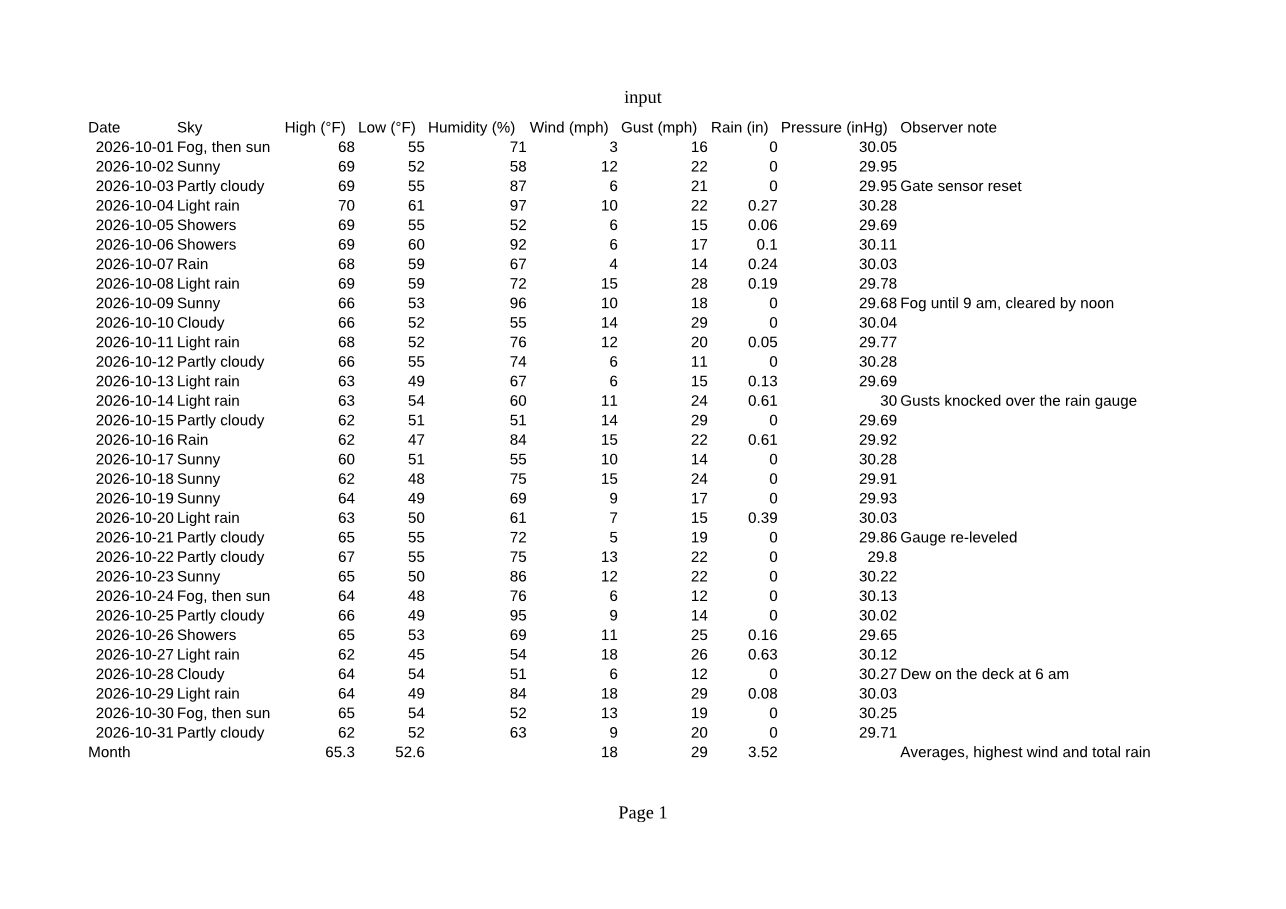
- Input
- rooftop-weather-oct-2026.csv (1.8 KB)
- Output
- rooftop-weather-oct-2026-1.png (304 KB)
- Source
- Written for this site: a fictional rooftop weather station's daily readings for October 2026, saved as comma-separated UTF-8 with a formula row at the bottom (CC0-1.0). How it was made
- Made by
- 2026-11-04, API build
9eeeb0640aba
Parameters
Send these as form fields next to the file. Names are case-insensitive. If you set one of the documented options below that we don't support yet, the request fails with a 400 that names it instead of returning a file made without it.
| Parameter | What it does |
|---|---|
PageOrientationenum, default default | Turns the paper. The sample's ten columns need two portrait A4 pages, but one landscape page holds them all.Values: default, portrait, landscape |
PageSizeenum, default default | Paper to lay the table out on. A CSV carries no page setup, so default means A4. Letter at 100 DPI gives 850 × 1100 pixel pages.Values: letter, legal, tabloid, ledger, statement, executive, lettersmall, a3, a4, a4small, a5, b4, b5 |
FitToPageboolean, default false | Shrinks the table until it is one page wide; long files still continue downward onto more pages. |
Scaleinteger | Prints at a fixed zoom. At 300 the sample spreads over 15 pages; at 10 it shrinks to a small block in the top corner of one page.Values: 10–300 (percent) |
HeaderOnEachPageboolean, default false | Repeats the CSV's first line at the top of every page. Useful once a file runs past one page tall: in a 121-line test file, pages 2 and 3 got the header row back. |
ImageResolutioninteger, default 150 | Pixels per inch of paper. Sent explicitly, it is also stored in the PNG's pHYs chunk (110 DPI in the sample); left out, no DPI is stored.Values: 36–600 |
PageRangestring | Draws only the listed pages, and each file keeps its page number: PageRange=2 returns only rooftop-weather-oct-2026-2.png. A page past the end returns 400 with the real page count.Values: e.g. 1, 2-, 1-3 |
ImageWidthinteger | Draws each page at this width, with the height following the paper's shape: 600 gives 600 × 849 for A4 portrait.Values: 1–20000 |
ImageHeightinteger | Same idea for the height. Send both with ScaleProportions=false to force an exact box, or ScaleIfLarger=true to stop small pages being enlarged.Values: 1–20000 |
TransparentColorstring | Pixels of exactly this color become transparent. white clears the paper; smoothed text edges are not pure white, so they keep a light fringe. With ColorSpace=gray too, the PNG holds one gray channel plus alpha.Values: a color name, #RRGGBB or R,G,B |
BackgroundColorstring, default white | Color under the page. The printed table has no fill of its own, so #FFF7D6 gives a cream sheet.Values: a color name, #RRGGBB or R,G,B |
ColorSpaceenum, default default | gray writes a one-channel PNG; monochrome cuts every pixel to black or white; rgb gives the same three-channel file as the default, which has no alpha channel. cmyk returns 400.Values: rgb, gray, monochrome |
FileNamestring | Stem for the page files: FileName=weather-oct gives weather-oct-1.png and weather-oct-2.png. |
StoreFileboolean, default false | Keeps the PNGs on our side for 3 hours and answers with a link per page instead of the data. |
Not supported yet
Setting one of these to anything but its default returns 400.
| Option | What to do instead |
|---|---|
Delimiter | Fields are split at commas only; a semicolon or tab returns 400. |
AutoFitColumns | Columns are already as wide as their longest value. |
ThousandsSeparator | Numbers print without grouping: 1234567.5 stays as it is, and a quoted "1,234" prints as 1234. |
DateFormat | Dates print as they are written in the CSV. |
Also refused when set: DecimalSeparator.
What carries over, and what doesn't
Kept
- All 31 daily rows and the Month row on one landscape page, with the formula results worked out: 65.3, 52.6, 18, 29 and 3.52
- UTF-8 text such as the degree sign in High (°F) and Low (°F)
- Quoted fields that contain commas ("Fog, then sun", "Fog until 9 am, cleared by noon") stay in their own column
- Dates written as 2026-10-01 print in that form
- Lossless pixels: an RGB PNG with no alpha channel, with the 110 DPI from the request stored in the file
Lost or not yet supported
- Trailing zeros. Number-looking fields are read as numbers, so 0.00 inches of rain prints as 0, 0.10 as 0.1 and a pressure of 30.00 as 30.
- Any styling a viewer would add: there are no grid lines and no bold header row.
- The page header prints "input" rather than your file name, and the footer prints "Page 1".
- Once you send any page option, that header and footer switch to a serif typeface while the cells stay sans-serif.
- On the default A4 portrait page, the last two columns (Pressure and Observer note) move to a second PNG.
Limits
- One CSV per request. Sending two files returns 400.
- Requests up to 10 MB on the Free plan or 100 MB on paid plans, all files and fields together.
- Up to 2,000 page images in one response.
- Each page image at most 16,000 pixels on a side and 100,000,000 pixels in all; larger requests return 413.
- 120 seconds per conversion, then 504.
Where teams use it
A readable table in chat threads and tickets
Chat tools and issue trackers preview a PNG inline but show a CSV as a download link. Post the nightly export as a picture that people can read without opening a spreadsheet.
Reference tables in a wiki or README
Rate cards, schedules and station logs stay crisp as PNG, because the format keeps every pixel of the lettering. Ask for landscape when the file has many columns.
A daily data card on a status page
A job that collects readings, like the fictional rooftop weather station in the sample, can publish the month so far as one image each morning.
Questions
Why does one CSV come back as two PNG files?
The table is printed before it becomes pictures, and A4 portrait is only so wide. Columns that don't fit go to a following page. Send PageOrientation=landscape (as the sample does) or FitToPage=true to get the ten sample columns on one page.
Can the PNG have a transparent background?
Yes, with TransparentColor=white, which clears every pure white pixel. In our test the paper became fully transparent while the text kept its smoothed, slightly light edges, so it looks best on a light backdrop. For a solid color instead, use BackgroundColor.
Does the PNG say what DPI it was drawn at?
Only when you send ImageResolution. Then the PNG gets a pHYs chunk with that value, 110 DPI in the sample. With the default of 150 the pixels are drawn at 150 DPI but no resolution is stored.
Are formulas in the CSV calculated before drawing?
Yes. A field that starts with = is read as a formula. The sample's last line averages the highs and lows, takes the highest wind and gust and adds up the rain, and the PNG shows 65.3, 52.6, 18, 29 and 3.52.
Convert your first CSV file in a minute.