CSV to WebP API
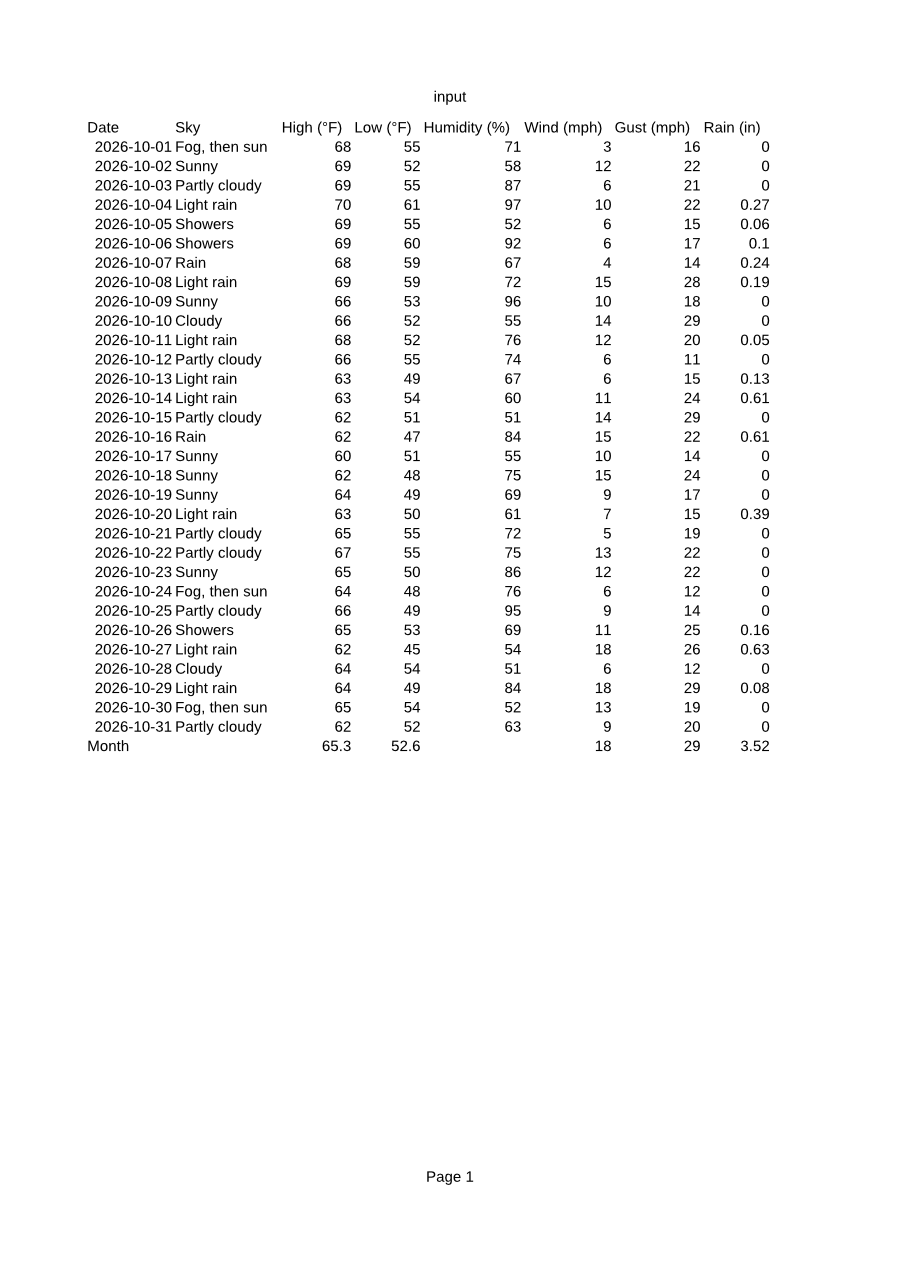
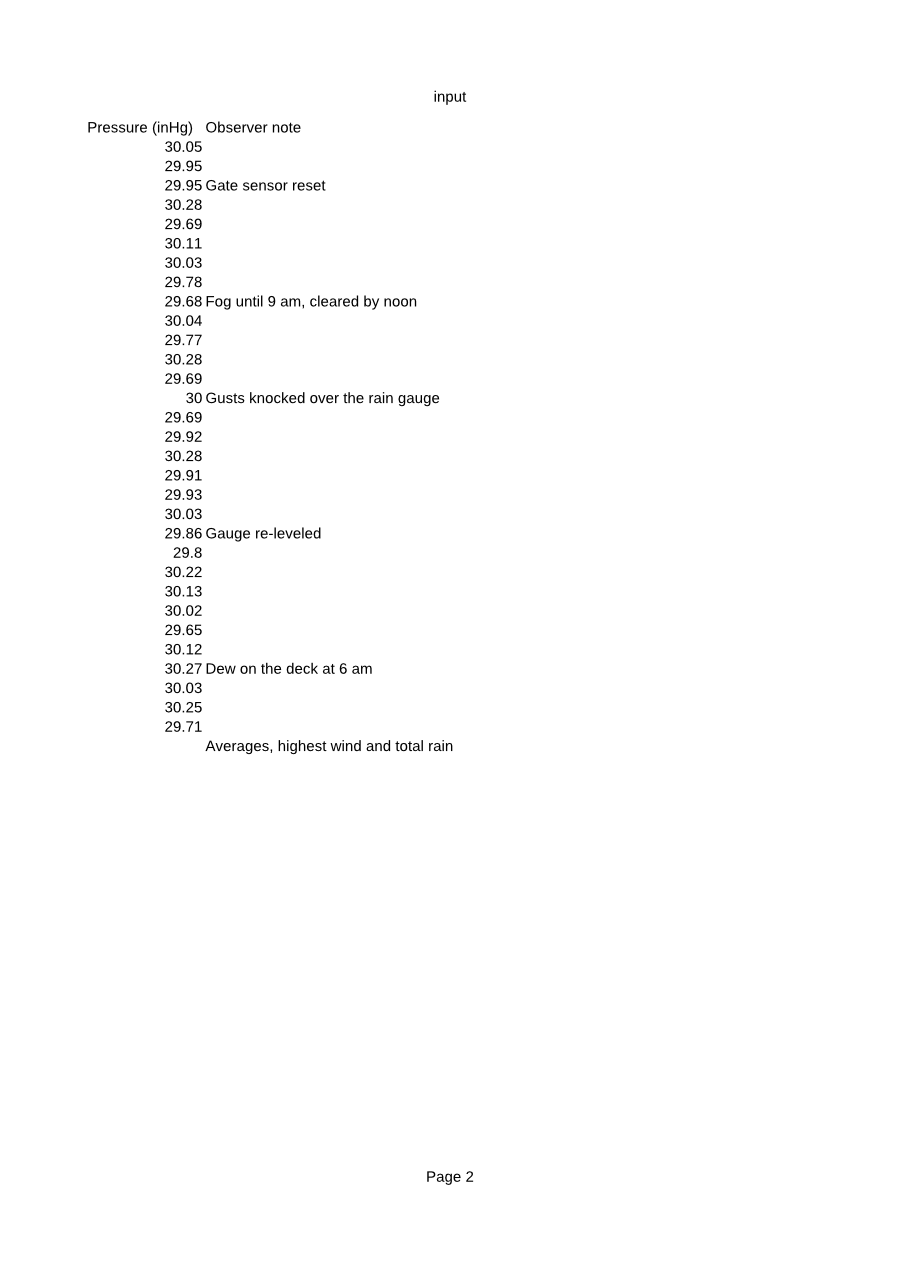
Send a CSV to /v2/convert/csv/to/webp to get each printed page as a lossless WebP. The sample sets ImageWidth=900, so the default A4 printout returns two 900 × 1273 images of 73,522 and 22,762 bytes.
- Endpoint
- POST /v2/
convert/ csv/ to/ webp - Accepts
- csv
- Sample timing
- 0.51 s median of 5 runsHow we measure
- Request size
- Up to 10 MB on the Free plan or 100 MB on paid plans, all files together
Request and response
Every sample below ran against the API before this page was published. Set PDFCONVERSIONAPI_KEY to your key and run it as is.
curl -sS -X POST \
  https://api.pdfconversionapi.com/v2/convert/csv/to/webp \
  -H "Authorization: Bearer $PDFCONVERSIONAPI_KEY" \
  -F File=@rooftop-weather-oct-2026.csv \
  --form-string ImageWidth=900 \
  -o response.json

# FileData is base64. Save the first file in converted/,
# or print the JSON error.
if jq -e '.Files' response.json > /dev/null; then
  mkdir -p converted
  name=$(jq -r '.Files[0].FileName' response.json)
  jq -r '.Files[0].FileData' response.json \
    | base64 --decode > "converted/$name"
else
  cat response.json
fi
import base64
import os
import requests
key = os.environ["PDFCONVERSIONAPI_KEY"]
response = requests.post(
"https://api.pdfconversionapi.com/v2/convert/csv/to/webp",
headers={"Authorization": f"Bearer {key}"},
files=[
("File", open("rooftop-weather-oct-2026.csv", "rb")),
],
data={
"ImageWidth": "900",
},
timeout=180,
)
result = response.json()
if not response.ok:
raise SystemExit(f"{result['Code']}: {result['Message']}")
os.makedirs("converted", exist_ok=True)
for file in result["Files"]:
path = os.path.join("converted", file["FileName"])
with open(path, "wb") as out:
out.write(base64.b64decode(file["FileData"]))
print(path, file["FileSize"], "bytes")
import { mkdir, readFile, writeFile } from "node:fs/promises";
import { join } from "node:path";

const form = new FormData();
const file = "rooftop-weather-oct-2026.csv";
form.append("File", new Blob([await readFile(file)]), file);
form.append("ImageWidth", "900");

const url = "https://api.pdfconversionapi.com/v2/convert/csv/to/webp";
const key = process.env.PDFCONVERSIONAPI_KEY;
const response = await fetch(url, {
  method: "POST",
  headers: { Authorization: `Bearer ${key}` },
  body: form,
});
const result = await response.json();
if (!response.ok) {
  throw new Error(`${result.Code}: ${result.Message}`);
}

await mkdir("converted", { recursive: true });
for (const file of result.Files) {
  const path = join("converted", file.FileName);
  await writeFile(path, Buffer.from(file.FileData, "base64"));
  console.log(path, file.FileSize, "bytes");
}
{
  "ConversionCost": 1,
  "ConversionTime": 0.51,
  "Files": [
    {
      "FileName": "rooftop-weather-oct-2026-1.webp",
      "FileExt": "webp",
      "FileSize": 73522,
      "FileData": "UklGRiofAQBXRUJQVlA4TB4f…"
    },
    {
      "FileName": "rooftop-weather-oct-2026-2.webp",
      "FileExt": "webp",
      "FileSize": 22762,
      "FileData": "UklGRuJYAABXRUJQVlA4TNVY…"
    }
  ]
}
Response from our test run on 2026-11-03. ConversionTime shows the median of 5 runs. FileData is shortened here; the real response carries the whole file as base64.
The sample, converted
The same file the code sends. Download the input and the output and compare them yourself.
- Input
- rooftop-weather-oct-2026.csv (1.8 KB)
- Output
- rooftop-weather-oct-2026-1.webp (72 KB)rooftop-weather-oct-2026-2.webp (22 KB)
- Source
- Written for this site: a fictional rooftop weather station's daily readings for October 2026, saved as comma-separated UTF-8 with a formula row at the bottom (CC0-1.0). How it was made
- Made by
- 2026-11-04, API build
9eeeb0640aba
Parameters
Send these as form fields next to the file. Names are case-insensitive. If you set one of the documented options below that we don't support yet, the request fails with a 400 that names it instead of returning a file made without it.
| Parameter | What it does |
|---|---|
ImageWidthinteger | Width of each page image. The page is drawn at this size directly, so 900 gives 900 × 1273 for A4 with sharp text, not a resample of a bigger drawing.Values: 1–20000 |
ImageHeightinteger | Height of each page image, the width following the paper's shape. With both, the page fits inside the box unless ScaleProportions=false.Values: 1–20000 |
ImageResolutioninteger, default 150 | Pixels per inch when no width or height is given. WebP has no field for it, so nothing is recorded in the file.Values: 36–600 |
PageOrientationenum, default default | On A4 landscape the sample's ten columns fit on one image instead of two.Values: default, portrait, landscape |
PageSizeenum, default default | The paper the CSV is laid out on, A4 unless you choose.Values: letter, legal, tabloid, ledger, statement, executive, lettersmall, a3, a4, a4small, a5, b4, b5 |
FitToPageboolean, default false | Squeezes the table to one page across; rows that don't fit still flow to further pages. |
Scaleinteger | Print zoom in percent.Values: 10–300 |
HeaderOnEachPageboolean, default false | Repeats the CSV's header line on every page after the first. |
PageRangestring | Encodes only those pages. PageRange=1 with a small ImageWidth makes a quick preview.Values: e.g. 1 or 1-3 |
TransparentColorstring | Turns pixels of exactly this color transparent; white removes the paper.Values: a color name, #RRGGBB or R,G,B |
BackgroundColorstring, default white | Fills the paper with a color before the table is drawn.Values: a color name, #RRGGBB or R,G,B |
ColorSpaceenum, default default | Converts the pixels to gray or black and white. The WebP is still written with three color channels; this black-on-white table comes out byte for byte the same in gray.Values: rgb, gray, monochrome |
FileNamestring | Base name for the images, before -1.webp. |
StoreFileboolean, default false | Answers with links valid for 3 hours. |
Not supported yet
Setting one of these to anything but its default returns 400.
| Option | What to do instead |
|---|---|
Delimiter | Commas only. |
Also refused when set: AutoFitColumns, ThousandsSeparator, DecimalSeparator, DateFormat.
What carries over, and what doesn't
Kept
- Every pixel of the drawn page: WebP output is lossless (VP8L)
- The 31 daily rows and the calculated Month row
- Commas inside quoted fields, such as the Observer notes
- UTF-8 symbols like the degree sign
Lost or not yet supported
- Two of the ten columns on the first image. Without a page option, Pressure (inHg) and Observer note print on page 2.
- Lossy compression. There is no lossy mode, and
ImageQualityis ignored: the file is byte for byte the same at 10 as at the default. - Any DPI value, which WebP has no field for.
- Trailing zeros (0.00 prints as 0) and the file name in the header, which shows "input".
Limits
- One CSV per request. Sending two files returns 400.
- Requests up to 10 MB on the Free plan or 100 MB on paid plans, all files and fields together.
- No more than 2,000 page images per request.
- 16,000 pixels per side and 100,000,000 pixels per page image; beyond that, 413.
- 120 seconds per conversion, then 504.
Where teams use it
Previews of uploaded CSVs on a website
A data portal can show what each uploaded file holds without loading it into a grid. Lossless WebP keeps small digits readable at a modest file size.
Lighter images than PNG
For page 1 of the sample at 150 DPI we measured 110,380 bytes as WebP against 368,842 as PNG, with the same pixels.
Tables in web pages and newsletters
Embed a printed table as an image where an HTML table would break the layout, such as an email template.
Questions
Is the WebP lossy or lossless?
Lossless. Each page is written as VP8L, so text edges match the drawn page exactly. ImageQuality has no effect on this route; to get a smaller file, lower ImageWidth or ImageResolution.
How much smaller than PNG is it?
On our sample, page 1 at the default 150 DPI is 110,380 bytes as WebP, 368,842 as PNG and 214,191 as a JPEG at quality 85. Page 2, which is mostly white, is 34,910 bytes as WebP.
Why does page 2 only hold two columns?
The CSV is printed on A4 portrait unless you choose otherwise, and the last two columns don't fit across. They go to a second page. PageOrientation=landscape or FitToPage=true keeps them on page 1.
Convert your first CSV file in a minute.