PAGES to PDF API
POST /v2/convert/pages/to/pdf opens an Apple Pages document on our side, with no Mac or Pages involved, and returns a PDF. The 2-page A5 sample keeps its paper size, 2 cm margins, title and heading sizes, a bold sentence, an underlined phrase and its tab stops.
- Endpoint
- POST /v2/
convert/ pages/ to/ pdf - Accepts
- pages
- Sample timing
- 0.547 s median of 5 runsHow we measure
- Request size
- Up to 10 MB on the Free plan or 100 MB on paid plans, all files together
Request and response
Every sample below ran against the API before this page was published. Set PDFCONVERSIONAPI_KEY to your key and run it as is.
curl -sS -X POST \
  https://api.pdfconversionapi.com/v2/convert/pages/to/pdf \
  -H "Authorization: Bearer $PDFCONVERSIONAPI_KEY" \
  -F File=@garden-rules.pages \
  -o response.json

# FileData is base64. Save the first file in converted/,
# or print the JSON error.
if jq -e '.Files' response.json > /dev/null; then
  mkdir -p converted
  name=$(jq -r '.Files[0].FileName' response.json)
  jq -r '.Files[0].FileData' response.json \
    | base64 --decode > "converted/$name"
else
  cat response.json
fi
import base64
import os
import requests
key = os.environ["PDFCONVERSIONAPI_KEY"]
response = requests.post(
"https://api.pdfconversionapi.com/v2/convert/pages/to/pdf",
headers={"Authorization": f"Bearer {key}"},
files=[("File", open("garden-rules.pages", "rb"))],
timeout=180,
)
result = response.json()
if not response.ok:
raise SystemExit(f"{result['Code']}: {result['Message']}")
os.makedirs("converted", exist_ok=True)
for file in result["Files"]:
path = os.path.join("converted", file["FileName"])
with open(path, "wb") as out:
out.write(base64.b64decode(file["FileData"]))
print(path, file["FileSize"], "bytes")
import { mkdir, readFile, writeFile } from "node:fs/promises";
import { join } from "node:path";

const form = new FormData();
const file = "garden-rules.pages";
form.append("File", new Blob([await readFile(file)]), file);

const url = "https://api.pdfconversionapi.com/v2/convert/pages/to/pdf";
const key = process.env.PDFCONVERSIONAPI_KEY;
const response = await fetch(url, {
  method: "POST",
  headers: { Authorization: `Bearer ${key}` },
  body: form,
});
const result = await response.json();
if (!response.ok) {
  throw new Error(`${result.Code}: ${result.Message}`);
}

await mkdir("converted", { recursive: true });
for (const file of result.Files) {
  const path = join("converted", file.FileName);
  await writeFile(path, Buffer.from(file.FileData, "base64"));
  console.log(path, file.FileSize, "bytes");
}
{
  "ConversionCost": 1,
  "ConversionTime": 0.547,
  "Files": [
    {
      "FileName": "garden-rules.pdf",
      "FileExt": "pdf",
      "FileSize": 41528,
      "FileData": "JVBERi0xLjcKJcOkw7zDtsOf…"
    }
  ]
}
Response from our test run on 2026-11-03. ConversionTime shows the median of 5 runs. FileData is shortened here; the real response carries the whole file as base64.
The sample, converted
The same file the code sends. Download the input and the output and compare them yourself.
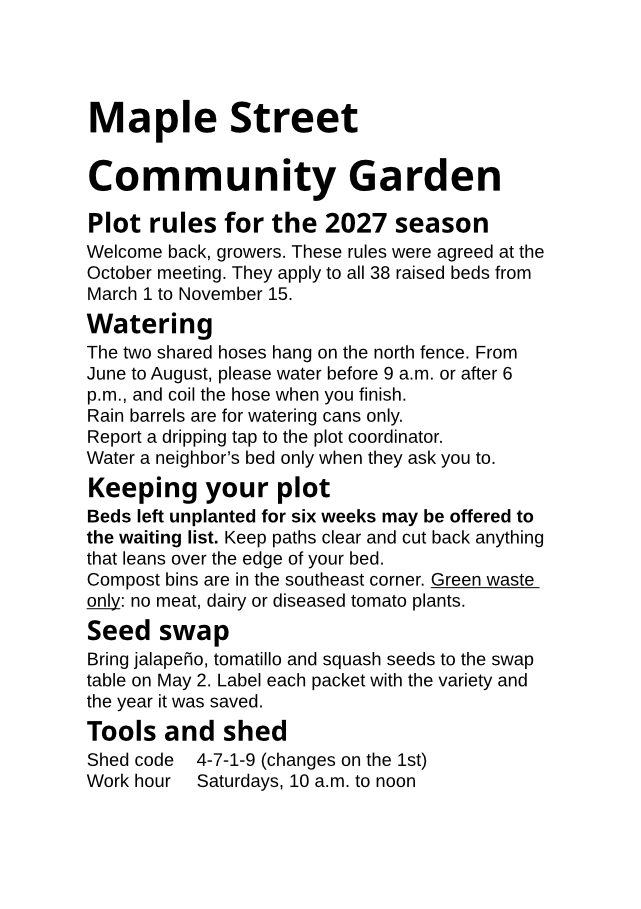
- Input
- garden-rules.pages (44 KB)
- Output
- garden-rules.pdf (41 KB)
- Source
- A two-page A5 Apple Pages document with garden rules we wrote; we put our text into a Pages test file from an open-source office suite's test data (MPL-2.0). How it was made
- Made by
- 2026-11-04, API build
9eeeb0640aba
Parameters
Send these as form fields next to the file. Names are case-insensitive. If you set one of the documented options below that we don't support yet, the request fails with a 400 that names it instead of returning a file made without it.
| Parameter | What it does |
|---|---|
PageRangestring | Pages to keep, for example 1 or 2-. PageRange=2 returns a one-page PDF of the sample's last paragraph; PageRange=3 returns 400 "PageRange asks for page 3, but the document has 2 pages". Can't be combined with PDF/A when it drops pages.Values: Page numbers and ranges |
Pdfaboolean, default false | Write PDF/A-1b. The sample then comes out as a PDF 1.4 file of about 50 KB (50,456 or 50,457 bytes in our runs). |
PdfaVersionenum, default none | Pick PDF/A-1b, 2b or 3b instead of Pdfa; pdfA3b gave a PDF 1.7 file marked part 3, conformance B.Values: none, pdfA1b, pdfA2b, pdfA3b |
FileNamestring | Name for the PDF without the extension, garden-rules when left out. |
StoreFileboolean, default false | Return a link to the stored PDF, valid for 3 hours. |
What carries over, and what doesn't
Kept
- The page size and margins saved in the document: both sample pages are A5 (420 × 595 pt) with 57 pt (2 cm) margins
- Paragraph styles' sizes: the title at 28 pt, the five headings at 18 pt bold, body text at 12 pt
- Character styles: the bold sentence about unplanted beds and the underlined 'Green waste only'
- Tab stops, so 'Shed code' and 'Work hour' line up with their values at 129 pt
- Characters such as the curly apostrophe in neighbor’s and the ñ in jalapeño
- Selectable, searchable text, with a structure tree in the PDF
Lost or not yet supported
- Bullets. The three items in the sample's bulleted list print as plain paragraphs, with no bullet character and no indent.
- Apple's fonts. Text set in Helvetica prints in Liberation Sans, which has the same widths, but the bold headings print in Noto Sans Bold, a different design.
- Headings as PDF bookmarks: the PDF has no outline.
Limits
- Word and spreadsheet options such as
PageSize,PageOrientation,IncludeMetadataandBookmarkModereturn 400 here, for example "PageSize is not supported yet for PAGES files". - A Numbers or WordPerfect file sent to this route returns 422 with "it could not be opened as PAGES". Use the route for the file's own format.
- Requests up to 10 MB on the Free plan or 100 MB on paid plans, all files and fields together. A conversion can run for up to 120 seconds; after that the API returns 504.
Where teams use it
Pages files sent by Mac and iPhone users
Customers and applicants on Apple devices send .pages files that Windows and Linux machines can't open. Converting on upload gives everyone a PDF.
Archiving documents written in Pages
PdfaVersion=pdfA2b turns a Pages letter or report into PDF/A for long-term storage in a records system.
Print and review workflows
Print services, e-signature tools and review queues take PDF. The conversion keeps the document's own paper size, so an A5 flyer stays A5.
Questions
Do I need a Mac or the Pages app?
No. Your code uploads the .pages file over HTTPS and gets the PDF back; the file is opened on our servers without any Apple software.
Which Pages files can I send?
A .pages document saved as a single file, which is a zip archive with an Index folder of .iwa files inside, the format Pages has used since version 5. The file our sample is built from was saved by Pages 5.5. The preview images Pages stores in the file are not needed: we removed them from the sample and it converted as shown.
Why do my bullets disappear?
In our test the list items kept their text and order but lost the bullet and the indent. If bullets matter, check the output, or make the PDF from Pages itself until this changes.
Can I get PDF/A?
Yes. Pdfa=true writes PDF/A-1b; PdfaVersion=pdfA2b or pdfA3b picks a later part, and wins if you send both (with Pdfa=true as well, pdfA2b still gave part 2). A PageRange that leaves pages out can't be combined with PDF/A: that returns 400 "PageRange cannot be combined with PDF/A yet".
Convert your first PAGES file in a minute.