PAGES to PNG API
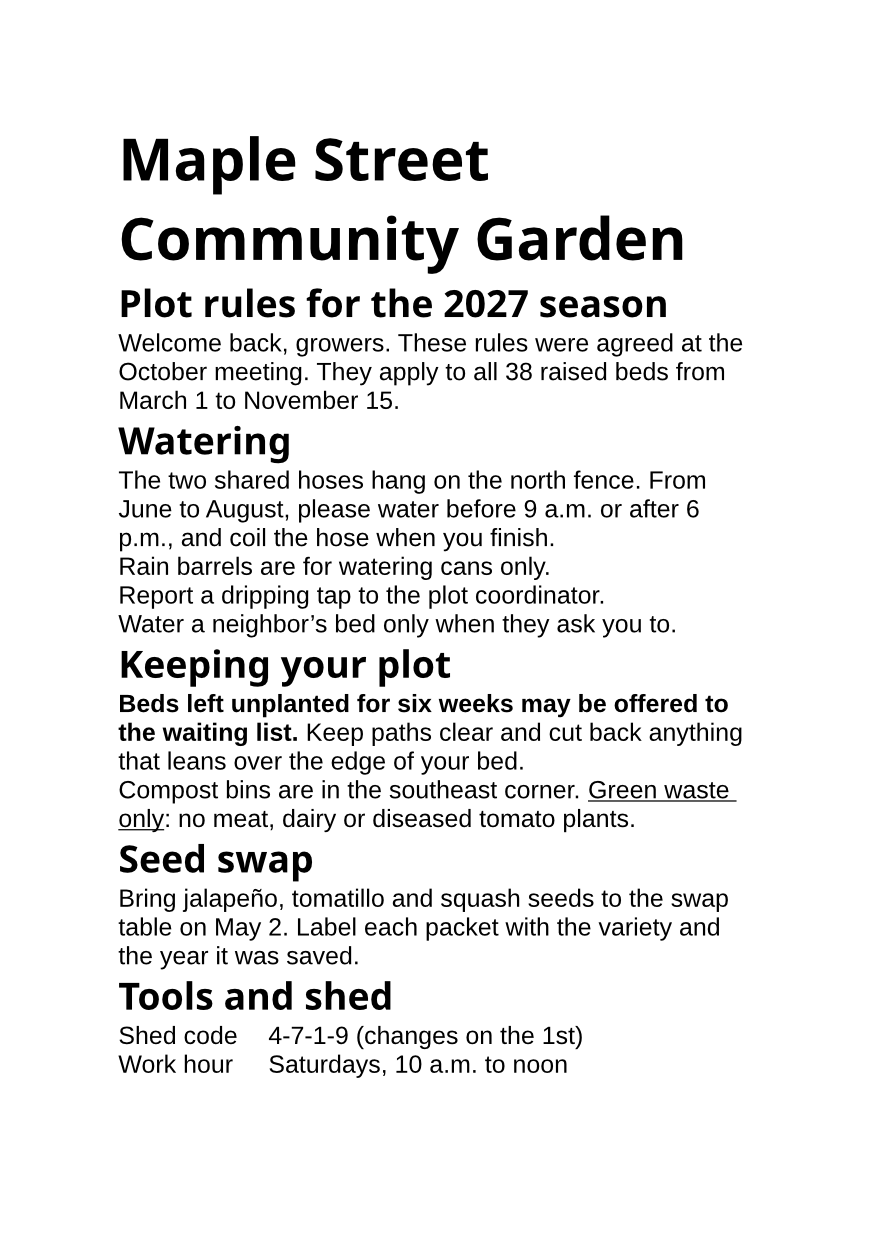
POST /v2/convert/pages/to/png lays out an Apple Pages document and returns one PNG per page, at the paper size saved in the file. The A5 sample comes back as two images of 875 × 1,239 pixels at the default 150 DPI.
- Endpoint
- POST /v2/
convert/ pages/ to/ png - Accepts
- pages
- Sample timing
- 0.566 s median of 5 runsHow we measure
- Request size
- Up to 10 MB on the Free plan or 100 MB on paid plans, all files together
Request and response
Every sample below ran against the API before this page was published. Set PDFCONVERSIONAPI_KEY to your key and run it as is.
curl -sS -X POST \
  https://api.pdfconversionapi.com/v2/convert/pages/to/png \
  -H "Authorization: Bearer $PDFCONVERSIONAPI_KEY" \
  -F File=@garden-rules.pages \
  -o response.json

# FileData is base64. Save the first file in converted/,
# or print the JSON error.
if jq -e '.Files' response.json > /dev/null; then
  mkdir -p converted
  name=$(jq -r '.Files[0].FileName' response.json)
  jq -r '.Files[0].FileData' response.json \
    | base64 --decode > "converted/$name"
else
  cat response.json
fi
import base64
import os
import requests
key = os.environ["PDFCONVERSIONAPI_KEY"]
response = requests.post(
"https://api.pdfconversionapi.com/v2/convert/pages/to/png",
headers={"Authorization": f"Bearer {key}"},
files=[("File", open("garden-rules.pages", "rb"))],
timeout=180,
)
result = response.json()
if not response.ok:
raise SystemExit(f"{result['Code']}: {result['Message']}")
os.makedirs("converted", exist_ok=True)
for file in result["Files"]:
path = os.path.join("converted", file["FileName"])
with open(path, "wb") as out:
out.write(base64.b64decode(file["FileData"]))
print(path, file["FileSize"], "bytes")
import { mkdir, readFile, writeFile } from "node:fs/promises";
import { join } from "node:path";

const form = new FormData();
const file = "garden-rules.pages";
form.append("File", new Blob([await readFile(file)]), file);

const url = "https://api.pdfconversionapi.com/v2/convert/pages/to/png";
const key = process.env.PDFCONVERSIONAPI_KEY;
const response = await fetch(url, {
  method: "POST",
  headers: { Authorization: `Bearer ${key}` },
  body: form,
});
const result = await response.json();
if (!response.ok) {
  throw new Error(`${result.Code}: ${result.Message}`);
}

await mkdir("converted", { recursive: true });
for (const file of result.Files) {
  const path = join("converted", file.FileName);
  await writeFile(path, Buffer.from(file.FileData, "base64"));
  console.log(path, file.FileSize, "bytes");
}
{
  "ConversionCost": 1,
  "ConversionTime": 0.566,
  "Files": [
    {
      "FileName": "garden-rules-1.png",
      "FileExt": "png",
      "FileSize": 333813,
      "FileData": "iVBORw0KGgoAAAANSUhEUgAA…"
    },
    {
      "FileName": "garden-rules-2.png",
      "FileExt": "png",
      "FileSize": 37484,
      "FileData": "iVBORw0KGgoAAAANSUhEUgAA…"
    }
  ]
}
Response from our test run on 2026-11-03. ConversionTime shows the median of 5 runs. FileData is shortened here; the real response carries the whole file as base64.
The sample, converted
The same file the code sends. Download the input and the output and compare them yourself.
- Input
- garden-rules.pages (44 KB)
- Output
- garden-rules-1.png (326 KB)garden-rules-2.png (37 KB)
- Source
- A two-page A5 Apple Pages document with garden rules we wrote; we put our text into a Pages test file from an open-source office suite's test data (MPL-2.0). How it was made
- Made by
- 2026-11-04, API build
9eeeb0640aba

Parameters
Send these as form fields next to the file. Names are case-insensitive. If you set one of the documented options below that we don't support yet, the request fails with a 400 that names it instead of returning a file made without it.
| Parameter | What it does |
|---|---|
ImageResolutioninteger, default 150 | Pixels per inch of paper. An A5 page is 875 × 1,239 at 150 and 583 × 826 at 100; at 72 the sample's pages shrank to 133,547 and 12,602 bytes.Values: 36 to 600 |
PageRangestring | Only these pages. PageRange=2 returns garden-rules-2.png alone.Values: Page numbers and ranges |
BackgroundColorstring | Fills the sheet behind the content; the page has no fill of its own, so #fff8e7 turned the margins and every empty area cream.Values: Color name, #RRGGBB or R,G,B |
TransparentColorstring | One exact color to make transparent, usually white, for placing the page over another background.Values: Color name, #RRGGBB or R,G,B |
ImageWidthinteger | Pixel width to scale each page to; the height follows the A5 shape unless ImageHeight is sent.Values: 1 to 20,000 |
FileNamestring | Stem of the numbered files, garden-rules by default. |
StoreFileboolean, default false | Store the PNGs for 3 hours and send links back. |
What carries over, and what doesn't
Kept
- The paper size saved in the document, so A5 pages stay A5 in shape: 875 × 1,239 pixels at 150 DPI
- Each page as its own file in order:
garden-rules-1.png(333,813 bytes) and the short last pagegarden-rules-2.png(37,484 bytes) - Title and heading sizes, the bold sentence, the underlined phrase and the tab-aligned shed details, as drawn in the PDF route
- Lossless pixels, so 12 pt body text stays sharp
Lost or not yet supported
- Bullets: the sample's three list items are drawn as plain paragraphs.
- Apple's fonts. Body text is drawn in Liberation Sans in place of Helvetica, and headings in Noto Sans Bold.
- Text you can copy. The words are pixels.
- A DPI value in the file unless you send
ImageResolution.
Limits
- Options for PDF output and page setup, such as
PageSize, return 400 with "... is not supported yet for PAGES files";Pdfais ignored for images. - At most 2,000 pages, 16,000 pixels per side and 100 million pixels per page; above that the API returns 413.
- Requests up to 10 MB on the Free plan or 100 MB on paid plans, all files and fields together. A conversion can run for up to 120 seconds; after that the API returns 504.
Where teams use it
Showing a Pages file in a web app
Browsers can't display .pages files. A PNG of each page lets users see what they uploaded, in its own paper size, before they submit it.
Page images for slides and newsletters
An A5 flyer or handout written in Pages can be dropped into a slide deck or an email as an image of each page.
Questions
Does the image use the Pages document's paper size?
Yes. The page is drawn at the size saved in the file, so the A5 sample gives images with A5 proportions. There is no option to change the paper size.
Why is page 2 so small?
File size follows content: the sample's second page holds two lines, so its PNG is 37,484 bytes against 333,813 for the full first page, at the same 875 × 1,239 pixels.
Can I get a thumbnail of the first page?
Send PageRange=1 and ImageWidth=200, or a low ImageResolution such as 36, which makes an A5 page 210 × 297 pixels.
Convert your first PAGES file in a minute.