PAGES to JPG API
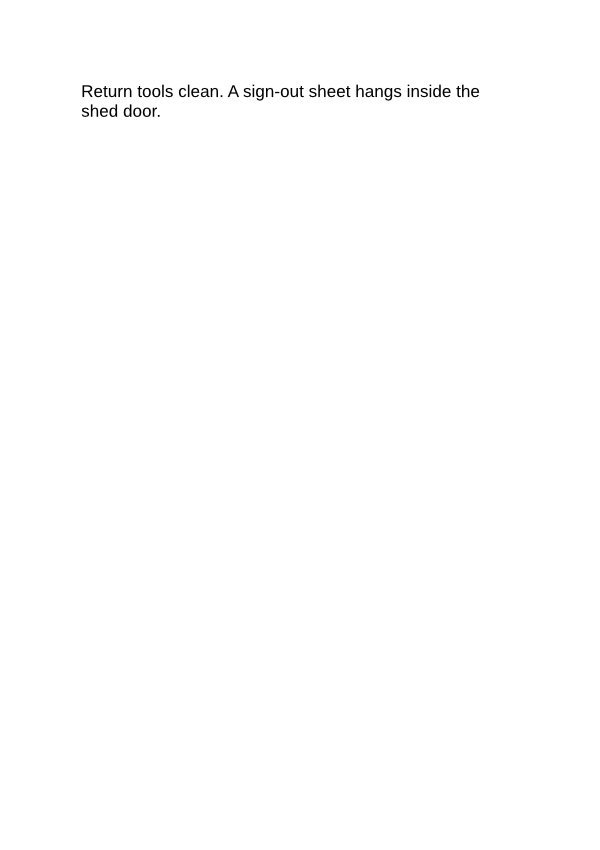
POST /v2/convert/pages/to/jpg returns a JPEG of every page in an Apple Pages document. The sample sends ImageWidth=600, so both A5 pages come back exactly 600 pixels wide and 850 tall, at 108,461 and 19,968 bytes.
- Endpoint
- POST /v2/
convert/ pages/ to/ jpg - Accepts
- pages
- Sample timing
- 0.569 s median of 5 runsHow we measure
- Request size
- Up to 10 MB on the Free plan or 100 MB on paid plans, all files together
Request and response
Every sample below ran against the API before this page was published. Set PDFCONVERSIONAPI_KEY to your key and run it as is.
curl -sS -X POST \
  https://api.pdfconversionapi.com/v2/convert/pages/to/jpg \
  -H "Authorization: Bearer $PDFCONVERSIONAPI_KEY" \
  -F File=@garden-rules.pages \
  --form-string ImageWidth=600 \
  -o response.json

# FileData is base64. Save the first file in converted/,
# or print the JSON error.
if jq -e '.Files' response.json > /dev/null; then
  mkdir -p converted
  name=$(jq -r '.Files[0].FileName' response.json)
  jq -r '.Files[0].FileData' response.json \
    | base64 --decode > "converted/$name"
else
  cat response.json
fi
import base64
import os
import requests
key = os.environ["PDFCONVERSIONAPI_KEY"]
response = requests.post(
"https://api.pdfconversionapi.com/v2/convert/pages/to/jpg",
headers={"Authorization": f"Bearer {key}"},
files=[("File", open("garden-rules.pages", "rb"))],
data={
"ImageWidth": "600",
},
timeout=180,
)
result = response.json()
if not response.ok:
raise SystemExit(f"{result['Code']}: {result['Message']}")
os.makedirs("converted", exist_ok=True)
for file in result["Files"]:
path = os.path.join("converted", file["FileName"])
with open(path, "wb") as out:
out.write(base64.b64decode(file["FileData"]))
print(path, file["FileSize"], "bytes")
import { mkdir, readFile, writeFile } from "node:fs/promises";
import { join } from "node:path";

const form = new FormData();
const file = "garden-rules.pages";
form.append("File", new Blob([await readFile(file)]), file);
form.append("ImageWidth", "600");

const url = "https://api.pdfconversionapi.com/v2/convert/pages/to/jpg";
const key = process.env.PDFCONVERSIONAPI_KEY;
const response = await fetch(url, {
  method: "POST",
  headers: { Authorization: `Bearer ${key}` },
  body: form,
});
const result = await response.json();
if (!response.ok) {
  throw new Error(`${result.Code}: ${result.Message}`);
}

await mkdir("converted", { recursive: true });
for (const file of result.Files) {
  const path = join("converted", file.FileName);
  await writeFile(path, Buffer.from(file.FileData, "base64"));
  console.log(path, file.FileSize, "bytes");
}
{
  "ConversionCost": 1,
  "ConversionTime": 0.569,
  "Files": [
    {
      "FileName": "garden-rules-1.jpg",
      "FileExt": "jpg",
      "FileSize": 108461,
      "FileData": "/9j/4AAQSkZJRgABAgAAAQAB…"
    },
    {
      "FileName": "garden-rules-2.jpg",
      "FileExt": "jpg",
      "FileSize": 19968,
      "FileData": "/9j/4AAQSkZJRgABAgAAAQAB…"
    }
  ]
}
Response from our test run on 2026-11-03. ConversionTime shows the median of 5 runs. FileData is shortened here; the real response carries the whole file as base64.
The sample, converted
The same file the code sends. Download the input and the output and compare them yourself.
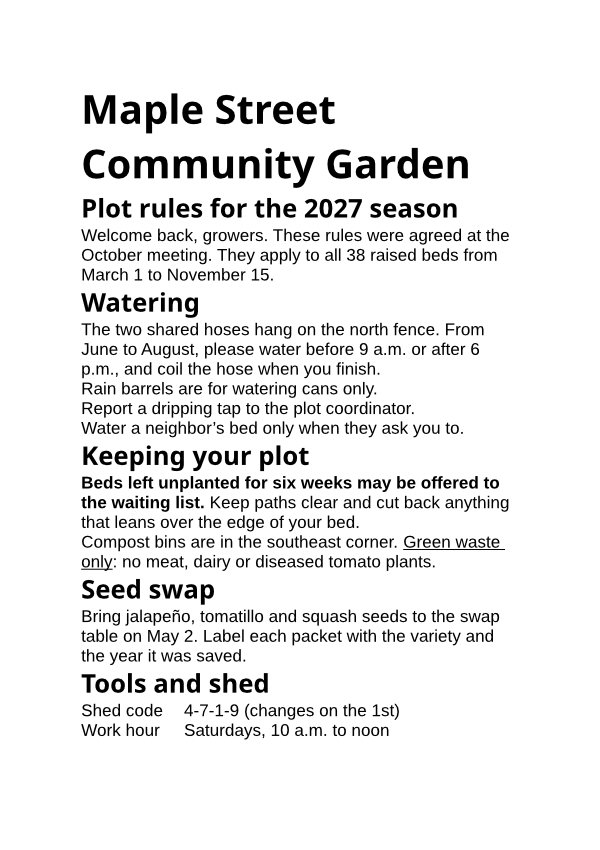
- Input
- garden-rules.pages (44 KB)
- Output
- garden-rules-1.jpg (106 KB)garden-rules-2.jpg (20 KB)
- Source
- A two-page A5 Apple Pages document with garden rules we wrote; we put our text into a Pages test file from an open-source office suite's test data (MPL-2.0). How it was made
- Made by
- 2026-11-04, API build
9eeeb0640aba
Parameters
Send these as form fields next to the file. Names are case-insensitive. If you set one of the documented options below that we don't support yet, the request fails with a 400 that names it instead of returning a file made without it.
| Parameter | What it does |
|---|---|
ImageWidthinteger | Target width in pixels; the page is drawn at the scale that width needs and the height follows the A5 shape, 850 for 600.Values: 1 to 20,000 |
ImageHeightinteger | Target height. With both sizes the page fits inside the box unless ScaleProportions=false.Values: 1 to 20,000 |
ImageResolutioninteger, default 150 | Used when no size is sent: 150 DPI makes each A5 page 875 × 1,239 pixels (186,752 and 38,261 bytes for the sample).Values: 36 to 600 |
ImageQualityinteger, default 85 | JPEG quality. At 150 DPI, ImageQuality=50 brought the sample's pages to 120,228 and 34,914 bytes.Values: 1 to 100 |
PageRangestring | Draw only some pages, for example 1.Values: Page numbers and ranges |
BackgroundColorstring | Paper color; JPEG can't be transparent, and the page itself has no fill.Values: Color name, #RRGGBB or R,G,B |
FileNamestring | Stem of the page files, numbered from 1. |
StoreFileboolean, default false | Links valid for 3 hours instead of image data. |
What carries over, and what doesn't
Kept
- The A5 proportions of the sample: 600 × 850 pixels when 600 wide is requested
- Both pages in order, the second holding the last two lines of text
- Heading sizes, bold, underline and tab alignment as laid out for the PDF route
Lost or not yet supported
- Edge sharpness: JPEG compression softens small text, more at lower
ImageQuality. - Bullets, which the sample's list items lose in layout.
- Helvetica, drawn as Liberation Sans, and the bold headings, drawn in Noto Sans Bold.
- Searchable text.
Limits
PageSize,PageOrientationand other page setup options return 400 "... is not supported yet for PAGES files".- Up to 2,000 pages, 16,000 pixels per side and 100 million pixels per page, or the API returns 413.
- Requests up to 10 MB on the Free plan or 100 MB on paid plans, all files and fields together. A conversion can run for up to 120 seconds; after that the API returns 504.
Where teams use it
Fixed-width previews in a file list
ImageWidth=600 gives every page the same width whatever its paper size, so previews of A5, Letter and A4 documents line up in a grid.
Sharing a Pages handout in chat or email
A JPEG of each page shows inline where a .pages attachment would need Apple's apps to open.
Questions
How do I get images of a fixed width?
Send ImageWidth. The page is drawn at the scale that width needs and the height follows the page's shape, so an A5 page at 600 wide is 850 tall. Add ImageHeight to fit inside a box instead.
What resolution is used when I send nothing?
150 DPI, which makes an A5 page 875 × 1,239 pixels, at quality 85. The JPEG then carries no DPI value; send ImageResolution to have it written.
Can I convert Keynote or Numbers files here?
No, this route reads Pages documents only; a Numbers file returns 422 "it could not be opened as PAGES". Numbers files have their own routes, such as /v2/convert/numbers/to/jpg.
Convert your first PAGES file in a minute.