PAGES to DOCX API
POST /v2/convert/pages/to/docx turns an Apple Pages document into a Word file people can edit on Windows, the web or Android. The A5 sample keeps its page size and margins, and every paragraph keeps its font size, weight and tabs as direct formatting.
- Endpoint
- POST /v2/
convert/ pages/ to/ docx - Accepts
- pages
- Sample timing
- 0.543 s median of 5 runsHow we measure
- Request size
- Up to 10 MB on the Free plan or 100 MB on paid plans, all files together
Request and response
Every sample below ran against the API before this page was published. Set PDFCONVERSIONAPI_KEY to your key and run it as is.
curl -sS -X POST \
  https://api.pdfconversionapi.com/v2/convert/pages/to/docx \
  -H "Authorization: Bearer $PDFCONVERSIONAPI_KEY" \
  -F File=@garden-rules.pages \
  -o response.json

# FileData is base64. Save the first file in converted/,
# or print the JSON error.
if jq -e '.Files' response.json > /dev/null; then
  mkdir -p converted
  name=$(jq -r '.Files[0].FileName' response.json)
  jq -r '.Files[0].FileData' response.json \
    | base64 --decode > "converted/$name"
else
  cat response.json
fi
import base64
import os
import requests
key = os.environ["PDFCONVERSIONAPI_KEY"]
response = requests.post(
"https://api.pdfconversionapi.com/v2/convert/pages/to/docx",
headers={"Authorization": f"Bearer {key}"},
files=[("File", open("garden-rules.pages", "rb"))],
timeout=180,
)
result = response.json()
if not response.ok:
raise SystemExit(f"{result['Code']}: {result['Message']}")
os.makedirs("converted", exist_ok=True)
for file in result["Files"]:
path = os.path.join("converted", file["FileName"])
with open(path, "wb") as out:
out.write(base64.b64decode(file["FileData"]))
print(path, file["FileSize"], "bytes")
import { mkdir, readFile, writeFile } from "node:fs/promises";
import { join } from "node:path";

const form = new FormData();
const file = "garden-rules.pages";
form.append("File", new Blob([await readFile(file)]), file);

const url = "https://api.pdfconversionapi.com/v2/convert/pages/to/docx";
const key = process.env.PDFCONVERSIONAPI_KEY;
const response = await fetch(url, {
  method: "POST",
  headers: { Authorization: `Bearer ${key}` },
  body: form,
});
const result = await response.json();
if (!response.ok) {
  throw new Error(`${result.Code}: ${result.Message}`);
}

await mkdir("converted", { recursive: true });
for (const file of result.Files) {
  const path = join("converted", file.FileName);
  await writeFile(path, Buffer.from(file.FileData, "base64"));
  console.log(path, file.FileSize, "bytes");
}
{
  "ConversionCost": 1,
  "ConversionTime": 0.543,
  "Files": [
    {
      "FileName": "garden-rules.docx",
      "FileExt": "docx",
      "FileSize": 7002,
      "FileData": "UEsDBBQAAAgIAER3ZF3o0AEj…"
    }
  ]
}
Response from our test run on 2026-11-03. ConversionTime shows the median of 5 runs. FileData is shortened here; the real response carries the whole file as base64.
The sample, converted
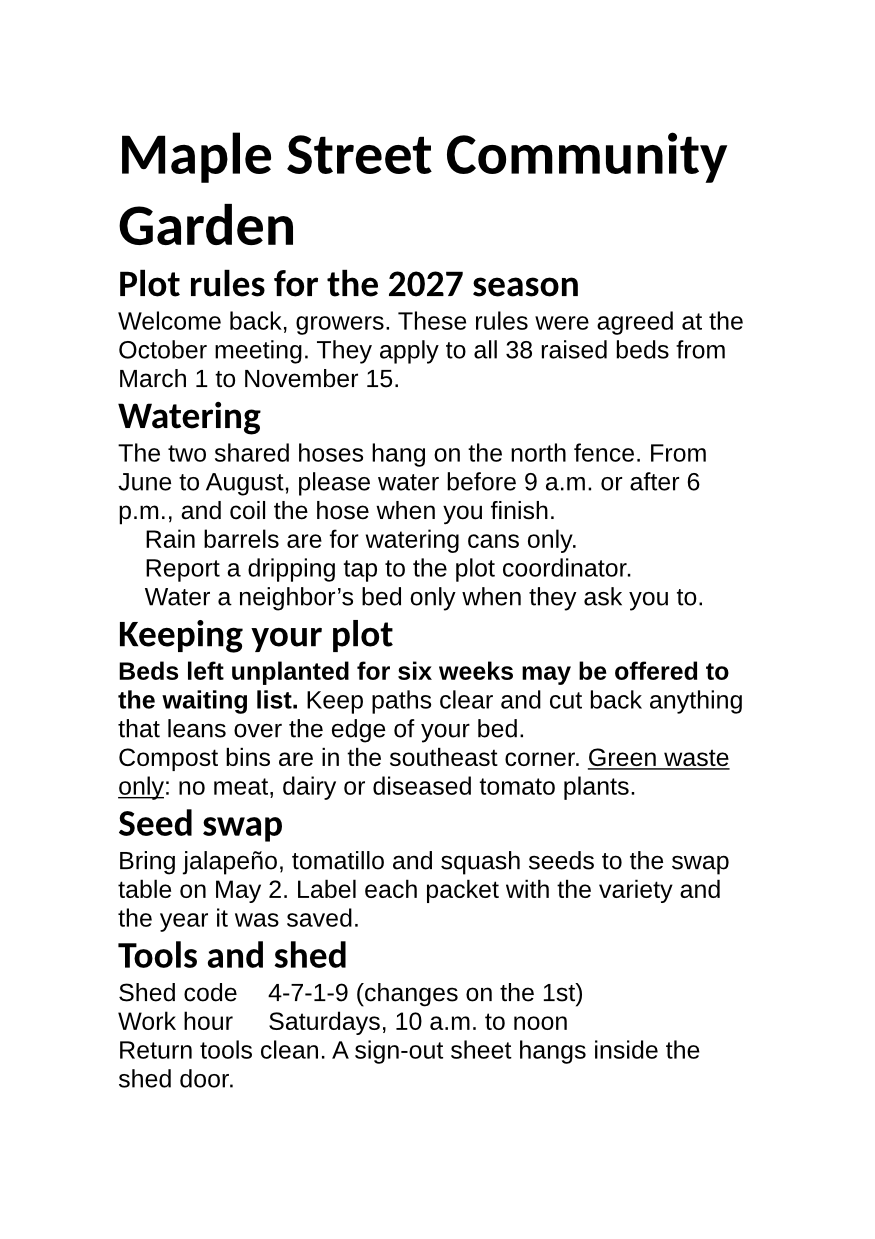
The same file the code sends. Download the input and the output and compare them yourself.
- Input
- garden-rules.pages (44 KB)
- Output
- garden-rules.docx (6.8 KB)
- Source
- A two-page A5 Apple Pages document with garden rules we wrote; we put our text into a Pages test file from an open-source office suite's test data (MPL-2.0). How it was made
- Made by
- 2026-11-04, API build
9eeeb0640aba
Parameters
Send these as form fields next to the file. Names are case-insensitive. If you set one of the documented options below that we don't support yet, the request fails with a 400 that names it instead of returning a file made without it.
| Parameter | What it does |
|---|---|
FileNamestring | Name of the .docx without the extension; garden-rules.docx if you leave it out. |
StoreFileboolean, default false | Return a 3-hour link to the DOCX instead of the file. |
What carries over, and what doesn't
Kept
- A5 paper (8,400 × 11,900 twips) with 2 cm (1,134 twip) margins, as saved in the sample
- Every one of the 17 paragraphs in order, with its size: 28 pt for the title, 18 pt bold for headings, 12 pt for body text
- The bold sentence and the underlined phrase, as w:b and w:u runs
- The 2 tabs in the shed code and work hour lines
- Unicode text such as neighbor’s and jalapeño
Lost or not yet supported
- Named styles. Every paragraph is in Word's Normal style with the look applied directly, so 'Title' and 'Heading 1' are gone and a table of contents built in Word finds no headings.
- Bullet characters. The three list items become a Word list with a 0.18 in hanging indent, but the bullet text is empty, so no bullet shows.
- Fonts by name only: the DOCX asks for Helvetica and Helvetica-Bold, which computers without those fonts replace with another.
Limits
- Options such as
PageSizeorUpdateTableOfContentsreturn 400 with "... is not supported yet for PAGES files". - A file that is not a Pages document returns 422 with "it could not be opened as PAGES".
- Requests up to 10 MB on the Free plan or 100 MB on paid plans, all files and fields together. A conversion can run for up to 120 seconds; after that the API returns 504.
Where teams use it
Editing a Pages file without a Mac
A colleague on Windows receives a .pages report and needs to change it. The DOCX opens in Word with the text, sizes and page setup in place.
Moving a Pages archive to Word
Offices leaving Apple's apps can convert their .pages documents in bulk and keep editing them, instead of keeping a Mac around to open old files.
Questions
Will the Word file look like the Pages document?
The text, page size, margins, sizes, bold, underline and tabs come through. Named paragraph styles and bullet characters don't, so headings look right but are Normal paragraphs, and list items show without bullets. Fonts are named as in the Pages file.
How do I get the headings back as Word headings?
Apply Heading 1 to those paragraphs in Word after the conversion. The converter writes each paragraph's look as direct formatting, so there is no style to remap automatically.
Can I get the text only?
Use /v2/convert/pages/to/txt, which reads the document's body text straight from the file, without layout, and returns it as UTF-8.
Do I need the Pages app?
No. The file is read and converted on our servers; your code only needs to send an HTTP request.
Convert your first PAGES file in a minute.