ODC to PDF API
POST /v2/convert/odc/to/pdf turns a standalone OpenDocument chart into a one-page PDF exactly the size of the chart, with no margins. Our 2,808-byte line chart, 18 × 10 cm, returns a 36,666-byte PDF whose page is 510.24 × 283.46 pt.
- Endpoint
- POST /v2/
convert/ odc/ to/ pdf - Accepts
- odc
- Sample timing
- 0.539 s median of 5 runsHow we measure
- Request size
- Up to 10 MB on the Free plan or 100 MB on paid plans, all files together
Request and response
Every sample below ran against the API before this page was published. Set PDFCONVERSIONAPI_KEY to your key and run it as is.
curl -sS -X POST \
  https://api.pdfconversionapi.com/v2/convert/odc/to/pdf \
  -H "Authorization: Bearer $PDFCONVERSIONAPI_KEY" \
  -F File=@garden-water-use.odc \
  -o response.json

# FileData is base64. Save the first file in converted/,
# or print the JSON error.
if jq -e '.Files' response.json > /dev/null; then
  mkdir -p converted
  name=$(jq -r '.Files[0].FileName' response.json)
  jq -r '.Files[0].FileData' response.json \
    | base64 --decode > "converted/$name"
else
  cat response.json
fi
import base64
import os
import requests
key = os.environ["PDFCONVERSIONAPI_KEY"]
response = requests.post(
"https://api.pdfconversionapi.com/v2/convert/odc/to/pdf",
headers={"Authorization": f"Bearer {key}"},
files=[("File", open("garden-water-use.odc", "rb"))],
timeout=180,
)
result = response.json()
if not response.ok:
raise SystemExit(f"{result['Code']}: {result['Message']}")
os.makedirs("converted", exist_ok=True)
for file in result["Files"]:
path = os.path.join("converted", file["FileName"])
with open(path, "wb") as out:
out.write(base64.b64decode(file["FileData"]))
print(path, file["FileSize"], "bytes")
import { mkdir, readFile, writeFile } from "node:fs/promises";
import { join } from "node:path";

const form = new FormData();
const file = "garden-water-use.odc";
form.append("File", new Blob([await readFile(file)]), file);

const url = "https://api.pdfconversionapi.com/v2/convert/odc/to/pdf";
const key = process.env.PDFCONVERSIONAPI_KEY;
const response = await fetch(url, {
  method: "POST",
  headers: { Authorization: `Bearer ${key}` },
  body: form,
});
const result = await response.json();
if (!response.ok) {
  throw new Error(`${result.Code}: ${result.Message}`);
}

await mkdir("converted", { recursive: true });
for (const file of result.Files) {
  const path = join("converted", file.FileName);
  await writeFile(path, Buffer.from(file.FileData, "base64"));
  console.log(path, file.FileSize, "bytes");
}
{
  "ConversionCost": 1,
  "ConversionTime": 0.539,
  "Files": [
    {
      "FileName": "garden-water-use.pdf",
      "FileExt": "pdf",
      "FileSize": 36666,
      "FileData": "JVBERi0xLjcKJcOkw7zDtsOf…"
    }
  ]
}
Response from our test run on 2026-11-03. ConversionTime shows the median of 5 runs. FileData is shortened here; the real response carries the whole file as base64.
The sample, converted
The same file the code sends. Download the input and the output and compare them yourself.
- Input
- garden-water-use.odc (2.7 KB)
- Output
- garden-water-use.pdf (36 KB)
- Source
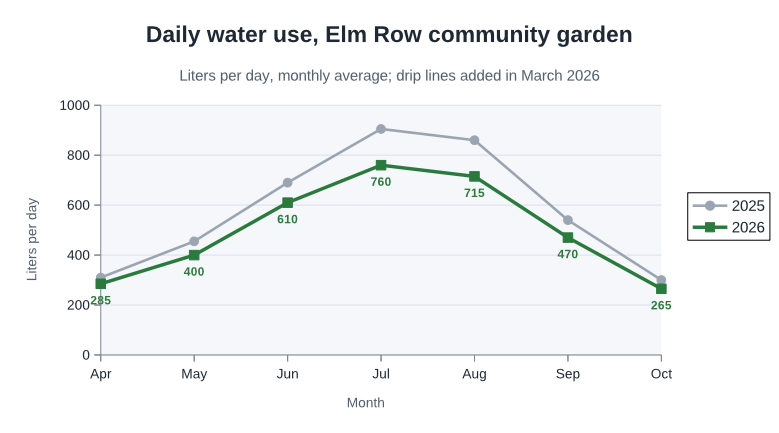
- A line chart of a fictional community garden's daily water use, 2025 against 2026, which we wrote as an OpenDocument chart by hand (CC0-1.0). How it was made
- Made by
- 2026-11-04, API build
9eeeb0640aba
Parameters
Send these as form fields next to the file. Names are case-insensitive. If you set one of the documented options below that we don't support yet, the request fails with a 400 that names it instead of returning a file made without it.
| Parameter | What it does |
|---|---|
PdfaVersionenum, default none | Write PDF/A: pdfA2b gave a PDF/A-2b chart of 45,609 bytes.Values: none, pdfA1b, pdfA2b, pdfA3b |
Pdfaboolean, default false | true writes PDF/A-1b (45,602 bytes for the sample). |
PageRangestring | A chart is always one page, so only 1 is useful; 2 returns 400 "PageRange asks for page 2, but the document has 1 page". |
FileNamestring | Base name of the PDF: FileName=water-2026 returns water-2026.pdf. |
StoreFileboolean, default false | Keep the PDF for 3 hours and return a link to it instead of the file. |
Not supported yet
Setting one of these to anything but its default returns 400.
| Option | What to do instead |
|---|---|
PageSize | The page is always the chart's own size; the request returns 400 "PageSize is not supported yet for ODC files". |
PageOrientation | Follows the chart's width and height. |
Also refused when set: PdfTitle.
What carries over, and what doesn't
Kept
- The chart's size as the page size: 18 × 10 cm is 510.24 × 283.46 pt, and a chart sized 4 × 6 in gave a 288 × 432 pt portrait page
- Lines, markers, gridlines and the shaded plot area as vector paths, with no images on the page
- Series colors and line widths: the 2025 line is gray #9AA5B1 at 1.7 pt, the 2026 line green #2B7A3D at 2.27 pt
- Title, subtitle, axis titles, legend entries and value labels as selectable text
- Only what the chart shows: the 2025 values, which have no labels, appear nowhere in the PDF's text
Lost or not yet supported
- The chart file's title: its "Garden water use 2025 and 2026" property doesn't reach the PDF, which has no title.
- Meaningful bookmarks: the outline holds one entry, "Page 1".
- Password-protected charts, which return 400 even with the right
Password.
Limits
- Chart sizes are kept between 1 and 100 cm per side: a chart claiming 900 cm by 2 mm printed on a 100 × 1 cm page. A chart with no size gets 16 × 9 cm.
- Charts with more than 10,000 parts in the package return 413.
- Only standalone charts: a file without an OpenDocument chart inside, such as a drawing or plain text, returns 422 "the input file could not be read: it could not be opened as ODC".
- Password-protected charts can't be converted yet. Without
Passwordthe API answers 422 "the input file is password-protected"; with it, 400 "password-protected ODC files are not supported yet". On an unprotected chartPasswordis ignored and the PDF stays 36,666 bytes. - Up to 10 MB on the Free plan or 100 MB on paid plans per request and 120 seconds per conversion.
Where teams use it
Charts dropped into PDF reports
A reporting job that writes .odc charts can turn each one into a PDF page and merge it into a report. Because the page has no margins, the chart can be placed or scaled as a figure without cropping.
Print-quality figures
Lines, markers, gridlines and labels stay vectors, so the chart prints sharp at any size: the 2026 series is a 2.27 pt green line, not a bitmap.
Archiving a chart
PdfaVersion=pdfA2b gives a PDF/A copy of a chart that can be filed with the data it came from.
Questions
What page size will the PDF have?
The chart's own width and height, with no margins. The sample's 18 × 10 cm chart gives a 510.24 × 283.46 pt page. PageSize and PageOrientation return 400 for charts.
Can I convert a chart that sits inside a spreadsheet or text document?
Not through this route, which takes standalone .odc files only. Send the spreadsheet or document to its own route instead, such as ods/to/pdf or odt/to/pdf; a drawing or a text file sent here returns 422.
Is the chart a picture inside the PDF?
No. The sample PDF has no images at all: lines and markers are paths and every label is text, so the chart can be searched and printed at any size.
Is the data table printed?
No. Only the chart is drawn. In the sample, the 2026 values appear because that series shows value labels; the 2025 numbers don't.
Convert your first ODC file in a minute.