ORA to JPG API
POST /v2/convert/ora/to/jpg composites the layer stack of an OpenRaster file and encodes it as a baseline JPEG. Quality is 85 unless you send ImageQuality, and any transparent areas are filled with white or AlphaColor.
- Endpoint
- POST /v2/
convert/ ora/ to/ jpg - Accepts
- ora
- Sample timing
- 45 ms median of 5 runsHow we measure
- Request size
- Up to 10 MB on the Free plan or 100 MB on paid plans, all files together
Request and response
Every sample below ran against the API before this page was published. Set PDFCONVERSIONAPI_KEY to your key and run it as is.
curl -sS -X POST \
  https://api.pdfconversionapi.com/v2/convert/ora/to/jpg \
  -H "Authorization: Bearer $PDFCONVERSIONAPI_KEY" \
  -F File=@garden-plan.ora \
  --form-string ImageQuality=90 \
  -o response.json

# FileData is base64. Save the first file in converted/,
# or print the JSON error.
if jq -e '.Files' response.json > /dev/null; then
  mkdir -p converted
  name=$(jq -r '.Files[0].FileName' response.json)
  jq -r '.Files[0].FileData' response.json \
    | base64 --decode > "converted/$name"
else
  cat response.json
fi
import base64
import os
import requests
key = os.environ["PDFCONVERSIONAPI_KEY"]
response = requests.post(
"https://api.pdfconversionapi.com/v2/convert/ora/to/jpg",
headers={"Authorization": f"Bearer {key}"},
files=[("File", open("garden-plan.ora", "rb"))],
data={
"ImageQuality": "90",
},
timeout=180,
)
result = response.json()
if not response.ok:
raise SystemExit(f"{result['Code']}: {result['Message']}")
os.makedirs("converted", exist_ok=True)
for file in result["Files"]:
path = os.path.join("converted", file["FileName"])
with open(path, "wb") as out:
out.write(base64.b64decode(file["FileData"]))
print(path, file["FileSize"], "bytes")
import { mkdir, readFile, writeFile } from "node:fs/promises";
import { join } from "node:path";

const form = new FormData();
const file = "garden-plan.ora";
form.append("File", new Blob([await readFile(file)]), file);
form.append("ImageQuality", "90");

const url = "https://api.pdfconversionapi.com/v2/convert/ora/to/jpg";
const key = process.env.PDFCONVERSIONAPI_KEY;
const response = await fetch(url, {
  method: "POST",
  headers: { Authorization: `Bearer ${key}` },
  body: form,
});
const result = await response.json();
if (!response.ok) {
  throw new Error(`${result.Code}: ${result.Message}`);
}

await mkdir("converted", { recursive: true });
for (const file of result.Files) {
  const path = join("converted", file.FileName);
  await writeFile(path, Buffer.from(file.FileData, "base64"));
  console.log(path, file.FileSize, "bytes");
}
{
  "ConversionCost": 1,
  "ConversionTime": 0.045,
  "Files": [
    {
      "FileName": "garden-plan.jpg",
      "FileExt": "jpg",
      "FileSize": 39989,
      "FileData": "/9j/4AAQSkZJRgABAgAAAQAB…"
    }
  ]
}
Response from our test run on 2026-11-03. ConversionTime shows the median of 5 runs. FileData is shortened here; the real response carries the whole file as base64.
The sample, converted
The same file the code sends. Download the input and the output and compare them yourself.
- Input
- garden-plan.ora (123 KB)
- Output
- garden-plan.jpg (39 KB)
- Source
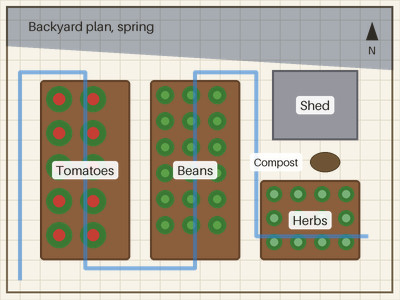
- A backyard vegetable garden plan that we drew and saved as an OpenRaster file with seven layers and a layer group, including a hidden layer and a multiply layer. (CC0-1.0). How it was made
- Made by
- 2026-11-04, API build
9eeeb0640aba
Parameters
Send these as form fields next to the file. Names are case-insensitive. If you set one of the documented options below that we don't support yet, the request fails with a 400 that names it instead of returning a file made without it.
| Parameter | What it does |
|---|---|
ImageQualityinteger, default 85 | Encoder quality. The plan weighed 39,989 bytes at the sample's 90, 32,915 at our default of 85 and 18,354 at 50. ConvertAPI documents 75 for PNG to JPG.Values: 1–100 |
AlphaColorstring, default white | Fill for transparent parts of the canvas. The sample has an opaque paper layer, so the color changed nothing there.Values: white, black, red, green, blue, gray, #RRGGBB or R,G,B |
BackgroundColorstring, default white | Read in place of AlphaColor when that one is missing.Values: Same as AlphaColor |
ImageWidthinteger | Width of the JPEG; the plan's 4:3 shape is kept, so 160 gives 160 × 120 (8,269 bytes).Values: 1–20000 |
ImageHeightinteger | Height of the JPEG; 150 gives 200 × 150.Values: 1–20000 |
ScaleProportionsboolean, default true | false with 200 × 200 squeezes the plan into a square (14,652 bytes). |
ScaleIfLargerboolean, default false | true keeps the 400 px plan when a bigger size is requested. |
ScaleImageboolean, default true | false keeps a top-left crop of the requested size. |
ColorSpaceenum, default default | gray gives a one-channel JPEG of 21,625 bytes at quality 85.Values: default, rgb, gray, monochrome (also srgb, truecolors, grayscale); cmyk returns 400 |
ImageResolutioninteger | JFIF density in dpi. The .ora's 150 ppi is not copied; ImageResolution=150 writes it.Values: 10–800 |
FileNamestring | Name for the result instead of garden-plan.jpg. |
StoreFileboolean, default false | Hold the JPEG for 3 hours and answer with a URL. |
What carries over, and what doesn't
Kept
- The composited stack, including the 50% Multiply shade over the title band and the 60% drip line
- Chroma at full resolution: the encoder writes 4:4:4, so even the thin blue drip line is not subsampled
- The 400 × 300 size unless you resize
Lost or not yet supported
- Exactness. JPEG is lossy: at 90 the plan looked clean to us, while at 50 faint ringing shows along the label boxes when zoomed in.
- Transparency, which JPEG can't hold; transparent canvas becomes
AlphaColor, white by default. - Layers, groups and the hidden 'Old layout' layer, which is left out.
- The 150 ppi and any embedded profile, unless you set
ImageResolution. - Bit depth above 8, if the layer PNGs were 16-bit.
Limits
- One .ora per request, canvas up to 100,000,000 pixels, no side above 300,000 px.
- JPEG output is capped at 65,500 px a side, a little below the format's 65,535: a 65,501 × 10 test .ora returned 413 (
JPEG images can be at most 65,500 pixels on a side, and this one is 65,501×10), while 65,500 × 10 converted. - Requests up to 10 MB on the Free plan or 100 MB on paid plans, all files and fields together.
- A conversion may take 120 seconds before it is stopped with 504.
- Tested with .ora files written by our own script, not yet with files from painting apps.
Where teams use it
Sharing plans and sketches
Send a JPEG of a layered plan to people who will only look at it. The sample garden plan is 39,989 bytes at quality 90, small enough for a mail or chat attachment.
CMS uploads that only take JPEG
When a site's media library accepts JPEG only, convert the .ora on upload and keep the OpenRaster file as the editable original.
Questions
Which quality setting suits line drawings?
The plan used 90 (39,989 bytes); 85, our default, gave 32,915; 50 gave 18,354, with faint ringing along the label boxes at 4× zoom. If the drawing must stay exact, use PNG or WebP from the same .ora.
Are hidden layers and blend modes respected?
Yes. Layers with visibility='hidden' are skipped, and the OpenRaster blend modes, from multiply to luminosity, are applied before the JPEG is written. Only the masking operators such as dst-in fall back to a normal blend.
Is the merged image inside the .ora used?
No. The stack is composited from its layers each time, so the JPEG reflects stack.xml even if the stored mergedimage.png is outdated or missing.
Convert your first ORA file in a minute.