ORA to PDF API
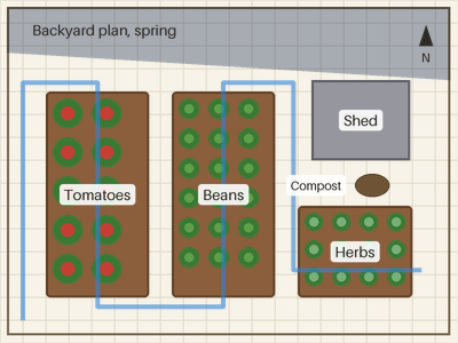
POST an .ora to /v2/convert/ora/to/pdf to get one PDF page holding the composited layers as a lossless image. With no page size the page matches the canvas at 96 pixels per inch, so the 400 × 300 plan is a 300 × 225 pt page.
- Endpoint
- POST /v2/
convert/ ora/ to/ pdf - Accepts
- ora
- Sample timing
- 47 ms median of 5 runsHow we measure
- Request size
- Up to 10 MB on the Free plan or 100 MB on paid plans, all files together
Request and response
Every sample below ran against the API before this page was published. Set PDFCONVERSIONAPI_KEY to your key and run it as is.
curl -sS -X POST \
  https://api.pdfconversionapi.com/v2/convert/ora/to/pdf \
  -H "Authorization: Bearer $PDFCONVERSIONAPI_KEY" \
  -F File=@garden-plan.ora \
  -o response.json

# FileData is base64. Save the first file in converted/,
# or print the JSON error.
if jq -e '.Files' response.json > /dev/null; then
  mkdir -p converted
  name=$(jq -r '.Files[0].FileName' response.json)
  jq -r '.Files[0].FileData' response.json \
    | base64 --decode > "converted/$name"
else
  cat response.json
fi
import base64
import os
import requests
key = os.environ["PDFCONVERSIONAPI_KEY"]
response = requests.post(
"https://api.pdfconversionapi.com/v2/convert/ora/to/pdf",
headers={"Authorization": f"Bearer {key}"},
files=[("File", open("garden-plan.ora", "rb"))],
timeout=180,
)
result = response.json()
if not response.ok:
raise SystemExit(f"{result['Code']}: {result['Message']}")
os.makedirs("converted", exist_ok=True)
for file in result["Files"]:
path = os.path.join("converted", file["FileName"])
with open(path, "wb") as out:
out.write(base64.b64decode(file["FileData"]))
print(path, file["FileSize"], "bytes")
import { mkdir, readFile, writeFile } from "node:fs/promises";
import { join } from "node:path";

const form = new FormData();
const file = "garden-plan.ora";
form.append("File", new Blob([await readFile(file)]), file);

const url = "https://api.pdfconversionapi.com/v2/convert/ora/to/pdf";
const key = process.env.PDFCONVERSIONAPI_KEY;
const response = await fetch(url, {
  method: "POST",
  headers: { Authorization: `Bearer ${key}` },
  body: form,
});
const result = await response.json();
if (!response.ok) {
  throw new Error(`${result.Code}: ${result.Message}`);
}

await mkdir("converted", { recursive: true });
for (const file of result.Files) {
  const path = join("converted", file.FileName);
  await writeFile(path, Buffer.from(file.FileData, "base64"));
  console.log(path, file.FileSize, "bytes");
}
{
  "ConversionCost": 1,
  "ConversionTime": 0.047,
  "Files": [
    {
      "FileName": "garden-plan.pdf",
      "FileExt": "pdf",
      "FileSize": 36166,
      "FileData": "JVBERi0xLjcKJYCAgIAKMSAw…"
    }
  ]
}
Response from our test run on 2026-11-03. ConversionTime shows the median of 5 runs. FileData is shortened here; the real response carries the whole file as base64.
The sample, converted
The same file the code sends. Download the input and the output and compare them yourself.
- Input
- garden-plan.ora (123 KB)
- Output
- garden-plan.pdf (35 KB)
- Source
- A backyard vegetable garden plan that we drew and saved as an OpenRaster file with seven layers and a layer group, including a hidden layer and a multiply layer. (CC0-1.0). How it was made
- Made by
- 2026-11-04, API build
9eeeb0640aba
Parameters
Send these as form fields next to the file. Names are case-insensitive. If you set one of the documented options below that we don't support yet, the request fails with a 400 that names it instead of returning a file made without it.
| Parameter | What it does |
|---|---|
PageSizeenum, default default | Standard paper instead of a canvas-sized page. The plan is centered at its own size: on A4 it sits at 147.6, 308.4 pt, 300 pt wide, and is not enlarged.Values: default, auto, a3, a4, a5, letter, legal |
PageOrientationenum, default default | landscape turns the paper; Letter landscape is 792 × 612 pt. On its own, without PageSize, it has no effect.Values: default, portrait, landscape |
Rotateinteger | Turns the plan on the page. 90 or -90 gives a portrait 225 × 300 pt page; 45 gives a 371.23 pt square so the corners fit.Values: -360–360 (degrees, clockwise) |
MarginHorizontalinteger, default 0 | Left and right margin in millimeters; 10 widens the canvas-sized page to 356.69 pt.Values: 0–500 (mm) |
MarginVerticalinteger, default 0 | Top and bottom margin; 20 makes the page 338.39 pt tall. If margins leave no room on a fixed page, the API returns 400.Values: 0–500 (mm) |
FileNamestring | Base name for the PDF, garden-plan by default. |
StoreFileboolean, default false | Keep the PDF for 3 hours and get a link back. |
What carries over, and what doesn't
Kept
- The composited pixels without loss: the embedded image is Flate-compressed RGB and decodes to our PNG output exactly
- No soft mask for opaque art like the sample; one is added when the canvas has transparency
- The plan's 4:3 shape on any page size, centered
Lost or not yet supported
- The 150 ppi from stack.xml. Pages use 96 pixels per inch, so the plan is 4.17 × 3.13 inches instead of 2.67 × 2.
- Layers: the PDF holds one flat image, and the labels are pixels, not searchable text.
- Color profiles from layer PNGs; the image is plain DeviceRGB.
- PDF/A:
Pdfa=trueis accepted and ignored, and the result is ordinary PDF 1.7.
Limits
- One .ora and one page per request; canvas up to 100,000,000 pixels and 300,000 px on its longest side.
- Requests up to 10 MB on the Free plan or 100 MB on paid plans, all files and fields together.
- Conversions end with 504 after 120 seconds.
- Images are never scaled up to fill a page; they are only shrunk to fit inside margins.
ImageWidth,ColorSpaceandPdfaare not read here and don't change the PDF.
Where teams use it
Printable plans and layouts
Garden plans, floor sketches and diagrams drawn in layers can go out as a PDF that prints on Letter or A4 with PageSize, while the .ora stays editable.
Attaching drawings to reports
When a report or ticket system takes PDF attachments, convert the OpenRaster file directly; the image is embedded without recompression, so labels stay as sharp as in the composite.
Questions
How big is the page?
Without PageSize, the canvas at 96 pixels per inch, plus margins. The 400 × 300 plan is 300 × 225 pt. With PageSize=letter and PageOrientation=landscape, the page is 792 × 612 pt with the plan centered at 300 × 225 pt.
Will the text in my drawing be selectable?
No. OpenRaster layers are raster images, so labels are pixels in the composite. Run the PDF through OCR if you need searchable text.
Is the drawing recompressed?
No. The composite is embedded with lossless Flate compression and decodes to exactly the pixels of our PNG output for the same file. The sample PDF is 36,166 bytes.
Convert your first ORA file in a minute.