PDN to SVG API
POST a .pdn to /v2/convert/pdn/to/svg and get an SVG of filled color paths traced from the merged layers. The sample sends CurveMode=polygon for straight edges, which made the file a quarter of the size of the default curved trace.
- Endpoint
- POST /v2/
convert/ pdn/ to/ svg - Accepts
- pdn
- Sample timing
- 59 ms median of 5 runsHow we measure
- Request size
- Up to 10 MB on the Free plan or 100 MB on paid plans, all files together
Request and response
Every sample below ran against the API before this page was published. Set PDFCONVERSIONAPI_KEY to your key and run it as is.
curl -sS -X POST \
  https://api.pdfconversionapi.com/v2/convert/pdn/to/svg \
  -H "Authorization: Bearer $PDFCONVERSIONAPI_KEY" \
  -F File=@lemonade-stand-sign.pdn \
  --form-string CurveMode=polygon \
  -o response.json

# FileData is base64. Save the first file in converted/,
# or print the JSON error.
if jq -e '.Files' response.json > /dev/null; then
  mkdir -p converted
  name=$(jq -r '.Files[0].FileName' response.json)
  jq -r '.Files[0].FileData' response.json \
    | base64 --decode > "converted/$name"
else
  cat response.json
fi
import base64
import os
import requests
key = os.environ["PDFCONVERSIONAPI_KEY"]
response = requests.post(
"https://api.pdfconversionapi.com/v2/convert/pdn/to/svg",
headers={"Authorization": f"Bearer {key}"},
files=[("File", open("lemonade-stand-sign.pdn", "rb"))],
data={
"CurveMode": "polygon",
},
timeout=180,
)
result = response.json()
if not response.ok:
raise SystemExit(f"{result['Code']}: {result['Message']}")
os.makedirs("converted", exist_ok=True)
for file in result["Files"]:
path = os.path.join("converted", file["FileName"])
with open(path, "wb") as out:
out.write(base64.b64decode(file["FileData"]))
print(path, file["FileSize"], "bytes")
import { mkdir, readFile, writeFile } from "node:fs/promises";
import { join } from "node:path";

const form = new FormData();
const file = "lemonade-stand-sign.pdn";
form.append("File", new Blob([await readFile(file)]), file);
form.append("CurveMode", "polygon");

const url = "https://api.pdfconversionapi.com/v2/convert/pdn/to/svg";
const key = process.env.PDFCONVERSIONAPI_KEY;
const response = await fetch(url, {
  method: "POST",
  headers: { Authorization: `Bearer ${key}` },
  body: form,
});
const result = await response.json();
if (!response.ok) {
  throw new Error(`${result.Code}: ${result.Message}`);
}

await mkdir("converted", { recursive: true });
for (const file of result.Files) {
  const path = join("converted", file.FileName);
  await writeFile(path, Buffer.from(file.FileData, "base64"));
  console.log(path, file.FileSize, "bytes");
}
{
  "ConversionCost": 1,
  "ConversionTime": 0.059,
  "Files": [
    {
      "FileName": "lemonade-stand-sign.svg",
      "FileExt": "svg",
      "FileSize": 38134,
      "FileData": "PD94bWwgdmVyc2lvbj0iMS4w…"
    }
  ]
}
Response from our test run on 2026-11-03. ConversionTime shows the median of 5 runs. FileData is shortened here; the real response carries the whole file as base64.
The sample, converted
The same file the code sends. Download the input and the output and compare them yourself.
- Input
- lemonade-stand-sign.pdn (87 KB)
- Output
- lemonade-stand-sign.svg (37 KB)
- Source
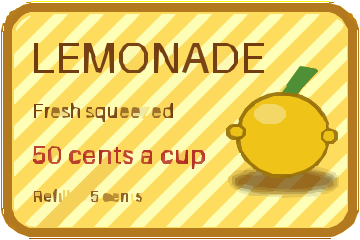
- A 360 x 240 price sign with rounded transparent corners that we drew and wrote as a layered PDN file ourselves: seven layers, including Overlay and Multiply blend modes, a semi-transparent shine and a hidden draft layer. (CC0-1.0). How it was made
- Made by
- 2026-11-04, API build
9eeeb0640aba
Parameters
Send these as form fields next to the file. Names are case-insensitive. If you set one of the documented options below that we don't support yet, the request fails with a 400 that names it instead of returning a file made without it.
| Parameter | What it does |
|---|---|
CurveModeenum, default spline | polygon, used by the sample, gives straight segments: 38,134 bytes. The default spline fits curves to the same 265 paths in 146,106 bytes; pixel follows pixel edges in 178,731.Values: spline, polygon, pixel |
Presetenum, default none | Starting settings: photo gave 117 paths, poster 274, and bw 20 black paths in 9,796 bytes.Values: none, bw, poster, photo |
ColorModeenum, default color | bw traces dark shapes only, the same 9,796-byte result as the bw preset for the sign.Values: color, bw |
ColorPrecisioninteger, default 6 | Bits per channel kept before tracing; 4 merged shades and gave 200 paths.Values: 1–8 |
FilterSpeckleinteger, default 4 | Patches smaller than this many pixels across are dropped: 16 left 120 paths, 1 kept 315.Values: 0–128 |
GradientStepinteger, default 16 | Color difference between stacked layers of the trace; 32 cut it to 233 paths.Values: 0–128 |
Layeringenum, default stacked | cutout makes shapes that do not overlap: 176 paths and 93,809 bytes.Values: stacked, cutout |
CornerThresholdinteger, default 60 | In curve mode, the smallest angle in degrees kept as a corner; 90 gave 154,830 bytes.Values: 0–180 |
SegmentLengthnumber, default 4 | In curve mode, the length curves are split down to; 8 gave 119,020 bytes.Values: 3.5–10 |
SpliceThresholdinteger, default 45 | In curve mode, the change of direction in degrees at which a curve is split; 90 gave 126,288 bytes.Values: 0–180 |
ImageWidthinteger | Scales the merged picture before tracing: 200 gave a 200 × 133 SVG with 193 paths. Needed for canvases over 12,000,000 pixels.Values: 1–20000 |
FileNamestring | Base name of the result; without it the file comes back as lemonade-stand-sign.svg. |
StoreFileboolean, default false | true returns a 3-hour link instead of the SVG in the JSON. |
What carries over, and what doesn't
Kept
- Flat shapes and their colors: the board, its brown border, the lemon and its leaf come out as filled paths
- Transparent areas: nothing is drawn in the rounded corners (3,224 clear pixels when the SVG is rendered, against 3,311 in the PNG)
- Large lettering: LEMONADE and the red price stay readable
- The canvas size, as
width="360"andheight="240"on the root element
Lost or not yet supported
- Small text where the stripes cross it: 'Refills 25 cents' and part of 'squeezed' broke into fragments.
- Exact colors: rendered back, the polygon trace was 4.58 levels from the PNG on average over opaque pixels, the default curves 5.7.
- A
viewBox, which CSS scaling needs; add one before resizing the SVG in a page. - Paint.NET layers. The tracer sees only the merged picture.
Limits
- One PDN per request, merged canvas up to 100,000,000 pixels.
- Tracing takes at most 12,000,000 pixels: a 4,000 × 3,001 PDN got 413 until it was sent with
ImageWidth=2000. - Requests up to 10 MB on the Free plan or 100 MB on paid plans, all files and fields together.
- 120 seconds per conversion, then 504.
Where teams use it
Signs and logos at any size
Flat-color artwork from Paint.NET, such as signs, badges and logos, can be traced once and then printed or displayed at any size without pixel blur.
Paths for cutters and engravers
With ColorMode=bw, dark shapes come back as black paths that vinyl cutter and laser software can follow.
Questions
Why use `CurveMode=polygon`?
For artwork of straight edges and text, it is much smaller: the sign took 38,134 bytes as polygons against 146,106 as curves, from the same 265 paths. Rendered back, the polygon version was also a little closer to the original, 4.58 levels against 5.7.
Does the SVG keep the transparent background?
Yes. Clear areas get no path, so the sign's corners stay empty when the SVG is placed on a colored page.
Why is the small text broken up?
The tracer outlines areas of one color. Where the white Overlay stripes cross thin letters, each letter splits into pieces of different color, and small pieces are merged or dropped. LEMONADE, crossed by the same stripes, stayed whole.
Convert your first PDN file in a minute.