PNM to JPG API
POST a netpbm image to /v2/convert/pnm/to/jpg and get a baseline JPEG back. The sample render, 230,415 bytes as a P6 file, came back as 16,587 bytes at ImageQuality=90, about 7% of its size.
- Endpoint
- POST /v2/
convert/ pnm/ to/ jpg - Accepts
- pnm
- Sample timing
- 1 ms median of 5 runsHow we measure
- Request size
- Up to 10 MB on the Free plan or 100 MB on paid plans, all files together
Request and response
Every sample below ran against the API before this page was published. Set PDFCONVERSIONAPI_KEY to your key and run it as is.
curl -sS -X POST \
  https://api.pdfconversionapi.com/v2/convert/pnm/to/jpg \
  -H "Authorization: Bearer $PDFCONVERSIONAPI_KEY" \
  -F File=@three-spheres-render.ppm \
  --form-string ImageQuality=90 \
  -o response.json

# FileData is base64. Save the first file in converted/,
# or print the JSON error.
if jq -e '.Files' response.json > /dev/null; then
  mkdir -p converted
  name=$(jq -r '.Files[0].FileName' response.json)
  jq -r '.Files[0].FileData' response.json \
    | base64 --decode > "converted/$name"
else
  cat response.json
fi
import base64
import os
import requests
key = os.environ["PDFCONVERSIONAPI_KEY"]
response = requests.post(
"https://api.pdfconversionapi.com/v2/convert/pnm/to/jpg",
headers={"Authorization": f"Bearer {key}"},
files=[("File", open("three-spheres-render.ppm", "rb"))],
data={
"ImageQuality": "90",
},
timeout=180,
)
result = response.json()
if not response.ok:
raise SystemExit(f"{result['Code']}: {result['Message']}")
os.makedirs("converted", exist_ok=True)
for file in result["Files"]:
path = os.path.join("converted", file["FileName"])
with open(path, "wb") as out:
out.write(base64.b64decode(file["FileData"]))
print(path, file["FileSize"], "bytes")
import { mkdir, readFile, writeFile } from "node:fs/promises";
import { join } from "node:path";

const form = new FormData();
const file = "three-spheres-render.ppm";
form.append("File", new Blob([await readFile(file)]), file);
form.append("ImageQuality", "90");

const url = "https://api.pdfconversionapi.com/v2/convert/pnm/to/jpg";
const key = process.env.PDFCONVERSIONAPI_KEY;
const response = await fetch(url, {
  method: "POST",
  headers: { Authorization: `Bearer ${key}` },
  body: form,
});
const result = await response.json();
if (!response.ok) {
  throw new Error(`${result.Code}: ${result.Message}`);
}

await mkdir("converted", { recursive: true });
for (const file of result.Files) {
  const path = join("converted", file.FileName);
  await writeFile(path, Buffer.from(file.FileData, "base64"));
  console.log(path, file.FileSize, "bytes");
}
{
  "ConversionCost": 1,
  "ConversionTime": 0.001,
  "Files": [
    {
      "FileName": "three-spheres-render.jpg",
      "FileExt": "jpg",
      "FileSize": 16587,
      "FileData": "/9j/4AAQSkZJRgABAgAAAQAB…"
    }
  ]
}
Response from our test run on 2026-11-03. ConversionTime shows the median of 5 runs. FileData is shortened here; the real response carries the whole file as base64.
The sample, converted
The same file the code sends. Download the input and the output and compare them yourself.
- Input
- three-spheres-render.ppm (225 KB)
- Output
- three-spheres-render.jpg (16 KB)
- Source
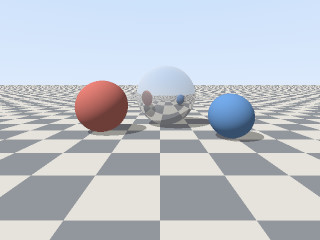
- A 320 x 240 frame from a small ray tracer we wrote for this page (three spheres on a checkered floor), saved as a binary PPM (P6) with 8 bits per channel. (CC0-1.0). How it was made
- Made by
- 2026-11-04, API build
9eeeb0640aba
Parameters
Send these as form fields next to the file. Names are case-insensitive. If you set one of the documented options below that we don't support yet, the request fails with a 400 that names it instead of returning a file made without it.
| Parameter | What it does |
|---|---|
ImageQualityinteger, default 85 | Encoder quality. For the render: 7,785 bytes at 50, 10,639 at 75, 13,640 at the default 85 and 16,587 at 90, the sample's setting.Values: 1–100 |
ColorSpaceenum, default default | gray writes a one-channel JPEG (9,912 bytes for the render). Without it, even a PGM input is saved with three color channels.Values: default, rgb, gray, monochrome |
AlphaColorstring, default white | Only matters for PAM files with an alpha channel: their clear and partly clear pixels are blended onto this color. PPM and PGM have no alpha, so it changes nothing for them.Values: A color name, #RRGGBB or R,G,B |
BackgroundColorstring, default white | Read as the blend color when AlphaColor isn't sent.Values: Same as AlphaColor |
ImageWidthinteger | JPEG width. ImageWidth=128 gave a 128 × 96 thumbnail of 3,632 bytes.Values: 1–20000 |
ImageHeightinteger | JPEG height, or the box height when combined with a width.Values: 1–20000 |
ScaleProportionsboolean, default true | false stretches the frame into the exact box. |
ScaleIfLargerboolean, default false | true makes resizing shrink-only. |
ScaleImageboolean, default true | false crops from the top-left corner instead of scaling. |
ImageResolutioninteger | Stored as the JFIF density in dots per inch; left out, the JPEG records only a 1:1 pixel aspect.Values: 10–800 |
ImageInterpolationboolean, default false | Accepted; resizing uses Lanczos regardless. |
FileNamestring | Name of the JPEG; defaults to the uploaded file's name. |
StoreFileboolean, default false | Return a URL valid for 3 hours instead of base64. |
What carries over, and what doesn't
Kept
- Colors within a few levels: at quality 90 the largest error against the PPM was 32 levels, the average 1.2
- Full color resolution, with no chroma subsampling (4:4:4)
- The 320 × 240 frame size
Lost or not yet supported
- Exact values, since JPEG is lossy.
- 16-bit depth. A 16-bit PPM gave the same JPEG, byte for byte, as its 8-bit version.
- PAM transparency, which is blended onto
AlphaColor. - The single gray channel of a PGM, unless you send
ColorSpace=gray: a test PGM came back as an 11,405-byte color JPEG, and as 9,910 bytes withgray.
Limits
- One file per request.
- Requests up to 10 MB on the Free plan or 100 MB on paid plans, all files and fields together.
- Images over 100,000,000 pixels return 413 before decoding.
- Each side can be at most 65,500 px, a little under the 65,535 a JPEG header can record: a 65,501 × 2 PPM returned 413 "JPEG images can be at most 65,500 pixels on a side, and this one is 65,501×2", while the 65,500 × 2 one converted.
- 120 seconds per conversion, then 504.
Where teams use it
Previews of rendered frames
Code that writes PPM frames, such as a renderer or a simulation, can post each frame here for a preview that fits in a web page or a chat message. At quality 90 the sample is 16,587 bytes instead of 230,415.
Uploads to services that want JPEG
Upload forms and print services that accept JPEG but not netpbm files can receive your frames once they are converted, instead of rejecting them.
Questions
What quality is used if I don't send ImageQuality?
85. For the sample render that gives 13,640 bytes; the code samples on this page send 90 for 16,587 bytes.
Why did my grayscale PGM become a color JPEG?
The JPEG is written with three channels unless you ask for gray. Send ColorSpace=gray to get a one-channel JPEG, which is also smaller.
Does a 16-bit PPM give a better JPEG?
No. JPEG here is 8 bits per channel, and the 16-bit test file produced exactly the same bytes as the 8-bit render it was made from. Use /v2/convert/pnm/to/png or /v2/convert/pnm/to/tiff to keep 16 bits.
Convert your first PNM file in a minute.