PNM to WebP API
POST a .ppm, .pgm, .pbm or .pam file to /v2/convert/pnm/to/webp and get a lossless WebP. For the sample render that is 9% of the PPM's size and 26% smaller than the PNG of the same pixels.
- Endpoint
- POST /v2/
convert/ pnm/ to/ webp - Accepts
- pnm
- Sample timing
- 1 ms median of 5 runsHow we measure
- Request size
- Up to 10 MB on the Free plan or 100 MB on paid plans, all files together
Request and response
Every sample below ran against the API before this page was published. Set PDFCONVERSIONAPI_KEY to your key and run it as is.
curl -sS -X POST \
  https://api.pdfconversionapi.com/v2/convert/pnm/to/webp \
  -H "Authorization: Bearer $PDFCONVERSIONAPI_KEY" \
  -F File=@three-spheres-render.ppm \
  -o response.json

# FileData is base64. Save the first file in converted/,
# or print the JSON error.
if jq -e '.Files' response.json > /dev/null; then
  mkdir -p converted
  name=$(jq -r '.Files[0].FileName' response.json)
  jq -r '.Files[0].FileData' response.json \
    | base64 --decode > "converted/$name"
else
  cat response.json
fi
import base64
import os
import requests
key = os.environ["PDFCONVERSIONAPI_KEY"]
response = requests.post(
"https://api.pdfconversionapi.com/v2/convert/pnm/to/webp",
headers={"Authorization": f"Bearer {key}"},
files=[("File", open("three-spheres-render.ppm", "rb"))],
timeout=180,
)
result = response.json()
if not response.ok:
raise SystemExit(f"{result['Code']}: {result['Message']}")
os.makedirs("converted", exist_ok=True)
for file in result["Files"]:
path = os.path.join("converted", file["FileName"])
with open(path, "wb") as out:
out.write(base64.b64decode(file["FileData"]))
print(path, file["FileSize"], "bytes")
import { mkdir, readFile, writeFile } from "node:fs/promises";
import { join } from "node:path";

const form = new FormData();
const file = "three-spheres-render.ppm";
form.append("File", new Blob([await readFile(file)]), file);

const url = "https://api.pdfconversionapi.com/v2/convert/pnm/to/webp";
const key = process.env.PDFCONVERSIONAPI_KEY;
const response = await fetch(url, {
  method: "POST",
  headers: { Authorization: `Bearer ${key}` },
  body: form,
});
const result = await response.json();
if (!response.ok) {
  throw new Error(`${result.Code}: ${result.Message}`);
}

await mkdir("converted", { recursive: true });
for (const file of result.Files) {
  const path = join("converted", file.FileName);
  await writeFile(path, Buffer.from(file.FileData, "base64"));
  console.log(path, file.FileSize, "bytes");
}
{
  "ConversionCost": 1,
  "ConversionTime": 0.001,
  "Files": [
    {
      "FileName": "three-spheres-render.webp",
      "FileExt": "webp",
      "FileSize": 20908,
      "FileData": "UklGRqRRAABXRUJQVlA4TJdR…"
    }
  ]
}
Response from our test run on 2026-11-03. ConversionTime shows the median of 5 runs. FileData is shortened here; the real response carries the whole file as base64.
The sample, converted
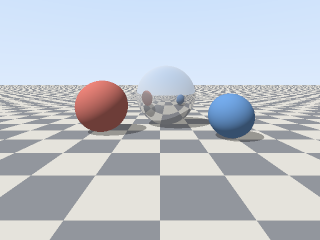
The same file the code sends. Download the input and the output and compare them yourself.
- Input
- three-spheres-render.ppm (225 KB)
- Output
- three-spheres-render.webp (20 KB)
- Source
- A 320 x 240 frame from a small ray tracer we wrote for this page (three spheres on a checkered floor), saved as a binary PPM (P6) with 8 bits per channel. (CC0-1.0). How it was made
- Made by
- 2026-11-04, API build
9eeeb0640aba
Parameters
Send these as form fields next to the file. Names are case-insensitive. If you set one of the documented options below that we don't support yet, the request fails with a 400 that names it instead of returning a file made without it.
| Parameter | What it does |
|---|---|
ImageWidthinteger | Width of the WebP; the render at ImageWidth=128 is 128 × 96 and 9,670 bytes.Values: 1–16384 |
ImageHeightinteger | Height, deriving the width when sent alone (ImageHeight=100 gives 133 × 100).Values: 1–16384 |
ScaleProportionsboolean, default true | false fills a differently shaped box by stretching. |
ScaleIfLargerboolean, default false | true never enlarges a frame past its own size. |
ScaleImageboolean, default true | false keeps 1:1 pixels and crops from the top-left. |
ColorSpaceenum, default default | gray brings the render down to 9,426 bytes and monochrome to 532 bytes.Values: default, rgb, gray, monochrome |
TransparentColorstring | Makes one exact color transparent: #92969D clears the 19,013 pixels of exactly that gray, the unshaded parts of the dark floor tiles (22,568 bytes); shadowed tile pixels stay opaque.Values: Color name, #RRGGBB or R,G,B |
ImageResolutioninteger | Accepted, not stored: WebP has no DPI field.Values: 10–800 |
ImageInterpolationboolean, default false | Accepted; scaling is Lanczos in every case. |
FileNamestring | Base name for the .webp; taken from the upload by default. |
StoreFileboolean, default false | Get a 3-hour link instead of the file in the JSON. |
What carries over, and what doesn't
Kept
- Every pixel of 8-bit input: decoding the sample WebP gives the PPM's RGB values exactly
- Alpha from PAM files: a P7 RGB_ALPHA test file kept its alpha values of 0 and 128
- The 320 × 240 size
Lost or not yet supported
- 16-bit precision. A 16-bit PPM gives the same 8-bit WebP as its 8-bit source.
- A lossy option.
ImageQualityisn't read on this route and is ignored: quality 50 returned the same bytes as no setting. - Gray as a separate format: PGM input is stored as color WebP with equal red, green and blue.
- Header comments and the original maxval.
Limits
- One file per request.
- Requests up to 10 MB on the Free plan or 100 MB on paid plans, all files and fields together.
- 100,000,000 pixels per image, and the same cap after resizing.
- A WebP side can't pass 16,384 px. A 16,385 × 2 PPM returned 413 "WebP images can be at most 16,384 pixels on a side, and this one is 16,385×2" and the 16,384 × 2 one converted. A resize past 16,384, such as
ImageWidth=16385withImageHeight=10andScaleProportions=false, gets the same 413 ending in "; lower ImageWidth or ImageHeight", though the API accepts values up to 20,000. - 120 seconds per conversion, then 504.
Where teams use it
Publishing renders on the web
Frames written as PPM by renderers and simulations can go straight to a web page as WebP without any loss. The sample needs 20,908 bytes, against 28,436 as PNG and 230,415 as PPM.
Compact storage of netpbm datasets
Lossless WebP keeps every value of 8-bit PPM and PGM images, so a collection can be stored smaller and decoded back to the same pixels when needed.
Questions
Is the WebP lossless?
Yes, always. The encoder writes the lossless WebP format, and the sample decodes to the same pixels as the PPM.
Why doesn't ImageQuality change the file?
There is no lossy encoder on this route, and ImageQuality isn't one of the options it reads. Unread options that ConvertAPI doesn't document for a pair are ignored, so the request succeeds with the lossless file.
Does the WebP of an opaque PPM have an alpha channel?
No. When every pixel is opaque, the WebP is written as RGB and its header says no alpha is used, as in the sample. Alpha is stored only when some pixel is transparent, from a PAM alpha channel or a TransparentColor that matches. A fully opaque RGB_ALPHA PAM, or a color that matches nothing, still gives an RGB file.
Convert your first PNM file in a minute.