PNM to PNG API
POST a .ppm, .pgm, .pbm or .pam file to /v2/convert/pnm/to/png and get a lossless PNG back. Gray stays gray and 16-bit samples stay 16-bit; the 230,415-byte sample render came back as a 28,436-byte PNG with identical pixels.
- Endpoint
- POST /v2/
convert/ pnm/ to/ png - Accepts
- pnm
- Sample timing
- 1 ms median of 5 runsHow we measure
- Request size
- Up to 10 MB on the Free plan or 100 MB on paid plans, all files together
Request and response
Every sample below ran against the API before this page was published. Set PDFCONVERSIONAPI_KEY to your key and run it as is.
curl -sS -X POST \
  https://api.pdfconversionapi.com/v2/convert/pnm/to/png \
  -H "Authorization: Bearer $PDFCONVERSIONAPI_KEY" \
  -F File=@three-spheres-render.ppm \
  -o response.json

# FileData is base64. Save the first file in converted/,
# or print the JSON error.
if jq -e '.Files' response.json > /dev/null; then
  mkdir -p converted
  name=$(jq -r '.Files[0].FileName' response.json)
  jq -r '.Files[0].FileData' response.json \
    | base64 --decode > "converted/$name"
else
  cat response.json
fi
import base64
import os
import requests
key = os.environ["PDFCONVERSIONAPI_KEY"]
response = requests.post(
"https://api.pdfconversionapi.com/v2/convert/pnm/to/png",
headers={"Authorization": f"Bearer {key}"},
files=[("File", open("three-spheres-render.ppm", "rb"))],
timeout=180,
)
result = response.json()
if not response.ok:
raise SystemExit(f"{result['Code']}: {result['Message']}")
os.makedirs("converted", exist_ok=True)
for file in result["Files"]:
path = os.path.join("converted", file["FileName"])
with open(path, "wb") as out:
out.write(base64.b64decode(file["FileData"]))
print(path, file["FileSize"], "bytes")
import { mkdir, readFile, writeFile } from "node:fs/promises";
import { join } from "node:path";

const form = new FormData();
const file = "three-spheres-render.ppm";
form.append("File", new Blob([await readFile(file)]), file);

const url = "https://api.pdfconversionapi.com/v2/convert/pnm/to/png";
const key = process.env.PDFCONVERSIONAPI_KEY;
const response = await fetch(url, {
  method: "POST",
  headers: { Authorization: `Bearer ${key}` },
  body: form,
});
const result = await response.json();
if (!response.ok) {
  throw new Error(`${result.Code}: ${result.Message}`);
}

await mkdir("converted", { recursive: true });
for (const file of result.Files) {
  const path = join("converted", file.FileName);
  await writeFile(path, Buffer.from(file.FileData, "base64"));
  console.log(path, file.FileSize, "bytes");
}
{
  "ConversionCost": 1,
  "ConversionTime": 0.001,
  "Files": [
    {
      "FileName": "three-spheres-render.png",
      "FileExt": "png",
      "FileSize": 28436,
      "FileData": "iVBORw0KGgoAAAANSUhEUgAA…"
    }
  ]
}
Response from our test run on 2026-11-03. ConversionTime shows the median of 5 runs. FileData is shortened here; the real response carries the whole file as base64.
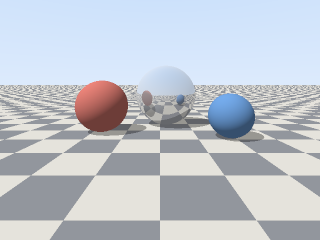
The sample, converted
The same file the code sends. Download the input and the output and compare them yourself.
- Input
- three-spheres-render.ppm (225 KB)
- Output
- three-spheres-render.png (28 KB)
- Source
- A 320 x 240 frame from a small ray tracer we wrote for this page (three spheres on a checkered floor), saved as a binary PPM (P6) with 8 bits per channel. (CC0-1.0). How it was made
- Made by
- 2026-11-04, API build
9eeeb0640aba
Parameters
Send these as form fields next to the file. Names are case-insensitive. If you set one of the documented options below that we don't support yet, the request fails with a 400 that names it instead of returning a file made without it.
| Parameter | What it does |
|---|---|
ImageWidthinteger | PNG width in pixels. The 320 × 240 render becomes 128 × 96 (11,333 bytes) with ImageWidth=128.Values: 1–20000 |
ImageHeightinteger | PNG height; ImageHeight=100 gives 133 × 100, the width rounded from the 4:3 shape.Values: 1–20000 |
ScaleProportionsboolean, default true | false with both sizes squeezes the frame into that exact box instead of fitting it inside. |
ScaleIfLargerboolean, default false | true keeps frames that are already smaller than the request at their own size. |
ScaleImageboolean, default true | false cuts a top-left region of the requested size without resampling, handy for checking a detail at 1:1. |
ColorSpaceenum, default default | gray writes an 8-bit grayscale PNG (11,204 bytes for the render); monochrome thresholds at mid-gray (1,614 bytes); rgb turns a PGM into a color PNG.Values: default, rgb, gray, monochrome |
TransparentColorstring | Pixels of exactly this color become transparent. #92969D clears 19,013 pixels, the unshaded parts of the render's dark floor tiles; their shadowed and distant pixels have other grays and stay. Any value adds an alpha channel, even when no pixel matches: RGBA for color, gray plus alpha for a PGM, a PBM or ColorSpace=gray, where the color is matched after the change to gray.Values: Color name, #RRGGBB or R,G,B |
ImageResolutioninteger | Writes a pHYs chunk with this DPI (300 adds 21 bytes). PNM headers have no resolution, so there is none unless you send it.Values: 10–800 |
ImageInterpolationboolean, default false | Accepted; scaling is Lanczos whatever you send. |
FileNamestring | Base name of the PNG. three-spheres-render.ppm becomes three-spheres-render.png by default. |
StoreFileboolean, default false | Keep the PNG for 3 hours and return its URL instead of base64. |
What carries over, and what doesn't
Kept
- Every pixel: the sample PNG decodes to the same RGB values as the P6 input
- 16-bit samples: a 16-bit P6 test file (maxval 65535) became a 16-bit PNG with identical values
- Gray as gray: P2 and P5 graymaps give 8-bit grayscale PNGs, and PBM bitmaps give gray PNGs with values 0 and 255
- Alpha from PAM: a P7 RGB_ALPHA test file kept its rows of alpha 0, 128 and 255
Lost or not yet supported
- Comment lines in the header (
# ...); the PNG has the same pixels with or without them. - Unusual maxvals. Samples are rescaled to the full range, so in a PGM with maxval 100 the value 50 is written as 128.
- 1-bit packing. A PBM becomes an 8-bit grayscale PNG, not a 1-bit one.
Limits
- One netpbm file per request; a second one returns 400.
- Requests up to 10 MB on the Free plan or 100 MB on paid plans, all files and fields together.
- 100,000,000 pixels at most, checked from the header before the pixels are read: a header claiming 12000 × 9000 returns 413.
- 120 seconds per conversion, then 504.
Where teams use it
Viewing frames from render and simulation code
Ray tracers, simulations and test harnesses can write PPM with no library at all: a short header, then raw bytes. Converting to PNG makes those frames viewable in a browser, and the sample shrank from 230,415 to 28,436 bytes, about 88% less.
Image datasets stored as PGM or PPM
Some computer vision datasets and lab tools store images as PGM or PPM. PNG keeps the exact values, including 16-bit depth and grayscale, so measurements made on the PNG match the source.
Questions
Which netpbm variants are accepted?
All seven magic numbers: P1, P2 and P3 (ASCII bitmap, graymap, pixmap), P4, P5 and P6 (their binary forms) and P7 (PAM) with the BLACKANDWHITE, GRAYSCALE and RGB tuple types and their _ALPHA forms. PFM floating-point files are not: they return 422 "the input file could not be read: PFM (floating-point) images can't be read yet".
Does a 16-bit PPM stay 16-bit?
In PNG, yes. A test PPM with maxval 65535 came back as a 16-bit RGB PNG with the same sample values. A 12-bit file (maxval 4095) is stretched to the 16-bit range on the way.
Do I have to rename .ppm or .pgm files to .pnm?
No. The route is pnm, but the file is recognized by its first two bytes, so .ppm, .pgm, .pbm and .pam uploads all work as they are. The sample is sent as a .ppm.
What does a PGM with maxval 100 look like after conversion?
The values are rescaled so that the file's maxval, 100, maps to 255. In our test, a sample value of 50 was written as 128.
Convert your first PNM file in a minute.