PNM to PDF API
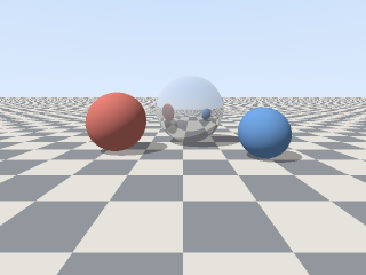
POST a netpbm image to /v2/convert/pnm/to/pdf and get a one-page PDF. The pixels are stored with lossless Flate compression: the 320 × 240 sample became a 3.33 × 2.5 inch page in an 18,105-byte file.
- Endpoint
- POST /v2/
convert/ pnm/ to/ pdf - Accepts
- pnm
- Sample timing
- 3 ms median of 5 runsHow we measure
- Request size
- Up to 10 MB on the Free plan or 100 MB on paid plans, all files together
Request and response
Every sample below ran against the API before this page was published. Set PDFCONVERSIONAPI_KEY to your key and run it as is.
curl -sS -X POST \
  https://api.pdfconversionapi.com/v2/convert/pnm/to/pdf \
  -H "Authorization: Bearer $PDFCONVERSIONAPI_KEY" \
  -F File=@three-spheres-render.ppm \
  -o response.json

# FileData is base64. Save the first file in converted/,
# or print the JSON error.
if jq -e '.Files' response.json > /dev/null; then
  mkdir -p converted
  name=$(jq -r '.Files[0].FileName' response.json)
  jq -r '.Files[0].FileData' response.json \
    | base64 --decode > "converted/$name"
else
  cat response.json
fi
import base64
import os
import requests
key = os.environ["PDFCONVERSIONAPI_KEY"]
response = requests.post(
"https://api.pdfconversionapi.com/v2/convert/pnm/to/pdf",
headers={"Authorization": f"Bearer {key}"},
files=[("File", open("three-spheres-render.ppm", "rb"))],
timeout=180,
)
result = response.json()
if not response.ok:
raise SystemExit(f"{result['Code']}: {result['Message']}")
os.makedirs("converted", exist_ok=True)
for file in result["Files"]:
path = os.path.join("converted", file["FileName"])
with open(path, "wb") as out:
out.write(base64.b64decode(file["FileData"]))
print(path, file["FileSize"], "bytes")
import { mkdir, readFile, writeFile } from "node:fs/promises";
import { join } from "node:path";

const form = new FormData();
const file = "three-spheres-render.ppm";
form.append("File", new Blob([await readFile(file)]), file);

const url = "https://api.pdfconversionapi.com/v2/convert/pnm/to/pdf";
const key = process.env.PDFCONVERSIONAPI_KEY;
const response = await fetch(url, {
  method: "POST",
  headers: { Authorization: `Bearer ${key}` },
  body: form,
});
const result = await response.json();
if (!response.ok) {
  throw new Error(`${result.Code}: ${result.Message}`);
}

await mkdir("converted", { recursive: true });
for (const file of result.Files) {
  const path = join("converted", file.FileName);
  await writeFile(path, Buffer.from(file.FileData, "base64"));
  console.log(path, file.FileSize, "bytes");
}
{
  "ConversionCost": 1,
  "ConversionTime": 0.003,
  "Files": [
    {
      "FileName": "three-spheres-render.pdf",
      "FileExt": "pdf",
      "FileSize": 18105,
      "FileData": "JVBERi0xLjcKJYCAgIAKMSAw…"
    }
  ]
}
Response from our test run on 2026-11-03. ConversionTime shows the median of 5 runs. FileData is shortened here; the real response carries the whole file as base64.
The sample, converted
The same file the code sends. Download the input and the output and compare them yourself.
- Input
- three-spheres-render.ppm (225 KB)
- Output
- three-spheres-render.pdf (18 KB)
- Source
- A 320 x 240 frame from a small ray tracer we wrote for this page (three spheres on a checkered floor), saved as a binary PPM (P6) with 8 bits per channel. (CC0-1.0). How it was made
- Made by
- 2026-11-04, API build
9eeeb0640aba
Parameters
Send these as form fields next to the file. Names are case-insensitive. If you set one of the documented options below that we don't support yet, the request fails with a 400 that names it instead of returning a file made without it.
| Parameter | What it does |
|---|---|
PageSizeenum, default default | Left out, the page takes the image's size at 96 px per inch (240 × 180 pt for the render). A named sheet centers the image at that same size, and shrinks it only if it doesn't fit inside the sheet and its margins.Values: default, auto, a3, a4, a5, letter, legal |
PageOrientationenum, default default | landscape turns a named sheet sideways, such as Letter at 792 × 612 pt. It has no effect on the default page.Values: default, portrait, landscape |
Rotateinteger | Turns the image clockwise by whole degrees. 90 or 270 puts the 320 × 240 render on a 180 × 240 pt portrait page; 45 makes a 296.98 pt square page that holds the tilted picture. Not sending it leaves the image as it is: netpbm headers have no orientation field.Values: -360 to 360 |
MarginHorizontalinteger, default 0 | Empty space in millimeters at the left and right. Without PageSize the page grows by twice the value: 10 turned the 240 × 180 pt page into 296.69 × 180. With a named sheet, the image shrinks to fit between the margins when it has to.Values: 0–500 (mm) |
MarginVerticalinteger, default 0 | Empty space in millimeters at the top and bottom: 10 gave 240 × 236.69 pt. Margins are added after the turn, so Rotate=90 with MarginHorizontal=10 gave 236.69 × 240 pt.Values: 0–500 (mm) |
FileNamestring | Base name of the PDF; the upload's name otherwise. |
StoreFileboolean, default false | Keep the PDF for 3 hours and return a link. |
What carries over, and what doesn't
Kept
- Every pixel: the image extracted from the sample PDF equals the PPM value for value
- Lossless storage, compressed with Flate (18,105 bytes against the PPM's 230,415)
- The image stream when you turn the picture or add margins: only the placement changes, and the 320 × 240 stream stays byte for byte the same
- Alpha from PAM files, as a soft mask: a P7 RGB_ALPHA test file produced one
Lost or not yet supported
- Color space and PDF/A options. ConvertAPI documents no options for PNM to PDF, so the ones this route doesn't read are ignored:
ColorSpace=grayandPdfa=truereturned the same PDF as no options. - Grayscale as a separate color space. A PGM is stored as an RGB image.
- 16-bit depth: a 16-bit PPM gives the same PDF as the 8-bit render.
- Size control.
ImageWidthisn't read here, and a named sheet never enlarges the image.
Limits
- One image per request and one page per PDF.
Rotatetakes whole degrees from -360 to 360, and margins whole millimeters from 0 to 500; other values return 400.- Requests up to 10 MB on the Free plan or 100 MB on paid plans, all files and fields together.
- Images over 100,000,000 pixels return 413 before decoding.
- 120 seconds per conversion, then 504.
Where teams use it
Captures and scans into documents
Camera, scanner and lab software that saves PNM can hand its output to people who expect a PDF. The pixels go in unchanged, so nothing is lost before printing or archiving.
Figures from your own code
Programs that write plots or renders as PPM get a printable page without adding a PDF library, and a frame from a camera mounted on its side can be stood upright with Rotate. For several images in one file, send them to /v2/convert/images/to/pdf.
Questions
How big is the PDF page?
The pixel count at 96 per inch, plus any margins. The 320 × 240 render gives 240 × 180 pt, 3.33 × 2.5 inches. With PageSize=letter the same image sits in the middle of an 8.5 × 11 inch sheet at that size.
Can I put a landscape frame on a portrait page?
Yes. Rotate=90 turns it clockwise and the page follows, so the render's 240 × 180 pt page becomes 180 × 240 pt. With PageSize=letter the turned image is centered on the upright sheet instead. -90 turns it the other way.
Why did Pdfa or ColorSpace not change my PDF?
This route doesn't read them, and because ConvertAPI documents no options for PNM to PDF, they are ignored without an error. Make an archival copy with /v2/convert/pdf/to/pdfa.
Is a grayscale PGM stored as gray?
No, it is written as an RGB image with equal channels. It looks the same but takes three samples per pixel inside the PDF.
Convert your first PNM file in a minute.