QOI to BMP API
POST a QOI to /v2/convert/qoi/to/bmp and get an uncompressed BMP. If any pixel is see-through, as on the sample card, it is 32-bit with a V4 header and an alpha mask; a fully opaque QOI, 3- or 4-channel, gives a 24-bit BMP with the 40-byte header.
- Endpoint
- POST /v2/
convert/ qoi/ to/ bmp - Accepts
- qoi
- Sample timing
- 1 ms median of 5 runsHow we measure
- Request size
- Up to 10 MB on the Free plan or 100 MB on paid plans, all files together
Request and response
Every sample below ran against the API before this page was published. Set PDFCONVERSIONAPI_KEY to your key and run it as is.
curl -sS -X POST \
  https://api.pdfconversionapi.com/v2/convert/qoi/to/bmp \
  -H "Authorization: Bearer $PDFCONVERSIONAPI_KEY" \
  -F File=@trail-map-card.qoi \
  -o response.json

# FileData is base64. Save the first file in converted/,
# or print the JSON error.
if jq -e '.Files' response.json > /dev/null; then
  mkdir -p converted
  name=$(jq -r '.Files[0].FileName' response.json)
  jq -r '.Files[0].FileData' response.json \
    | base64 --decode > "converted/$name"
else
  cat response.json
fi
import base64
import os
import requests
key = os.environ["PDFCONVERSIONAPI_KEY"]
response = requests.post(
"https://api.pdfconversionapi.com/v2/convert/qoi/to/bmp",
headers={"Authorization": f"Bearer {key}"},
files=[("File", open("trail-map-card.qoi", "rb"))],
timeout=180,
)
result = response.json()
if not response.ok:
raise SystemExit(f"{result['Code']}: {result['Message']}")
os.makedirs("converted", exist_ok=True)
for file in result["Files"]:
path = os.path.join("converted", file["FileName"])
with open(path, "wb") as out:
out.write(base64.b64decode(file["FileData"]))
print(path, file["FileSize"], "bytes")
import { mkdir, readFile, writeFile } from "node:fs/promises";
import { join } from "node:path";

const form = new FormData();
const file = "trail-map-card.qoi";
form.append("File", new Blob([await readFile(file)]), file);

const url = "https://api.pdfconversionapi.com/v2/convert/qoi/to/bmp";
const key = process.env.PDFCONVERSIONAPI_KEY;
const response = await fetch(url, {
  method: "POST",
  headers: { Authorization: `Bearer ${key}` },
  body: form,
});
const result = await response.json();
if (!response.ok) {
  throw new Error(`${result.Code}: ${result.Message}`);
}

await mkdir("converted", { recursive: true });
for (const file of result.Files) {
  const path = join("converted", file.FileName);
  await writeFile(path, Buffer.from(file.FileData, "base64"));
  console.log(path, file.FileSize, "bytes");
}
{
  "ConversionCost": 1,
  "ConversionTime": 0.001,
  "Files": [
    {
      "FileName": "trail-map-card.bmp",
      "FileExt": "bmp",
      "FileSize": 480122,
      "FileData": "Qk16UwcAAAAAAHoAAABsAAAA…"
    }
  ]
}
Response from our test run on 2026-11-03. ConversionTime shows the median of 5 runs. FileData is shortened here; the real response carries the whole file as base64.
The sample, converted
The same file the code sends. Download the input and the output and compare them yourself.
- Input
- trail-map-card.qoi (66 KB)
- Output
- trail-map-card.bmp (469 KB)
- Source
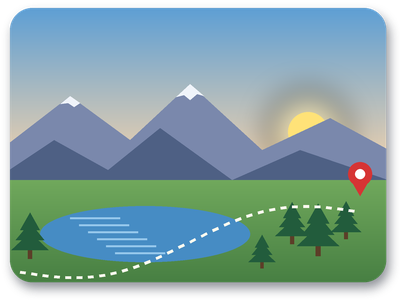
- A 400 x 300 trail map card with a sunrise sky, rounded transparent corners and a soft drop shadow, drawn by us and saved as a 4-channel QOI. (CC0-1.0). How it was made
- Made by
- 2026-11-04, API build
9eeeb0640aba
Parameters
Send these as form fields next to the file. Names are case-insensitive. If you set one of the documented options below that we don't support yet, the request fails with a 400 that names it instead of returning a file made without it.
| Parameter | What it does |
|---|---|
ImageResolutioninteger | Stored as pixels per meter in the header (300 dpi becomes 11,811). Without it, both fields are 0.Values: 10–800 |
ImageWidthinteger | Bitmap width. At 128 px the card's BMP is 49,274 bytes instead of 480,122.Values: 1–20000 |
ImageHeightinteger | Bitmap height: ImageHeight=100 gave 133 × 100, 53,322 bytes.Values: 1–20000 |
ScaleProportionsboolean, default true | false stretches to an exact box such as 200 × 200. |
ScaleIfLargerboolean, default false | true avoids upscaling. |
ScaleImageboolean, default true | false crops the top-left area instead. |
ColorSpaceenum, default default | Gray or black-and-white pixel values in the same layout: the card stays a 480,122-byte 32-bit BMP, and the 3-channel copy stays 24-bit at 360,054 bytes.Values: default, rgb, gray, monochrome; cmyk returns 400 |
FileNamestring | Name of the .bmp file. |
StoreFileboolean, default false | true keeps the bitmap for 3 hours and returns a URL, which spares a 640 KB base64 string for the sample. |
What carries over, and what doesn't
Kept
- Every color and alpha value: the sample's BMP decodes to the same 120,000 RGBA pixels
- Partial transparency, stored in the top byte of each pixel (alpha mask 0xFF000000)
- 400 × 300, rows bottom-up as BMP readers expect
Lost or not yet supported
- Compression. The 67,304-byte QOI becomes 480,122 bytes: 122 bytes of header and 4 bytes for each pixel.
- An alpha channel no pixel uses. A 4-channel QOI with alpha 255 everywhere gives a 24-bit BMP with no alpha byte, 360,054 bytes at 400 × 300, the same as a 3-channel one.
- The QOI colorspace byte. A copy of the card marked linear (colorspace 1) gave the same BMP as the sRGB one; the 32-bit header's color-space field is 0, and the 24-bit header has none.
Limits
- One QOI per request.
- Output size is width × height × 4 bytes plus 122 with transparency (the card at 1,000 × 750 is 3,000,122 bytes), or 3 bytes per pixel, rows padded to 4 bytes, plus 54 when opaque.
- 100,000,000 pixels per image; requests up to 10 MB on the Free plan or 100 MB on paid plans.
- 120 seconds per conversion.
Where teams use it
Feeding frame buffers and display drivers
A 32-bit BMP is raw BGRA with a fixed header, so firmware or a display driver can copy the rows straight into a frame buffer, bottom row first.
Windows tools that predate QOI
Programs that only read Windows bitmaps can work with QOI art once it is converted, with alpha available to any that use it.
Questions
Can I get a 24-bit BMP?
Yes, when no pixel is transparent. A 3-channel QOI, or a 4-channel one whose alpha is 255 everywhere, comes back 24-bit with the 40-byte header: 360,054 bytes for a 400 × 300 copy of the card. If any alpha is below 255, as on the sample, the BMP is 32-bit with a V4 header and BI_BITFIELDS masks, and no option drops the alpha.
Will the soft shadow show in the BMP?
The alpha values are in the file and the header marks them as alpha. A reader that honors 32-bit BMP alpha shows the shadow; a reader that ignores the alpha byte draws every pixel opaque, so the shadow's dark color shows at full strength.
How do I set the print size?
Send ImageResolution. 300 is written as 11,811 pixels per meter in both directions, which readers convert back to 300 dpi.
Convert your first QOI file in a minute.