TIFF to PNM API
POST a TIFF to /v2/convert/tiff/to/pnm and get a Netpbm file of its first page: a short text header followed by 8-bit RGB bytes with no compression. The header is binary PPM (P6); ColorSpace=gray or monochrome switches to a one-channel PGM (P5).
- Endpoint
- POST /v2/
convert/ tiff/ to/ pnm - Accepts
- tiff
- Sample timing
- 1 ms median of 5 runsHow we measure
- Request size
- Up to 10 MB on the Free plan or 100 MB on paid plans, all files together
Request and response
Every sample below ran against the API before this page was published. Set PDFCONVERSIONAPI_KEY to your key and run it as is.
curl -sS -X POST \
  https://api.pdfconversionapi.com/v2/convert/tiff/to/pnm \
  -H "Authorization: Bearer $PDFCONVERSIONAPI_KEY" \
  -F File=@bin-label-c14.tiff \
  -o response.json

# FileData is base64. Save the first file in converted/,
# or print the JSON error.
if jq -e '.Files' response.json > /dev/null; then
  mkdir -p converted
  name=$(jq -r '.Files[0].FileName' response.json)
  jq -r '.Files[0].FileData' response.json \
    | base64 --decode > "converted/$name"
else
  cat response.json
fi
import base64
import os
import requests
key = os.environ["PDFCONVERSIONAPI_KEY"]
response = requests.post(
"https://api.pdfconversionapi.com/v2/convert/tiff/to/pnm",
headers={"Authorization": f"Bearer {key}"},
files=[("File", open("bin-label-c14.tiff", "rb"))],
timeout=180,
)
result = response.json()
if not response.ok:
raise SystemExit(f"{result['Code']}: {result['Message']}")
os.makedirs("converted", exist_ok=True)
for file in result["Files"]:
path = os.path.join("converted", file["FileName"])
with open(path, "wb") as out:
out.write(base64.b64decode(file["FileData"]))
print(path, file["FileSize"], "bytes")
import { mkdir, readFile, writeFile } from "node:fs/promises";
import { join } from "node:path";

const form = new FormData();
const file = "bin-label-c14.tiff";
form.append("File", new Blob([await readFile(file)]), file);

const url = "https://api.pdfconversionapi.com/v2/convert/tiff/to/pnm";
const key = process.env.PDFCONVERSIONAPI_KEY;
const response = await fetch(url, {
  method: "POST",
  headers: { Authorization: `Bearer ${key}` },
  body: form,
});
const result = await response.json();
if (!response.ok) {
  throw new Error(`${result.Code}: ${result.Message}`);
}

await mkdir("converted", { recursive: true });
for (const file of result.Files) {
  const path = join("converted", file.FileName);
  await writeFile(path, Buffer.from(file.FileData, "base64"));
  console.log(path, file.FileSize, "bytes");
}
{
  "ConversionCost": 1,
  "ConversionTime": 0.001,
  "Files": [
    {
      "FileName": "bin-label-c14.pnm",
      "FileExt": "pnm",
      "FileSize": 360015,
      "FileData": "UDYKNDAwIDMwMCAyNTUKKCgo…"
    }
  ]
}
Response from our test run on 2026-11-03. ConversionTime shows the median of 5 runs. FileData is shortened here; the real response carries the whole file as base64.
The sample, converted
The same file the code sends. Download the input and the output and compare them yourself.
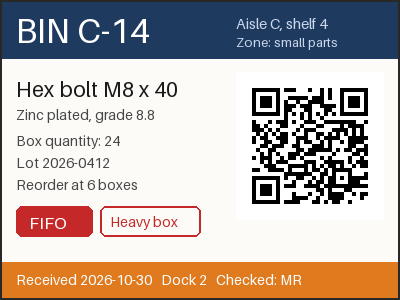
- Input
- bin-label-c14.tiff (42 KB)
- Output
- bin-label-c14.pnm (352 KB)
- Source
- A two-page warehouse bin label and cycle-count sheet we drew for this page, saved as an LZW-compressed TIFF at 200 dpi. (CC0-1.0). How it was made
- Made by
- 2026-11-04, API build
9eeeb0640aba
Parameters
Send these as form fields next to the file. Names are case-insensitive. If you set one of the documented options below that we don't support yet, the request fails with a 400 that names it instead of returning a file made without it.
| Parameter | What it does |
|---|---|
ImageWidthinteger | Width in pixels; the file grows with width × height × 3. 200 gave 200 × 150 and 90,015 bytes.Values: 1–20000 |
ImageHeightinteger | Height in pixels, or the second side of a fitting box together with ImageWidth.Values: 1–20000 |
ScaleProportionsboolean, default true | false resamples to the exact box, changing the aspect ratio. |
ScaleIfLargerboolean, default false | true leaves pages that already fit the box at their own size. |
ScaleImageboolean, default true | false copies a top-left window of the requested size without resampling. |
ImageInterpolationboolean, default false | Accepted either way; resampling is always Lanczos. |
ColorSpaceenum, default default | gray or monochrome write a one-channel PGM (P5), so the label shrinks to 120,015 bytes, a third of the color file; monochrome uses only the values 0 and 255. cmyk returns 400.Values: default, rgb, gray, monochrome |
AlphaColorstring, default white | Color that transparent pixels of an RGBA TIFF are blended onto, since the output has no alpha. No effect on opaque scans like the sample.Values: Color name, #RRGGBB or R,G,B |
BackgroundColorstring, default white | Fallback for AlphaColor.Values: Same as AlphaColor |
ImageResolutioninteger | Checked for range and then unused, because the PNM header has no resolution field.Values: 10–800 |
FileNamestring | Name for the output; bin-label-c14.pnm by default. |
StoreFileboolean, default false | true keeps the file for 3 hours and returns Files[].Url, which keeps a 360 KB raw image out of the JSON. |
What carries over, and what doesn't
Kept
- Every RGB value of page 1: decoded with another reader, the PNM matched the TIFF page exactly.
- Size and layout: 400 × 300 pixels in top-to-bottom rows, 3 bytes per pixel, after a 15-byte header.
- Readability by our own API: sending the PNM back to
/v2/convert/pnm/to/pnggave a PNG identical to a direct TIFF to PNG conversion. - The Orientation tag, applied to the pixels: a 300 × 200 TIFF tagged 6 came out 200 × 300 and upright.
Lost or not yet supported
- Compression: 42,928 bytes of LZW TIFF became 360,015 bytes.
- 16-bit depth: a 16-bit gray TIFF came out as an 8-bit P6 with three equal channels, or as an 8-bit P5 with
ColorSpace=gray. - The second page, the 200 dpi value and the ICC profile.
- Transparency: alpha is blended onto
AlphaColor, white by default.
Limits
- One TIFF per request, first page only.
- Requests up to 10 MB on the Free plan or 100 MB on paid plans, all files and fields together.
- Pages above 100,000,000 pixels are refused with 413 before decoding.
- Palette TIFFs return 422.
- Each conversion may take up to 120 seconds; after that the API answers 504.
Where teams use it
Feeding pixels to your own code
Computer-vision scripts, test harnesses and teaching code can read Netpbm with a few lines, because the header is plain text and the pixels follow as raw bytes. Turn TIFF scans into that layout on the server and skip a TIFF decoder in your code.
Command-line image pipelines
Netpbm-style tools chain small programs that pass raw images along. Converting the TIFF first gives them an uncompressed page to start from.
Questions
Is the output PPM (P6) or PAM (P7)?
PPM. The sample starts with three short header lines, P6, 400 300 and 255, then 360,000 bytes of RGB, 360,015 bytes in all. With ColorSpace=gray or monochrome it is a PGM (P5) with one byte per pixel instead. Neither uses the PAM (P7) header.
Does a gray scan come back with one channel?
Only when you ask for it. A gray TIFF sent as it is comes back as P6 with three equal values per pixel: our 8-bit gray copy of the label gave 360,015 bytes. Add ColorSpace=gray and the result is a P5 file with one byte per pixel, 120,015 bytes for the label.
Can I get 16-bit PNM output?
No. A 16-bit grayscale TIFF came back with MAXVAL 255. Use /v2/convert/tiff/to/png or /v2/convert/tiff/to/tiff, which kept 16 bits in our tests.
What happens with multi-page TIFFs?
You get the first page only. The sample's count sheet on page 2 was skipped, and the request still succeeded.
Convert your first TIFF file in a minute.