BMP to BMP API
POST a bitmap to /v2/convert/bmp/to/bmp and get it back as an uncompressed, bottom-up BMP: 24-bit with the 40-byte header when it is opaque, 32-bit with a version 4 header when it has transparency. Use it to resize, to set the DPI with ImageResolution, or to normalize unusual BMP variants.
- Endpoint
- POST /v2/
convert/ bmp/ to/ bmp - Accepts
- bmp
- Sample timing
- 2 ms median of 5 runsHow we measure
- Request size
- Up to 10 MB on the Free plan or 100 MB on paid plans, all files together
Request and response
Every sample below ran against the API before this page was published. Set PDFCONVERSIONAPI_KEY to your key and run it as is.
curl -sS -X POST \
  https://api.pdfconversionapi.com/v2/convert/bmp/to/bmp \
  -H "Authorization: Bearer $PDFCONVERSIONAPI_KEY" \
  -F File=@shelf-label.bmp \
  --form-string ImageResolution=203 \
  -o response.json

# FileData is base64. Save the first file in converted/,
# or print the JSON error.
if jq -e '.Files' response.json > /dev/null; then
  mkdir -p converted
  name=$(jq -r '.Files[0].FileName' response.json)
  jq -r '.Files[0].FileData' response.json \
    | base64 --decode > "converted/$name"
else
  cat response.json
fi
import base64
import os
import requests
key = os.environ["PDFCONVERSIONAPI_KEY"]
response = requests.post(
"https://api.pdfconversionapi.com/v2/convert/bmp/to/bmp",
headers={"Authorization": f"Bearer {key}"},
files=[("File", open("shelf-label.bmp", "rb"))],
data={
"ImageResolution": "203",
},
timeout=180,
)
result = response.json()
if not response.ok:
raise SystemExit(f"{result['Code']}: {result['Message']}")
os.makedirs("converted", exist_ok=True)
for file in result["Files"]:
path = os.path.join("converted", file["FileName"])
with open(path, "wb") as out:
out.write(base64.b64decode(file["FileData"]))
print(path, file["FileSize"], "bytes")
import { mkdir, readFile, writeFile } from "node:fs/promises";
import { join } from "node:path";

const form = new FormData();
const file = "shelf-label.bmp";
form.append("File", new Blob([await readFile(file)]), file);
form.append("ImageResolution", "203");

const url = "https://api.pdfconversionapi.com/v2/convert/bmp/to/bmp";
const key = process.env.PDFCONVERSIONAPI_KEY;
const response = await fetch(url, {
  method: "POST",
  headers: { Authorization: `Bearer ${key}` },
  body: form,
});
const result = await response.json();
if (!response.ok) {
  throw new Error(`${result.Code}: ${result.Message}`);
}

await mkdir("converted", { recursive: true });
for (const file of result.Files) {
  const path = join("converted", file.FileName);
  await writeFile(path, Buffer.from(file.FileData, "base64"));
  console.log(path, file.FileSize, "bytes");
}
{
  "ConversionCost": 1,
  "ConversionTime": 0.002,
  "Files": [
    {
      "FileName": "shelf-label.bmp",
      "FileExt": "bmp",
      "FileSize": 300054,
      "FileData": "Qk0WlAQAAAAAADYAAAAoAAAA…"
    }
  ]
}
Response from our test run on 2026-11-03. ConversionTime shows the median of 5 runs. FileData is shortened here; the real response carries the whole file as base64.
The sample, converted
The same file the code sends. Download the input and the output and compare them yourself.
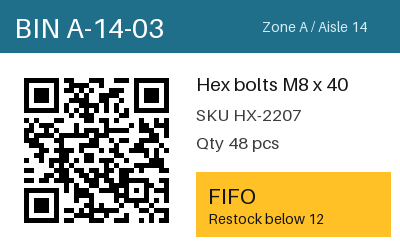
- Input
- shelf-label.bmp (293 KB)
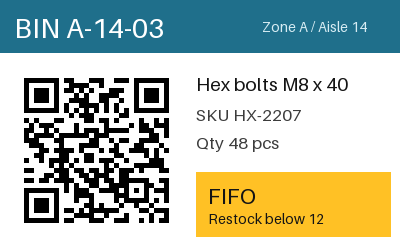
- Output
- shelf-label.bmp (293 KB)
- Source
- A 24-bit warehouse bin label with a QR code and a colored header, drawn by us for this page. (CC0-1.0). How it was made
- Made by
- 2026-11-04, API build
9eeeb0640aba
Parameters
Send these as form fields next to the file. Names are case-insensitive. If you set one of the documented options below that we don't support yet, the request fails with a 400 that names it instead of returning a file made without it.
| Parameter | What it does |
|---|---|
ImageResolutioninteger | Resolution stored in the header, in DPI. The sample sends 203, and the header then reads 7,992 pixels per meter. Without it the fields are 0, even when the input declared a DPI.Values: 10–800 |
ImageWidthinteger | Target width. 200 shrank the label to 200 × 125 (75,054 bytes); 800 doubled it to 800 × 500, 1,200,054 bytes.Values: 1–20000 |
ImageHeightinteger | Target height, width in proportion (100 gave 160 × 100). Both together describe a box.Values: 1–20000 |
ScaleProportionsboolean, default true | false stretches to the full box (300 × 300 stays 300 × 300). |
ScaleIfLargerboolean, default false | true keeps a bitmap that is already smaller than the target at its size. |
ScaleImageboolean, default true | false crops to the requested size from the top-left corner; 150 × 100 gave a 45,254-byte file, each 450-byte row padded to 452. |
ColorSpaceenum, default default | Converts the pixels to gray (the label's teal header became level 96) or black and white. The file stays 24-bit, with the same value in red, green and blue.Values: default, rgb, gray, monochrome |
FileNamestring | Name of the new BMP; defaults to the uploaded name. |
StoreFileboolean, default false | Get a download URL for 3 hours instead of base64. |
What carries over, and what doesn't
Kept
- Every pixel: the sample output decoded to the input's exact values
- Alpha, when the input BMP has an alpha mask: that file comes back 32-bit with every alpha value kept
- Row order on screen: a top-down input came back as a normal bottom-up file with the same picture
Lost or not yet supported
- Compactness of small inputs. The 24-bit label stays 300,054 bytes, but a 1-bit copy of it (13,062 bytes) and a run-length encoded one (16,686 bytes) also came back as 300,054-byte 24-bit files.
- The input's palette and bit depth: output is 24-bit, or 32-bit when there is transparency, with no option for 1- or 8-bit.
- The input's DPI. A 300 DPI bitmap came back with 0 pixels per meter unless
ImageResolutionwas sent. - Compression: output is never run-length encoded.
Limits
- One bitmap per request.
- Requests up to 10 MB on the Free plan or 100 MB on paid plans, all files and fields together.
- Headers declaring more than 100,000,000 pixels are refused with 413 before decoding.
- BMPs that wrap PNG or JPEG data (compression 5 or 4) are not decoded: 422 "the input file could not be read: this BMP image uses a feature that can't be read yet (PNG compression)" (or JPEG compression).
- Width and height targets from 1 to 20,000 px.
- Conversions are cut off at 120 seconds with a 504.
Where teams use it
Setting the DPI for label and receipt printers
Printer drivers and label software often size a bitmap from its DPI. Rewriting the BMP with ImageResolution sets the value they read without touching the pixels.
Normalizing BMP variants
Run-length encoded, 1-bit, palette and top-down bitmaps all come out in one layout, which helps firmware tools and hand-written parsers that only understand plain uncompressed BMP.
Resizing without changing format
Scale a bitmap for a fixed-size display or a thumbnail and keep it a BMP for the system that needs one.
Questions
Why is my BMP bigger after converting?
An opaque bitmap is written at 3 bytes per pixel, each row padded to a multiple of 4 bytes, plus a 54-byte header, so a 400 × 250 one is 300,054 bytes whatever depth the input had. A bitmap with transparency takes 4 bytes per pixel plus a 122-byte header.
Which header does the new BMP use?
For an opaque bitmap such as the sample, the 40-byte BITMAPINFOHEADER with 24 bits per pixel and no compression (BI_RGB). For one with transparency, a 108-byte version 4 header with BI_BITFIELDS, masks for red, green, blue and alpha, and 0 in the color space field; the image tools built into macOS open it.
Does TransparentColor work here?
No. The route accepts it without error, as ConvertAPI documents no options for BMP to BMP and unread names are ignored, but the file is unchanged. Use /v2/convert/bmp/to/png for a transparent result.
Which BMP inputs can it read?
In our tests: 1-bit, 8-bit palette, 24-bit, 32-bit, run-length encoded (RLE8) and top-down bitmaps. Each came out with identical pixels.
Convert your first BMP file in a minute.