Barcode generator API
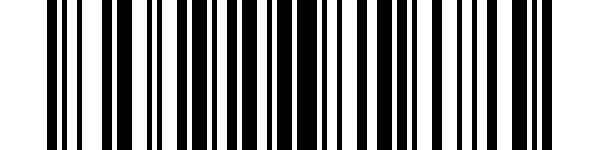
POST /v2/convert/data/to/barcode draws a barcode from the Data parameter or from an uploaded text file. The sample sent a 7-byte file holding TL-0457 with OutputFormat=png and ImageHeight=150, and got a 600 × 150 Code 128 PNG of 1,059 bytes that our own reader decodes back to TL-0457.
- Endpoint
- POST /v2/
convert/ data/ to/ barcode - Accepts
- data
- Sample timing
- 1 ms median of 5 runsHow we measure
- Request size
- Up to 10 MB on the Free plan or 100 MB on paid plans, all files together
Request and response
Every sample below ran against the API before this page was published. Set PDFCONVERSIONAPI_KEY to your key and run it as is.
curl -sS -X POST \
  https://api.pdfconversionapi.com/v2/convert/data/to/barcode \
  -H "Authorization: Bearer $PDFCONVERSIONAPI_KEY" \
  -F File=@asset-tag.txt \
  --form-string OutputFormat=png \
  --form-string ImageHeight=150 \
  -o response.json

# FileData is base64. Save the first file in converted/,
# or print the JSON error.
if jq -e '.Files' response.json > /dev/null; then
  mkdir -p converted
  name=$(jq -r '.Files[0].FileName' response.json)
  jq -r '.Files[0].FileData' response.json \
    | base64 --decode > "converted/$name"
else
  cat response.json
fi
import base64
import os
import requests
key = os.environ["PDFCONVERSIONAPI_KEY"]
response = requests.post(
"https://api.pdfconversionapi.com/v2/convert/data/to/barcode",
headers={"Authorization": f"Bearer {key}"},
files=[("File", open("asset-tag.txt", "rb"))],
data={
"OutputFormat": "png",
"ImageHeight": "150",
},
timeout=180,
)
result = response.json()
if not response.ok:
raise SystemExit(f"{result['Code']}: {result['Message']}")
os.makedirs("converted", exist_ok=True)
for file in result["Files"]:
path = os.path.join("converted", file["FileName"])
with open(path, "wb") as out:
out.write(base64.b64decode(file["FileData"]))
print(path, file["FileSize"], "bytes")
import { mkdir, readFile, writeFile } from "node:fs/promises";
import { join } from "node:path";

const form = new FormData();
const file = "asset-tag.txt";
form.append("File", new Blob([await readFile(file)]), file);
form.append("OutputFormat", "png");
form.append("ImageHeight", "150");

const url = "https://api.pdfconversionapi.com/v2/convert/data/to/barcode";
const key = process.env.PDFCONVERSIONAPI_KEY;
const response = await fetch(url, {
  method: "POST",
  headers: { Authorization: `Bearer ${key}` },
  body: form,
});
const result = await response.json();
if (!response.ok) {
  throw new Error(`${result.Code}: ${result.Message}`);
}

await mkdir("converted", { recursive: true });
for (const file of result.Files) {
  const path = join("converted", file.FileName);
  await writeFile(path, Buffer.from(file.FileData, "base64"));
  console.log(path, file.FileSize, "bytes");
}
{
  "ConversionCost": 1,
  "ConversionTime": 0.001,
  "Files": [
    {
      "FileName": "asset-tag.png",
      "FileExt": "png",
      "FileSize": 1059,
      "FileData": "iVBORw0KGgoAAAANSUhEUgAA…"
    }
  ]
}
Response from our test run on 2026-11-03. ConversionTime shows the median of 5 runs. FileData is shortened here; the real response carries the whole file as base64.
The sample, converted
The same file the code sends. Download the input and the output and compare them yourself.
- Input
- asset-tag.txt (7 bytes)
- Output
- asset-tag.png (1.0 KB)
- Source
- A seven-character asset tag for a fictional tool library, written for this site as a text file with no line break at the end. (CC0-1.0). How it was made
- Made by
- 2026-11-04, API build
9eeeb0640aba
Parameters
Send these as form fields next to the file. Names are case-insensitive. If you set one of the documented options below that we don't support yet, the request fails with a 400 that names it instead of returning a file made without it.
| Parameter | What it does |
|---|---|
Datastring | The text to encode. When it is set, an uploaded file is ignored; without it, the file's bytes are used exactly, line breaks included.Values: 1–4096 bytes of UTF-8 |
BarcodeFormatenum, default code128 | Kind of code. EAN-13 takes 12 digits (the check digit is added) or 13 with a correct check digit; ITF-14 needs exactly 14 digits.Values: code128, code39, qrcode, datamatrix, ean13, ean8, pdf417, aztec, upca, upce, itf14 |
OutputFormatenum, default svg | File type. The sample's PNG is 1,059 bytes; the same code as SVG is 68,662 bytes at 600 × 150 and 283,312 bytes at the default 600 × 600, because the SVG draws every pixel row.Values: svg, png, jpg, tiff |
ImageWidthinteger, default 600 | Width in pixels. A code that needs more room comes out wider: TL-0457 is 101 modules, so ImageWidth=50 gave 101 px.Values: 10–10000 |
ImageHeightinteger, default 600 | Height in pixels; 150 gives the sample its label shape. PDF417 keeps its own proportions (600 × 160 at the default height).Values: 10–10000 |
Margininteger, default 0 | Extra blank modules around the code. The width stays fixed, so a larger margin means thinner bars: for TL-0457 at 600 px, 0 gives 5 px modules, 20 gives 4 px and 100 gives 2 px. EAN-13 and UPC-A need it: at 0 our reader couldn't read them back, at 10 it could.Values: 0–1000 |
ScaleProportionsboolean, default true | For QR, Data Matrix and Aztec only: true keeps them square inside the box (600 × 200 gave 200 × 200), false stretches them (600 × 200). For linear codes, false returns 400. |
ImageResolutioninteger | DPI written into PNG, JPEG or TIFF files. With SVG output any value other than 200 returns 400.Values: 10–800 |
FileNamestring | Base name of the image. An uploaded file names it (asset-tag.png here); with Data alone it is barcode. |
StoreFileboolean, default false | true returns a link in Files[].Url, valid for 3 hours, instead of the image in base64. |
Not supported yet
Setting one of these to anything but its default returns 400.
| Option | What to do instead |
|---|---|
Gs1Format | GS1 application identifiers and FNC1 are not encoded yet. Gs1Format=true returns 400 "Gs1Format is not supported yet". |
What carries over, and what doesn't
Kept
- Your text exactly: our test codes, read back with our barcode reader, gave their input, from
TL-0457in Code 128 to a 23-character PDF417 (EAN-13 and UPC-A once they had a margin) - Sharp edges: the PNG is grayscale with only two values, 0 and 255, and the SVG sets
shape-rendering="crispEdges" - Whole-pixel modules: TL-0457's 101 modules are 5 px each in the sample, centered with 47 px of white on the left and 48 on the right
- Lowercase in Code 39, encoded as Full ASCII pairs
Lost or not yet supported
- Human-readable text: no digits or caption are printed under the bars.
- Characters a code can't hold.
Caféin Code 128 returned 400 "this data cannot be a code128 barcode: Bad character in input: ASCII value=233"; use QR, Data Matrix or Aztec for non-ASCII text. - Non-UTF-8 files: an uploaded file with Latin-1 bytes returned 400 "the data must be UTF-8 text".
- Colors: bars are always black on a white background.
TransparentColor=#FFFFFF, read for PNG and TIFF output, can clear the white, but no other color can be set.
Limits
- At most one uploaded file. Without a file,
Datais required: sending neither returns 400 "set the Data parameter or upload a text file". - 1 to 4,096 bytes of text, and less for most kinds. Code 128 and Code 39 take at most 80 characters, and text too long for a QR, PDF417 or Aztec code returns 400. Data Matrix stops at its largest symbol: 2,335 capital letters fit, and 2,336 returned 400 "this data is too long for a datamatrix barcode".
- Images from 10 to 10,000 px per side, and no more than 100,000,000 pixels.
- 120 seconds per request, then 504.
Where teams use it
Asset and shelf labels
Print a Code 128 for each tool, bin or shelf from its ID. A short PNG such as the sample's 600 × 150 tag drops straight into a label template.
Retail and shipping codes
Make EAN-13, UPC-A or ITF-14 codes for packaging proofs, with Margin set so the quiet zone is wide enough to scan.
Square codes for small items
Data Matrix and Aztec hold an ID in a small square, for parts, lab samples or tickets where a linear code won't fit.
Questions
Why does my barcode encode an extra character?
An uploaded file is used byte for byte. A file saved with a final line break produced a code that reads TL-0457\n. Remove the trailing newline, or send the text in Data instead.
Why can't my EAN-13 be scanned?
With the default Margin=0, the bars nearly fill the 600 px width and the quiet zone is too narrow: our own reader found nothing. With Margin=10 the bars moved in to x = 62 to 536 and the code read correctly.
Should I use SVG or PNG?
PNG for most labels: the sample is 1,059 bytes. SVG scales without blur for print, but it describes every pixel row of the image, so a 600 × 600 Code 128 is 283,312 bytes. Set ImageHeight low when you use SVG.
What does an EAN-13 with a wrong check digit do?
It is refused with 400 "this data cannot be a ean13 barcode: Contents do not pass checksum". Send the first 12 digits and the API adds the right check digit.
Convert your first DATA file in a minute.