Barcode reader API
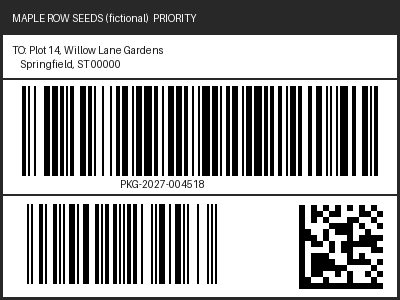
POST /v2/convert/barcode/to/data finds the barcodes in an image or in each page of a PDF and returns them as {"barcodes": [...]}. The sample shipping label has three codes; with DetectMultiple=true all three came back in a 284-byte JSON file: the Data Matrix lot code, the EAN-13 and the Code 128 tracking number.
- Endpoint
- POST /v2/
convert/ barcode/ to/ data - Accepts
- barcode
- Sample timing
- 18 ms median of 5 runsHow we measure
- Request size
- Up to 10 MB on the Free plan or 100 MB on paid plans, all files together
Request and response
Every sample below ran against the API before this page was published. Set PDFCONVERSIONAPI_KEY to your key and run it as is.
curl -sS -X POST \
  https://api.pdfconversionapi.com/v2/convert/barcode/to/data \
  -H "Authorization: Bearer $PDFCONVERSIONAPI_KEY" \
  -F File=@parcel-label.png \
  --form-string DetectMultiple=true \
  -o response.json

# FileData is base64. Save the first file in converted/,
# or print the JSON error.
if jq -e '.Files' response.json > /dev/null; then
  mkdir -p converted
  name=$(jq -r '.Files[0].FileName' response.json)
  jq -r '.Files[0].FileData' response.json \
    | base64 --decode > "converted/$name"
else
  cat response.json
fi
import base64
import os
import requests
key = os.environ["PDFCONVERSIONAPI_KEY"]
response = requests.post(
"https://api.pdfconversionapi.com/v2/convert/barcode/to/data",
headers={"Authorization": f"Bearer {key}"},
files=[("File", open("parcel-label.png", "rb"))],
data={
"DetectMultiple": "true",
},
timeout=180,
)
result = response.json()
if not response.ok:
raise SystemExit(f"{result['Code']}: {result['Message']}")
os.makedirs("converted", exist_ok=True)
for file in result["Files"]:
path = os.path.join("converted", file["FileName"])
with open(path, "wb") as out:
out.write(base64.b64decode(file["FileData"]))
print(path, file["FileSize"], "bytes")
import { mkdir, readFile, writeFile } from "node:fs/promises";
import { join } from "node:path";

const form = new FormData();
const file = "parcel-label.png";
form.append("File", new Blob([await readFile(file)]), file);
form.append("DetectMultiple", "true");

const url = "https://api.pdfconversionapi.com/v2/convert/barcode/to/data";
const key = process.env.PDFCONVERSIONAPI_KEY;
const response = await fetch(url, {
  method: "POST",
  headers: { Authorization: `Bearer ${key}` },
  body: form,
});
const result = await response.json();
if (!response.ok) {
  throw new Error(`${result.Code}: ${result.Message}`);
}

await mkdir("converted", { recursive: true });
for (const file of result.Files) {
  const path = join("converted", file.FileName);
  await writeFile(path, Buffer.from(file.FileData, "base64"));
  console.log(path, file.FileSize, "bytes");
}
{
  "ConversionCost": 1,
  "ConversionTime": 0.018,
  "Files": [
    {
      "FileName": "parcel-label.json",
      "FileExt": "json",
      "FileSize": 284,
      "FileData": "ewogICJiYXJjb2RlcyI6IFsK…"
    }
  ]
}
Response from our test run on 2026-11-03. ConversionTime shows the median of 5 runs. FileData is shortened here; the real response carries the whole file as base64.
The sample, converted
The same file the code sends. Download the input and the output and compare them yourself.
parcel-label.json, 19 lines
{ "barcodes": [ { "format": "datamatrix", "page": 1, "text": "LOT 27-0318" }, { "format": "ean13", "page": 1, "text": "2000001234563" }, { "format": "code128", "page": 1, "text": "PKG-2027-004518" } ]}
- Input
- parcel-label.png (6.9 KB)
- Output
- parcel-label.json (284 bytes)
- Source
- A drawn shipping label for a fictional seed shop, made for this site, with a Code 128 tracking number, an EAN-13 product code and a Data Matrix lot code. (CC0-1.0). How it was made
- Made by
- 2026-11-04, API build
9eeeb0640aba
Parameters
Send these as form fields next to the file. Names are case-insensitive. If you set one of the documented options below that we don't support yet, the request fails with a 400 that names it instead of returning a file made without it.
| Parameter | What it does |
|---|---|
DetectMultipleboolean, default false | false returns one code at most, the first one found, which on the sample label was the Data Matrix, not the tracking number. true returns every code on every page searched. |
BarcodeFormatenum, default auto | Look for one kind only. code128 on the sample returned just PKG-2027-004518, even without DetectMultiple; qrcode returned an empty list.Values: auto, code128, code39, qrcode, datamatrix, ean13, ean8, pdf417, aztec, upca, upce, itf14 |
IncludeInvertedboolean, default false | Also read light-on-dark codes. An inverted copy of the label gave no codes without it and all three with it. |
PageRangestring, default 1-2000 | PDF pages to search. On a two-page PDF with the label on page 2, PageRange=1 gave an empty list and PageRange=5 returned 400. Sent with an image, any value but the default returns 400.Values: e.g. 2, 1-3, 2- |
EnhancedDetectionboolean, default false | Accepted for ConvertAPI compatibility. The reader always runs its thorough search, so the result is the same either way. |
AutoRotateboolean, default false | Accepted and changes nothing: every orientation is tried anyway. A copy of the label turned 90° gave the same three codes. |
FileNamestring | Base name of the JSON file; the sample's is parcel-label.json. |
StoreFileboolean, default false | true returns a 3-hour link in Files[].Url instead of the JSON in base64. |
What carries over, and what doesn't
Kept
- Text, kind and page for each code:
{"format": "code128", "page": 1, "text": "PKG-2027-004518"} - 1D and 2D codes in one pass: Data Matrix, EAN-13 and Code 128 from the same label
- Rotated labels: turned 90°, all three codes still read
- Page numbers from PDFs: the label on page 2 of a test PDF came back with
"page": 2 - Check digits as part of the text: the EAN-13 is returned as all 13 digits,
2000001234563
Lost or not yet supported
- Code positions, sizes and symbology versions: the JSON has no coordinates.
- Steep tilts for long 1D codes. With the label tilted 17°, the Data Matrix and EAN-13 still read, the Code 128 did not.
- Code 39 Full ASCII decoding. A code made from lowercase
tl-0457read back as+T+L-0457. - Password-protected PDFs: they return 422 "the input file is password-protected" even when the right
Passwordis sent.
Limits
- One image or PDF per request, recognized by its content: PNG, JPEG, GIF, BMP, WebP, TIFF, ICO, PNM and QOI images, and PDFs. A TGA returns 422 "unrecognized image format".
- Images up to 100,000,000 pixels; PDF pages are drawn at 200 DPI, up to 2,000 pages per request.
- No code found is not an error: the response is 200 with
{"barcodes": []}. - Requests up to 10 MB on the Free plan or 100 MB on paid plans, all files and fields together.
- 120 seconds per request, then 504.
Where teams use it
Reading labels from photos and scans
Warehouse and returns desks photograph parcel labels or scan packing slips. Send the image or the scanned PDF and store the tracking number and product code from the JSON instead of typing them.
Checking printed codes before they ship
Render your label, read it back with BarcodeFormat set to the kind you printed, and compare the text with what you meant to encode.
Sorting scanned documents by their code
Cover sheets with a barcode can route a batch of scanned pages: the page field says where each code was found in the PDF.
Questions
Why do I get only one barcode when my label has several?
DetectMultiple is off by default, as in ConvertAPI, and the reader then stops at the first code it finds. On the sample that was the Data Matrix lot code. Send DetectMultiple=true to get every code, or BarcodeFormat to pick the kind you need.
Which barcode types can it read?
The kinds you can name in BarcodeFormat: Code 128, Code 39, QR, Data Matrix, EAN-13, EAN-8, PDF417, Aztec, UPC-A, UPC-E and ITF-14. In auto mode the reader may also find other kinds, which are reported with "format": "other".
What comes back when no barcode is found?
A 200 response whose JSON is {"barcodes": []}. A blank 400 × 300 image gave exactly that, 20 bytes. Check the array length rather than the status code.
Can I read barcodes from a protected PDF?
Not yet. ConvertAPI documents Password here and the API accepts the field, but a PDF with an open password returned 422 with and without it. Remove the password first with /v2/convert/pdf/to/unprotect: the same test PDF, unprotected that way, gave all three codes.
Convert your first BARCODE file in a minute.