QR code generator API
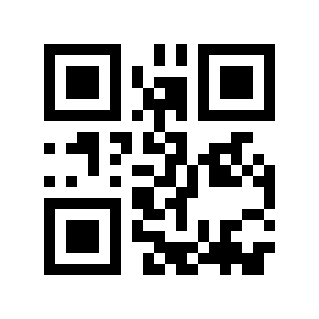
POST /v2/convert/data/to/qrcode turns text into a QR code, from the Data parameter or an uploaded file. The sample encoded the 7-byte asset tag TL-0457 with ErrorCorrection=H and ImageWidth=300: a 319 × 319 SVG of 4,790 bytes, 21 × 21 modules of 11 px inside a 4-module quiet zone.
- Endpoint
- POST /v2/
convert/ data/ to/ qrcode - Accepts
- data
- Sample timing
- 1 ms median of 5 runsHow we measure
- Request size
- Up to 10 MB on the Free plan or 100 MB on paid plans, all files together
Request and response
Every sample below ran against the API before this page was published. Set PDFCONVERSIONAPI_KEY to your key and run it as is.
curl -sS -X POST \
  https://api.pdfconversionapi.com/v2/convert/data/to/qrcode \
  -H "Authorization: Bearer $PDFCONVERSIONAPI_KEY" \
  -F File=@asset-tag.txt \
  --form-string ErrorCorrection=H \
  --form-string ImageWidth=300 \
  -o response.json

# FileData is base64. Save the first file in converted/,
# or print the JSON error.
if jq -e '.Files' response.json > /dev/null; then
  mkdir -p converted
  name=$(jq -r '.Files[0].FileName' response.json)
  jq -r '.Files[0].FileData' response.json \
    | base64 --decode > "converted/$name"
else
  cat response.json
fi
import base64
import os
import requests
key = os.environ["PDFCONVERSIONAPI_KEY"]
response = requests.post(
"https://api.pdfconversionapi.com/v2/convert/data/to/qrcode",
headers={"Authorization": f"Bearer {key}"},
files=[("File", open("asset-tag.txt", "rb"))],
data={
"ErrorCorrection": "H",
"ImageWidth": "300",
},
timeout=180,
)
result = response.json()
if not response.ok:
raise SystemExit(f"{result['Code']}: {result['Message']}")
os.makedirs("converted", exist_ok=True)
for file in result["Files"]:
path = os.path.join("converted", file["FileName"])
with open(path, "wb") as out:
out.write(base64.b64decode(file["FileData"]))
print(path, file["FileSize"], "bytes")
import { mkdir, readFile, writeFile } from "node:fs/promises";
import { join } from "node:path";

const form = new FormData();
const file = "asset-tag.txt";
form.append("File", new Blob([await readFile(file)]), file);
form.append("ErrorCorrection", "H");
form.append("ImageWidth", "300");

const url = "https://api.pdfconversionapi.com/v2/convert/data/to/qrcode";
const key = process.env.PDFCONVERSIONAPI_KEY;
const response = await fetch(url, {
  method: "POST",
  headers: { Authorization: `Bearer ${key}` },
  body: form,
});
const result = await response.json();
if (!response.ok) {
  throw new Error(`${result.Code}: ${result.Message}`);
}

await mkdir("converted", { recursive: true });
for (const file of result.Files) {
  const path = join("converted", file.FileName);
  await writeFile(path, Buffer.from(file.FileData, "base64"));
  console.log(path, file.FileSize, "bytes");
}
{
  "ConversionCost": 1,
  "ConversionTime": 0.001,
  "Files": [
    {
      "FileName": "asset-tag.svg",
      "FileExt": "svg",
      "FileSize": 4790,
      "FileData": "PD94bWwgdmVyc2lvbj0iMS4w…"
    }
  ]
}
Response from our test run on 2026-11-03. ConversionTime shows the median of 5 runs. FileData is shortened here; the real response carries the whole file as base64.
The sample, converted
The same file the code sends. Download the input and the output and compare them yourself.
- Input
- asset-tag.txt (7 bytes)
- Output
- asset-tag.svg (4.7 KB)
- Source
- A seven-character asset tag for a fictional tool library, written for this site as a text file with no line break at the end. (CC0-1.0). How it was made
- Made by
- 2026-11-04, API build
9eeeb0640aba
Parameters
Send these as form fields next to the file. Names are case-insensitive. If you set one of the documented options below that we don't support yet, the request fails with a 400 that names it instead of returning a file made without it.
| Parameter | What it does |
|---|---|
Datastring | The text to encode, such as a URL. If it is set, an uploaded file is ignored; if not, the file's bytes are encoded as they are.Values: 1–2953 bytes |
ErrorCorrectionenum, default M | Error correction level, from L (least redundancy, most room for data) to H (most). Higher levels need more modules for long text; TL-0457 fits the smallest 21 × 21 code even at H, the level the sample's format bits show.Values: L, M, Q, H |
OutputFormatenum, default svg | File type. For TL-0457 at the default size: SVG 4,892 bytes, PNG 4,081, WebP 532, JPEG 33,894 and TIFF 371,079.Values: svg, png, jpg, webp, tiff |
ImageWidthinteger, default 600 | Smallest side in pixels. The code is drawn with whole-pixel modules, so the size is rounded up: 600 gives 609 (21 px modules), 300 gives 319, 100 gives 116 and 21 gives 29.Values: 21–10000 |
ImageResolutioninteger | DPI stored in PNG, JPEG or TIFF output. WebP output takes the value but stores no DPI: the file is byte-identical to one made without it. With SVG output it returns 400 unless it is 200.Values: 10–800 |
FileNamestring | Base name of the image. An uploaded file names it, as asset-tag.svg here; with only Data it is qrcode.svg. |
StoreFileboolean, default false | true returns a link in Files[].Url for 3 hours instead of the image inline. |
Not supported yet
Setting one of these to anything but its default returns 400.
| Option | What to do instead |
|---|---|
ImageHeight | The code is always square and sized by ImageWidth. 600 passes; other values return 400. |
Margin | 0 is accepted, but every code has a 4-module quiet zone; other values return 400. |
ScaleProportions | false returns 400; codes are never stretched. |
Gs1Format | true returns 400 "Gs1Format is not supported yet for DATA → QRCODE". |
What carries over, and what doesn't
Kept
- Your text byte for byte:
Café ✓ 日本sent inDataread back exactly - Raw bytes from a file, UTF-8 or not: a Latin-1
Caf\xe9file read back asCafé - A 4-module white quiet zone on every side, which scanners need
- Square modules of whole pixels, and in SVG one 11 × 11 square per dark module for the sample, with
shape-rendering="crispEdges" - Line breaks and other characters from an uploaded file, a final newline included
Lost or not yet supported
- Colors: dark modules are black, and the light modules and quiet zone white.
TransparentColor=#FFFFFFmakes the white clear in PNG, WebP and TIFF output (276,507 pixels at the default size); there is no setting for other colors. - A logo or text in the middle: the API draws only the code.
- Room for long text at high error correction: 2,331 bytes of lowercase text fit at
M, 2,332 returned 400 "data too long", and the 2,953-byte maximum fits only atL.
Limits
- At most one uploaded file. Without a file,
Datais required: sending neither returns 400 "set the Data parameter or upload a text file". - 1 to 2,953 bytes; past that, 400 "QR data must be 1–2953 bytes". Levels above
Lhold less, so long text can also return 400 "data too long". ImageWidthfrom 21 to 10,000 px.- 120 seconds per request, then 504.
Where teams use it
Links on printed material
Put a QR code for a page, a menu or a form on posters, packaging and receipts. SVG, the default, stays sharp at any print size.
Asset tags and tickets
Encode an ID like the sample's TL-0457 or a ticket URL. For tags that get scratched or partly covered, use ErrorCorrection=H.
Wi-Fi and contact codes
QR codes can hold structured strings such as WIFI:T:WPA;S:…;P:…;; for a guest network. The API encodes the string as given; build it in your own code.
Questions
Why is my QR code 609 pixels wide when I asked for 600?
Modules are whole pixels and the size is a minimum. TL-0457 needs 21 modules plus 8 for the quiet zone, 29 in all; 600 / 29 rounds up to 21 px per module, so 609 px. Pick ImageWidth as a multiple of the module count for an exact size.
Why does my code read with an extra line at the end?
The uploaded file is encoded exactly, and a text editor may have saved a final newline: a file with TL-0457 and a line break read back as TL-0457\n. Strip it, or pass the text in Data.
How much text fits in one QR code?
Up to 2,953 bytes at ErrorCorrection=L, which makes the largest code, 177 × 177 modules (740 px at the default width). At the default M, 2,331 bytes of lowercase text was the most we could fit.
Which output should I choose?
SVG for print and anything that is scaled, PNG or WebP for screens and documents. JPEG works but suits two-color images poorly: 33,894 bytes against 4,081 for the PNG of the same code, with 42 gray levels along the module edges instead of 2.
Convert your first DATA file in a minute.