Read QR codes from JPG API
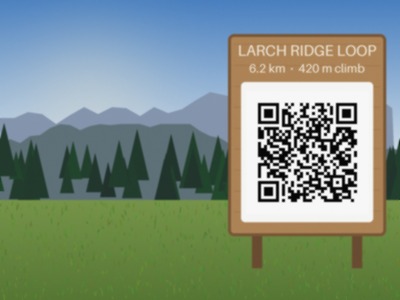
Send a JPEG to /v2/convert/jpg/to/qrdata and the API decodes the QR codes it finds in the photo, returning their text as {"codes": [...]}. In the sample, the code on the trail sign, 33 modules at 3 pixels each, reads as https://example.com/trails/larch-ridge-loop.
- Endpoint
- POST /v2/
convert/ jpg/ to/ qrdata - Accepts
- jpg
- Sample timing
- 4 ms median of 5 runsHow we measure
- Request size
- Up to 10 MB on the Free plan or 100 MB on paid plans, all files together
Request and response
Every sample below ran against the API before this page was published. Set PDFCONVERSIONAPI_KEY to your key and run it as is.
curl -sS -X POST \
  https://api.pdfconversionapi.com/v2/convert/jpg/to/qrdata \
  -H "Authorization: Bearer $PDFCONVERSIONAPI_KEY" \
  -F File=@trailhead-sign.jpg \
  -o response.json

# FileData is base64. Save the first file in converted/,
# or print the JSON error.
if jq -e '.Files' response.json > /dev/null; then
  mkdir -p converted
  name=$(jq -r '.Files[0].FileName' response.json)
  jq -r '.Files[0].FileData' response.json \
    | base64 --decode > "converted/$name"
else
  cat response.json
fi
import base64
import os
import requests
key = os.environ["PDFCONVERSIONAPI_KEY"]
response = requests.post(
"https://api.pdfconversionapi.com/v2/convert/jpg/to/qrdata",
headers={"Authorization": f"Bearer {key}"},
files=[("File", open("trailhead-sign.jpg", "rb"))],
timeout=180,
)
result = response.json()
if not response.ok:
raise SystemExit(f"{result['Code']}: {result['Message']}")
os.makedirs("converted", exist_ok=True)
for file in result["Files"]:
path = os.path.join("converted", file["FileName"])
with open(path, "wb") as out:
out.write(base64.b64decode(file["FileData"]))
print(path, file["FileSize"], "bytes")
import { mkdir, readFile, writeFile } from "node:fs/promises";
import { join } from "node:path";

const form = new FormData();
const file = "trailhead-sign.jpg";
form.append("File", new Blob([await readFile(file)]), file);

const url = "https://api.pdfconversionapi.com/v2/convert/jpg/to/qrdata";
const key = process.env.PDFCONVERSIONAPI_KEY;
const response = await fetch(url, {
  method: "POST",
  headers: { Authorization: `Bearer ${key}` },
  body: form,
});
const result = await response.json();
if (!response.ok) {
  throw new Error(`${result.Code}: ${result.Message}`);
}

await mkdir("converted", { recursive: true });
for (const file of result.Files) {
  const path = join("converted", file.FileName);
  await writeFile(path, Buffer.from(file.FileData, "base64"));
  console.log(path, file.FileSize, "bytes");
}
{
  "ConversionCost": 1,
  "ConversionTime": 0.004,
  "Files": [
    {
      "FileName": "trailhead-sign.json",
      "FileExt": "json",
      "FileSize": 70,
      "FileData": "ewogICJjb2RlcyI6IFsKICAg…"
    }
  ]
}
Response from our test run on 2026-11-03. ConversionTime shows the median of 5 runs. FileData is shortened here; the real response carries the whole file as base64.
The sample, converted
The same file the code sends. Download the input and the output and compare them yourself.
trailhead-sign.json, 5 lines
{ "codes": [ "https://example.com/trails/larch-ridge-loop" ]}
- Input
- trailhead-sign.jpg (25 KB)
- Output
- trailhead-sign.json (70 bytes)
- Source
- A drawn mountain trailhead with a wooden sign and a QR code, made by us for these pages and saved at JPEG quality 92 with an EXIF block, an sRGB color profile and 300 dpi. (CC0-1.0). How it was made
- Made by
- 2026-11-04, API build
9eeeb0640aba
Parameters
Send these as form fields next to the file. Names are case-insensitive. If you set one of the documented options below that we don't support yet, the request fails with a 400 that names it instead of returning a file made without it.
| Parameter | What it does |
|---|---|
FileNamestring | Name of the JSON result. FileName=larch-ridge returned larch-ridge.json in place of trailhead-sign.json. |
StoreFileboolean, default false | With true, the JSON file is kept for 3 hours and Files[].Url points to it. |
What carries over, and what doesn't
Kept
- The full text of each code, non-ASCII included: a code holding
Café menu ✓ 2026came back exactly as encoded - Several codes per photo: a JPEG with two codes returned both texts
- Codes at an angle: copies turned 30°, 90° and 180° all decoded
- CMYK and progressive JPEGs, which decode like any other
Lost or not yet supported
- Position, size and version of each code. The JSON lists the texts only.
- Light-on-dark codes. An inverted code returned 422; qrcode-to-data with
IncludeInverted=trueread it. - Other symbologies. A Code 128 barcode photo returned 422 here and decoded on barcode-to-data.
Limits
- One JPEG per request.
- Requests up to 10 MB on the Free plan or 100 MB on paid plans.
- 100,000,000 pixels per image; larger photos get 413.
- Up to 50 code candidates are decoded per photo.
- No readable code means 422, not an empty list.
- 120 seconds per conversion.
Where teams use it
Codes in phone photos
Field staff photograph signs, equipment plates or posters that carry a QR code. Send the photo as taken and store the decoded link next to it, with no app on the phone doing the scanning.
Proofing printed codes
Photograph a printed proof of a label or flyer and compare the decoded text with the text you encoded, before the print run goes out.
Routing uploads by their code
When each form or parcel photo carries a QR code with an ID, read it on upload and file the photo under that ID.
Questions
Why does a code my phone can read return 422?
This reader is sensitive to JPEG artifacts and scale. Copies of the sample saved at quality 60, 75 and 85 decoded; at 30, 40 and 50 they returned 422, and 15 happened to work. A 360 px wide copy failed where 320 and 280 px copies read, and 240 and 200 px copies failed too. The qrcode-to-data route uses a different reader and found the code in all six copies that failed here, so it is a good fallback.
What does the response contain?
One JSON file, base64-encoded in Files[0].FileData like any other result. Decoded, the sample's file is 70 bytes: {"codes": ["https://example.com/trails/larch-ridge-loop"]}, pretty-printed. Nothing else is reported.
Do I need to turn a sideways phone photo first?
No. The EXIF orientation is not used, and it rarely needs to be: copies of the sample turned 90°, 180° and 270° decoded the same, as did copies turned 15°, 30°, 45°, 60° and 135°. One copy turned 200° returned 422; qrcode-to-data read it.
What error do I get when there is no code?
HTTP 422 with "no readable QR code was found in the image". The photo itself was read fine; treat that status as an empty result. A file that is not an image at all gets 422 with "the input file could not be read: unrecognized image format".
Can I send ImageWidth or other options to help?
They are ignored. Only FileName and StoreFile are read here, and the sample gave the same 70-byte result with ImageWidth=100. To try a smaller scale, resize the photo with jpg-to-jpg first and send that.
Convert your first JPG file in a minute.