Read QR codes from WebP API
POST a WebP to /v2/convert/webp/to/qrdata and get back a JSON file listing the text of every QR code found, as {"codes": [...]}. Lossy and lossless WebPs both work; for animated ones, only the first frame is searched.
- Endpoint
- POST /v2/
convert/ webp/ to/ qrdata - Accepts
- webp
- Sample timing
- 5 ms median of 5 runsHow we measure
- Request size
- Up to 10 MB on the Free plan or 100 MB on paid plans, all files together
Request and response
Every sample below ran against the API before this page was published. Set PDFCONVERSIONAPI_KEY to your key and run it as is.
curl -sS -X POST \
  https://api.pdfconversionapi.com/v2/convert/webp/to/qrdata \
  -H "Authorization: Bearer $PDFCONVERSIONAPI_KEY" \
  -F File=@guest-badge.webp \
  -o response.json

# FileData is base64. Save the first file in converted/,
# or print the JSON error.
if jq -e '.Files' response.json > /dev/null; then
  mkdir -p converted
  name=$(jq -r '.Files[0].FileName' response.json)
  jq -r '.Files[0].FileData' response.json \
    | base64 --decode > "converted/$name"
else
  cat response.json
fi
import base64
import os
import requests
key = os.environ["PDFCONVERSIONAPI_KEY"]
response = requests.post(
"https://api.pdfconversionapi.com/v2/convert/webp/to/qrdata",
headers={"Authorization": f"Bearer {key}"},
files=[("File", open("guest-badge.webp", "rb"))],
timeout=180,
)
result = response.json()
if not response.ok:
raise SystemExit(f"{result['Code']}: {result['Message']}")
os.makedirs("converted", exist_ok=True)
for file in result["Files"]:
path = os.path.join("converted", file["FileName"])
with open(path, "wb") as out:
out.write(base64.b64decode(file["FileData"]))
print(path, file["FileSize"], "bytes")
import { mkdir, readFile, writeFile } from "node:fs/promises";
import { join } from "node:path";

const form = new FormData();
const file = "guest-badge.webp";
form.append("File", new Blob([await readFile(file)]), file);

const url = "https://api.pdfconversionapi.com/v2/convert/webp/to/qrdata";
const key = process.env.PDFCONVERSIONAPI_KEY;
const response = await fetch(url, {
  method: "POST",
  headers: { Authorization: `Bearer ${key}` },
  body: form,
});
const result = await response.json();
if (!response.ok) {
  throw new Error(`${result.Code}: ${result.Message}`);
}

await mkdir("converted", { recursive: true });
for (const file of result.Files) {
  const path = join("converted", file.FileName);
  await writeFile(path, Buffer.from(file.FileData, "base64"));
  console.log(path, file.FileSize, "bytes");
}
{
  "ConversionCost": 1,
  "ConversionTime": 0.005,
  "Files": [
    {
      "FileName": "guest-badge.json",
      "FileExt": "json",
      "FileSize": 65,
      "FileData": "ewogICJjb2RlcyI6IFsKICAg…"
    }
  ]
}
Response from our test run on 2026-11-03. ConversionTime shows the median of 5 runs. FileData is shortened here; the real response carries the whole file as base64.
The sample, converted
The same file the code sends. Download the input and the output and compare them yourself.
guest-badge.json, 5 lines
{ "codes": [ "HBX26 GUEST PASS 0381 HALL B WORKSHOPS" ]}
- Input
- guest-badge.webp (9.4 KB)
- Output
- guest-badge.json (65 bytes)
- Source
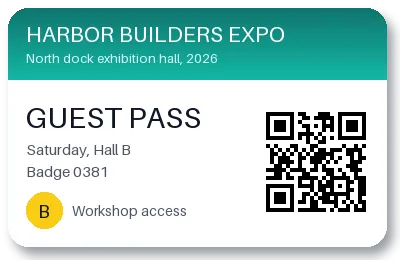
- A guest pass for a made-up trade show that we drew for this page, saved as a lossy WebP with a transparent background and a soft shadow. (CC0-1.0). How it was made
- Made by
- 2026-11-04, API build
9eeeb0640aba
Parameters
Send these as form fields next to the file. Names are case-insensitive. If you set one of the documented options below that we don't support yet, the request fails with a 400 that names it instead of returning a file made without it.
| Parameter | What it does |
|---|---|
FileNamestring | Base name of the JSON result; guest-badge.json by default. |
StoreFileboolean, default false | true stores the JSON for 3 hours and returns Files[].Url. |
What carries over, and what doesn't
Kept
- The code's text exactly: HBX26 GUEST PASS 0381 HALL B WORKSHOPS for the sample, read through its lossy compression.
- Several codes at once: a WebP with two QR codes returned both, in one
codesarray. - Lossless WebPs, which decode the same way.
Lost or not yet supported
- Codes on transparent backgrounds whose hidden color is dark. Transparency is ignored when reading, so a QR code drawn on transparent pixels that store black returned 422; the same code over transparent white was found.
- Codes after the first frame of an animated WebP: with the code on frame 2 the API returned 422, with it on frame 1 it was found.
- Position and format details. Only the text is returned;
/v2/convert/qrcode/to/datareports the format and page as well. - Barcodes other than QR, which need
/v2/convert/barcode/to/data.
Limits
- One WebP per request.
- Requests up to 10 MB on the Free plan or 100 MB on paid plans, all files and fields together.
- Images over 100,000,000 pixels return 413.
- At most 50 candidate codes are decoded per image.
- No readable code returns 422 'no readable QR code was found in the image'.
- Each request stops at 120 seconds with 504.
Where teams use it
Tickets and passes shared as images
E-tickets, guest passes and boarding cards can end up as WebP when saved from a browser or a chat app. Read the code server-side to check the pass number before entry.
Moderating uploaded images
Find out which links or payloads are hidden in QR codes inside user-uploaded WebP images before they are shown to others.
Questions
What does a successful response contain?
One JSON file, base64-encoded in Files[0].FileData. For the sample it is 65 bytes of indented JSON: {"codes": ["HBX26 GUEST PASS 0381 HALL B WORKSHOPS"]}.
Why isn't the QR code in my transparent WebP found?
Transparent pixels are read by the color they store, without their alpha. If the code's light areas are transparent pixels that store black, the code becomes black on black. Put the code on an opaque light background, or make sure the transparent pixels store white.
Does it read animated WebP?
It reads the first frame only. Move the frame with the code to the front, or export that frame as a still image.
Does lossy compression stop the code from reading?
Not at the quality of the sample, which was saved at WebP quality 80 and decoded correctly. Very small or heavily compressed codes can fail.
Convert your first WebP file in a minute.