Read QR codes from GIF API
Upload a GIF to POST /v2/convert/gif/to/qrdata and the API scans its first frame for QR codes. You get back a small JSON file with a codes array holding the text of each code it could decode.
- Endpoint
- POST /v2/
convert/ gif/ to/ qrdata - Accepts
- gif
- Sample timing
- 3 ms median of 5 runsHow we measure
- Request size
- Up to 10 MB on the Free plan or 100 MB on paid plans, all files together
Request and response
Every sample below ran against the API before this page was published. Set PDFCONVERSIONAPI_KEY to your key and run it as is.
curl -sS -X POST \
  https://api.pdfconversionapi.com/v2/convert/gif/to/qrdata \
  -H "Authorization: Bearer $PDFCONVERSIONAPI_KEY" \
  -F File=@parcel-tracker.gif \
  -o response.json

# FileData is base64. Save the first file in converted/,
# or print the JSON error.
if jq -e '.Files' response.json > /dev/null; then
  mkdir -p converted
  name=$(jq -r '.Files[0].FileName' response.json)
  jq -r '.Files[0].FileData' response.json \
    | base64 --decode > "converted/$name"
else
  cat response.json
fi
import base64
import os
import requests
key = os.environ["PDFCONVERSIONAPI_KEY"]
response = requests.post(
"https://api.pdfconversionapi.com/v2/convert/gif/to/qrdata",
headers={"Authorization": f"Bearer {key}"},
files=[("File", open("parcel-tracker.gif", "rb"))],
timeout=180,
)
result = response.json()
if not response.ok:
raise SystemExit(f"{result['Code']}: {result['Message']}")
os.makedirs("converted", exist_ok=True)
for file in result["Files"]:
path = os.path.join("converted", file["FileName"])
with open(path, "wb") as out:
out.write(base64.b64decode(file["FileData"]))
print(path, file["FileSize"], "bytes")
import { mkdir, readFile, writeFile } from "node:fs/promises";
import { join } from "node:path";

const form = new FormData();
const file = "parcel-tracker.gif";
form.append("File", new Blob([await readFile(file)]), file);

const url = "https://api.pdfconversionapi.com/v2/convert/gif/to/qrdata";
const key = process.env.PDFCONVERSIONAPI_KEY;
const response = await fetch(url, {
  method: "POST",
  headers: { Authorization: `Bearer ${key}` },
  body: form,
});
const result = await response.json();
if (!response.ok) {
  throw new Error(`${result.Code}: ${result.Message}`);
}

await mkdir("converted", { recursive: true });
for (const file of result.Files) {
  const path = join("converted", file.FileName);
  await writeFile(path, Buffer.from(file.FileData, "base64"));
  console.log(path, file.FileSize, "bytes");
}
{
  "ConversionCost": 1,
  "ConversionTime": 0.003,
  "Files": [
    {
      "FileName": "parcel-tracker.json",
      "FileExt": "json",
      "FileSize": 57,
      "FileData": "ewogICJjb2RlcyI6IFsKICAg…"
    }
  ]
}
Response from our test run on 2026-11-03. ConversionTime shows the median of 5 runs. FileData is shortened here; the real response carries the whole file as base64.
The sample, converted
The same file the code sends. Download the input and the output and compare them yourself.
parcel-tracker.json, 5 lines
{ "codes": [ "https://example.com/t/PKG48213" ]}
- Input
- parcel-tracker.gif (8.7 KB)
- Output
- parcel-tracker.json (57 bytes)
- Source
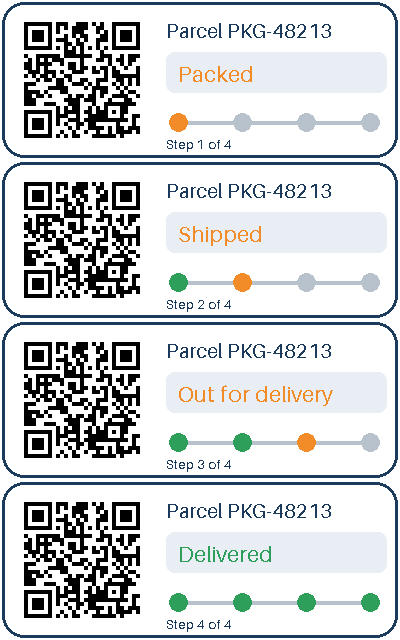
- A four-frame animated parcel-tracking card with a transparent outside and a QR code, drawn by us for this page. (CC0-1.0). How it was made
- Made by
- 2026-11-04, API build
9eeeb0640aba
Parameters
Send these as form fields next to the file. Names are case-insensitive. If you set one of the documented options below that we don't support yet, the request fails with a 400 that names it instead of returning a file made without it.
| Parameter | What it does |
|---|---|
FileNamestring | Name of the returned JSON file. Without it, parcel-tracker.gif gives parcel-tracker.json. |
StoreFileboolean, default false | Return a URL to the JSON for 3 hours rather than base64. |
What carries over, and what doesn't
Kept
- The full text of each code, byte for byte: the sample returns https://example.com/t/PKG48213
- Several codes per image: a GIF with two QR codes side by side returned both texts
- Codes that are turned: a QR code rotated 30 degrees in a test image was read
Lost or not yet supported
- Every frame after the first. A two-frame GIF with the QR code only in frame 2 returned 422.
- Position, size and error-correction level of each code; only the text is returned.
- Other barcode types such as Code 128 or Data Matrix, which this route does not look for.
Limits
- One GIF per request; only frame 1 is scanned.
- Up to 50 candidate codes are tried per image.
- Requests up to 10 MB on the Free plan or 100 MB on paid plans, all files and fields together.
- Images over 100,000,000 pixels: 413.
- No readable code: 422 "no readable QR code was found in the image".
Where teams use it
Shipping and tracking graphics
When a tracking card or label arrives as a GIF image, reading its QR code on the server gives you the tracking link without anyone holding up a phone.
Checking generated codes
If your system draws QR codes into GIF badges or tickets, run each one through this route before sending it out to confirm the code decodes to the text you meant.
Questions
What does the response look like?
A JSON file in Files[0], here parcel-tracker.json, containing {"codes": ["https://example.com/t/PKG48213"]}. Decode FileData from base64 to read it.
Will it find a QR code in a later frame of an animated GIF?
No. Only frame 1 is decoded. We tested a GIF whose first frame is blank and whose second holds a QR code, and the API answered 422.
Can it read light codes on a dark background?
No. An inverted test code (white modules on black) was not found. Dark modules on a light background are what it reads; a code with its blank margin cropped off was still found.
Are the codes in a fixed order?
They come back in the order the detector found them, which is not guaranteed to be left to right. In our two-code test the right-hand code came first.
Convert your first GIF file in a minute.