Read QR codes from BMP API
POST a bitmap to /v2/convert/bmp/to/qrdata and the API looks for QR codes in it. The reply holds a JSON file whose codes array lists the decoded text of each one.
- Endpoint
- POST /v2/
convert/ bmp/ to/ qrdata - Accepts
- bmp
- Sample timing
- 3 ms median of 5 runsHow we measure
- Request size
- Up to 10 MB on the Free plan or 100 MB on paid plans, all files together
Request and response
Every sample below ran against the API before this page was published. Set PDFCONVERSIONAPI_KEY to your key and run it as is.
curl -sS -X POST \
  https://api.pdfconversionapi.com/v2/convert/bmp/to/qrdata \
  -H "Authorization: Bearer $PDFCONVERSIONAPI_KEY" \
  -F File=@shelf-label.bmp \
  -o response.json

# FileData is base64. Save the first file in converted/,
# or print the JSON error.
if jq -e '.Files' response.json > /dev/null; then
  mkdir -p converted
  name=$(jq -r '.Files[0].FileName' response.json)
  jq -r '.Files[0].FileData' response.json \
    | base64 --decode > "converted/$name"
else
  cat response.json
fi
import base64
import os
import requests
key = os.environ["PDFCONVERSIONAPI_KEY"]
response = requests.post(
"https://api.pdfconversionapi.com/v2/convert/bmp/to/qrdata",
headers={"Authorization": f"Bearer {key}"},
files=[("File", open("shelf-label.bmp", "rb"))],
timeout=180,
)
result = response.json()
if not response.ok:
raise SystemExit(f"{result['Code']}: {result['Message']}")
os.makedirs("converted", exist_ok=True)
for file in result["Files"]:
path = os.path.join("converted", file["FileName"])
with open(path, "wb") as out:
out.write(base64.b64decode(file["FileData"]))
print(path, file["FileSize"], "bytes")
import { mkdir, readFile, writeFile } from "node:fs/promises";
import { join } from "node:path";

const form = new FormData();
const file = "shelf-label.bmp";
form.append("File", new Blob([await readFile(file)]), file);

const url = "https://api.pdfconversionapi.com/v2/convert/bmp/to/qrdata";
const key = process.env.PDFCONVERSIONAPI_KEY;
const response = await fetch(url, {
  method: "POST",
  headers: { Authorization: `Bearer ${key}` },
  body: form,
});
const result = await response.json();
if (!response.ok) {
  throw new Error(`${result.Code}: ${result.Message}`);
}

await mkdir("converted", { recursive: true });
for (const file of result.Files) {
  const path = join("converted", file.FileName);
  await writeFile(path, Buffer.from(file.FileData, "base64"));
  console.log(path, file.FileSize, "bytes");
}
{
  "ConversionCost": 1,
  "ConversionTime": 0.003,
  "Files": [
    {
      "FileName": "shelf-label.json",
      "FileExt": "json",
      "FileSize": 61,
      "FileData": "ewogICJjb2RlcyI6IFsKICAg…"
    }
  ]
}
Response from our test run on 2026-11-03. ConversionTime shows the median of 5 runs. FileData is shortened here; the real response carries the whole file as base64.
The sample, converted
The same file the code sends. Download the input and the output and compare them yourself.
shelf-label.json, 5 lines
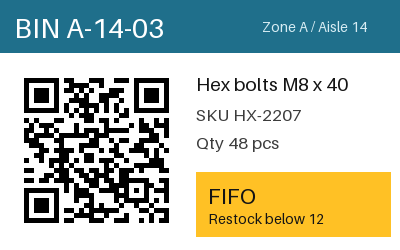
{ "codes": [ "BIN A-14-03 | SKU HX-2207 | QTY 48" ]}
- Input
- shelf-label.bmp (293 KB)
- Output
- shelf-label.json (61 bytes)
- Source
- A 24-bit warehouse bin label with a QR code and a colored header, drawn by us for this page. (CC0-1.0). How it was made
- Made by
- 2026-11-04, API build
9eeeb0640aba
Parameters
Send these as form fields next to the file. Names are case-insensitive. If you set one of the documented options below that we don't support yet, the request fails with a 400 that names it instead of returning a file made without it.
| Parameter | What it does |
|---|---|
FileNamestring | Base name of the JSON result; shelf-label.bmp gives shelf-label.json when it is left out. |
StoreFileboolean, default false | true returns a link to the JSON, kept 3 hours, in place of base64. |
What carries over, and what doesn't
Kept
- The exact text, separators and spaces included: BIN A-14-03 | SKU HX-2207 | QTY 48
- Codes in any BMP layout we tried: 1-bit, 8-bit, run-length encoded, top-down and 32-bit copies of the label all decoded the same
- Tilted codes: a copy rotated 30 degrees was read
- Very small codes: a 37 × 37 px bitmap, one pixel per module, was read
Lost or not yet supported
- Where the code sits in the image, its version and its error-correction level.
- Codes the reader cannot find: an inverted code (light on dark) and a blurred one both returned 422.
- Other symbologies such as Code 128, EAN or Data Matrix.
Limits
- One bitmap per request.
- Up to 50 candidate codes per image are decoded.
- Requests up to 10 MB on the Free plan or 100 MB on paid plans, all files and fields together.
- Images over 100,000,000 pixels get a 413; a header claiming 12,000 × 9,000 was refused without reading pixels.
- If nothing decodes: 422 "no readable QR code was found in the image".
Where teams use it
Warehouse and inventory labels
Label design programs can export bin and shelf labels as BMP. Reading the exported image back confirms that what was printed encodes the right bin, SKU or quantity, like the sample's "BIN A-14-03 | SKU HX-2207 | QTY 48".
Images from industrial cameras
Some inspection cameras save their frames as BMP. Posting a frame here pulls out any QR codes it shows without running a decoder yourself.
Questions
What does the API return?
One file, shelf-label.json, with the content {"codes": ["BIN A-14-03 | SKU HX-2207 | QTY 48"]} for the sample. It arrives base64-encoded in Files[0].FileData, like any other conversion result.
Does the code need a white border?
It helps, but it is not required in our tests: a copy of the code cropped to its outer modules, with no quiet zone, still decoded.
Why do I get a 422?
Either no code was detected or none decoded. Common causes are light-on-dark codes, heavy blur and codes cut off at the edge. A truncated BMP returns 422 too, but with "the input file could not be read: the image is cut short: its data ends before its last pixel".
Are parameters like ImageWidth used?
No. This route reads only FileName and StoreFile; other names are ignored, so the result is the same.
Convert your first BMP file in a minute.