DCM to JPG API
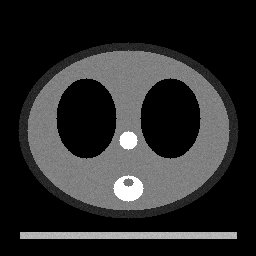
POST a .dcm file to /v2/convert/dcm/to/jpg and get one JPEG per frame, with the file's rescale and first display window applied as a viewer would. The sample asks for frame 2 of 3 with ColorSpace=gray and gets a one-channel JPEG of 9,616 bytes.
- Endpoint
- POST /v2/
convert/ dcm/ to/ jpg - Accepts
- dcm
- Sample timing
- 2 ms median of 5 runsHow we measure
- Request size
- Up to 10 MB on the Free plan or 100 MB on paid plans, all files together
Request and response
Every sample below ran against the API before this page was published. Set PDFCONVERSIONAPI_KEY to your key and run it as is.
curl -sS -X POST \
  https://api.pdfconversionapi.com/v2/convert/dcm/to/jpg \
  -H "Authorization: Bearer $PDFCONVERSIONAPI_KEY" \
  -F File=@phantom-ct.dcm \
  --form-string PageRange=2 \
  --form-string ColorSpace=gray \
  -o response.json

# FileData is base64. Save the first file in converted/,
# or print the JSON error.
if jq -e '.Files' response.json > /dev/null; then
  mkdir -p converted
  name=$(jq -r '.Files[0].FileName' response.json)
  jq -r '.Files[0].FileData' response.json \
    | base64 --decode > "converted/$name"
else
  cat response.json
fi
import base64
import os
import requests
key = os.environ["PDFCONVERSIONAPI_KEY"]
response = requests.post(
"https://api.pdfconversionapi.com/v2/convert/dcm/to/jpg",
headers={"Authorization": f"Bearer {key}"},
files=[("File", open("phantom-ct.dcm", "rb"))],
data={
"PageRange": "2",
"ColorSpace": "gray",
},
timeout=180,
)
result = response.json()
if not response.ok:
raise SystemExit(f"{result['Code']}: {result['Message']}")
os.makedirs("converted", exist_ok=True)
for file in result["Files"]:
path = os.path.join("converted", file["FileName"])
with open(path, "wb") as out:
out.write(base64.b64decode(file["FileData"]))
print(path, file["FileSize"], "bytes")
import { mkdir, readFile, writeFile } from "node:fs/promises";
import { join } from "node:path";

const form = new FormData();
const file = "phantom-ct.dcm";
form.append("File", new Blob([await readFile(file)]), file);
form.append("PageRange", "2");
form.append("ColorSpace", "gray");

const url = "https://api.pdfconversionapi.com/v2/convert/dcm/to/jpg";
const key = process.env.PDFCONVERSIONAPI_KEY;
const response = await fetch(url, {
  method: "POST",
  headers: { Authorization: `Bearer ${key}` },
  body: form,
});
const result = await response.json();
if (!response.ok) {
  throw new Error(`${result.Code}: ${result.Message}`);
}

await mkdir("converted", { recursive: true });
for (const file of result.Files) {
  const path = join("converted", file.FileName);
  await writeFile(path, Buffer.from(file.FileData, "base64"));
  console.log(path, file.FileSize, "bytes");
}
{
  "ConversionCost": 1,
  "ConversionTime": 0.002,
  "Files": [
    {
      "FileName": "phantom-ct-2.jpg",
      "FileExt": "jpg",
      "FileSize": 9616,
      "FileData": "/9j/4AAQSkZJRgABAgAAAQAB…"
    }
  ]
}
Response from our test run on 2026-11-03. ConversionTime shows the median of 5 runs. FileData is shortened here; the real response carries the whole file as base64.
The sample, converted
The same file the code sends. Download the input and the output and compare them yourself.
- Input
- phantom-ct.dcm (385 KB)
- Output
- phantom-ct-2.jpg (9.4 KB)
- Source
- A made-up CT test object with no patient behind it, generated by us: three 256 x 256 slices in one uncompressed DICOM file with two display windows. (CC0-1.0). How it was made
- Made by
- 2026-11-04, API build
9eeeb0640aba
Parameters
Send these as form fields next to the file. Names are case-insensitive. If you set one of the documented options below that we don't support yet, the request fails with a 400 that names it instead of returning a file made without it.
| Parameter | What it does |
|---|---|
PageRangestring, default 1-2000 | Frames to convert, counted from 1. The sample sends 2 and gets phantom-ct-2.jpg; without it, all three frames come back as phantom-ct-1.jpg to -3.jpg. A frame past the end returns 400.Values: 2, 1-3, 1,3, 2-, last |
ColorSpaceenum, default default | By default a grayscale DICOM still becomes a three-channel JPEG with equal channels (10,935 bytes for frame 2). gray writes one channel (9,616); monochrome thresholds at mid-gray and came out larger, 18,766.Values: default, rgb, gray, monochrome |
ImageQualityinteger, default 85 | JPEG quality. Frame 2 is 6,038 bytes at 50, 8,440 at 75 and 17,643 at 95. ConvertAPI documents 75 as its default; we use 85.Values: 1–100 |
ImageWidthinteger | Scales each frame with a Lanczos3 filter: 512 turned the 256-pixel slices into 512 × 512 JPEGs.Values: 1–20000 |
ImageHeightinteger | Target height; with ImageWidth, a box the frame fits into (200 × 100 gave 100 × 100).Values: 1–20000 |
ScaleProportionsboolean, default true | false stretches each frame to the exact box (200 × 100). |
ScaleIfLargerboolean, default false | true stops enlargement, so ImageWidth=512 leaves the 256-pixel frames as they are. |
ScaleImageboolean, default true | false cuts the top-left ImageWidth × ImageHeight area out of each frame. |
ImageResolutioninteger | Dots per inch in the JFIF header. Without it the header holds a 1:1 aspect ratio and no unit; the DICOM's pixel spacing isn't used.Values: 10–800 |
FileNamestring | Base name: slice gives slice-1.jpg, slice-2.jpg and so on. |
StoreFileboolean, default false | true returns links valid for 3 hours instead of base64 files. |
What carries over, and what doesn't
Kept
- The display window: the PNG route on the same file matched the standard linear window formula within half a level, and the JPEG adds only its compression error
- Frame order, in the file names:
-1,-2,-3 - Color DICOM images, which stay RGB
- MONOCHROME1 images, inverted so that higher values are darker, as the standard defines
Lost or not yet supported
- Most of the value range: the 12-bit CT values pass through the soft-tissue window (40/400), so everything below -160 HU is black and above 240 HU white.
- The second window in the file (bone, 400/1800); only the first is used.
- Some accuracy to JPEG compression: at quality 85, frame 2 differs from the lossless PNG by 1.6 levels on average and up to 25.
- Patient name, ID and every other header field. The JPEG has a JFIF header and nothing else.
- Pixel spacing (0.9 mm in the sample): the JPEG has no physical size.
Limits
- One DICOM file per request, at most 2,000 frames converted per request; a 2,001-frame file needs
PageRange. - Each frame up to 100,000,000 pixels; requests up to 10 MB on the Free plan or 100 MB on paid plans; 120 seconds per conversion.
- Compressed files: JPEG Baseline, RLE Lossless and deflated files are read; JPEG 2000 returned 422, and JPEG-LS isn't supported either.
- Signed pixel data with negative values and no window comes out nearly black: a test ramp from -500 to 445 gave values 0 to 2.
Where teams use it
Sharing an image with someone who has no DICOM viewer
A clinic portal, a referral letter or an email to a patient can carry a JPEG, while a .dcm file needs special software. The window applied is the one stored in the file, so the picture looks as it did on the sender's screen.
Thumbnails for an imaging archive
Archive and research tools list studies with small previews. Send PageRange for the middle frame and ImageWidth=128 to get one small JPEG per series.
Slides and teaching material
Lecture slides and course notes take JPEG. Anonymized teaching cases convert frame by frame, with the frame number in each file name.
Questions
Which window is applied?
The first one in the file. The sample stores a soft-tissue window (center 40, width 400) and a bone window (400, 1800); the JPEGs use the soft-tissue one. Without a window, unsigned data is stretched from its lowest to its highest value; signed data with negative values is not, and comes out nearly black.
Can I choose the bone window instead?
Not yet; there is no parameter for the window. The order in the file decides. To show another window, rewrite the Window Center and Window Width tags so the one you want comes first, then convert.
Is patient information copied into the JPEG?
No header field is written: we searched the sample's JPEGs for the patient name and ID and found neither. Text that is part of the pixel data itself is image content and stays.
How are multi-frame files named?
Each frame becomes its own file, numbered from 1: phantom-ct-1.jpg to phantom-ct-3.jpg. A single-frame file gives name.jpg without a number.
Which compressed DICOM files can it read?
Uncompressed files (implicit or explicit VR), deflated files, RLE Lossless and JPEG Baseline all converted in our tests, with or without the 128-byte preamble. JPEG 2000 returned 422 'Unsupported TransferSyntax'; JPEG-LS is not built in either.
Convert your first DCM file in a minute.