DCM to PNG API
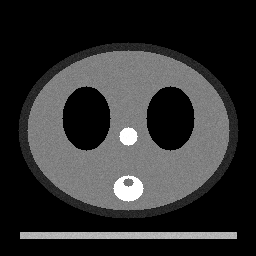
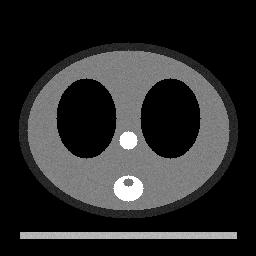
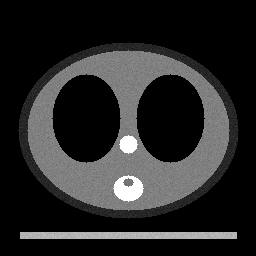
POST a .dcm file to /v2/convert/dcm/to/png and get a lossless PNG for every frame, numbered -1, -2 and so on. Rescale, display window and MONOCHROME1 inversion are applied first, so the three-slice sample came back as three 256 × 256 grayscale PNGs of about 20 KB each.
- Endpoint
- POST /v2/
convert/ dcm/ to/ png - Accepts
- dcm
- Sample timing
- 4 ms median of 5 runsHow we measure
- Request size
- Up to 10 MB on the Free plan or 100 MB on paid plans, all files together
Request and response
Every sample below ran against the API before this page was published. Set PDFCONVERSIONAPI_KEY to your key and run it as is.
curl -sS -X POST \
  https://api.pdfconversionapi.com/v2/convert/dcm/to/png \
  -H "Authorization: Bearer $PDFCONVERSIONAPI_KEY" \
  -F File=@phantom-ct.dcm \
  -o response.json

# FileData is base64. Save the first file in converted/,
# or print the JSON error.
if jq -e '.Files' response.json > /dev/null; then
  mkdir -p converted
  name=$(jq -r '.Files[0].FileName' response.json)
  jq -r '.Files[0].FileData' response.json \
    | base64 --decode > "converted/$name"
else
  cat response.json
fi
import base64
import os
import requests
key = os.environ["PDFCONVERSIONAPI_KEY"]
response = requests.post(
"https://api.pdfconversionapi.com/v2/convert/dcm/to/png",
headers={"Authorization": f"Bearer {key}"},
files=[("File", open("phantom-ct.dcm", "rb"))],
timeout=180,
)
result = response.json()
if not response.ok:
raise SystemExit(f"{result['Code']}: {result['Message']}")
os.makedirs("converted", exist_ok=True)
for file in result["Files"]:
path = os.path.join("converted", file["FileName"])
with open(path, "wb") as out:
out.write(base64.b64decode(file["FileData"]))
print(path, file["FileSize"], "bytes")
import { mkdir, readFile, writeFile } from "node:fs/promises";
import { join } from "node:path";

const form = new FormData();
const file = "phantom-ct.dcm";
form.append("File", new Blob([await readFile(file)]), file);

const url = "https://api.pdfconversionapi.com/v2/convert/dcm/to/png";
const key = process.env.PDFCONVERSIONAPI_KEY;
const response = await fetch(url, {
  method: "POST",
  headers: { Authorization: `Bearer ${key}` },
  body: form,
});
const result = await response.json();
if (!response.ok) {
  throw new Error(`${result.Code}: ${result.Message}`);
}

await mkdir("converted", { recursive: true });
for (const file of result.Files) {
  const path = join("converted", file.FileName);
  await writeFile(path, Buffer.from(file.FileData, "base64"));
  console.log(path, file.FileSize, "bytes");
}
{
  "ConversionCost": 1,
  "ConversionTime": 0.004,
  "Files": [
    {
      "FileName": "phantom-ct-1.png",
      "FileExt": "png",
      "FileSize": 22208,
      "FileData": "iVBORw0KGgoAAAANSUhEUgAA…"
    },
    {
      "FileName": "phantom-ct-2.png",
      "FileExt": "png",
      "FileSize": 20257,
      "FileData": "iVBORw0KGgoAAAANSUhEUgAA…"
    },
    {
      "FileName": "phantom-ct-3.png",
      "FileExt": "png",
      "FileSize": 18924,
      "FileData": "iVBORw0KGgoAAAANSUhEUgAA…"
    }
  ]
}
Response from our test run on 2026-11-03. ConversionTime shows the median of 5 runs. FileData is shortened here; the real response carries the whole file as base64.
The sample, converted
The same file the code sends. Download the input and the output and compare them yourself.
- Input
- phantom-ct.dcm (385 KB)
- Output
- phantom-ct-1.png (22 KB)phantom-ct-2.png (20 KB)phantom-ct-3.png (18 KB)
- Source
- A made-up CT test object with no patient behind it, generated by us: three 256 x 256 slices in one uncompressed DICOM file with two display windows. (CC0-1.0). How it was made
- Made by
- 2026-11-04, API build
9eeeb0640aba
Parameters
Send these as form fields next to the file. Names are case-insensitive. If you set one of the documented options below that we don't support yet, the request fails with a 400 that names it instead of returning a file made without it.
| Parameter | What it does |
|---|---|
PageRangestring, default 1-2000 | Which frames to convert. Default: all of them, here 22,208, 20,257 and 18,924 bytes. PageRange=last returns only frame 3.Values: 2, 1-3, 1,3, 2-, last |
ImageWidthinteger | Resamples every frame; 512 doubled the slices to 512 × 512 (68,971 bytes for frame 1).Values: 1–20000 |
ImageHeightinteger | Target height, or a bounding box with ImageWidth.Values: 1–20000 |
ScaleProportionsboolean, default true | false lets both sizes apply exactly. |
ScaleIfLargerboolean, default false | true only ever shrinks frames. |
ScaleImageboolean, default true | false crops the top-left area of each frame. |
ColorSpaceenum, default default | Grayscale DICOM already gives gray PNGs, so gray changes nothing. rgb writes three channels (63,720 bytes for frame 1); monochrome two levels (7,612).Values: default, rgb, gray, monochrome |
TransparentColorstring | Adds an alpha channel and clears pixels of exactly this color. #000000 cleared 38,446 of frame 1's 65,536 pixels: the air around the body and the lungs, which the window also maps to black.Values: #RRGGBB, R,G,B or a basic color name |
ImageResolutioninteger | Writes a pHYs chunk with this dpi; the pixel spacing in the DICOM is not converted into one.Values: 10–800 |
FileNamestring | Base name for the numbered PNGs. |
StoreFileboolean, default false | true returns links valid for 3 hours. |
What carries over, and what doesn't
Kept
- The windowed values exactly: every pixel was within half a level of the DICOM linear window formula
- Color images as RGB, and MONOCHROME1 inverted to normal display
- Every frame, in order, in numbered files
- Identical output from uncompressed, deflated and RLE-compressed copies of the same image
Lost or not yet supported
- Bit depth: 12- or 16-bit data becomes 8-bit after windowing; the sample's values, which run from -1,000 to 736 HU, end up as 8-bit gray with 150 distinct levels in frame 1.
- The original values: you can't recover Hounsfield units from the PNG.
- Every header field, patient name and ID included; the PNG holds only IHDR, IDAT and IEND chunks.
- Brightness for signed data with negative values and no window, which came out nearly black in our test.
Limits
- One DICOM file per request; up to 2,000 frames per request, each up to 100,000,000 pixels.
- Requests up to 10 MB on the Free plan or 100 MB on paid plans, 120 seconds per conversion.
- JPEG 2000 and JPEG-LS compressed files are not read; a JPEG 2000 file returned 422 'Unsupported TransferSyntax'.
- A file without image rows and columns, such as a structured report, returns 422 'the DICOM file holds no image'.
Where teams use it
Image datasets for machine learning
Training pipelines built on general image loaders read PNG but not DICOM. Converting each frame with the file's own window gives images that look as a reader saw them; keep the .dcm files if a model needs the full value range.
Figures for papers and teaching
PNG keeps every edge and gray level of the windowed image, so figures and annotated teaching cases show no compression artifacts around small structures.
Web viewers without a DICOM decoder
A browser displays the PNG frames directly; step through a multi-frame file by loading -1.png, -2.png and so on.
Questions
Can I get 16-bit PNGs with the raw values?
No. Frames are windowed and written at 8 bits per channel. For analysis on Hounsfield units or other raw values, read the DICOM pixel data directly; use these PNGs for display.
What happens when the file has no window?
The frame is stretched from its lowest to its highest value: a test ramp from 1000 to 1630 came out as 0 to 255. One exception we found: signed data that goes below zero, with no window, comes out nearly black.
Is the PNG lossless?
The PNG stores the windowed 8-bit image without loss. The window itself discards values outside its range, so the step from DICOM to PNG is not reversible.
How do I get only one frame?
Send PageRange: 2 for frame 2, last for the final one, or 1,3 for two of them. The frame number stays in the file name.
Convert your first DCM file in a minute.