DOT to PDF API
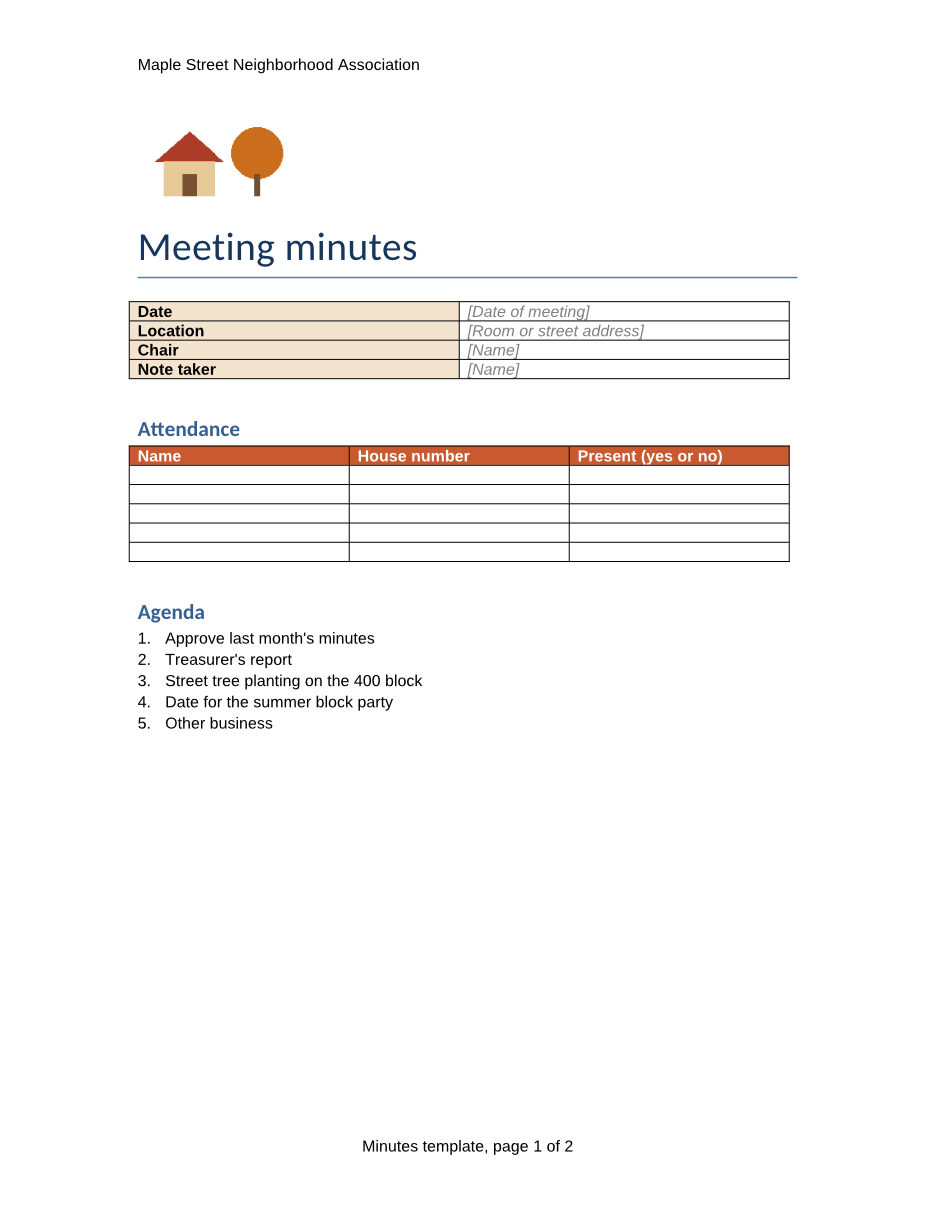
Send a Word 97-2003 template to POST /v2/convert/dot/to/pdf and get the blank form as a PDF, laid out by an office suite on our side. The sample minutes template came back as a 66,911-byte, 2-page Letter PDF with its placeholders, tables and page-numbered footer.
- Endpoint
- POST /v2/
convert/ dot/ to/ pdf - Accepts
- dot
- Sample timing
- 0.546 s median of 5 runsHow we measure
- Request size
- Up to 10 MB on the Free plan or 100 MB on paid plans, all files together
Request and response
Every sample below ran against the API before this page was published. Set PDFCONVERSIONAPI_KEY to your key and run it as is.
curl -sS -X POST \
  https://api.pdfconversionapi.com/v2/convert/dot/to/pdf \
  -H "Authorization: Bearer $PDFCONVERSIONAPI_KEY" \
  -F File=@meeting-minutes.dot \
  -o response.json

# FileData is base64. Save the first file in converted/,
# or print the JSON error.
if jq -e '.Files' response.json > /dev/null; then
  mkdir -p converted
  name=$(jq -r '.Files[0].FileName' response.json)
  jq -r '.Files[0].FileData' response.json \
    | base64 --decode > "converted/$name"
else
  cat response.json
fi
import base64
import os
import requests
key = os.environ["PDFCONVERSIONAPI_KEY"]
response = requests.post(
"https://api.pdfconversionapi.com/v2/convert/dot/to/pdf",
headers={"Authorization": f"Bearer {key}"},
files=[("File", open("meeting-minutes.dot", "rb"))],
timeout=180,
)
result = response.json()
if not response.ok:
raise SystemExit(f"{result['Code']}: {result['Message']}")
os.makedirs("converted", exist_ok=True)
for file in result["Files"]:
path = os.path.join("converted", file["FileName"])
with open(path, "wb") as out:
out.write(base64.b64decode(file["FileData"]))
print(path, file["FileSize"], "bytes")
import { mkdir, readFile, writeFile } from "node:fs/promises";
import { join } from "node:path";

const form = new FormData();
const file = "meeting-minutes.dot";
form.append("File", new Blob([await readFile(file)]), file);

const url = "https://api.pdfconversionapi.com/v2/convert/dot/to/pdf";
const key = process.env.PDFCONVERSIONAPI_KEY;
const response = await fetch(url, {
  method: "POST",
  headers: { Authorization: `Bearer ${key}` },
  body: form,
});
const result = await response.json();
if (!response.ok) {
  throw new Error(`${result.Code}: ${result.Message}`);
}

await mkdir("converted", { recursive: true });
for (const file of result.Files) {
  const path = join("converted", file.FileName);
  await writeFile(path, Buffer.from(file.FileData, "base64"));
  console.log(path, file.FileSize, "bytes");
}
{
  "ConversionCost": 1,
  "ConversionTime": 0.546,
  "Files": [
    {
      "FileName": "meeting-minutes.pdf",
      "FileExt": "pdf",
      "FileSize": 66911,
      "FileData": "JVBERi0xLjcKJcOkw7zDtsOf…"
    }
  ]
}
Response from our test run on 2026-11-03. ConversionTime shows the median of 5 runs. FileData is shortened here; the real response carries the whole file as base64.
The sample, converted
The same file the code sends. Download the input and the output and compare them yourself.
- Input
- meeting-minutes.dot (29 KB)
- Output
- meeting-minutes.pdf (65 KB)
- Source
- A two-page meeting minutes template for a fictional neighborhood association, written for this site and saved as a Word 97-2003 template, with fill-in tables and bracketed placeholders. (CC0-1.0). How it was made
- Made by
- 2026-11-04, API build
9eeeb0640aba
Parameters
Send these as form fields next to the file. Names are case-insensitive. If you set one of the documented options below that we don't support yet, the request fails with a 400 that names it instead of returning a file made without it.
| Parameter | What it does |
|---|---|
PageRangestring | Keep only these pages, for example 1 for the first page of the form. 2- returns just page 2. A page past the end returns 400 with the page count, and abc returns 400 with an example.Values: e.g. 1, 2-, 1-3,5 |
Pdfaboolean, default false | Write PDF/A-1b. The sample then comes back as a PDF 1.4 file marked part 1, conformance B. |
PdfaVersionenum, default none | Pick PDF/A-1b, 2b or 3b instead. It wins over Pdfa=true: sent together with PdfaVersion=pdfA3b, Pdfa=true gave a PDF/A-3b file.Values: none, pdfA1b, pdfA2b, pdfA3b |
Passwordstring | Opens a password-protected Word 97-2003 file. Our protected test file converted with its password and returned 422 "the input file is password-protected" without it. |
FileNamestring | Base name of the PDF: FileName=minutes-blank gives minutes-blank.pdf. |
StoreFileboolean, default false | Answer with a link to the PDF, valid for 3 hours. |
Not supported yet
Setting one of these to anything but its default returns 400.
| Option | What to do instead |
|---|---|
IncludeMarkup | true returns 400 "IncludeMarkup is not supported yet for DOT files". |
UpdateTableOfContents | true returns 400. |
BookmarkMode | Bookmarks always follow the headings; another mode returns 400. |
IncludeMetadata | Title and author are always copied from the template; false returns 400. |
IncludeStructureTags | true returns 400, although the PDF is tagged anyway (see below). |
SubsetFonts | true returns 400 and false is accepted, but fonts are embedded as subsets either way. |
PdfTitle | Set the title in the template's document properties instead; the same goes for PdfAuthor, PdfSubject and PdfKeywords. |
What carries over, and what doesn't
Kept
- Both Letter pages (612 × 792 points), with the header and the footer fields filled in: "Minutes template, page 1 of 2"
- Placeholders as they look in the template: "[Date of meeting]" and "[Name]" in gray italic
- Empty table rows with their borders, and the orange-red header rows with white text
- A bookmark per heading: Attendance, Agenda, Decisions, Action items
- Title and author from the template's properties, and a structure tree (the PDF is tagged, language en-US)
- Text you can select and search, in fonts embedded as subsets
Lost or not yet supported
- Arial and Calibri themselves: the PDF embeds Liberation Sans and Carlito, which have the same character widths.
- Template behavior. The PDF is a static copy of the blank form; fields and placeholders can't be filled in.
- With
PageRange, the bookmarks, the tags and the language setting. A page subset keeps the title and author but drops those three.
Limits
- Requests up to 10 MB on the Free plan or 100 MB on paid plans, all files and fields together.
- 120 seconds per conversion, then 504.
- A
PageRangethat leaves pages out can't be combined with PDF/A yet; the pair returns 400. - Macros in the template are never run: each conversion uses a new office profile with macro execution switched off.
Where teams use it
Printable blank forms from a template library
Offices that keep their forms as .dot files can publish a PDF of each one for people who fill them in by hand, such as the minutes sheet with its empty attendance and action tables.
Checking templates before they are rolled out
Render every template in a folder to PDF and review the pages, or compare them with last month's PDFs, before the templates go to users.
Archiving old templates as PDF/A
Before retiring Word 97 templates, keep a PDF/A-2b copy of each for the record with PdfaVersion=pdfA2b.
Questions
Do macros in the .dot run during conversion?
No. Templates are a common home for macros, so every conversion starts the office suite with a new profile in which macro execution is disabled, whatever the file asks for.
Can I get PDF/A?
Yes: Pdfa=true gives PDF/A-1b, and PdfaVersion=pdfA2b or pdfA3b give the later parts. If you send both, PdfaVersion decides. Leave out PageRange, which can't be combined with PDF/A yet. pdfA2u and other versions return 400.
What does PageRange leave out of the PDF?
Selecting pages writes a new PDF from the chosen pages. With PageRange=2-, the one-page result kept the template's title and author, but had no bookmarks, no tags and no language setting. Convert the whole template if you need those; splitting that PDF afterwards with /v2/convert/pdf/to/split keeps the title and author too, but not those three.
Is a .dot handled differently from a .doc?
Both are the Word 97-2003 binary format, but this route opens the file as a template with its own import filter, through the office suite, while /v2/convert/doc/to/pdf uses a different converter. A .doc sent to this route also converted in our test.
Convert your first DOT file in a minute.