DOT to PNG API
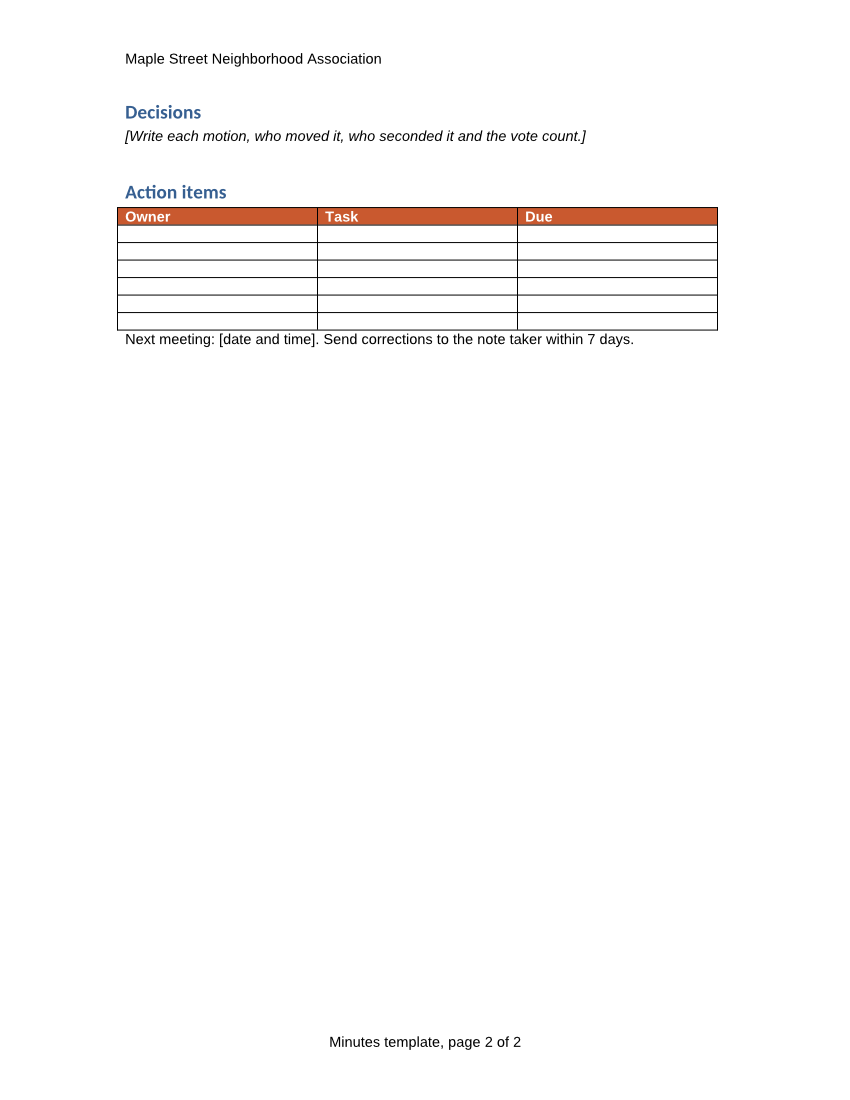
POST /v2/convert/dot/to/png draws every page of a Word 97-2003 template as a PNG. With ImageResolution=100, as in the sample, the two Letter pages are 850 × 1,100 pixels and carry a pHYs chunk saying 100 DPI.
- Endpoint
- POST /v2/
convert/ dot/ to/ png - Accepts
- dot
- Sample timing
- 0.561 s median of 5 runsHow we measure
- Request size
- Up to 10 MB on the Free plan or 100 MB on paid plans, all files together
Request and response
Every sample below ran against the API before this page was published. Set PDFCONVERSIONAPI_KEY to your key and run it as is.
curl -sS -X POST \
  https://api.pdfconversionapi.com/v2/convert/dot/to/png \
  -H "Authorization: Bearer $PDFCONVERSIONAPI_KEY" \
  -F File=@meeting-minutes.dot \
  --form-string ImageResolution=100 \
  -o response.json

# FileData is base64. Save the first file in converted/,
# or print the JSON error.
if jq -e '.Files' response.json > /dev/null; then
  mkdir -p converted
  name=$(jq -r '.Files[0].FileName' response.json)
  jq -r '.Files[0].FileData' response.json \
    | base64 --decode > "converted/$name"
else
  cat response.json
fi
import base64
import os
import requests
key = os.environ["PDFCONVERSIONAPI_KEY"]
response = requests.post(
"https://api.pdfconversionapi.com/v2/convert/dot/to/png",
headers={"Authorization": f"Bearer {key}"},
files=[("File", open("meeting-minutes.dot", "rb"))],
data={
"ImageResolution": "100",
},
timeout=180,
)
result = response.json()
if not response.ok:
raise SystemExit(f"{result['Code']}: {result['Message']}")
os.makedirs("converted", exist_ok=True)
for file in result["Files"]:
path = os.path.join("converted", file["FileName"])
with open(path, "wb") as out:
out.write(base64.b64decode(file["FileData"]))
print(path, file["FileSize"], "bytes")
import { mkdir, readFile, writeFile } from "node:fs/promises";
import { join } from "node:path";

const form = new FormData();
const file = "meeting-minutes.dot";
form.append("File", new Blob([await readFile(file)]), file);
form.append("ImageResolution", "100");

const url = "https://api.pdfconversionapi.com/v2/convert/dot/to/png";
const key = process.env.PDFCONVERSIONAPI_KEY;
const response = await fetch(url, {
  method: "POST",
  headers: { Authorization: `Bearer ${key}` },
  body: form,
});
const result = await response.json();
if (!response.ok) {
  throw new Error(`${result.Code}: ${result.Message}`);
}

await mkdir("converted", { recursive: true });
for (const file of result.Files) {
  const path = join("converted", file.FileName);
  await writeFile(path, Buffer.from(file.FileData, "base64"));
  console.log(path, file.FileSize, "bytes");
}
{
  "ConversionCost": 1,
  "ConversionTime": 0.561,
  "Files": [
    {
      "FileName": "meeting-minutes-1.png",
      "FileExt": "png",
      "FileSize": 82974,
      "FileData": "iVBORw0KGgoAAAANSUhEUgAA…"
    },
    {
      "FileName": "meeting-minutes-2.png",
      "FileExt": "png",
      "FileSize": 59017,
      "FileData": "iVBORw0KGgoAAAANSUhEUgAA…"
    }
  ]
}
Response from our test run on 2026-11-03. ConversionTime shows the median of 5 runs. FileData is shortened here; the real response carries the whole file as base64.
The sample, converted
The same file the code sends. Download the input and the output and compare them yourself.
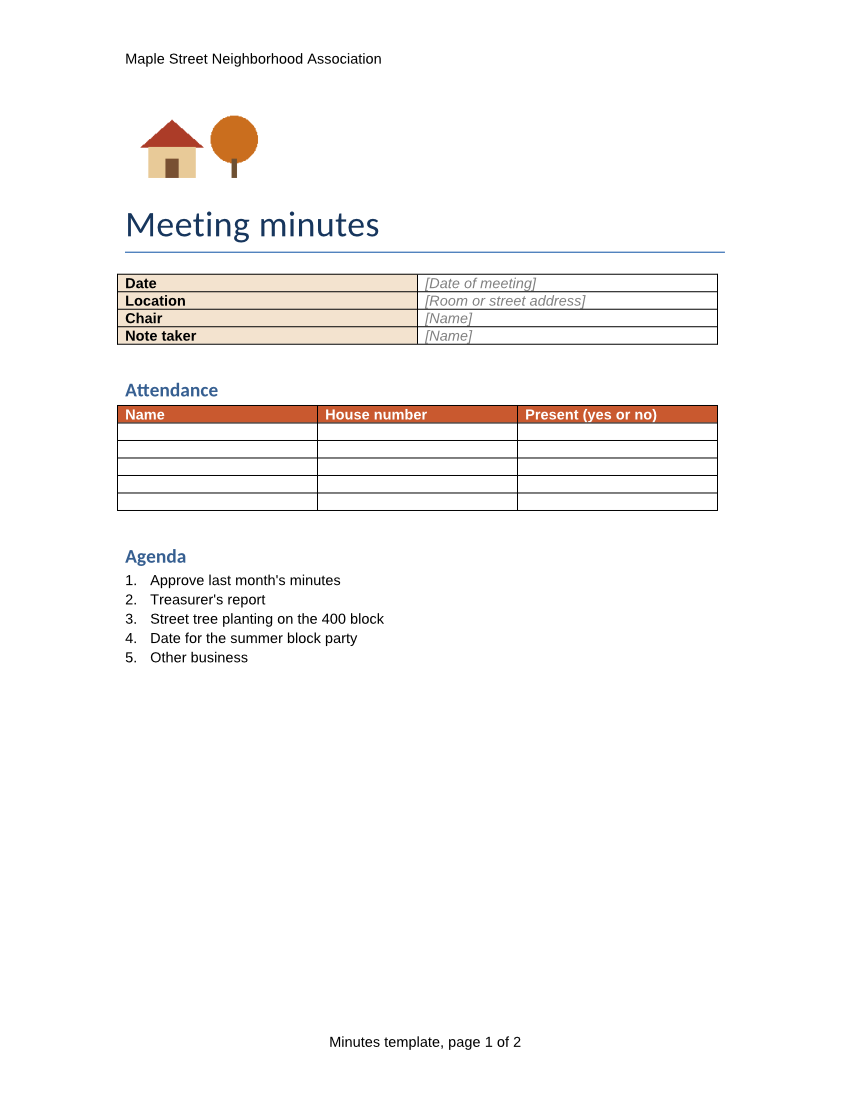
- Input
- meeting-minutes.dot (29 KB)
- Output
- meeting-minutes-1.png (81 KB)meeting-minutes-2.png (58 KB)
- Source
- A two-page meeting minutes template for a fictional neighborhood association, written for this site and saved as a Word 97-2003 template, with fill-in tables and bracketed placeholders. (CC0-1.0). How it was made
- Made by
- 2026-11-04, API build
9eeeb0640aba
Parameters
Send these as form fields next to the file. Names are case-insensitive. If you set one of the documented options below that we don't support yet, the request fails with a 400 that names it instead of returning a file made without it.
| Parameter | What it does |
|---|---|
ImageResolutioninteger, default 150 | Drawing resolution. When sent, it is also stored as 3,937 pixels per meter for 100 DPI. The sample's pages are 82,974 and 59,017 bytes at 100 and 141,199 and 105,996 at 150.Values: 36–600 |
TransparentColorstring | Pixels of exactly this color become transparent: with white at 72 DPI, 92.4% of page 1 is clear and only the text, lines, logo and colored header rows remain. |
PageRangestring | Pages to draw; 1 returns only the first.Values: e.g. 1, 2- |
ImageWidthinteger | Width in pixels with the height in proportion; 600 gives 600 × 776 pages of about 50 KB and 34 KB.Values: 1–20,000 |
ImageHeightinteger | Height in pixels with the width in proportion.Values: 1–20,000 |
ColorSpaceenum, default default | gray gives one-channel PNGs (54,168 and 40,792 bytes at 150 DPI); monochrome keeps only black and white; rgb gives the same three-channel PNGs as the default.Values: default, rgb, gray, monochrome |
BackgroundColorstring | Paints the page area before drawing. The layout leaves the paper unpainted, so #FFF8E7 turns the whole background cream, margins and blank cells included. |
Passwordstring | Password for a protected Word 97-2003 template. |
FileNamestring | Stem for the files, before -1.png, -2.png. |
StoreFileboolean, default false | Get links that last 3 hours instead of the images. |
Not supported yet
Setting one of these to anything but its default returns 400.
| Option | What to do instead |
|---|---|
IncludeMarkup | true returns 400 "IncludeMarkup is not supported yet for DOT files". |
PageSize | The page size comes from the template; PageSize=letter returns 400 for DOT files. |
What carries over, and what doesn't
Kept
- Every pixel as drawn: PNG compression is lossless
- The orange-red table header rows, the logo and the gray placeholder text
- Both pages, named
meeting-minutes-1.pngandmeeting-minutes-2.png - The print size, through the pHYs chunk, when
ImageResolutionis sent
Lost or not yet supported
- Text you can select; the pages are images.
- The exact Arial and Calibri faces, drawn with Liberation Sans and Carlito.
- A DPI value when
ImageResolutionis left out: the PNG then has no pHYs chunk at all.
Limits
- Up to 2,000 pages per request; more returns 413.
- 16,000 pixels per side and 100 million pixels per page.
- Requests up to 10 MB on the Free plan or 100 MB on paid plans, all files and fields together; 120 seconds per conversion, then 504.
Where teams use it
Overlaying a form on your own background
With TransparentColor=white, a form page can sit on a colored panel or over a photo in a web page or a slide, with only its ink showing.
Documentation of a template library
Intranet pages that list the organization's templates can show a lossless image of each page, sharp enough to read the placeholder text.
Questions
Does ImageQuality change the PNG?
No. PNG is lossless and the option is not documented for this conversion, so it is ignored: the sample with ImageQuality=50 is byte-for-byte the default output.
How do I get a transparent background?
Send TransparentColor=white. Pixels that are exactly white become transparent. Letter edges are smoothed into light grays, so they stay opaque and can look slightly light on a dark background.
Can I get both pages in one image?
Not as PNG; each page is its own file. For one file, use /v2/convert/dot/to/pdf.
Convert your first DOT file in a minute.