DOT to JPG API
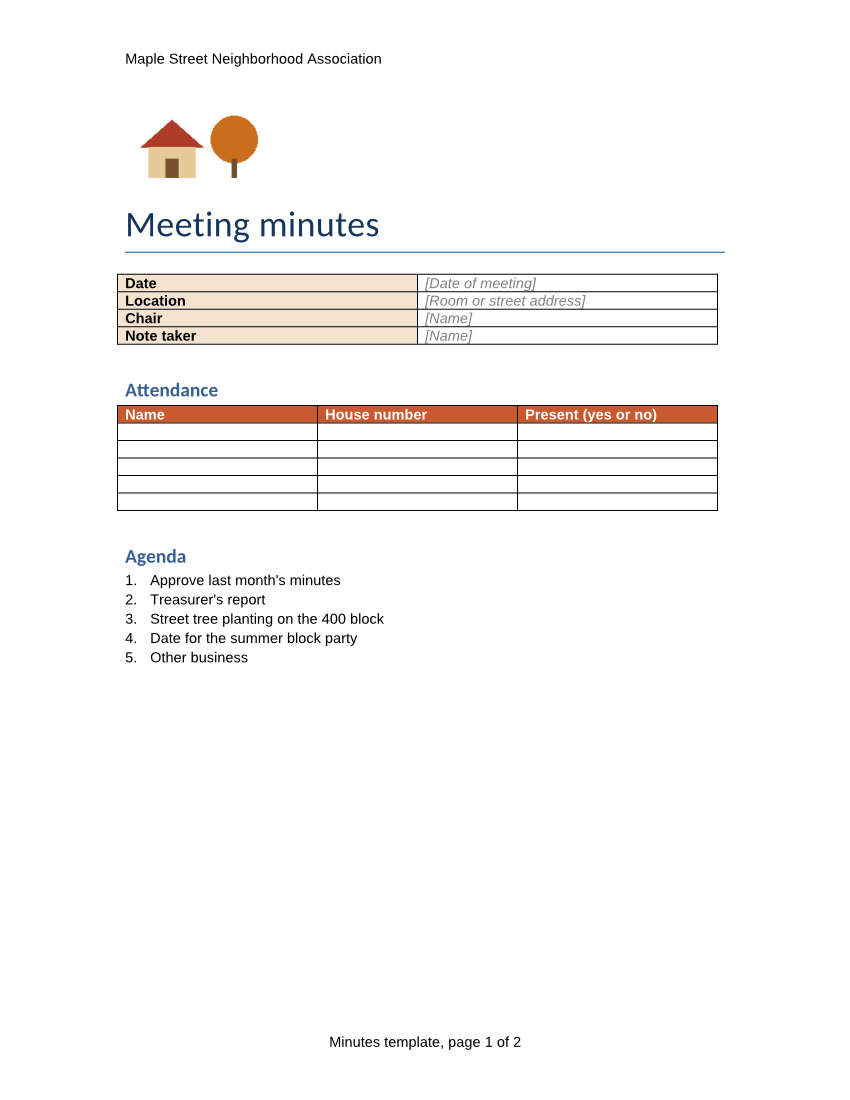
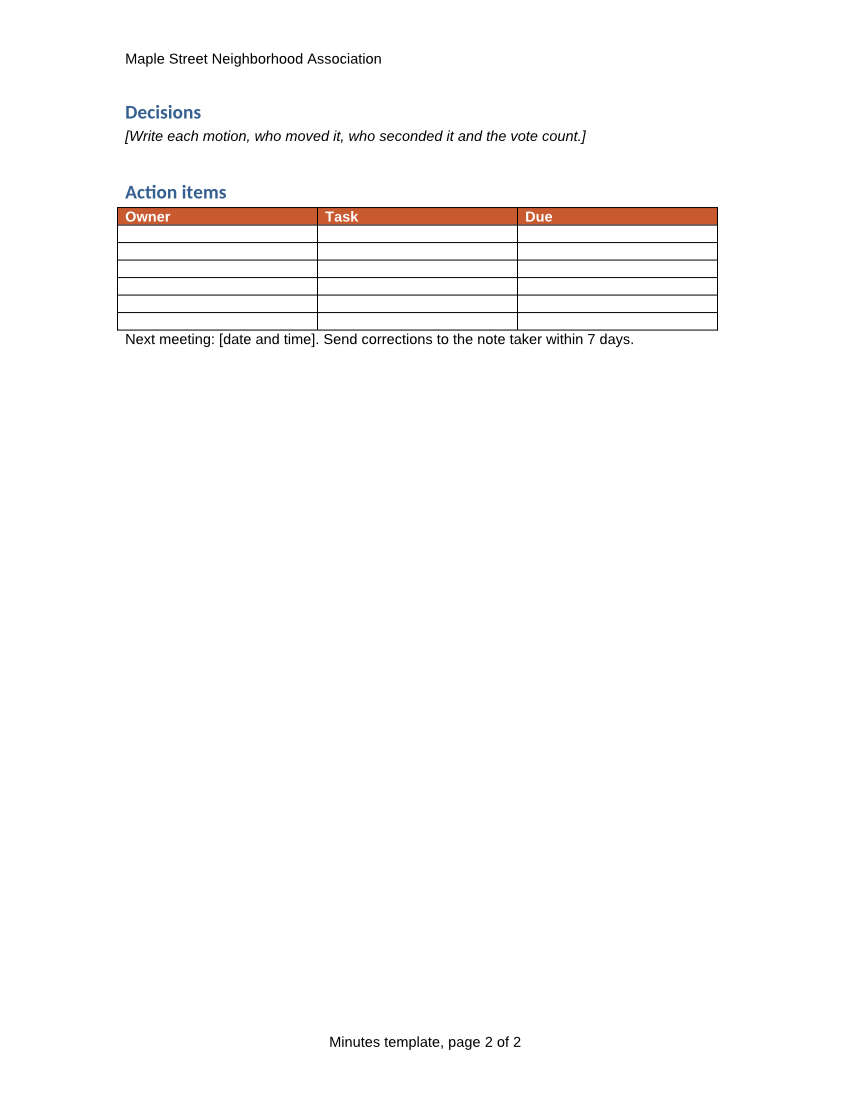
POST /v2/convert/dot/to/jpg turns every page of a Word 97-2003 template into a JPEG. The sample sends ImageResolution=100 and ImageQuality=60: two 850 × 1,100 pages of 59,960 and 45,492 bytes, each recording 100 DPI.
- Endpoint
- POST /v2/
convert/ dot/ to/ jpg - Accepts
- dot
- Sample timing
- 0.567 s median of 5 runsHow we measure
- Request size
- Up to 10 MB on the Free plan or 100 MB on paid plans, all files together
Request and response
Every sample below ran against the API before this page was published. Set PDFCONVERSIONAPI_KEY to your key and run it as is.
curl -sS -X POST \
  https://api.pdfconversionapi.com/v2/convert/dot/to/jpg \
  -H "Authorization: Bearer $PDFCONVERSIONAPI_KEY" \
  -F File=@meeting-minutes.dot \
  --form-string ImageResolution=100 \
  --form-string ImageQuality=60 \
  -o response.json

# FileData is base64. Save the first file in converted/,
# or print the JSON error.
if jq -e '.Files' response.json > /dev/null; then
  mkdir -p converted
  name=$(jq -r '.Files[0].FileName' response.json)
  jq -r '.Files[0].FileData' response.json \
    | base64 --decode > "converted/$name"
else
  cat response.json
fi
import base64
import os
import requests
key = os.environ["PDFCONVERSIONAPI_KEY"]
response = requests.post(
"https://api.pdfconversionapi.com/v2/convert/dot/to/jpg",
headers={"Authorization": f"Bearer {key}"},
files=[("File", open("meeting-minutes.dot", "rb"))],
data={
"ImageResolution": "100",
"ImageQuality": "60",
},
timeout=180,
)
result = response.json()
if not response.ok:
raise SystemExit(f"{result['Code']}: {result['Message']}")
os.makedirs("converted", exist_ok=True)
for file in result["Files"]:
path = os.path.join("converted", file["FileName"])
with open(path, "wb") as out:
out.write(base64.b64decode(file["FileData"]))
print(path, file["FileSize"], "bytes")
import { mkdir, readFile, writeFile } from "node:fs/promises";
import { join } from "node:path";

const form = new FormData();
const file = "meeting-minutes.dot";
form.append("File", new Blob([await readFile(file)]), file);
form.append("ImageResolution", "100");
form.append("ImageQuality", "60");

const url = "https://api.pdfconversionapi.com/v2/convert/dot/to/jpg";
const key = process.env.PDFCONVERSIONAPI_KEY;
const response = await fetch(url, {
  method: "POST",
  headers: { Authorization: `Bearer ${key}` },
  body: form,
});
const result = await response.json();
if (!response.ok) {
  throw new Error(`${result.Code}: ${result.Message}`);
}

await mkdir("converted", { recursive: true });
for (const file of result.Files) {
  const path = join("converted", file.FileName);
  await writeFile(path, Buffer.from(file.FileData, "base64"));
  console.log(path, file.FileSize, "bytes");
}
{
  "ConversionCost": 1,
  "ConversionTime": 0.567,
  "Files": [
    {
      "FileName": "meeting-minutes-1.jpg",
      "FileExt": "jpg",
      "FileSize": 59960,
      "FileData": "/9j/4AAQSkZJRgABAgEAZABk…"
    },
    {
      "FileName": "meeting-minutes-2.jpg",
      "FileExt": "jpg",
      "FileSize": 45492,
      "FileData": "/9j/4AAQSkZJRgABAgEAZABk…"
    }
  ]
}
Response from our test run on 2026-11-03. ConversionTime shows the median of 5 runs. FileData is shortened here; the real response carries the whole file as base64.
The sample, converted
The same file the code sends. Download the input and the output and compare them yourself.
- Input
- meeting-minutes.dot (29 KB)
- Output
- meeting-minutes-1.jpg (59 KB)meeting-minutes-2.jpg (44 KB)
- Source
- A two-page meeting minutes template for a fictional neighborhood association, written for this site and saved as a Word 97-2003 template, with fill-in tables and bracketed placeholders. (CC0-1.0). How it was made
- Made by
- 2026-11-04, API build
9eeeb0640aba
Parameters
Send these as form fields next to the file. Names are case-insensitive. If you set one of the documented options below that we don't support yet, the request fails with a 400 that names it instead of returning a file made without it.
| Parameter | What it does |
|---|---|
ImageQualityinteger, default 85 | JPEG quality. At 150 DPI the two pages total 258 KB at the default 85, 231 KB at 75 (ConvertAPI's default) and 201 KB at 50. 0 and 101 return 400.Values: 1–100 |
ImageResolutioninteger, default 150 | Pixels per inch: 1,275 × 1,650 per Letter page at 150, 850 × 1,100 at 100. The value is written to the JPEG's density fields when you send it.Values: 36–600 |
PageRangestring | Render only some pages; PageRange=2 returns meeting-minutes-2.jpg.Values: e.g. 1, 2, 1-2 |
ImageWidthinteger | Scale each page to this width (800 gives 800 × 1,035).Values: 1–20,000 |
ImageHeightinteger | Scale each page to this height (500 gives 386 × 500 pages of 23,638 and 16,269 bytes at the default quality).Values: 1–20,000 |
ColorSpaceenum, default default | gray writes a one-channel JPEG; monochrome thresholds to black and white first.Values: default, rgb, gray, monochrome |
BackgroundColorstring | Fill under the page. The template's paper is not painted white by the layout, so this color fills the whole page around the text and tables. |
Passwordstring | Opens a password-protected Word 97-2003 template. |
FileNamestring | Stem for the page files: meeting-minutes-1.jpg, meeting-minutes-2.jpg by default. |
StoreFileboolean, default false | Return a link per page instead of the data; links expire after 3 hours. |
Not supported yet
Setting one of these to anything but its default returns 400.
| Option | What to do instead |
|---|---|
IncludeMarkup | true returns 400 "IncludeMarkup is not supported yet for DOT files". |
UpdateTableOfContents | true returns 400 for DOT files. |
What carries over, and what doesn't
Kept
- The header, logo, title and both tables with their orange-red header rows
- Bracketed placeholders in gray italic, such as "[Room or street address]"
- The page-numbered footer, "Minutes template, page 2 of 2" on the second image
- The resolution: the sample's JPEGs say 100 DPI, so they print at Letter size
Lost or not yet supported
- Sharp edges on small type: JPEG compression adds faint noise around letters, more at low
ImageQuality. Use PNG for exact pixels. - Transparency; JPEG has no alpha channel.
- The template's original fonts: Arial is drawn with Liberation Sans and Calibri headings with Carlito.
Limits
- Up to 2,000 pages per request; above that, 413.
- 16,000 pixels per side and 100 million pixels per page.
- Requests up to 10 MB on the Free plan or 100 MB on paid plans, all files and fields together; 120 seconds per conversion, then 504.
Where teams use it
Thumbnails in a template picker
Show users what each form looks like before they create a document from it. PageRange=1 with ImageWidth=300 gives one small JPEG per template.
Attaching a form to an email or ticket
Mail clients and help desks show JPEGs inline. Send page images of the blank form so people can see it without opening Word.
Questions
Which quality setting should I use?
Our default is 85 and ConvertAPI's is 75, so send ImageQuality=75 when you move code over and want similar file sizes. Lower values make smaller files: the sample at 100 DPI and quality 60 is 105 KB for both pages, against 258 KB at 150 DPI and 85.
Why is my whole page colored when I set BackgroundColor?
The template's layout does not paint white paper, so the background color fills everything that is not text, lines or a fill. With BackgroundColor=black, black text disappears into the background.
Do I get one image per page?
Yes, named with the page number: meeting-minutes-1.jpg and meeting-minutes-2.jpg for the sample. For a single file with every page, use /v2/convert/dot/to/pdf.
Convert your first DOT file in a minute.