DOTX to JPG API
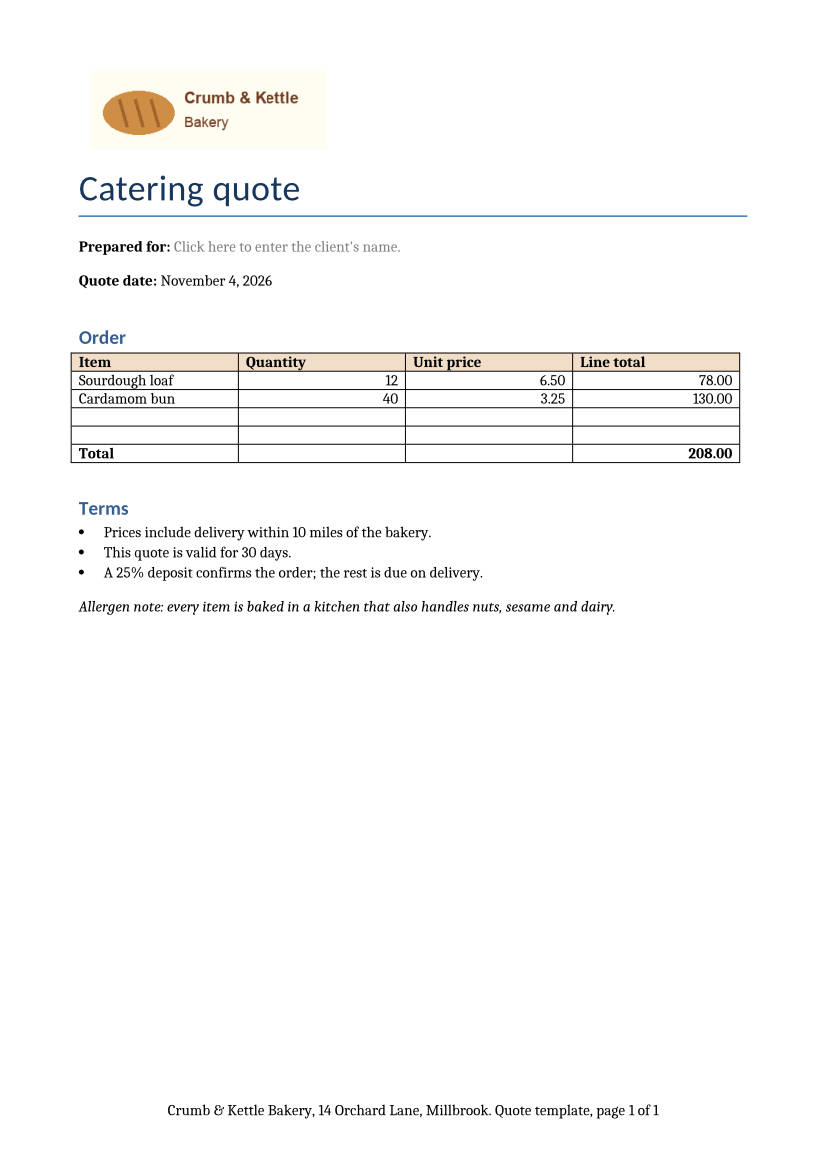
POST /v2/convert/dotx/to/jpg returns a JPEG of each page of a Word template. The one-page A4 sample, drawn at ImageResolution=100 with ImageQuality=70, comes back as an 826 × 1,169 image of 69,102 bytes that records 100 DPI.
- Endpoint
- POST /v2/
convert/ dotx/ to/ jpg - Accepts
- dotx
- Sample timing
- 0.614 s median of 5 runsHow we measure
- Request size
- Up to 10 MB on the Free plan or 100 MB on paid plans, all files together
Request and response
Every sample below ran against the API before this page was published. Set PDFCONVERSIONAPI_KEY to your key and run it as is.
curl -sS -X POST \
  https://api.pdfconversionapi.com/v2/convert/dotx/to/jpg \
  -H "Authorization: Bearer $PDFCONVERSIONAPI_KEY" \
  -F File=@catering-quote.dotx \
  --form-string ImageResolution=100 \
  --form-string ImageQuality=70 \
  -o response.json

# FileData is base64. Save the first file in converted/,
# or print the JSON error.
if jq -e '.Files' response.json > /dev/null; then
  mkdir -p converted
  name=$(jq -r '.Files[0].FileName' response.json)
  jq -r '.Files[0].FileData' response.json \
    | base64 --decode > "converted/$name"
else
  cat response.json
fi
import base64
import os
import requests
key = os.environ["PDFCONVERSIONAPI_KEY"]
response = requests.post(
"https://api.pdfconversionapi.com/v2/convert/dotx/to/jpg",
headers={"Authorization": f"Bearer {key}"},
files=[("File", open("catering-quote.dotx", "rb"))],
data={
"ImageResolution": "100",
"ImageQuality": "70",
},
timeout=180,
)
result = response.json()
if not response.ok:
raise SystemExit(f"{result['Code']}: {result['Message']}")
os.makedirs("converted", exist_ok=True)
for file in result["Files"]:
path = os.path.join("converted", file["FileName"])
with open(path, "wb") as out:
out.write(base64.b64decode(file["FileData"]))
print(path, file["FileSize"], "bytes")
import { mkdir, readFile, writeFile } from "node:fs/promises";
import { join } from "node:path";

const form = new FormData();
const file = "catering-quote.dotx";
form.append("File", new Blob([await readFile(file)]), file);
form.append("ImageResolution", "100");
form.append("ImageQuality", "70");

const url = "https://api.pdfconversionapi.com/v2/convert/dotx/to/jpg";
const key = process.env.PDFCONVERSIONAPI_KEY;
const response = await fetch(url, {
  method: "POST",
  headers: { Authorization: `Bearer ${key}` },
  body: form,
});
const result = await response.json();
if (!response.ok) {
  throw new Error(`${result.Code}: ${result.Message}`);
}

await mkdir("converted", { recursive: true });
for (const file of result.Files) {
  const path = join("converted", file.FileName);
  await writeFile(path, Buffer.from(file.FileData, "base64"));
  console.log(path, file.FileSize, "bytes");
}
{
  "ConversionCost": 1,
  "ConversionTime": 0.614,
  "Files": [
    {
      "FileName": "catering-quote-1.jpg",
      "FileExt": "jpg",
      "FileSize": 69102,
      "FileData": "/9j/4AAQSkZJRgABAgEAZABk…"
    }
  ]
}
Response from our test run on 2026-11-03. ConversionTime shows the median of 5 runs. FileData is shortened here; the real response carries the whole file as base64.
The sample, converted
The same file the code sends. Download the input and the output and compare them yourself.
- Input
- catering-quote.dotx (40 KB)
- Output
- catering-quote-1.jpg (67 KB)
- Source
- A one-page catering quote template for a fictional bakery, written for this site and saved as a Word template, with a fill-in content control, a date field and a price table. (CC0-1.0). How it was made
- Made by
- 2026-11-04, API build
9eeeb0640aba
Parameters
Send these as form fields next to the file. Names are case-insensitive. If you set one of the documented options below that we don't support yet, the request fails with a 400 that names it instead of returning a file made without it.
| Parameter | What it does |
|---|---|
ImageQualityinteger, default 85 | Compression quality. For the quote page at 150 DPI: 154,524 bytes at 85 and 121,341 at 60. ConvertAPI's default is 75.Values: 1–100 |
ImageResolutioninteger, default 150 | Pixels per inch of A4 paper: 1,240 × 1,753 at 150, 826 × 1,169 at 100. Sent explicitly, it is also written into the JPEG header.Values: 36–600 |
ImageWidthinteger | Exact output width; ImageWidth=1200 gives a 1,200 × 1,697 page of 146,589 bytes.Values: 1–20,000 |
ImageHeightinteger | Exact output height, width in proportion.Values: 1–20,000 |
PageRangestring | Pages of a longer template to render. A range may run past the end: 1-5 on the one-page sample returns its single page.Values: e.g. 1, 1-3 |
ColorSpaceenum, default default | gray for a one-channel JPEG, or monochrome.Values: default, rgb, gray, monochrome |
BackgroundColorstring | Color painted under the page. The layout leaves the paper unpainted, so this is the color of the whole sheet: black gave an all-black page with the black text lost in it. |
Passwordstring | Password of an encrypted .dotx; the encrypted sample rendered the same page with it. |
FileNamestring | Stem of the image name, before -1.jpg. |
StoreFileboolean, default false | Return a 3-hour link per page instead of the data. |
Not supported yet
Setting one of these to anything but its default returns 400.
| Option | What to do instead |
|---|---|
IncludeMarkup | true returns 400 "IncludeMarkup is not supported yet for DOTX files". |
PageSize | The paper size comes from the template (A4 for the sample); PageSize returns 400. |
What carries over, and what doesn't
Kept
- The bakery logo, title, price table and its peach header row
- The gray placeholder of the client-name content control
- The footer, "Quote template, page 1 of 1"
- The quote date as of the conversion day: "November 4, 2026"
Lost or not yet supported
- The template's stored date: the DATE field is refreshed, so the saved "January 5, 2027" does not appear.
- Pixel-exact text: JPEG adds faint artifacts around letters. PNG avoids them.
- Cambria letter shapes, drawn with Caladea at the same widths.
Limits
- 2,000 pages per request at most.
- 16,000 pixels per side and 100 million pixels per page; 413 above either.
- Requests up to 10 MB on the Free plan or 100 MB on paid plans, all files and fields together; 120 seconds per conversion, then 504.
Where teams use it
Template pickers in document automation tools
Show a picture of each .dotx next to its name so users choose the right quote, letter or contract template. One page at 100 DPI is enough for a preview pane.
Sending a layout for approval
Email a JPEG of a new template to the person who signs it off. Mail apps show it inline, with no attachment to open.
Questions
What does ImageQuality change in practice?
File size, and how much noise surrounds the letters. For the quote at 100 DPI, quality 70 gives 69,102 bytes; at 150 DPI the default 85 gives 154,524 and 60 gives 121,341.
Can I preview a template with sample data filled in?
Not through this route; it renders the template as it is, placeholders included. Fill a copy of the template with your data, save it as .docx, and send that to /v2/convert/docx/to/jpg.
Why does a black background hide the text?
BackgroundColor fills every part of the page the template leaves unpainted, and the template paints no white paper. Black therefore covers the whole sheet, and black text on it disappears. Use a light color, or leave the option out for white.
Convert your first DOTX file in a minute.