DWG to PNG API
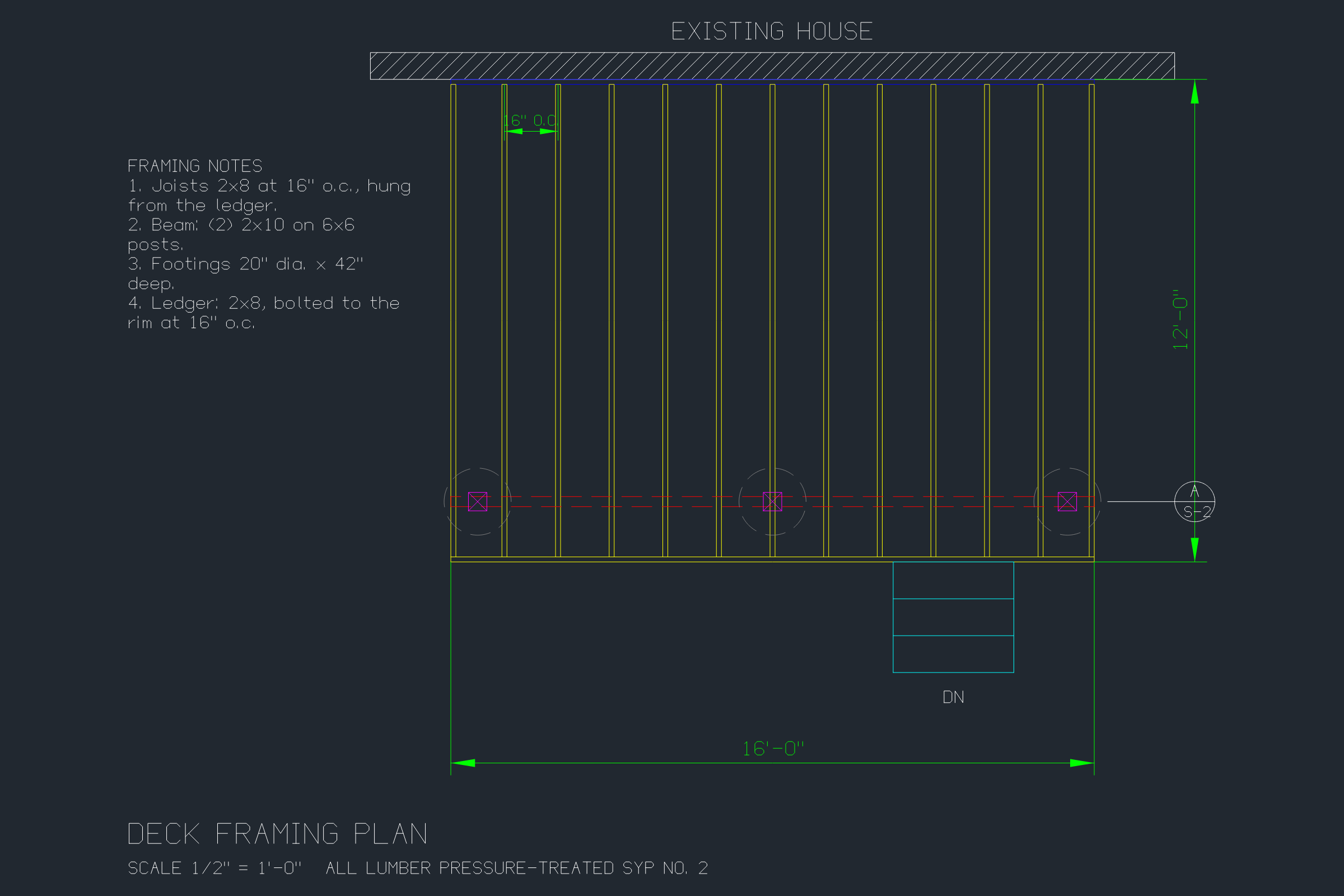
POST a DWG to /v2/convert/dwg/to/png and get one 2400 × 1600 PNG of model space, fitted to the drawing's extents. It looks the way a CAD program shows the file on screen: a dark gray background with every layer in its own color.
- Endpoint
- POST /v2/
convert/ dwg/ to/ png - Accepts
- dwg
- Sample timing
- 71 ms median of 5 runsHow we measure
- Request size
- Up to 10 MB on the Free plan or 100 MB on paid plans, all files together
Request and response
Every sample below ran against the API before this page was published. Set PDFCONVERSIONAPI_KEY to your key and run it as is.
curl -sS -X POST \
  https://api.pdfconversionapi.com/v2/convert/dwg/to/png \
  -H "Authorization: Bearer $PDFCONVERSIONAPI_KEY" \
  -F File=@deck-framing-plan.dwg \
  -o response.json

# FileData is base64. Save the first file in converted/,
# or print the JSON error.
if jq -e '.Files' response.json > /dev/null; then
  mkdir -p converted
  name=$(jq -r '.Files[0].FileName' response.json)
  jq -r '.Files[0].FileData' response.json \
    | base64 --decode > "converted/$name"
else
  cat response.json
fi
import base64
import os
import requests
key = os.environ["PDFCONVERSIONAPI_KEY"]
response = requests.post(
"https://api.pdfconversionapi.com/v2/convert/dwg/to/png",
headers={"Authorization": f"Bearer {key}"},
files=[("File", open("deck-framing-plan.dwg", "rb"))],
timeout=180,
)
result = response.json()
if not response.ok:
raise SystemExit(f"{result['Code']}: {result['Message']}")
os.makedirs("converted", exist_ok=True)
for file in result["Files"]:
path = os.path.join("converted", file["FileName"])
with open(path, "wb") as out:
out.write(base64.b64decode(file["FileData"]))
print(path, file["FileSize"], "bytes")
import { mkdir, readFile, writeFile } from "node:fs/promises";
import { join } from "node:path";

const form = new FormData();
const file = "deck-framing-plan.dwg";
form.append("File", new Blob([await readFile(file)]), file);

const url = "https://api.pdfconversionapi.com/v2/convert/dwg/to/png";
const key = process.env.PDFCONVERSIONAPI_KEY;
const response = await fetch(url, {
  method: "POST",
  headers: { Authorization: `Bearer ${key}` },
  body: form,
});
const result = await response.json();
if (!response.ok) {
  throw new Error(`${result.Code}: ${result.Message}`);
}

await mkdir("converted", { recursive: true });
for (const file of result.Files) {
  const path = join("converted", file.FileName);
  await writeFile(path, Buffer.from(file.FileData, "base64"));
  console.log(path, file.FileSize, "bytes");
}
{
  "ConversionCost": 1,
  "ConversionTime": 0.071,
  "Files": [
    {
      "FileName": "deck-framing-plan.png",
      "FileExt": "png",
      "FileSize": 97617,
      "FileData": "iVBORw0KGgoAAAANSUhEUgAA…"
    }
  ]
}
Response from our test run on 2026-11-03. ConversionTime shows the median of 5 runs. FileData is shortened here; the real response carries the whole file as base64.
The sample, converted
The same file the code sends. Download the input and the output and compare them yourself.
- Input
- deck-framing-plan.dwg (12 KB)
- Output
- deck-framing-plan.png (95 KB)
- Source
- A framing plan for a fictional 16 by 12 foot backyard deck, which we drew as a DXF with a short script and saved as DWG (2004 format) (CC0-1.0). How it was made
- Made by
- 2026-11-04, API build
9eeeb0640aba
Parameters
Send these as form fields next to the file. Names are case-insensitive. If you set one of the documented options below that we don't support yet, the request fails with a 400 that names it instead of returning a file made without it.
| Parameter | What it does |
|---|---|
FileNamestring | Base name of the PNG. Without it, deck-framing-plan.dwg is returned as deck-framing-plan.png. |
StoreFileboolean, default false | Returns a link to the stored PNG, valid for 3 hours, in place of the base64 image data. |
Not supported yet
Setting one of these to anything but its default returns 400.
| Option | What to do instead |
|---|---|
ImageWidth | The PNG is always 2400 × 1600. Shrink it afterwards with /v2/convert/png/to/png and ImageWidth. |
ImageResolution | Only the documented default, 200, passes, and it changes nothing: the PNG carries no DPI value. |
BackgroundColor | Only the word White, ConvertAPI's default, passes, and the background stays dark gray even then. #FFFFFF or any other value returns 400. |
ColorSpace | Only truecolors passes. For a gray image, use dwg/to/jpg or dwg/to/tiff with ColorSpace=gray. |
SpaceToConvert | Model space only. Even SpaceToConvert=model returns 400, so leave it out. |
ExportLayers | false returns 400. Layers are drawn as the file has them set: on layers drawn, off and frozen ones left out. |
Also refused when set: ImageHeight, CustomSpaceToConvert.
What carries over, and what doesn't
Kept
- Each layer's color as a CAD screen shows it: yellow joists, a red beam, magenta posts, a cyan stair and green dimensions in the sample
- White (color 7) stays white, so the EXISTING HOUSE label, the wall and the framing notes are light on dark
- Linetypes: the HIDDEN beam line and the footing circles are dashed
- The ANSI31 hatch in the house wall, drawn as diagonal lines
- Block inserts with their attribute values: three 6x6 posts and a section mark reading A over S-2
- Multiline text wrapped at its saved width: the framing notes break onto 9 lines
- Layer visibility: the 24 decking boards on S-DECKING, a layer that is off in the file, are not drawn
Lost or not yet supported
- The frame is 2400 × 1600 pixels whatever the drawing's shape. A test drawing three times taller than wide filled only 509 × 1,522 pixels in the middle.
- The background is opaque dark gray, RGB 33, 40, 48, on 97% of the sample's pixels. There's no white or transparent PNG;
dwg/to/webpwithTransparentColor=33,40,48gives a transparent background. - Paper space isn't drawn: the sheet border and the SHEET S-1 label in Layout1 are missing.
- There's no scale or DPI. The PNG has no resolution chunk and the drawing is fitted to the frame, so distances can't be measured in pixels.
- Lineweights are ignored. In a test plan, an outline saved at 0.50 mm came out 1 pixel wide like every other line.
- Text in SHX-font styles, such as the sample's Standard style (txt), is drawn with the converter's own single-stroke font.
Limits
- DWG files saved in the R13 through 2018 formats.
- One PNG per DWG, always 2400 × 1600, showing model space.
- A damaged DWG returns 422: the sample cut off at 6,000 bytes gave "the input file could not be read: DWG: the file is cut short or damaged".
- Requests up to 10 MB on the Free plan or 100 MB on paid plans, all files and fields together.
- Conversions are stopped after 120 seconds with a 504.
Where teams use it
Thumbnails in a drawing library
Show a picture of every uploaded DWG in a file list or search result. Every PNG has the same 2400 × 1600 frame, so a grid of them lines up; scale them down once for the list view.
Checking a DWG before anyone opens it
Estimators and support staff can see whether a file is a framing plan or an elevation, and whether the expected layers have anything on them, without a CAD license on their machine.
Images for tickets and chat
Attach the PNG to a support ticket or a team thread when someone asks about a detail. Yellow and cyan annotation layers stay readable on the dark background.
Questions
Why is the background dark?
The converter draws the file as a CAD program shows it on screen: background RGB 33, 40, 48, with color 7 lines in white. BackgroundColor can't change that; only White is accepted and the result is still dark. For a white background, convert to SVG or PDF, where color 7 is drawn black on white.
Can I set the image size?
Not on this route. ImageWidth, ImageHeight and any ImageResolution other than 200 return 400. Resize the 2400 × 1600 result with a second request to /v2/convert/png/to/png and ImageWidth, or ask for SVG, which scales without blur.
Does it draw layouts or only model space?
Only model space, fitted to its extents. Viewports, title blocks and anything else in a paper-space layout are left out; SpaceToConvert and CustomSpaceToConvert return 400 for any value but the default.
Will layers that are switched off show up?
No. Off and frozen layers stay hidden, as in the file: the sample's S-DECKING layer is off, so none of its 24 board lines are in the PNG. Turn a layer on in the DWG before converting if you need it in the picture.
Convert your first DWG file in a minute.