DWG to SVG API
POST a DWG to /v2/convert/dwg/to/svg and get an SVG of model space back. Lines, circles, text and hatch lines all become plain polylines in the drawing's own units, on a white background, so the file scales in any browser without getting blurry.
- Endpoint
- POST /v2/
convert/ dwg/ to/ svg - Accepts
- dwg
- Sample timing
- 25 ms median of 5 runsHow we measure
- Request size
- Up to 10 MB on the Free plan or 100 MB on paid plans, all files together
Request and response
Every sample below ran against the API before this page was published. Set PDFCONVERSIONAPI_KEY to your key and run it as is.
curl -sS -X POST \
  https://api.pdfconversionapi.com/v2/convert/dwg/to/svg \
  -H "Authorization: Bearer $PDFCONVERSIONAPI_KEY" \
  -F File=@deck-framing-plan.dwg \
  -o response.json

# FileData is base64. Save the first file in converted/,
# or print the JSON error.
if jq -e '.Files' response.json > /dev/null; then
  mkdir -p converted
  name=$(jq -r '.Files[0].FileName' response.json)
  jq -r '.Files[0].FileData' response.json \
    | base64 --decode > "converted/$name"
else
  cat response.json
fi
import base64
import os
import requests
key = os.environ["PDFCONVERSIONAPI_KEY"]
response = requests.post(
"https://api.pdfconversionapi.com/v2/convert/dwg/to/svg",
headers={"Authorization": f"Bearer {key}"},
files=[("File", open("deck-framing-plan.dwg", "rb"))],
timeout=180,
)
result = response.json()
if not response.ok:
raise SystemExit(f"{result['Code']}: {result['Message']}")
os.makedirs("converted", exist_ok=True)
for file in result["Files"]:
path = os.path.join("converted", file["FileName"])
with open(path, "wb") as out:
out.write(base64.b64decode(file["FileData"]))
print(path, file["FileSize"], "bytes")
import { mkdir, readFile, writeFile } from "node:fs/promises";
import { join } from "node:path";

const form = new FormData();
const file = "deck-framing-plan.dwg";
form.append("File", new Blob([await readFile(file)]), file);

const url = "https://api.pdfconversionapi.com/v2/convert/dwg/to/svg";
const key = process.env.PDFCONVERSIONAPI_KEY;
const response = await fetch(url, {
  method: "POST",
  headers: { Authorization: `Bearer ${key}` },
  body: form,
});
const result = await response.json();
if (!response.ok) {
  throw new Error(`${result.Code}: ${result.Message}`);
}

await mkdir("converted", { recursive: true });
for (const file of result.Files) {
  const path = join("converted", file.FileName);
  await writeFile(path, Buffer.from(file.FileData, "base64"));
  console.log(path, file.FileSize, "bytes");
}
{
  "ConversionCost": 1,
  "ConversionTime": 0.025,
  "Files": [
    {
      "FileName": "deck-framing-plan.svg",
      "FileExt": "svg",
      "FileSize": 119657,
      "FileData": "PHN2ZyB4bWxucz0iaHR0cDov…"
    }
  ]
}
Response from our test run on 2026-11-03. ConversionTime shows the median of 5 runs. FileData is shortened here; the real response carries the whole file as base64.
The sample, converted
The same file the code sends. Download the input and the output and compare them yourself.
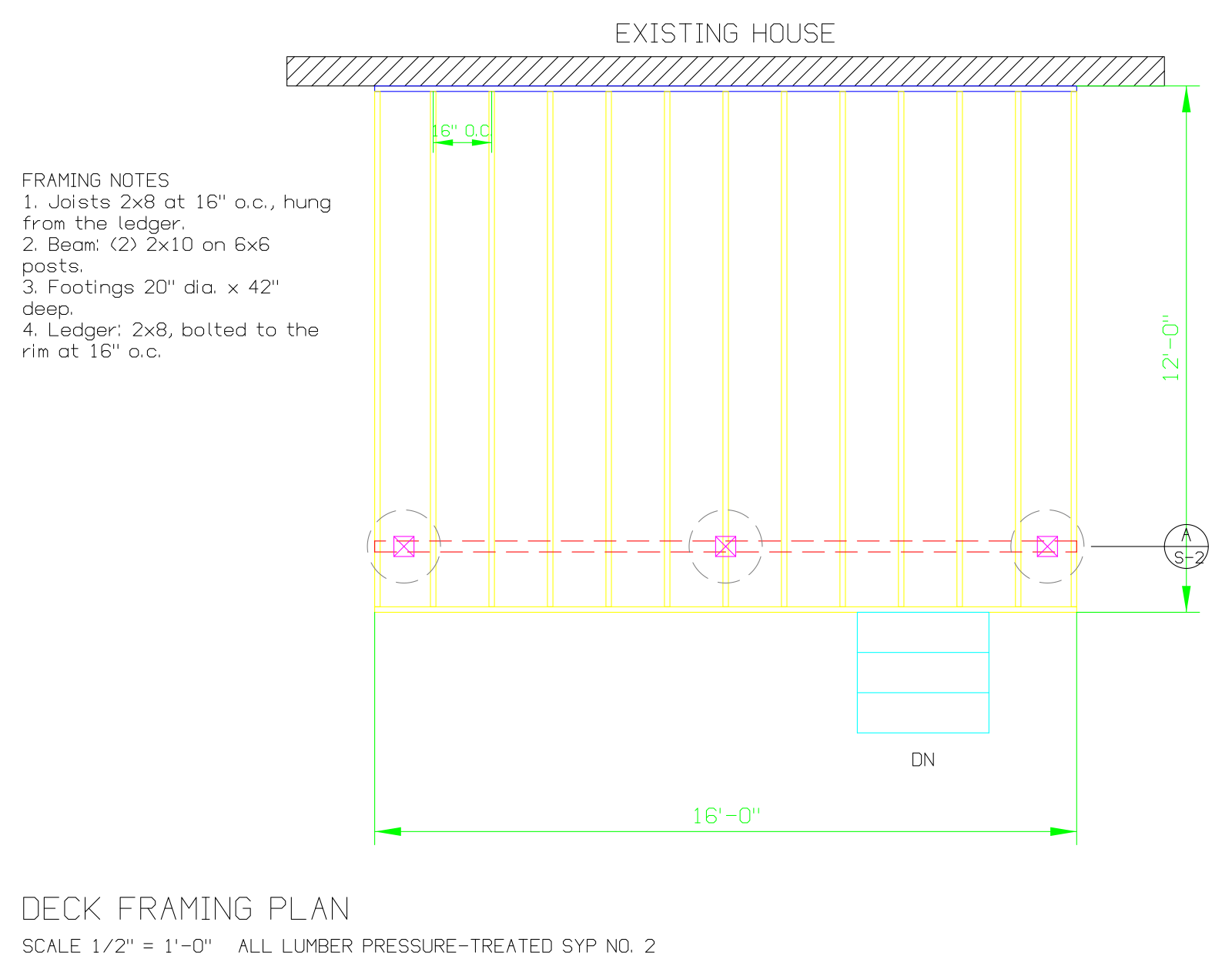
- Input
- deck-framing-plan.dwg (12 KB)
- Output
- deck-framing-plan.svg (117 KB)
- Source
- A framing plan for a fictional 16 by 12 foot backyard deck, which we drew as a DXF with a short script and saved as DWG (2004 format) (CC0-1.0). How it was made
- Made by
- 2026-11-04, API build
9eeeb0640aba
Parameters
Send these as form fields next to the file. Names are case-insensitive. If you set one of the documented options below that we don't support yet, the request fails with a 400 that names it instead of returning a file made without it.
| Parameter | What it does |
|---|---|
FileNamestring | Name of the SVG without the extension; deck-framing-plan when you don't send one. |
StoreFileboolean, default false | Keep the SVG on our side and reply with a 3-hour link in Files[].Url instead of base64 data. |
Not supported yet
Setting one of these to anything but its default returns 400.
| Option | What to do instead |
|---|---|
ImageWidth | Only 800, ConvertAPI's documented default, is accepted, and it doesn't change the file: the SVG says width="1600". Other values return 400. Set the display size in your own HTML or CSS. |
ImageHeight | Same as ImageWidth: only 600 passes. The height attribute follows the drawing's proportions (1268 for the sample). |
ColorSpace | Only truecolors passes; lines keep their layer colors. |
SpaceToConvert | Model space only. |
ExportLayers | false returns 400, and the SVG has no layer groups anyway (see below). |
Also refused when set: CustomSpaceToConvert.
What carries over, and what doesn't
Kept
- Vector geometry: the sample is 526 polylines and 6 filled paths, with no bitmaps inside
- Real drawing units: the viewBox is 336.96 × 266.96, the deck plan's extents in inches plus a small margin
- Layer colors, except that white (color 7) becomes black on the white background, so the wall, notes and title read like a print
- Dashed linetypes, the ANSI31 wall hatch and the green dimension arrowheads (filled paths)
- Block inserts with their attributes: three posts and the A / S-2 section mark
- The layer state saved in the DWG: nothing from the off S-DECKING layer is drawn
Lost or not yet supported
- Text becomes strokes. The SVG has no
<text>elements, so notes and labels can't be searched, selected or restyled. - Layers are not kept as groups: there are no
<g>elements or ids, just 532 shapes in drawing order, so you can't hide a layer in the SVG. - Every line has the same
stroke-width(0.22464 drawing units); lineweights from the DWG are not used. - Dashes are written as separate short polylines rather than
stroke-dasharray, and circles and arcs as chains of straight segments. - Yellow (color 2) lines like the sample's joists are pale on white; that color was picked for a dark CAD screen.
- Paper-space layouts, including the sample's sheet border and SHEET S-1 label, are not drawn.
Limits
- DWG files saved in the R13 through 2018 formats.
- One SVG per DWG, showing model space fitted to its extents.
- A truncated DWG returns 422 "the input file could not be read: DWG: the file is cut short or damaged" (tested with the sample cut to 6,000 bytes).
- Requests up to 10 MB on the Free plan or 100 MB on paid plans, all files and fields together.
- 120 seconds per conversion, then 504.
Where teams use it
Zoomable drawing previews in a web app
Put the SVG in an <img> or inline it and let people zoom into a framing detail. Line work stays sharp at any zoom, which a 2400-pixel PNG can't offer.
Figures for documentation and reports
Drop a plan into HTML documentation or a generated report as a vector figure. The 119,657-byte sample scales to any size without blur.
Vector artwork from a DWG
Open the SVG in a vector editor to recolor, crop or annotate a plan for a presentation, without exporting it from CAD by hand.
Questions
How big does the SVG display?
The root element says width="1600" and a height that keeps the drawing's proportions (1268 for the deck plan), with the viewBox in drawing units. Override the size with CSS or the width attribute of an <img>; ImageWidth and ImageHeight on the request are refused unless they are ConvertAPI's defaults, 800 and 600.
Is the background white or transparent?
White. The first element is a full-size <rect> filled white, and color-7 lines are drawn black on it. Delete that <rect> for a transparent SVG, but then black lines vanish on dark pages.
Can I select or search the text?
No. Notes, dimension values and attribute text are drawn as polylines in a single-stroke font, the same way a plotter draws them. If you need the words, read them from a DXF made with /v2/convert/dwg/to/dxf.
Can I measure distances in the SVG?
Yes, in drawing units relative to each other: the viewBox matches the drawing's extents in its own units (inches for the sample), with a margin added on each side and the y axis turned to point down, as SVG requires.
Convert your first DWG file in a minute.