DXF to SVG API
POST a DXF to /v2/convert/dxf/to/svg and you get an SVG whose viewBox is the drawing's extents in its own units, here feet. Every entity is drawn as a polyline or a filled path on a white background, ready to put in a web page.
- Endpoint
- POST /v2/
convert/ dxf/ to/ svg - Accepts
- dxf
- Sample timing
- 27 ms median of 5 runsHow we measure
- Request size
- Up to 10 MB on the Free plan or 100 MB on paid plans, all files together
Request and response
Every sample below ran against the API before this page was published. Set PDFCONVERSIONAPI_KEY to your key and run it as is.
curl -sS -X POST \
  https://api.pdfconversionapi.com/v2/convert/dxf/to/svg \
  -H "Authorization: Bearer $PDFCONVERSIONAPI_KEY" \
  -F File=@linden-garden-site-plan.dxf \
  -o response.json

# FileData is base64. Save the first file in converted/,
# or print the JSON error.
if jq -e '.Files' response.json > /dev/null; then
  mkdir -p converted
  name=$(jq -r '.Files[0].FileName' response.json)
  jq -r '.Files[0].FileData' response.json \
    | base64 --decode > "converted/$name"
else
  cat response.json
fi
import base64
import os
import requests
key = os.environ["PDFCONVERSIONAPI_KEY"]
response = requests.post(
"https://api.pdfconversionapi.com/v2/convert/dxf/to/svg",
headers={"Authorization": f"Bearer {key}"},
files=[("File", open("linden-garden-site-plan.dxf", "rb"))],
timeout=180,
)
result = response.json()
if not response.ok:
raise SystemExit(f"{result['Code']}: {result['Message']}")
os.makedirs("converted", exist_ok=True)
for file in result["Files"]:
path = os.path.join("converted", file["FileName"])
with open(path, "wb") as out:
out.write(base64.b64decode(file["FileData"]))
print(path, file["FileSize"], "bytes")
import { mkdir, readFile, writeFile } from "node:fs/promises";
import { join } from "node:path";

const form = new FormData();
const file = "linden-garden-site-plan.dxf";
form.append("File", new Blob([await readFile(file)]), file);

const url = "https://api.pdfconversionapi.com/v2/convert/dxf/to/svg";
const key = process.env.PDFCONVERSIONAPI_KEY;
const response = await fetch(url, {
  method: "POST",
  headers: { Authorization: `Bearer ${key}` },
  body: form,
});
const result = await response.json();
if (!response.ok) {
  throw new Error(`${result.Code}: ${result.Message}`);
}

await mkdir("converted", { recursive: true });
for (const file of result.Files) {
  const path = join("converted", file.FileName);
  await writeFile(path, Buffer.from(file.FileData, "base64"));
  console.log(path, file.FileSize, "bytes");
}
{
  "ConversionCost": 1,
  "ConversionTime": 0.027,
  "Files": [
    {
      "FileName": "linden-garden-site-plan.svg",
      "FileExt": "svg",
      "FileSize": 161020,
      "FileData": "PHN2ZyB4bWxucz0iaHR0cDov…"
    }
  ]
}
Response from our test run on 2026-11-03. ConversionTime shows the median of 5 runs. FileData is shortened here; the real response carries the whole file as base64.
The sample, converted
The same file the code sends. Download the input and the output and compare them yourself.
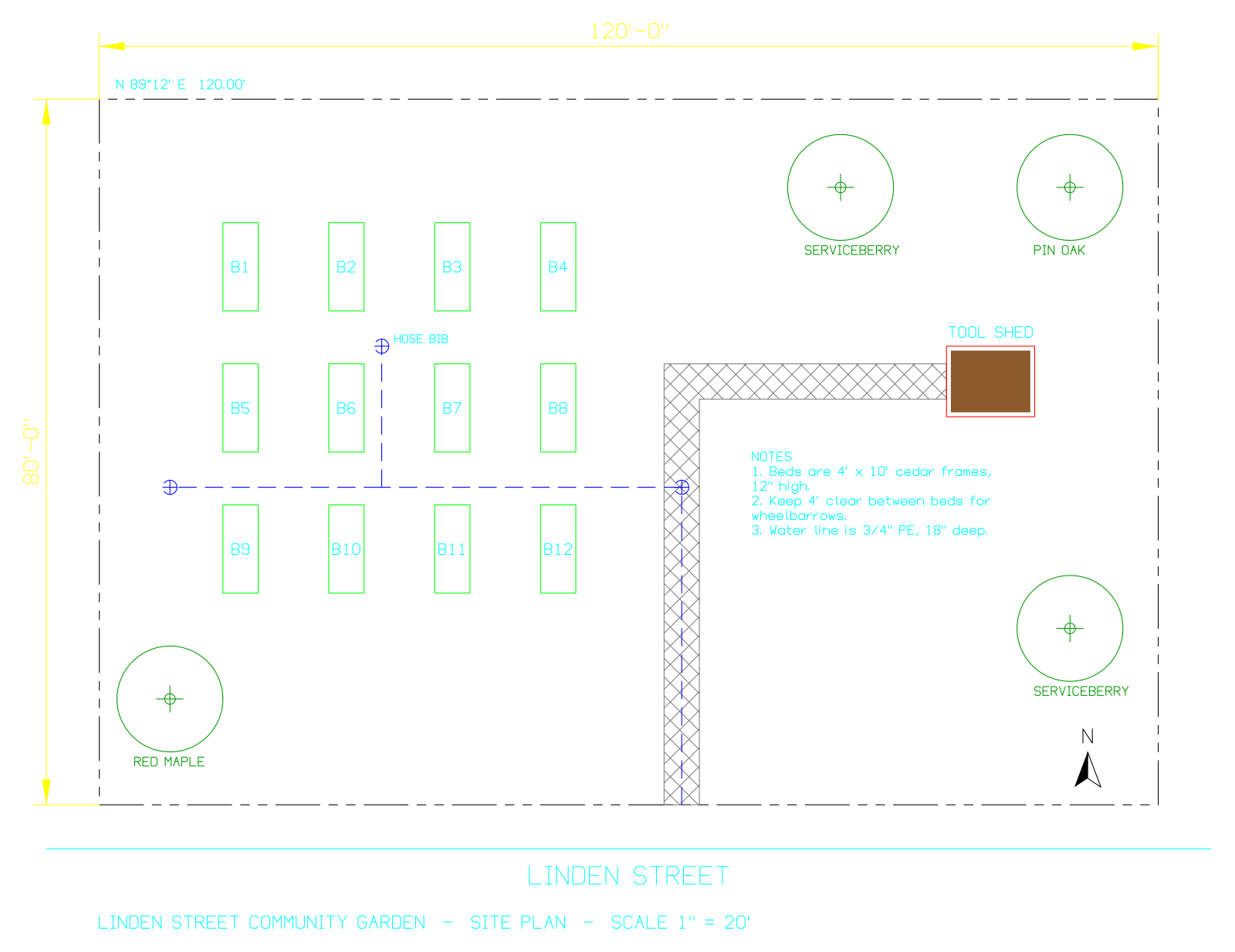
- Input
- linden-garden-site-plan.dxf (24 KB)
- Output
- linden-garden-site-plan.svg (157 KB)
- Source
- A site plan for a fictional community garden, in feet, which we wrote as a DXF R2000 file with a short script (CC0-1.0). How it was made
- Made by
- 2026-11-04, API build
9eeeb0640aba
Parameters
Send these as form fields next to the file. Names are case-insensitive. If you set one of the documented options below that we don't support yet, the request fails with a 400 that names it instead of returning a file made without it.
| Parameter | What it does |
|---|---|
FileNamestring | Stem of the SVG file name, linden-garden-site-plan if not set. |
StoreFileboolean, default false | Ask for a stored copy and a link to it (3 hours) instead of the SVG in the response. |
Not supported yet
Setting one of these to anything but its default returns 400.
| Option | What to do instead |
|---|---|
ImageWidth | The SVG's width attribute is always 1600. Sending 800, ConvertAPI's default, is accepted; any other value, such as 2000, returns 400. |
ImageHeight | Follows the drawing's proportions (1234 for the garden plan); only 600 is accepted. |
ColorSpace | Colors are written as they are; monochrome or gray return 400. |
SpaceToConvert | Paper space can't be chosen yet. |
CustomSpaceToConvert | Layouts can't be picked by name; Layout1 returns 400. |
ExportLayers | Only true is accepted. |
What carries over, and what doesn't
Kept
- Geometry as vectors: 713 polylines and 6 filled paths for the garden plan, no embedded bitmap
- Drawing units in the viewBox: 139.94 × 107.94, the plan's extents in feet plus a small margin
- True colors: the shed's solid fill is written as
#8b5a2b, and the north arrow's SOLID as a black filled path - Color 7 turned into black for the white background, so the property line reads as on a print
- Linetypes as visible dashes, the ANSI37 crosshatch, tree symbols with their species text and the dimension arrowheads
- Off and frozen layers stay out, as in the PNG
Lost or not yet supported
- No text elements: labels, notes and dimension values are strokes, so the SVG can't be searched or edited as text.
- No layers: the SVG has no
<g>groups or ids, so there's no way to switch the beds or the water line off in the browser. - One line width for everything (0.093295 feet here). The 0.50 mm lineweight of the shed outline is not used.
- Cyan notes and yellow dimensions, colors chosen for a dark CAD screen, are faint on the white background.
- Dashes are separate small polylines rather than a
stroke-dasharray, and arcs are chains of straight segments. - Paper-space content, such as the SHEET L-1 border, isn't drawn.
Limits
- DXF versions R12 through 2018.
- One SVG of model space per DXF.
- Input that isn't DXF returns 422, for example "the input file could not be read: line 1: bad group code
hello" for a file that only says hello. - Requests up to 10 MB on the Free plan or 100 MB on paid plans, all files and fields together.
- Up to 120 seconds per conversion; a slower one returns 504.
Where teams use it
Interactive plans on a website
Show a site plan that visitors can zoom into on a phone, with bed numbers that stay readable at any zoom. The sample SVG is 161,020 bytes.
Figures in generated documents
Insert the SVG into an HTML report or a static site so the drawing prints sharply, without exporting images from CAD by hand.
Questions
Does the SVG keep the drawing's coordinates?
In its own units, yes: the viewBox spans the extents of model space (feet for the sample) plus a margin, and the y axis is flipped because SVG counts downward. Origins are shifted so the viewBox starts at 0, 0, so subtract the margin if you map points back to DXF coordinates.
Why are the yellow and cyan lines so pale?
The SVG keeps each entity's color, and yellow (color 2) and cyan (color 4) are meant for a dark screen. On the white background they lose contrast. Change those layers to darker colors in the DXF, or edit the stroke values in the SVG.
Can I style layers with CSS?
Not directly. The SVG has no classes, groups or ids, only one element per drawn stroke. You can select by stroke color, which follows the layer color for entities drawn in their layer's color: in the sample, everything except the brown shed fill.
Is the background transparent?
No, the SVG begins with a white <rect> covering the whole viewBox. Remove that element to place the drawing over another background.
Convert your first DXF file in a minute.