DXF to DWG API
POST a DXF to /v2/convert/dxf/to/dwg and get a binary DWG back, written with the AC1018 header of AutoCAD 2004 whatever version the DXF was. The sample site plan went from 24,301 bytes of text to a 12,748-byte DWG.
- Endpoint
- POST /v2/
convert/ dxf/ to/ dwg - Accepts
- dxf
- Sample timing
- 21 ms median of 5 runsHow we measure
- Request size
- Up to 10 MB on the Free plan or 100 MB on paid plans, all files together
Request and response
Every sample below ran against the API before this page was published. Set PDFCONVERSIONAPI_KEY to your key and run it as is.
curl -sS -X POST \
  https://api.pdfconversionapi.com/v2/convert/dxf/to/dwg \
  -H "Authorization: Bearer $PDFCONVERSIONAPI_KEY" \
  -F File=@linden-garden-site-plan.dxf \
  -o response.json

# FileData is base64. Save the first file in converted/,
# or print the JSON error.
if jq -e '.Files' response.json > /dev/null; then
  mkdir -p converted
  name=$(jq -r '.Files[0].FileName' response.json)
  jq -r '.Files[0].FileData' response.json \
    | base64 --decode > "converted/$name"
else
  cat response.json
fi
import base64
import os
import requests
key = os.environ["PDFCONVERSIONAPI_KEY"]
response = requests.post(
"https://api.pdfconversionapi.com/v2/convert/dxf/to/dwg",
headers={"Authorization": f"Bearer {key}"},
files=[("File", open("linden-garden-site-plan.dxf", "rb"))],
timeout=180,
)
result = response.json()
if not response.ok:
raise SystemExit(f"{result['Code']}: {result['Message']}")
os.makedirs("converted", exist_ok=True)
for file in result["Files"]:
path = os.path.join("converted", file["FileName"])
with open(path, "wb") as out:
out.write(base64.b64decode(file["FileData"]))
print(path, file["FileSize"], "bytes")
import { mkdir, readFile, writeFile } from "node:fs/promises";
import { join } from "node:path";

const form = new FormData();
const file = "linden-garden-site-plan.dxf";
form.append("File", new Blob([await readFile(file)]), file);

const url = "https://api.pdfconversionapi.com/v2/convert/dxf/to/dwg";
const key = process.env.PDFCONVERSIONAPI_KEY;
const response = await fetch(url, {
  method: "POST",
  headers: { Authorization: `Bearer ${key}` },
  body: form,
});
const result = await response.json();
if (!response.ok) {
  throw new Error(`${result.Code}: ${result.Message}`);
}

await mkdir("converted", { recursive: true });
for (const file of result.Files) {
  const path = join("converted", file.FileName);
  await writeFile(path, Buffer.from(file.FileData, "base64"));
  console.log(path, file.FileSize, "bytes");
}
{
  "ConversionCost": 1,
  "ConversionTime": 0.021,
  "Files": [
    {
      "FileName": "linden-garden-site-plan.dwg",
      "FileExt": "dwg",
      "FileSize": 12748,
      "FileData": "QUMxMDE4AAAAAAAAA4AMAAAh…"
    }
  ]
}
Response from our test run on 2026-11-03. ConversionTime shows the median of 5 runs. FileData is shortened here; the real response carries the whole file as base64.
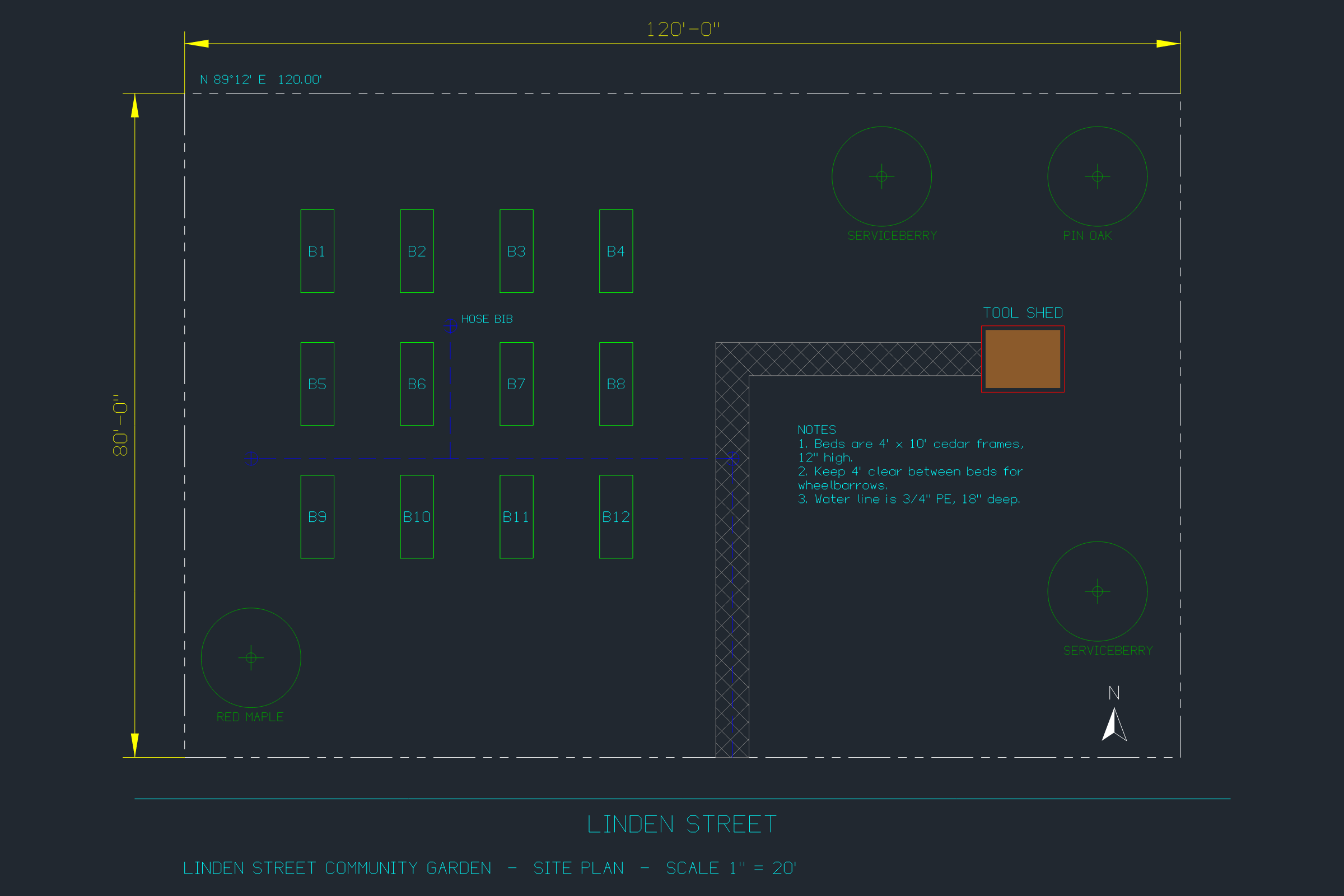
The sample, converted
The same file the code sends. Download the input and the output and compare them yourself.
- Input
- linden-garden-site-plan.dxf (24 KB)
- Output
- linden-garden-site-plan.dwg (12 KB)
- Source
- A site plan for a fictional community garden, in feet, which we wrote as a DXF R2000 file with a short script (CC0-1.0). How it was made
- Made by
- 2026-11-04, API build
9eeeb0640aba
Parameters
Send these as form fields next to the file. Names are case-insensitive. If you set one of the documented options below that we don't support yet, the request fails with a 400 that names it instead of returning a file made without it.
| Parameter | What it does |
|---|---|
FileNamestring | Name for the DWG, extension left off. By default the DXF's name is kept: linden-garden-site-plan.dwg. |
StoreFileboolean, default false | Store the DWG and return a link to it, valid for 3 hours, in place of the base64 data. |
What carries over, and what doesn't
Kept
- All 60 entities of the sample: 19 polylines, 23 texts, 8 block inserts with 4 attributes, 4 points, 2 hatches, 2 dimensions, 1 line and 1 multiline note
- Layer states: V-SURVEY stays off and X-OLD-SHED stays frozen, so the survey points and the removed shed remain hidden in the DWG
- The 0.50 mm lineweight saved on the A-SHED layer and the true color of the shed's fill, RGB 139, 90, 43
- The PHANTOM and DASHED linetype definitions and the layers that use them
- Text exactly as written, including the \P paragraph breaks of the notes and the %%d degree code in the property bearing
- Units: $INSUNITS 2 (feet) and $MEASUREMENT 0
- Paper space: Layout1 with its border and SHEET L-1 label
- The look of the plan: the DWG renders to the same PNG as the DXF, byte for byte
Lost or not yet supported
- The DWG version is fixed. R12, R2000 and 2004 DXF test files all came back with the AC1018 header, and ConvertAPI documents no options for this pair, so anything you send (we tried
PageSizeandSpaceToConvert) is ignored. - Read back as DXF, the two anonymous dimension blocks have been renamed *D3 and *D4, and the header lists 110 variables filled in by the converter, where the sample set 9.
- The converter's documentation says entities it doesn't model yet are not kept when it saves. All 19 entity types in our tests survived, among them ellipses, splines, 3D faces, rays and wipeouts, and extended data on a line was kept too; we did not test 3D solids or raster image references.
- A Defpoints layer is added to the layer table.
Limits
- DXF versions R12 through 2018; the converter's documentation lists ASCII and binary DXF, and we tested ASCII.
- One DXF per request, one DWG back.
- Input that isn't DXF returns 422: a file holding only the word hello gave "the input file could not be read: line 1: bad group code
hello". The sample cut off at 12,000 bytes returned 422 "the input file could not be read: unexpected end of file". - Requests up to 10 MB on the Free plan or 100 MB on paid plans, all files and fields together.
- Each conversion may run for 120 seconds before the API returns 504.
Where teams use it
Delivering DWG from code that writes DXF
Scripts, configurators and libraries such as ezdxf write DXF because it is a documented text format. When a client, a permit office or an architect asks for DWG, convert the file in the same job.
One format for an archive
Drawings arrive as R12 exports from cutting software, R2000 files from scripts and newer DXF from CAD programs. Converting all of them leaves an archive of 2004-format DWG files with full layer tables.
Smaller files to store and send
The binary DWG is about half the size of the text DXF: 12,748 bytes against 24,301 for the sample.
Questions
Which DWG version do I get?
AC1018, the DWG format of AutoCAD 2004 to 2006, which later releases also open. It is the same for every input version; there is no option to write R2000, 2013 or 2018 DWG.
Can it convert an old R12 DXF?
Yes. An R12 (AC1009) drawing of a machined plate converted to an AC1018 DWG in our test, with its POLYLINE entities written as lightweight polylines.
Is paper space kept?
Yes. The sample's Layout1 border and SHEET L-1 label are in the DWG, and both layouts, Model and Layout1, are listed when it is read back. Only the image, SVG and PDF conversions leave paper space out.
Will converting the same DXF twice give the same file?
In our runs, yes: the sample produced the same 12,748 bytes both times, so the result can be cached by the input's checksum.
What if I upload a DWG here by mistake?
The reader goes by content, not by the name, so a DWG sent to dxf/to/dwg came back as a DWG with status 200. Text that isn't DXF returns 422.
Convert your first DXF file in a minute.