DXF to PNG API
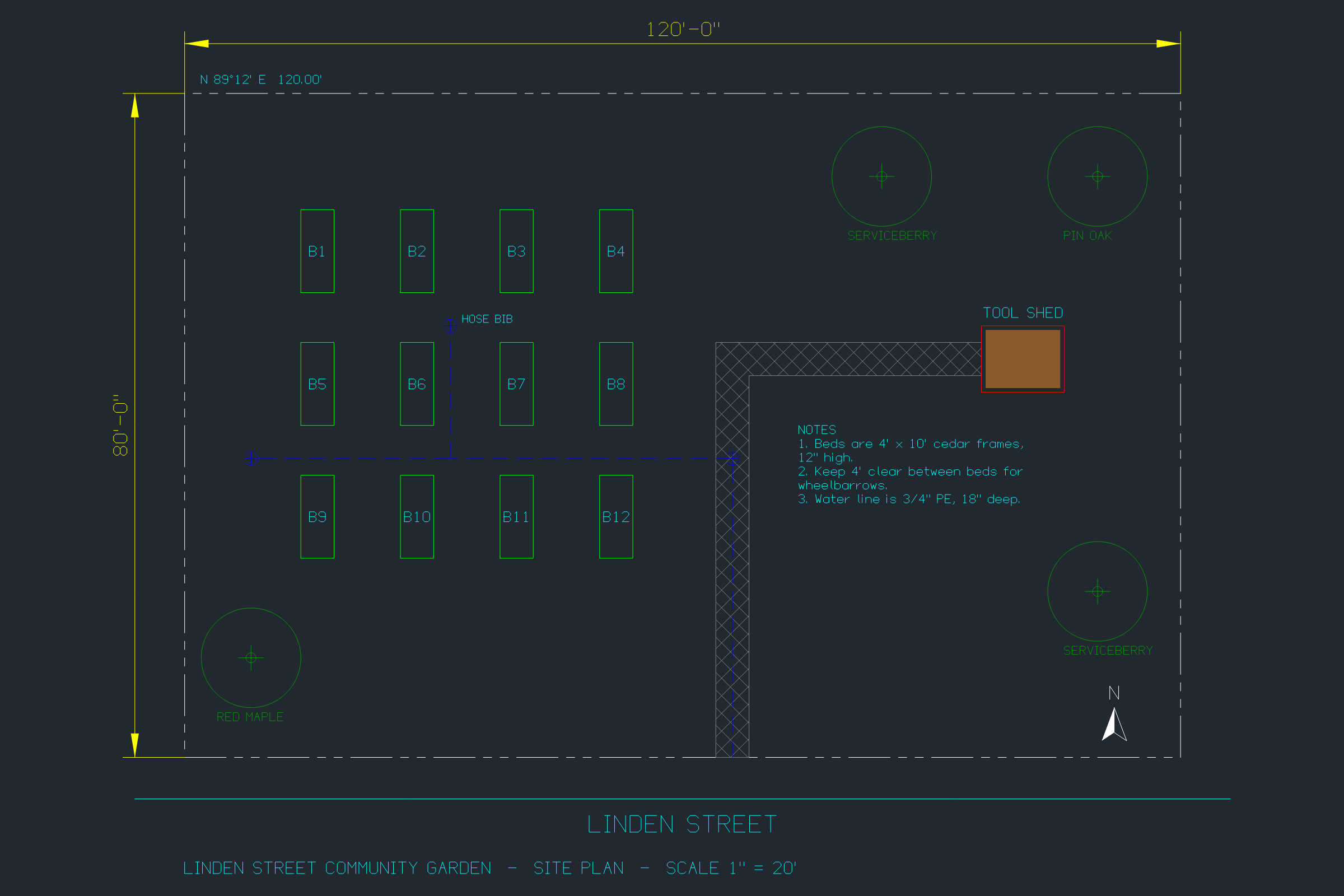
Send a DXF to POST /v2/convert/dxf/to/png and the reply carries a PNG of model space, 2400 by 1600 pixels, scaled to fit. Hatches, linetypes, block attributes and multiline text are drawn the way a CAD program shows them on a dark screen.
- Endpoint
- POST /v2/
convert/ dxf/ to/ png - Accepts
- dxf
- Sample timing
- 93 ms median of 5 runsHow we measure
- Request size
- Up to 10 MB on the Free plan or 100 MB on paid plans, all files together
Request and response
Every sample below ran against the API before this page was published. Set PDFCONVERSIONAPI_KEY to your key and run it as is.
curl -sS -X POST \
  https://api.pdfconversionapi.com/v2/convert/dxf/to/png \
  -H "Authorization: Bearer $PDFCONVERSIONAPI_KEY" \
  -F File=@linden-garden-site-plan.dxf \
  -o response.json

# FileData is base64. Save the first file in converted/,
# or print the JSON error.
if jq -e '.Files' response.json > /dev/null; then
  mkdir -p converted
  name=$(jq -r '.Files[0].FileName' response.json)
  jq -r '.Files[0].FileData' response.json \
    | base64 --decode > "converted/$name"
else
  cat response.json
fi
import base64
import os
import requests
key = os.environ["PDFCONVERSIONAPI_KEY"]
response = requests.post(
"https://api.pdfconversionapi.com/v2/convert/dxf/to/png",
headers={"Authorization": f"Bearer {key}"},
files=[("File", open("linden-garden-site-plan.dxf", "rb"))],
timeout=180,
)
result = response.json()
if not response.ok:
raise SystemExit(f"{result['Code']}: {result['Message']}")
os.makedirs("converted", exist_ok=True)
for file in result["Files"]:
path = os.path.join("converted", file["FileName"])
with open(path, "wb") as out:
out.write(base64.b64decode(file["FileData"]))
print(path, file["FileSize"], "bytes")
import { mkdir, readFile, writeFile } from "node:fs/promises";
import { join } from "node:path";

const form = new FormData();
const file = "linden-garden-site-plan.dxf";
form.append("File", new Blob([await readFile(file)]), file);

const url = "https://api.pdfconversionapi.com/v2/convert/dxf/to/png";
const key = process.env.PDFCONVERSIONAPI_KEY;
const response = await fetch(url, {
  method: "POST",
  headers: { Authorization: `Bearer ${key}` },
  body: form,
});
const result = await response.json();
if (!response.ok) {
  throw new Error(`${result.Code}: ${result.Message}`);
}

await mkdir("converted", { recursive: true });
for (const file of result.Files) {
  const path = join("converted", file.FileName);
  await writeFile(path, Buffer.from(file.FileData, "base64"));
  console.log(path, file.FileSize, "bytes");
}
{
  "ConversionCost": 1,
  "ConversionTime": 0.093,
  "Files": [
    {
      "FileName": "linden-garden-site-plan.png",
      "FileExt": "png",
      "FileSize": 132185,
      "FileData": "iVBORw0KGgoAAAANSUhEUgAA…"
    }
  ]
}
Response from our test run on 2026-11-03. ConversionTime shows the median of 5 runs. FileData is shortened here; the real response carries the whole file as base64.
The sample, converted
The same file the code sends. Download the input and the output and compare them yourself.
- Input
- linden-garden-site-plan.dxf (24 KB)
- Output
- linden-garden-site-plan.png (129 KB)
- Source
- A site plan for a fictional community garden, in feet, which we wrote as a DXF R2000 file with a short script (CC0-1.0). How it was made
- Made by
- 2026-11-04, API build
9eeeb0640aba
Parameters
Send these as form fields next to the file. Names are case-insensitive. If you set one of the documented options below that we don't support yet, the request fails with a 400 that names it instead of returning a file made without it.
| Parameter | What it does |
|---|---|
FileNamestring | The PNG's name without .png. Defaults to the DXF's: linden-garden-site-plan.png. |
StoreFileboolean, default false | true gives you a link to the PNG, kept 3 hours, rather than the image in the JSON. |
Not supported yet
Setting one of these to anything but its default returns 400.
| Option | What to do instead |
|---|---|
ImageWidth | Every PNG is 2400 × 1600. For another size, send it on to /v2/convert/png/to/png with ImageWidth. |
ImageResolution | Values other than 200 (ConvertAPI's default) return 400; 200 changes nothing. |
BackgroundColor | The background is always dark. The word White is accepted because it is the documented default; a hex value such as #ffffff returns 400. |
ColorSpace | truecolors only. Gray images are available from dxf/to/jpg, dxf/to/tiff and dxf/to/webp. |
SpaceToConvert | Model space is the only choice; non-default values return 400. |
ExportLayers | Only true passes. |
Also refused when set: ImageHeight, CustomSpaceToConvert.
What carries over, and what doesn't
Kept
- True colors as well as color numbers: the shed's solid fill, saved as RGB 139, 90, 43, is drawn in exactly that color
- Pattern hatches: the ANSI37 crosshatch on the gravel walk
- Linetypes: the PHANTOM property line (one long dash, two short) and the dashed water line
- Block attributes: the four tree symbols show their species, RED MAPLE, PIN OAK and SERVICEBERRY twice
- MTEXT paragraphs, wrapped at the note's 30-foot width onto 6 lines
- Dimensions with filled arrowheads and their override text, 120'-0" and 80'-0"
- The %%d code in the property bearing, drawn as a degree sign: N 89°12' E
- Layer states: nothing from the off V-SURVEY layer (points TP-1 to TP-4) or the frozen X-OLD-SHED layer is drawn
Lost or not yet supported
- Lineweights are not drawn: the shed outline, saved at 0.50 mm, is 1 pixel wide like the bed outlines.
- The frame is fixed. The plan is scaled to fit 2400 × 1600, so there's no drawing scale, and one stray 1-foot line 2,000 feet away shrank the whole garden to 104 × 79 pixels in a corner.
- The background is dark gray, RGB 33, 40, 48, and fully opaque.
- Paper space is left out, including the sample's SHEET L-1 border.
- Lettering in SHX-font styles uses the converter's own single-stroke font.
Limits
- DXF versions R12 through 2018.
- A single PNG of model space for each DXF, always 2400 × 1600.
- Input that isn't DXF returns 422 naming the line that failed: the text "not a drawing at all" gave "the input file could not be read: line 1: bad group code
not a drawing at all". - Requests up to 10 MB on the Free plan or 100 MB on paid plans, all files and fields together.
- Conversions longer than 120 seconds return 504.
Where teams use it
Plan images in a site or landscape app
An app that produces DXF site plans for its users can show the same plan as a PNG on the project page, next to the download link for the DXF.
Visual checks on DXF files your code writes
Render every DXF a build or a script produces. The same DXF always gave a byte-identical PNG in our runs, so a changed checksum means the drawing changed.
Pictures of drawings for people without CAD
Clients, neighbors and committee members can look at a PNG of a site plan on any phone, without installing a DXF viewer.
Questions
Can I render just part of the drawing?
Not yet: there's no window or view option, and the image always fits the extents of everything in model space. If the result looks tiny, look for objects far from the drawing, delete them, and convert again.
Why does `BackgroundColor=White` work but `#ffffff` fail?
The API accepts a documented option only when it can honor it or when it is sent with its documented default. White is ConvertAPI's default for this pair, so it passes (in any letter case) and changes nothing. Any other value, even #ffffff, counts as a request for a different color, which this route can't do, so it returns 400.
Does an R12 DXF work?
Yes. An R12 file of a machined plate rendered without trouble in our test. R12 predates MTEXT and HATCH, so text in such files is single-line TEXT and filled areas are SOLID entities, both of which are drawn.
How do I get a white background?
Ask for SVG (dxf/to/svg) or PDF (dxf/to/pdf); both are drawn on white with color-7 lines in black. The PNG is always drawn light-on-dark.
Convert your first DXF file in a minute.