DWG to DXF API
Send a DWG to POST /v2/convert/dwg/to/dxf and the same drawing comes back as a text DXF. Nothing is plotted or flattened: entities, layers, blocks and both layouts are written out again, and our 2004-format sample DWG came back with the same AC1018 version header.
- Endpoint
- POST /v2/
convert/ dwg/ to/ dxf - Accepts
- dwg
- Sample timing
- 23 ms median of 5 runsHow we measure
- Request size
- Up to 10 MB on the Free plan or 100 MB on paid plans, all files together
Request and response
Every sample below ran against the API before this page was published. Set PDFCONVERSIONAPI_KEY to your key and run it as is.
curl -sS -X POST \
  https://api.pdfconversionapi.com/v2/convert/dwg/to/dxf \
  -H "Authorization: Bearer $PDFCONVERSIONAPI_KEY" \
  -F File=@deck-framing-plan.dwg \
  -o response.json

# FileData is base64. Save the first file in converted/,
# or print the JSON error.
if jq -e '.Files' response.json > /dev/null; then
  mkdir -p converted
  name=$(jq -r '.Files[0].FileName' response.json)
  jq -r '.Files[0].FileData' response.json \
    | base64 --decode > "converted/$name"
else
  cat response.json
fi
import base64
import os
import requests
key = os.environ["PDFCONVERSIONAPI_KEY"]
response = requests.post(
"https://api.pdfconversionapi.com/v2/convert/dwg/to/dxf",
headers={"Authorization": f"Bearer {key}"},
files=[("File", open("deck-framing-plan.dwg", "rb"))],
timeout=180,
)
result = response.json()
if not response.ok:
raise SystemExit(f"{result['Code']}: {result['Message']}")
os.makedirs("converted", exist_ok=True)
for file in result["Files"]:
path = os.path.join("converted", file["FileName"])
with open(path, "wb") as out:
out.write(base64.b64decode(file["FileData"]))
print(path, file["FileSize"], "bytes")
import { mkdir, readFile, writeFile } from "node:fs/promises";
import { join } from "node:path";

const form = new FormData();
const file = "deck-framing-plan.dwg";
form.append("File", new Blob([await readFile(file)]), file);

const url = "https://api.pdfconversionapi.com/v2/convert/dwg/to/dxf";
const key = process.env.PDFCONVERSIONAPI_KEY;
const response = await fetch(url, {
  method: "POST",
  headers: { Authorization: `Bearer ${key}` },
  body: form,
});
const result = await response.json();
if (!response.ok) {
  throw new Error(`${result.Code}: ${result.Message}`);
}

await mkdir("converted", { recursive: true });
for (const file of result.Files) {
  const path = join("converted", file.FileName);
  await writeFile(path, Buffer.from(file.FileData, "base64"));
  console.log(path, file.FileSize, "bytes");
}
{
  "ConversionCost": 1,
  "ConversionTime": 0.023,
  "Files": [
    {
      "FileName": "deck-framing-plan.dxf",
      "FileExt": "dxf",
      "FileSize": 38908,
      "FileData": "ICAwDQpTRUNUSU9ODQogIDIN…"
    }
  ]
}
Response from our test run on 2026-11-03. ConversionTime shows the median of 5 runs. FileData is shortened here; the real response carries the whole file as base64.
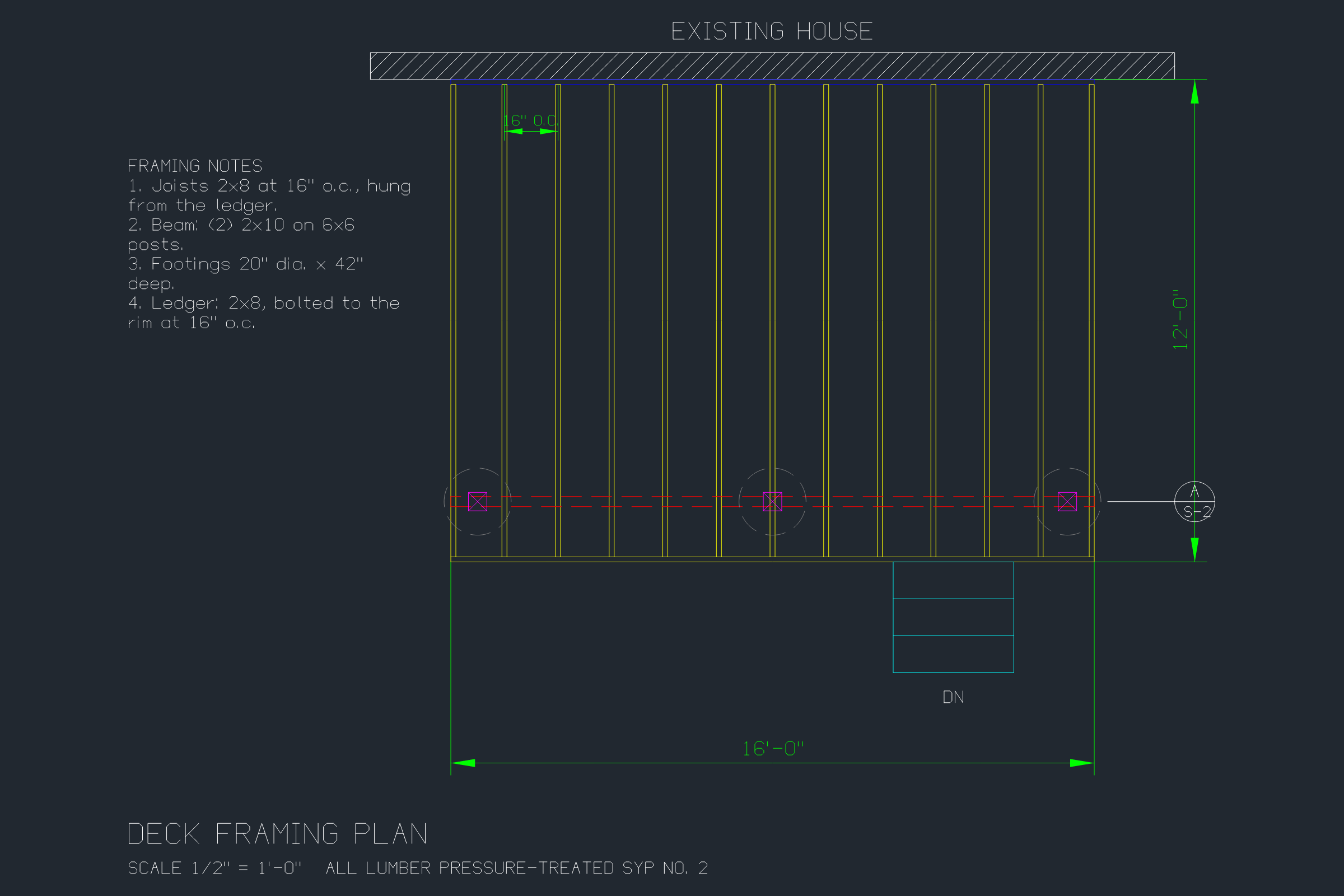
The sample, converted
The same file the code sends. Download the input and the output and compare them yourself.
- Input
- deck-framing-plan.dwg (12 KB)
- Output
- deck-framing-plan.dxf (38 KB)
- Source
- A framing plan for a fictional 16 by 12 foot backyard deck, which we drew as a DXF with a short script and saved as DWG (2004 format) (CC0-1.0). How it was made
- Made by
- 2026-11-04, API build
9eeeb0640aba
Parameters
Send these as form fields next to the file. Names are case-insensitive. If you set one of the documented options below that we don't support yet, the request fails with a 400 that names it instead of returning a file made without it.
| Parameter | What it does |
|---|---|
FileNamestring | Name for the DXF without its extension. If you leave it out, deck-framing-plan.dwg comes back as deck-framing-plan.dxf. |
StoreFileboolean, default false | true keeps the DXF on our side and answers with a download link in Files[].Url, good for 3 hours, instead of the file contents. |
What carries over, and what doesn't
Kept
- Every entity in the sample: 31 lines, 18 polylines, 5 single-line texts, 4 block inserts with their 2 attributes, 3 circles, 3 dimensions, 1 hatch and 1 multiline note
- Layer definitions: the 11 layer names with their color numbers and linetypes, and the off state of S-DECKING, whose 24 decking lines stay hidden
- Both layouts, Model and Layout1, with the sheet border and the SHEET S-1 label that sit in paper space
- Block definitions POST6X6 and SECTION-MARK, and the attribute values of each insert
- Drawing units and measurement system: $INSUNITS stays 1 (inches) and $MEASUREMENT 0 (imperial)
- Extended data on entities: a test line carrying the string pipe-id 42 still had it after DXF to DWG to DXF
- The look of the drawing: the DXF renders to the same 2400 × 1600 PNG as the DWG, byte for byte
Lost or not yet supported
- You can't pick the DXF version. The 2004-format sample came back as AC1018, and options are ignored on this route: a made-up
Version=R12returned the same 38,908-byte file. - Anonymous dimension blocks are renumbered: the three in the drawing we started from come out as *D2, *D3 and *D4. Code that looks dimension blocks up by name has to follow the DIMENSION entity's block reference instead.
- The converter writes its own header: the DXF lists 110 header variables, where the DXF we built the sample DWG from set 9, and a Defpoints layer is added.
- Text takes about three times the space of DWG: 38,908 bytes (6,328 lines) for the 12,268-byte sample.
- Its documentation says entities it doesn't model yet are not kept when it saves. All 19 entity types in our tests came through, including ellipses, splines, 3D faces, wipeouts, leaders and tolerances; 3D solids and raster images were not part of the test.
Limits
- DWG files from the R13 through 2018 formats; our sample and test files were 2004 format (AC1018).
- One DWG in, one DXF out.
- A truncated DWG returns 422: the first 6,000 bytes of the sample gave "DWG: file header read failed".
- Requests up to 10 MB on the Free plan or 100 MB on paid plans, all files and fields together.
- 120 seconds per conversion; a longer one returns 504.
Where teams use it
Handing DWG files to tools that read only DXF
Some CAM, nesting, GIS and scripting tools import DXF but not DWG. Convert each DWG when it is uploaded and pass the DXF along, so the people sending files don't need to export it themselves.
Reading drawing data without a DWG library
DXF is plain text in group-code and value pairs. After the conversion a short script can list layer names, read block attributes (the sample's section mark keeps DETAIL = A and SHEET = S-2) or pull every note out of the MTEXT entities.
Line-by-line diffs between revisions
The same DWG gives the same DXF bytes every time we ran it, so two revisions converted the same way can be compared with an ordinary text diff in version control.
Questions
Which DXF version does it write?
The sample DWG is in the AutoCAD 2004 format (AC1018) and the DXF it produced carries $ACADVER AC1018, the version AutoCAD 2004 to 2006 write. There is no setting for R12 or 2018 output: ConvertAPI documents no options for this pair, and the API ignores the ones you send.
Is the DXF ASCII or binary?
ASCII. The sample's DXF has Windows line endings and 6,328 lines, which any text editor opens. The first lines are the HEADER section starting with $ACADVER.
Are paper-space layouts and title blocks kept?
Yes. Model and Layout1 both come through, with the two paper-space entities of the sample (the sheet border and SHEET S-1). This is a difference from the PNG, SVG and PDF conversions, which draw model space only.
Do I get the same DXF if I convert the same DWG twice?
In our runs, yes: two conversions of the sample produced byte-identical DXF files. That keeps cached results and diffs stable.
What happens if I send a DXF to this route by mistake?
It is read by its content, not its name, so a DXF uploaded to dwg/to/dxf returned 200 with a DXF rewritten by the converter. A file that is neither returns 422.
Convert your first DWG file in a minute.