DXF to TIFF API
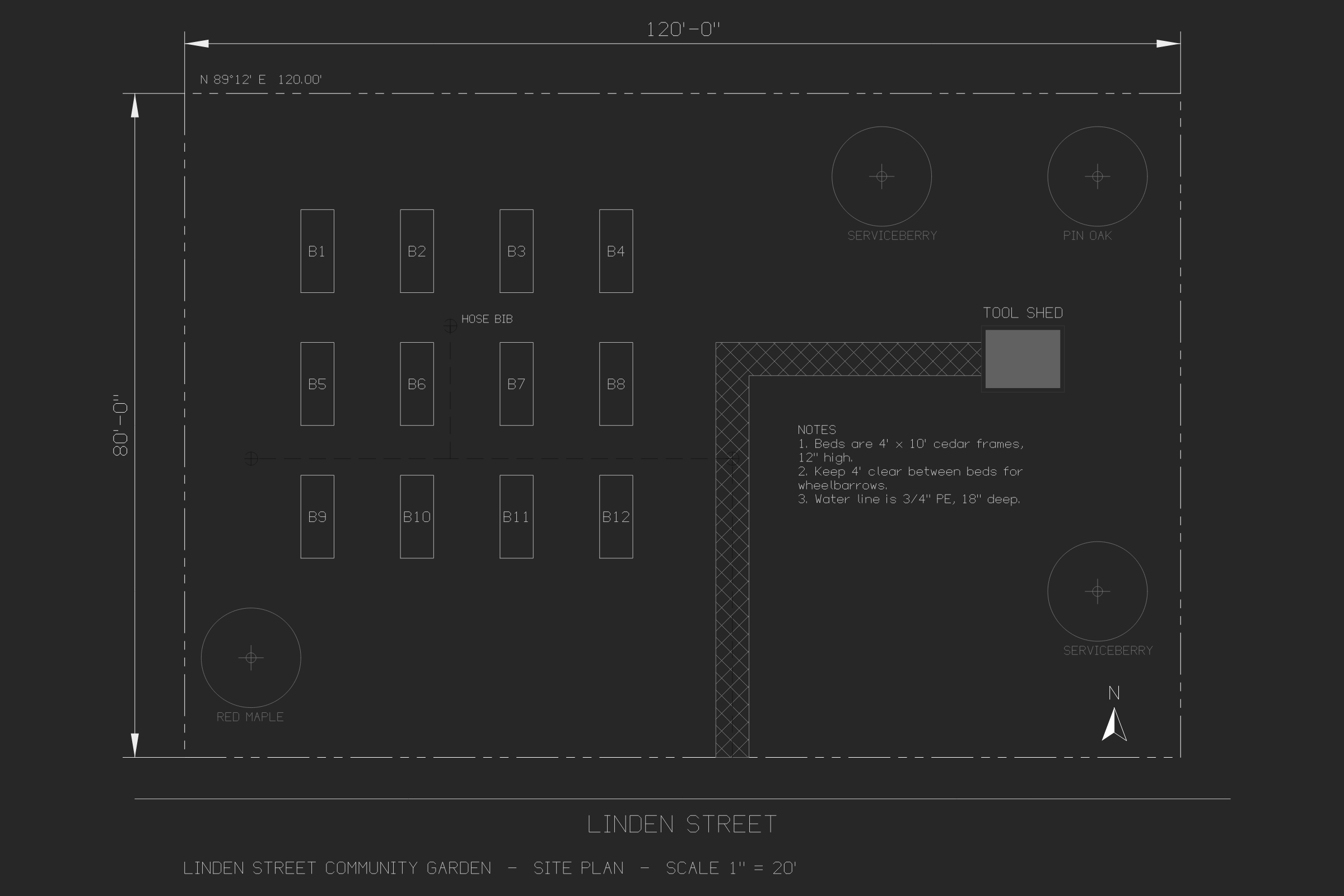
POST a DXF to /v2/convert/dxf/to/tiff and receive one uncompressed TIFF of model space, 2400 × 1600 pixels. The sample sends ColorSpace=gray and ImageResolution=300, so the file stores 8-bit gray and says 300 DPI.
- Endpoint
- POST /v2/
convert/ dxf/ to/ tiff - Accepts
- dxf
- Sample timing
- 0.188 s median of 5 runsHow we measure
- Request size
- Up to 10 MB on the Free plan or 100 MB on paid plans, all files together
Request and response
Every sample below ran against the API before this page was published. Set PDFCONVERSIONAPI_KEY to your key and run it as is.
curl -sS -X POST \
  https://api.pdfconversionapi.com/v2/convert/dxf/to/tiff \
  -H "Authorization: Bearer $PDFCONVERSIONAPI_KEY" \
  -F File=@linden-garden-site-plan.dxf \
  --form-string ColorSpace=gray \
  --form-string ImageResolution=300 \
  -o response.json

# FileData is base64. Save the first file in converted/,
# or print the JSON error.
if jq -e '.Files' response.json > /dev/null; then
  mkdir -p converted
  name=$(jq -r '.Files[0].FileName' response.json)
  jq -r '.Files[0].FileData' response.json \
    | base64 --decode > "converted/$name"
else
  cat response.json
fi
import base64
import os
import requests
key = os.environ["PDFCONVERSIONAPI_KEY"]
response = requests.post(
"https://api.pdfconversionapi.com/v2/convert/dxf/to/tiff",
headers={"Authorization": f"Bearer {key}"},
files=[("File", open("linden-garden-site-plan.dxf", "rb"))],
data={
"ColorSpace": "gray",
"ImageResolution": "300",
},
timeout=180,
)
result = response.json()
if not response.ok:
raise SystemExit(f"{result['Code']}: {result['Message']}")
os.makedirs("converted", exist_ok=True)
for file in result["Files"]:
path = os.path.join("converted", file["FileName"])
with open(path, "wb") as out:
out.write(base64.b64decode(file["FileData"]))
print(path, file["FileSize"], "bytes")
import { mkdir, readFile, writeFile } from "node:fs/promises";
import { join } from "node:path";

const form = new FormData();
const file = "linden-garden-site-plan.dxf";
form.append("File", new Blob([await readFile(file)]), file);
form.append("ColorSpace", "gray");
form.append("ImageResolution", "300");

const url = "https://api.pdfconversionapi.com/v2/convert/dxf/to/tiff";
const key = process.env.PDFCONVERSIONAPI_KEY;
const response = await fetch(url, {
  method: "POST",
  headers: { Authorization: `Bearer ${key}` },
  body: form,
});
const result = await response.json();
if (!response.ok) {
  throw new Error(`${result.Code}: ${result.Message}`);
}

await mkdir("converted", { recursive: true });
for (const file of result.Files) {
  const path = join("converted", file.FileName);
  await writeFile(path, Buffer.from(file.FileData, "base64"));
  console.log(path, file.FileSize, "bytes");
}
{
  "ConversionCost": 1,
  "ConversionTime": 0.188,
  "Files": [
    {
      "FileName": "linden-garden-site-plan.tiff",
      "FileExt": "tiff",
      "FileSize": 3840230,
      "FileData": "SUkqADiYOgAsAQAAAQAAACwB…"
    }
  ]
}
Response from our test run on 2026-11-03. ConversionTime shows the median of 5 runs. FileData is shortened here; the real response carries the whole file as base64.
The sample, converted
The same file the code sends. Download the input and the output and compare them yourself.
- Input
- linden-garden-site-plan.dxf (24 KB)
- Output
- linden-garden-site-plan.tiff (3.7 MB)
- Source
- A site plan for a fictional community garden, in feet, which we wrote as a DXF R2000 file with a short script (CC0-1.0). How it was made
- Made by
- 2026-11-04, API build
9eeeb0640aba
Parameters
Send these as form fields next to the file. Names are case-insensitive. If you set one of the documented options below that we don't support yet, the request fails with a 400 that names it instead of returning a file made without it.
| Parameter | What it does |
|---|---|
ImageResolutioninteger | Sets the TIFF's X and Y resolution tags; the sample's TIFF reports 300 × 300 DPI, which makes it 8 × 5.33 inches when printed. The pixel count stays 2400 × 1600. Without it, the tags say 1 × 1 with no unit, so no DPI is recorded.Values: 10–800 |
ColorSpaceenum, default default | gray stores one byte per pixel, 3,840,230 bytes, instead of 15,360,342 for color with alpha. monochrome uses the same 8-bit layout with only black and white. rgb drops the alpha channel no pixel uses, for 11,520,306 bytes, while truecolors is the same as sending nothing: 15,360,342 bytes of RGBA. cmyk returns 400.Values: default, rgb, truecolors, gray, grayscale, monochrome |
TransparentColorstring | One exact color becomes transparent in a color TIFF; 33,40,48 clears the dark background. Not documented by ConvertAPI for this pair, but applied.Values: A color name, #RRGGBB or R,G,B |
MultiPageboolean, default true | Accepted. A DXF gives one page, so true and false return the same file. |
FileNamestring | Name of the TIFF without .tiff. Defaults to the DXF's name. |
StoreFileboolean, default false | Keep the TIFF on our side and get a 3-hour link, handy for files of several megabytes. |
Not supported yet
Setting one of these to anything but its default returns 400.
| Option | What to do instead |
|---|---|
ImageWidth | Fixed at 2400 × 1600; ImageWidth=1200 returns 400. |
SpaceToConvert | Model space only. |
ExportLayers | false returns 400. |
Also refused when set: ImageHeight, CustomSpaceToConvert.
What carries over, and what doesn't
Kept
- All 2400 × 1600 pixels without compression loss
- In the default color output, every layer color, the white property line and the exact brown of the shed fill
- Hatches, linetypes, dimensions and tree attributes as on a CAD screen
- A recorded resolution when
ImageResolutionis sent: 300 DPI in the sample
Lost or not yet supported
- File size. TIFFs are written uncompressed: 3,840,230 bytes in gray and 15,360,342 in color for a 24,301-byte DXF.
- Gray turns colors into brightness, and some layers nearly vanish: the brown shed fill becomes 97 and red lines about 50, close to the background's 39, while cyan notes stay bright.
- The background is dark and stays dark; there is no white-background option.
- No drawing scale: the plan is fitted to the frame, and the DPI tag doesn't change that.
- Lineweights and paper space are left out.
Limits
- DXF versions R12 through 2018.
- One single-page TIFF per DXF.
ImageResolutionmust be 10 to 800;ColorSpace=cmykreturns 400.- Requests up to 10 MB on the Free plan or 100 MB on paid plans, all files and fields together.
- A conversion is stopped at 120 seconds with a 504.
Where teams use it
Drawings in a scanned-document archive
Archives built on TIFF scans can take a TIFF of each DXF with the same DPI tag as the scans around it, so viewers size it consistently.
Inputs for image-processing steps
Machine-vision and image-comparison tools often read TIFF. A raw, uncompressed 8-bit gray image of the drawing needs no decoder beyond a basic TIFF reader.
Questions
What does `ImageResolution=300` change?
Only the TIFF's resolution tags. The image is still 2400 × 1600 pixels; at 300 DPI a program will print it 8 inches wide, at 100 DPI 24 inches wide.
Can I get a compressed TIFF?
Not from this route: single-page TIFFs are stored raw. Choose gray to cut the size to a quarter, or use PNG (132,185 bytes for the same picture) where TIFF isn't required.
Is there a multi-page option for several layouts?
No. Only model space is drawn, so there is one page per DXF. MultiPage is accepted but has nothing to combine.
Convert your first DXF file in a minute.